


Accounting often starts simple: a few transactions, a basic spreadsheet, and a clear sense of where the numbers go. For many small businesses, spreadsheets are an accessible way to learn the mechanics of bookkeeping and understand how transactions flow through journals, ledgers, and financial statements. But as activity increases, the way accounting is recorded and the tools used to record it begin to matter just as much as the accounting itself.
This article walks through the core accounting journals using practical spreadsheet examples, showing how transactions are organized, summarized, and posted to the general ledger. A downloadable spreadsheet is also available, allowing you to follow along, explore each journal firsthand, and see how the pieces connect in a working accounting system.
Chart of accounts
The chart of accounts is the foundation of the accounting system. It provides a structured list of all accounts a business uses to record transactions, ensuring consistent classification and reporting of financial activity.
By standardizing account names, numbers, and categories, the chart of accounts makes financial statements easier to prepare, compare, and audit, while also reducing errors and ambiguity in transaction recording. Every journal entry, ledger posting, and report ultimately ties back to this structure.
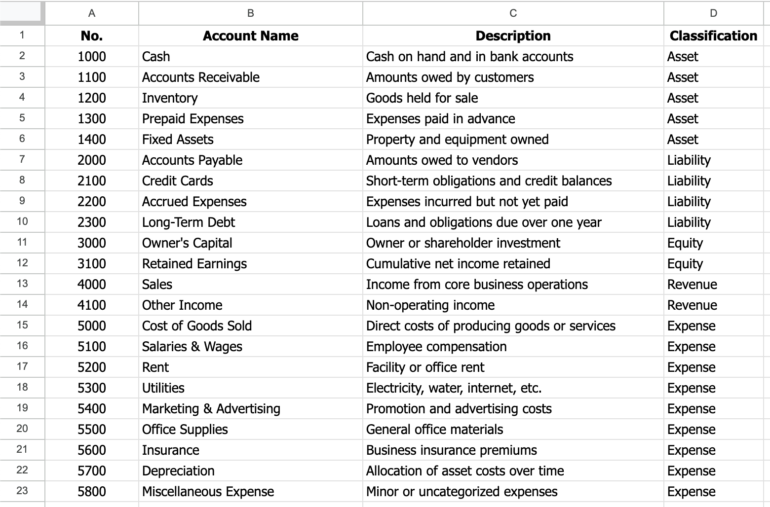
The image above shows the Chart of Accounts sheet used in the spreadsheet. Each account is assigned a unique number, a clear name, a short description, and a classification (asset, liability, equity, revenue, or expense).
The numbering scheme groups similar accounts together, supporting logical organization and scalability as the business grows. This sheet also acts as a reference table for the general journal, driving account dropdown selections, and automatically supplying account numbers through lookup formulas.
General journal
The general journal serves as the catch-all record for transactions that cannot be entered into a specific special journal. Transactions are entered sequentially by date and commonly include adjusting and correcting entries, accruals, depreciation, and other transactions that are infrequent or require detailed analysis.
In addition, the general journal is used to record summary postings from special journals. Rather than posting each transaction individually, the totals from a special journal are combined and entered as a single journal entry, such as debiting Accounts Receivable and crediting Sales for the total sales amount.

The image above shows the most basic general journal format used in our downloadable spreadsheet. Transactions are recorded under a single GJ number with debits and credits entered on separate lines, along with the date, account, reference, and description.
The Account field uses a dropdown with data validation linked to the Chart of Accounts sheet, and the Ref column is driven by an XLOOKUP formula that automatically populates the account number based on the selected account. While the layout is intentionally simple, it can be further customized with formulas to automate calculations and reduce manual entry.
Sales journal
A sales journal is a special journal used to record credit sales of goods or services made in the normal course of business. Its primary purpose is efficiency. Instead of recording each sales transaction in the general journal, similar transactions are captured in one place using a consistent format.
This reduces repetition, improves accuracy, and simplifies posting to the general ledger by allowing totals to be summarized and posted periodically rather than entry by entry.

The image above is the sales journal format used in our downloadable spreadsheet. Each row represents a credit sale and includes the date, customer name, invoice number, and a brief description of the transaction. The right-hand columns separate the two accounting effects of a sale:
- One column captures the amount debited to Accounts Receivable and credited to Sales.
- The other captures the related cost entry, debiting Cost of Goods Sold and crediting Inventory.
This structure reflects how sales journals are designed to handle recurring transactions with predictable debit-credit patterns while keeping the data clean and easy to summarize. Eventually, the individual sales recorded in the sales journal are not posted one by one to the general journal.
Instead, the column totals (for Accounts Receivable/Sales and Cost of Goods Sold/Inventory) are summarized at the end of the period and recorded in the general journal as a single summary entry. This consolidated entry is then posted to the general ledger, preserving accuracy while significantly reducing the volume of journal entries.
Purchases journal
The purchases journal works in much the same way as the sales journal, but on the buying side of the business. Just as the sales journal groups recurring credit sales into a single, efficient record, the purchases journal consolidates frequent credit purchases from suppliers into a standardized format.
In practice, purchase transactions tend to be numerous and repetitive — inventory restocks, supplies, recurring vendor invoices — often following the same debit-credit pattern. Recording each one individually in the general journal would be time-consuming and redundant. The purchases journal avoids that repetition by capturing all credit purchases in one place, using consistent columns for Accounts Payable and the related expense or asset accounts. Like the sales journal, totals are later summarized and posted to the general ledger, keeping the system both efficient and controlled.

Here’s the purchases journal layout used in the spreadsheet. Each row represents a credit purchase from a supplier, with columns for the supplier name, invoice date, and payment terms to support payables tracking.
The Accounts Payable column captures the credit amount owed to the vendor, while the debit is recorded in the appropriate column based on what was purchased, such as Inventory, Office Supplies, or Other (Misc). This mirrors the column-based structure of the sales journal and allows frequent, similar purchase transactions to be recorded quickly and summarized efficiently for posting to the general ledger.
Cash receipts journal
The cash receipts journal is a special journal used to record all cash inflows received by a business. This includes customer payments on account, cash sales, and other sources of cash, such as miscellaneous income. Its purpose is to efficiently capture high-volume cash activity in one place rather than recording each receipt individually in the general journal.
Like the sales and purchases journals, the cash receipts journal reduces repetition by standardizing transactions that occur frequently and follow predictable accounting patterns. It typically tracks who made the payment, the reason for the receipt, and how the cash is applied. Periodically, column totals are summarized and posted to the appropriate control accounts in the general ledger.

The image above is the cash receipts journal in a downloadable spreadsheet. Each row records a cash collection, identifying the payer and a brief description of the transaction. Cash received is debited in the Dr Cash column, while the corresponding credit is applied to Accounts Receivable, Sales, or other applicable accounts. Additional columns allow for sales discounts or related cost entries when needed, making the structure flexible while still optimized for repetitive cash transactions.
Cash payments journal
A cash payments journal is a special journal used to record all cash outflows made by a business. While the cash receipts journal tracks money coming in, the cash payments journal focuses on where cash is going, such as payments to suppliers, operating expenses, and other cash disbursements. Its primary purpose is to efficiently capture frequent cash payments in a single place, rather than recording each payment individually in the general journal.
Like the cash receipts journal, the cash payments journal reduces repetition by standardizing transactions that occur often and follow predictable patterns. Cash payments are typically numerous (e.g., vendor payments, rent, utilities, and routine expenses), and recording them one by one in the general journal would be inefficient and error-prone. By grouping these transactions, the cash payments journal simplifies posting, improves control over cash, and makes it easier to monitor disbursements. Periodically, totals are summarized and posted to the appropriate general ledger accounts.

Shown here is the cash payments journal in the spreadsheet. Each row records a cash disbursement, identifying the account or supplier being paid and a brief description of the transaction. Cash is credited in the Cr Cash column, while the corresponding debit is recorded in Purchases, Other Accounts, or another applicable column depending on the nature of the payment. A separate discount column allows early-payment discounts to be tracked when applicable, keeping the journal both flexible and consistent with standard accounting practice.
Choosing between accounting spreadsheets and software
Accounting spreadsheets have clear practical limits. They are easy to use and maintain when transaction volume is low, but as activity increases, they can become difficult to manage, more error-prone, and time-consuming to maintain. That’s why it’s important to understand when spreadsheets are an appropriate accounting tool and when they make more sense to move to dedicated accounting software.
Ask yourself the following:
- Do you have a low volume of transactions each month (e.g., under 100)?
- Is one person primarily responsible for bookkeeping?
- Are your transactions simple and repetitive (few adjustments, accruals, or complex entries)?
- Do you only need basic financial reports, prepared periodically — not in real time?
- Are you comfortable manually entering data and maintaining formulas without automation?
If you answered “yes” to at least four of these, spreadsheets are likely a good fit for now. But if you answered “no” to two or more, it’s time to seriously consider accounting software.
Why accounting software becomes more effective as you grow
As transaction volume and complexity increase, dedicated accounting software tends to outperform spreadsheets. Platforms like QuickBooks Online are designed to automate routine processes, enforce accounting structure, and scale in ways spreadsheets cannot.
Automation and efficiency
QuickBooks Online automatically imports bank and credit card transactions and provides tools to match and categorize them, significantly reducing manual data entry. It also supports recurring invoices, scheduled bills, and memorized transactions. In contrast, spreadsheets require every transaction to be keyed in manually, with formulas and workflows maintained by the user.
Built-in accounting structure and reporting
QBO includes a predefined chart of accounts, sales and purchasing workflows, bank reconciliation tools, and built-in double-entry rules. Financial reports — such as the Profit & Loss, Balance Sheet, Cash Flow Statement, and A/R and A/P aging — are generated directly from live data. In spreadsheets, these reports must be designed manually using formulas, pivots, and links that require ongoing maintenance.
Accuracy, controls, and audit trail
QuickBooks Online enforces double-entry posting, flags inconsistencies, and maintains an audit log that tracks user activity and changes. Features like reconciliations and period locking help preserve data integrity. Spreadsheets, by comparison, are vulnerable to formula errors, broken links, and accidental overwrites, with little visibility into who made changes.
Collaboration, access, and data security
QBO is cloud-based and supports multiple users working simultaneously with role-based permissions. Data is centrally stored, backed up, and protected through access controls. Spreadsheet-based systems often rely on shared files or drives, which increases the risk of version conflicts and unauthorized changes.
Scalability and integrations
As transaction volume grows, spreadsheet workbooks can become large, slow, and difficult to manage. QuickBooks Online is built to handle higher volumes and integrates with a wide range of tools — such as payroll systems, payment processors, point-of-sale platforms, and inventory applications — allowing accounting data to flow across systems rather than living in a standalone file.
Frequently asked questions (FAQs)
Who should use an accounting spreadsheet?
Accounting spreadsheets work best for small businesses, startups, freelancers, or students with low transaction volume and relatively simple accounting needs. They are especially useful for learning accounting fundamentals or managing early-stage operations.
How do accounting spreadsheets compare to accounting software?
Spreadsheets are flexible and low-cost, but manual and fragile. Accounting software automates transaction imports, enforces accounting rules, provides built-in reports, and scales more easily as the business grows.
Are accounting spreadsheets accurate enough for real businesses?
They can be accurate when properly designed and carefully maintained, especially at low volumes. However, as transactions increase, spreadsheets become more vulnerable to formula errors, broken links, and inconsistent data entry.