


| Provider | Best for | Starting monthly price |
|---|---|---|
| Xero Accounting | Mac users needing a fully browser-based system with no installation and consistent access | $25 |
| Zoho Books | Mac users managing finances on Apple devices with strong iOS and cloud sync support | $20 |
| QuickBooks Online | Mac users wanting an intuitive, web-based interface that works smoothly on Safari | $38 |
| Sage Intacct | Mac-based teams needing scalable cloud access for complex, multi-entity workflows | Contact for pricing |
| FreshBooks | Mac users handling invoicing through a simple browser interface with no setup required | $23 |
| Wave Accounting | Mac users running basic accounting in a free, browser-based platform | $0 |
Many Apple users want to be able to use their accounting software on their MacBook, iPad, and iPhone. Fortunately, many accounting software platforms offer apps for Mac and iOS devices.
We’ve rounded up six of the best accounting software options for Macs to help kick off your search.
- Top accounting software for Mac comparison
- Why Xero Accounting is my pick for Mac users needing browser-based access
- Why Zoho Books works well for Mac users in the Apple ecosystem
- Why QuickBooks Online is good for Mac users who want a simple interface
- Why Sage Intacct is my choice for Mac-based teams that are scaling
- Why FreshBooks is strong for Mac users focused on invoicing
- Why Wave Accounting is good for Mac users needing a free browser-based tool
- Key features of accounting software for Mac
- How do I choose the best accounting software for Mac for my business?
Top accounting software for Mac comparison
| Forever free plan | Mac desktop app | Expense tracking | Native time tracking | Inventory management | |
|---|---|---|---|---|---|
| Xero Accounting | No | Yes | Yes | Yes | Yes |
| Zoho Books | Yes | Yes | Requires integration with Zoho Expense | Yes | Yes |
| QuickBooks Online | No | Yes | Yes | Yes | Yes |
| Sage Intacct | No | Yes | Yes | Yes | Yes |
| FreshBooks | No | Yes | Yes | Yes | Yes |
| Wave Accounting | Yes | No | Yes (free with paid plan only) | No | No |
Methodology
To choose the best accounting software for Macs, we consulted user reviews and product documentation. We considered factors such as pricing, customer support, and user reviews. We also considered features such as invoicing, time tracking, expense tracking, mileage tracking, inventory tracking, and financial reports.
Why you can trust TechRepublic
I evaluated these accounting platforms from a Mac user’s perspective, focusing on their performance in browser-based workflows, Safari compatibility, iOS functionality, and cross-device consistency across Mac, iPhone, and iPad. My research compared not only accounting features, but also how easily each system fits into a macOS environment without requiring Windows-based workarounds, desktop installations, or feature compromises.
Why Xero Accounting is my pick for Mac users needing browser-based access
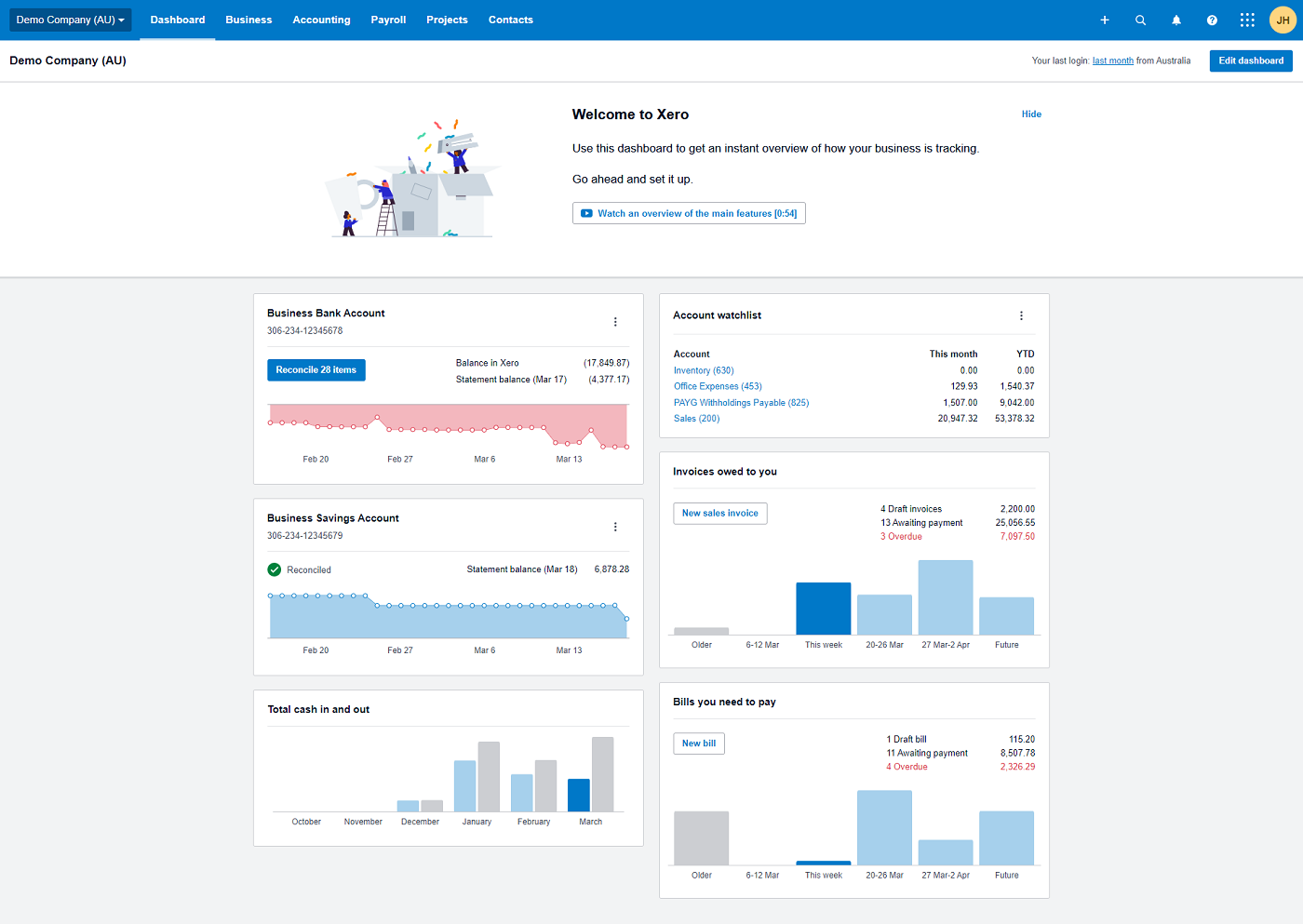
Xero works well for Mac users because it runs entirely in the browser, so there’s no need to install or maintain desktop software. I can access the full system through Safari or any modern browser, and the experience stays consistent without feature gaps compared to Windows setups.
That browser-first design reduces friction on macOS. I can handle invoicing, reconciliation, and reporting without worrying about compatibility issues, updates, or version differences. The iOS app extends that experience when working away from a Mac, but the core strength comes from how complete and stable the web platform feels.
The platform still delivers strong core functionality alongside that access. Inventory tracking runs in real time with accounting workflows, which supports product-based businesses without requiring extra tools. That combination of full browser access and operational depth makes it a practical fit for Mac-based workflows.
Pricing
- Early: $25 per month
- Growing: $55 per month
- Established: $90 per month
Features
- Track expenses using the iOS mobile app
- Manage inventory and create orders
- Organize customer and vendor contacts
- Connect to multiple payment gateways and financial institutions
Pros
- All plans support unlimited users
- Project and time tracking are included in some plans
- Guided setup process supports accounting beginners
- Option to add Gusto payroll.
Cons
- Early plan is limited to 20 invoices and 5 bills per month
- Only one organization is allowed per account
- Mid-tier plan is three times the cost of the entry-level plan
- No telephone support offered
For more information, read the full Xero review.
Why Zoho Books works well for Mac users in the Apple ecosystem

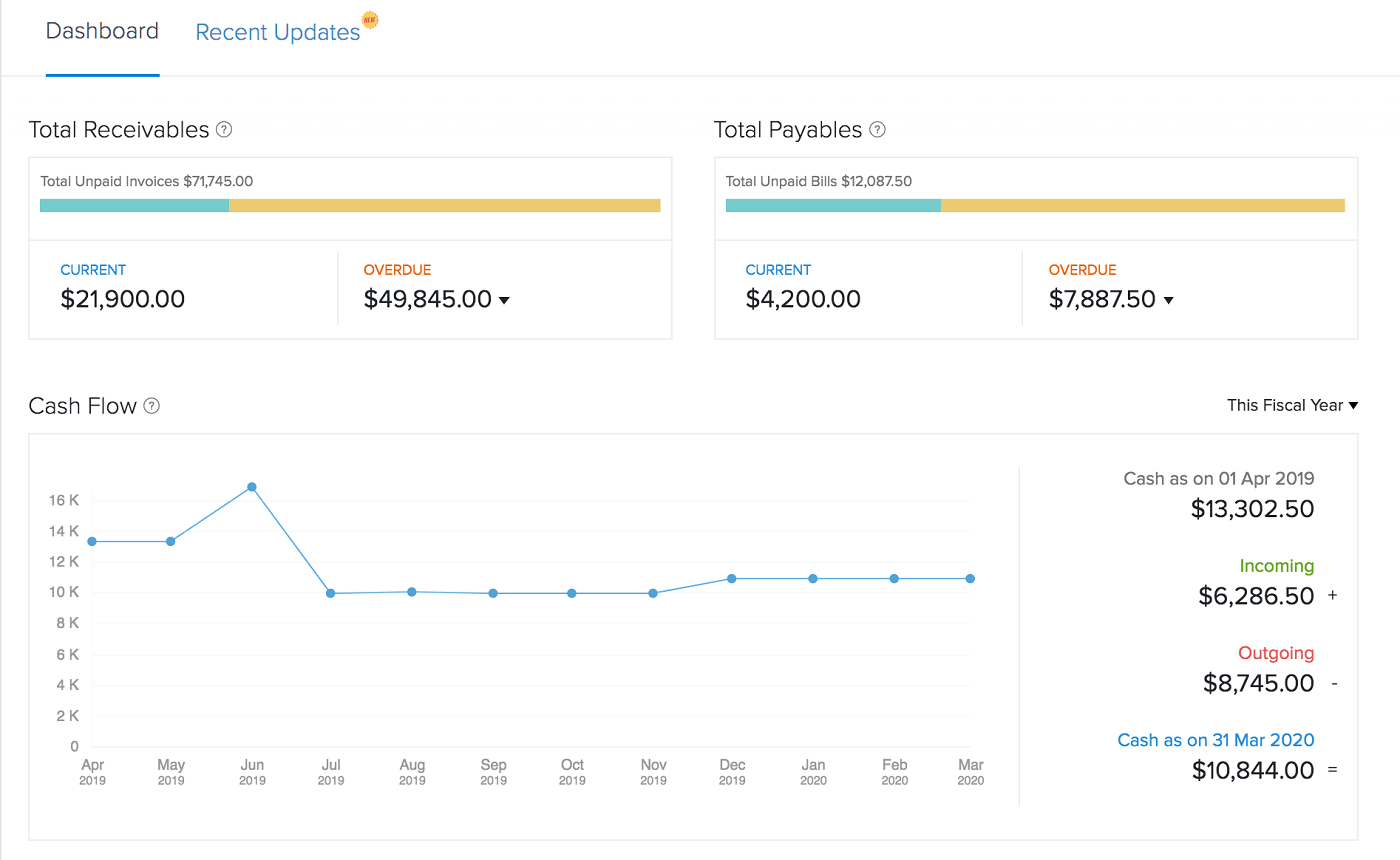
Zoho Books stands out for Mac users who rely on Apple devices because the iOS experience doesn’t feel stripped down compared to the browser version. I can handle invoices, expenses, and approvals from an iPhone or iPad without running into missing features or broken workflows.
That tight integration matters for Mac workflows. I can start tasks on a Mac through the browser, then continue them on iOS without losing functionality or context. Zoho also extends this setup with separate apps like Zoho Invoice and Zoho Expense, keeping related workflows connected across Apple devices.
Cost is another advantage here. Zoho Books offers a free plan, which lowers the barrier for Mac users who want a capable accounting system without committing to paid software upfront.
Pricing
- Free: $0 for businesses with less than $50K USD per calendar year
- Standard: $15 per organization per month billed annually, or $20 per organization per month billed monthly
- Professional: $40 per organization per month billed annually, or $50 per organization per month billed monthly
- Premium: $60 per organization per month billed annually, or $70 per organization per month billed monthly. A 14-day free trial is available for this plan
- Elite: $120 per organization per month billed annually, or $150 per organization per month billed monthly
- Ultimate: $240 per organization per month billed annually, or $275 per organization per month billed monthly
Zoho Books also offers the following add-ons:
- Additional users: $3 per user per month
- Advanced auto scans: $10 per month for 50 scans per month
- Snail mails: $2 per credit
Features
- Transactions sync automatically
- Expense and mileage tracking
- Invoicing and estimate tools
- Inventory management available
Pros
- Very well-reviewed iOS apps
- Forever free plan is available for small businesses
- Free Zoho Books webinar every week
- Six pricing plans to choose from
Cons
- Requires a third-party integration for automatic sales tax calculations.
- Must set up free invoicing and inventory add-ons to get full functionality.
- Charges a small fee for extra users.
- Free plan has email support only.
For more information, read the full Zoho Books review.
Why QuickBooks Online is good for Mac users who want a simple interface

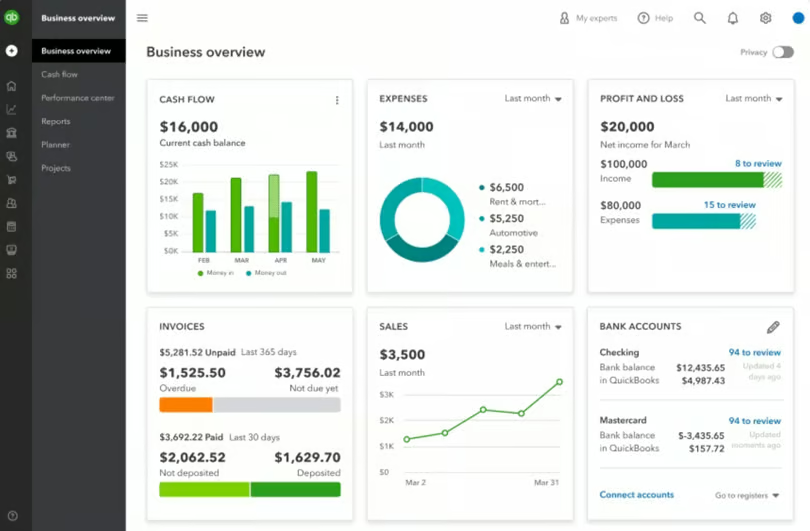
QuickBooks Online fits naturally into a Mac workflow because it runs fully in the browser, so there’s no need to install or manage desktop software. I can access everything through Safari or any modern browser, and the experience stays consistent without feature limitations.
That setup makes everyday tasks easier to complete. I can create invoices, reconcile transactions, and run reports with guided workflows that reduce errors, especially for users without an accounting background.
The platform also maintains consistency across devices. Moving between a Mac and mobile doesn’t change how the system behaves, which keeps day-to-day accounting predictable while still supporting core accounting needs.
Pricing
- QuickBooks Simple Start: $38 per month with access for one user
- QuickBooks Essentials: $75 per month with access for up to three users
- QuickBooks Plus: $115 per month with access for up to five users
- QuickBooks Advanced: $275 per month with access for up to 25 users
Features
- Make invoices, estimates, and quotes
- Automatic income and expense tracking
- Free receipt capture offered
- Payroll add-on available in all 50 states
Pros
- Unlimited invoices, clients, and bills on all plans
- Expense and mileage tracking on all plans
- Sales tax is calculated automatically
- Used by accountants all over the world
Cons
- Some users say that customer service could be improved
- Prices are higher than average
- Each plan limits the number of users
- Must choose between a free trial and a discount on the first three months of service
For more information, read the full QuickBooks Online review.
Why Sage Intacct is my choice for Mac-based teams that are scaling
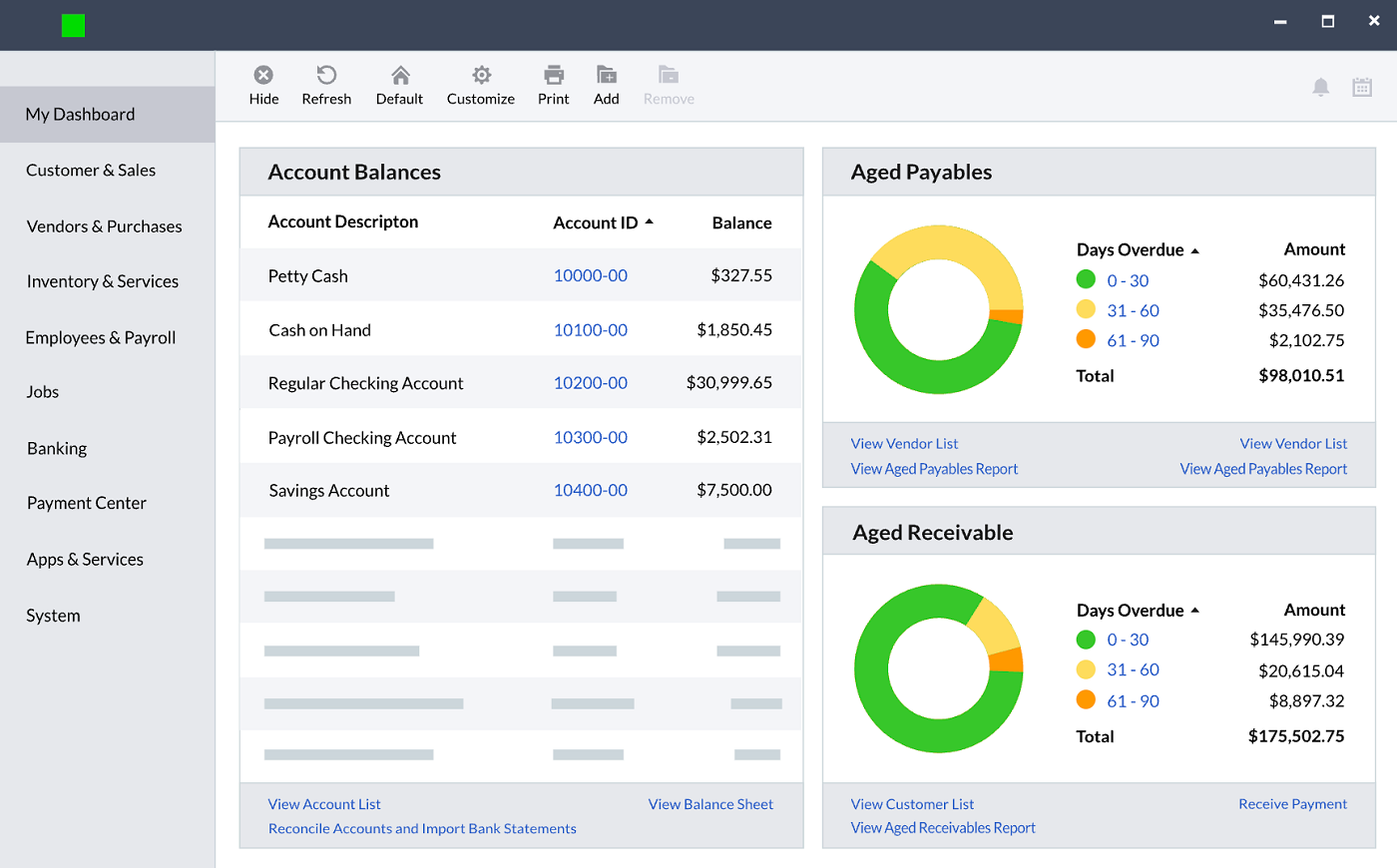
Sage Intacct fits Mac-based teams that are scaling because the platform is fully cloud-based and designed to handle more complex financial operations without relying on desktop environments. I can access it through a browser on macOS, and the system supports high-volume workflows without slowing down or limiting functionality.
That cloud architecture becomes more important as operations grow. I can manage multi-entity structures, approvals, and consolidations in one system, which removes the need for external tools or manual workarounds that smaller platforms often require.
The platform also stands apart in how it handles reporting and financial structure. I can segment data by department, location, or project and generate detailed reports to support decision-making as complexity increases. That level of depth makes it a stronger fit for Mac users who need more than basic accounting and are planning for long-term growth.
Pricing
Sage Intacct does not disclose pricing for this software product — interested customers must contact the sales team for a personalized pricing quote.
Features
- General ledger enhanced by AI and automation
- Multi-Entity Insights for growing businesses
- Option to add on advanced accounting modules
- Salesforce integration available
Pros
- Advanced financial analytics offered
- Tools for specialized industries
- Excellent customer support.
- Can add on fixed asset management
Cons
- Pricing is not transparent
- Customers say that costs tend to run high
- Too advanced and complex for small businesses
- Software interface could be more intuitive
Why FreshBooks is strong for Mac users focused on invoicing

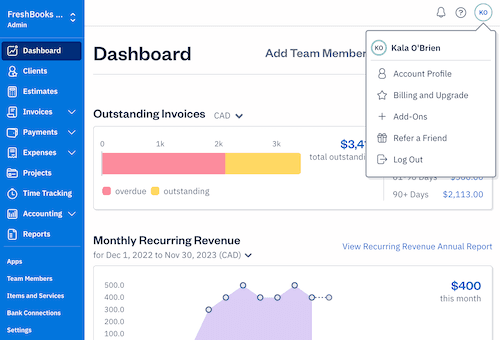
FreshBooks fits Mac users focused on invoicing because it runs entirely in the browser while keeping billing workflows simple and easy to manage. I can access it on a Mac without installing anything, and the interface keeps invoicing front and center instead of buried in accounting menus.
That design makes client billing faster to complete. I can create branded invoices, send them, and track payments in a few steps without navigating complex accounting features. The system keeps the workflow focused, which reduces friction for service-based businesses.
The platform also maintains simplicity across devices. I can move between a Mac and mobile to manage invoices or follow up on payments, which keeps billing consistent without adding extra steps or tools.
Pricing
- Lite: $23 per month, billed monthly or $228 billed yearly; allows users to bill five clients per month
- Plus: $43 per month billed monthly or $396 billed yearly; allows users to bill 50 clients per month
- Premium: $70 per month, billed monthly or $720 billed yearly; includes unlimited billable clients
- Select: Custom quote pricing for enterprises
Features
- Invoicing, estimate, and proposal tools
- Expense tracking and mobile receipt tracking
- Accept payments directly in FreshBooks
- Native time tracking and project tracking
Pros
- Transparent, affordable pricing plans
- Intuitive interface is user-friendly
- Well-reviewed iOS apps
- Payroll integration with Gusto and SurePayroll by Paychex
Cons
- Only 5 users and limited features on the Lite plan
- Could use more third-party integrations
- Costs $20 per month for the Advanced Payments feature
- Additional users cost $11 per person per month
For more information, read the full FreshBooks review.
Why Wave Accounting is good for Mac users needing a free browser-based tool

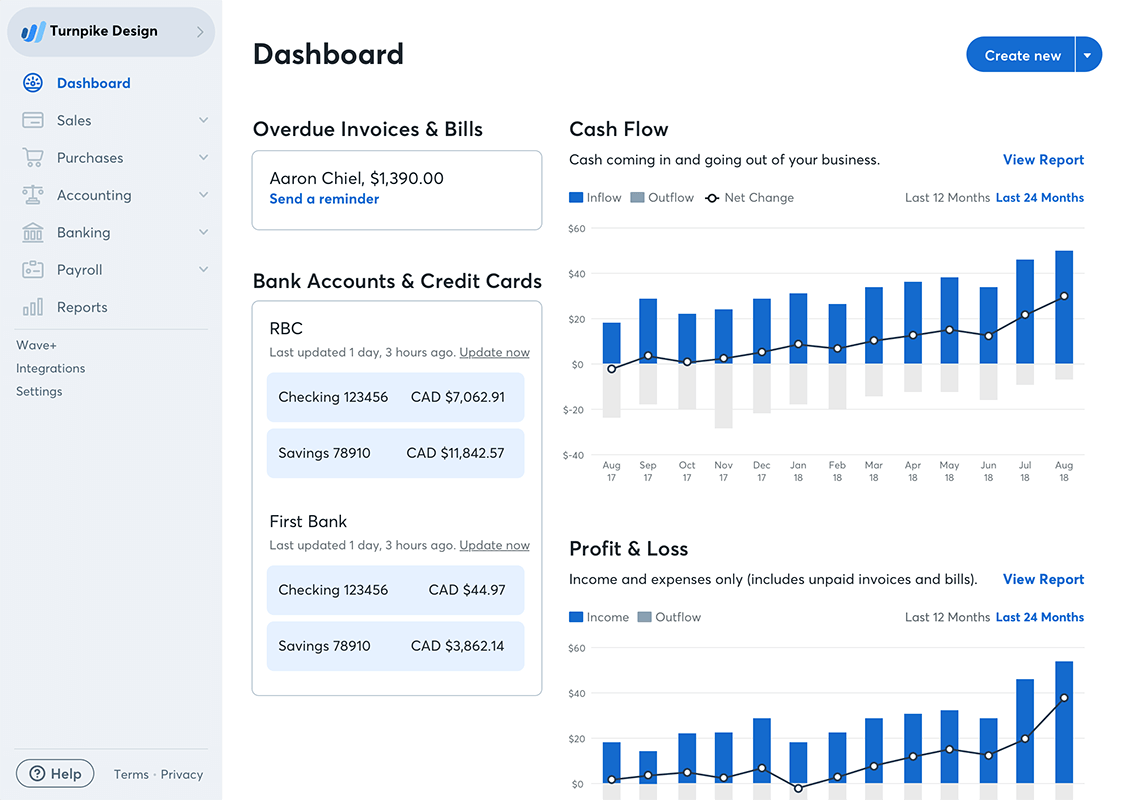
Wave stands out for Mac users who want a completely free accounting tool that runs in the browser with zero setup. I can open it on a Mac and start managing finances right away without installing software or dealing with system requirements.
The experience stays simple and focused on core tasks. I can send invoices, track income and expenses, and review basic reports without navigating complex features or workflows. That makes it easier to stay consistent with bookkeeping, especially for solo operators.
Cost is the main differentiator here. There’s no monthly fee to access essential accounting tools, which makes it a practical starting point for freelancers or very small businesses working entirely on a Mac.
Pricing
- Wave Starter: Free for life
- Wave Pro: $16 per month or $170 per year
- Mobile receipts: Included free with Wave Pro, or $11 per month or $96 per year with Wave Starter
- Payroll: $40 a month in tax service states and $20 a month in self-service states, plus $6 per active employee or independent contractor paid each month
- Advisors: $149 a month for ongoing bookkeeping support, or $379 for a one-time accounting and payroll coaching package
Features
- Sales and sales tax tracking included
- Invoices are automatable and customizable
- Detailed income and expense tracking
- Basic finance and accounting reports
Pros
- Free forever accounting and invoicing plan
- Unlimited clients, invoices, and bank accounts
- Easy-to-navigate interface
- Manage multiple businesses with one accounting software
Cons
- Accounting features are not as comprehensive as those of some competitors
- No native integrations offered
- Paid add-on for mobile receipt capture with the free plan
- No phone-based customer service
For more information, read the full Wave Accounting review.
More about Accounting
- What Is Accounting? Definition, Types, Importance and Examples
- Best Accounting Software and Services
- Verito vs. Rightworks: Which IT Provider Is Best for Your Firm?
- Top Free Accounting Software
- Accounting Glossary
Key features of accounting software for Mac
Desktop and mobile apps
While most accounting software offers iOS mobile apps, not all of them offer desktop or iPad apps. Even if these apps are available, they may have limited functionality compared to the cloud-based web app. Be sure to fully test all the versions of the app that you plan to use to confirm that each app offers the features that you need.
Invoicing
Invoicing and billing are key activities for many businesses, which is why the best accounting software for Macs should make it easy to generate customized invoices and send them to clients. Other related features to look for include late payment fees, invoice reminders, pre-loaded templates, and estimate-to-invoice conversion.
Expense and mileage tracking
Expense and mileage tracking ensures that your company is reimbursed for expenses that you incur as the normal cost of doing business. Most accounting software for Mac includes these features, but some confine it to higher-tier pricing plans or limit the number of receipts and trips you can capture on the entry-level plans.
Reporting
The best accounting software for Macs should come pre-loaded with reporting templates that cover all basic accounting and financial metrics, such as profit and loss statements. These reports should be easy to adjust for the necessary dates and should also automatically pull data from other parts of the software.
Integrations
Some accounting software offer pre-built native integrations to other tools, while others rely on third-party middleware tools such as Zapier to connect the software to other apps. Make a list of your must-have integrations and check that each software can support the other tools your business relies on.
How do I choose the best accounting software for Mac for my business?
I focus first on how the software actually works on a Mac before looking at features. Most platforms offer a free trial or free plan, so I use that time to test the browser experience on macOS and compare it with the iOS app. In practice, desktop and mobile versions don’t always match, so I check whether key workflows like invoicing, reconciliation, and approvals stay consistent across devices.
From there, I narrow options based on what the business actually needs. I look at whether the system supports core requirements like expense tracking, inventory, or advanced reporting, and whether those features are built in or require workarounds. I also factor in volume limits, since lower-tier plans often cap invoices, transactions, or users.
Pricing flexibility is another part of the evaluation. Most tools offer month-to-month plans, which makes it easier to upgrade as the business grows or switch platforms if the system no longer fits. That flexibility reduces long-term risk when choosing software for a Mac-based workflow.