

Open source payroll software gives businesses more control over how they manage employee pay, from configuring salary calculations to adjusting payroll workflows. It can also reduce software licensing costs, although setup, hosting, and ongoing maintenance may require technical resources or outside help.
Choosing the right system depends on your payroll needs, the HR functions you want to manage, and how much customization your business requires. Some options focus on detailed payroll calculations, while others offer broader employee management tools or more flexible configurations. Here’s how my top four picks compare on their strengths and starting costs.
| Software | Best for | Starter monthly pricing |
|---|---|---|
| Frappe HR | Comprehensive payroll management | Free: Self-hosted Paid: $5 for managed cloud hosting |
| Horilla | All-in-one HR and payroll | Free: Self-hosted Paid: $7/user for managed cloud hosting |
| PHP Payroll | Flexible employee pay structures | Free: Self-hosted Paid: $5 for a single site; $40 for a server with multiple sites |
| Open HRMS | Customizable HR and payroll workflows | Free: Self-hosted Paid: Call for a quote |
Why you can trust TechRepublic
TechRepublic follows a strict editorial policy, combining rigorous research with practical analysis to help IT and business leaders make informed technology purchasing decisions.
My recommendations draw on more than eight years of reviewing HR and payroll software and 10 years working with HRIS, time tracking, and payroll systems. That experience helps me assess more than whether an application can generate a payslip. I also consider how it handles compensation changes, payroll records, and the work involved in keeping payroll accurate.
For this guide, I looked for products that offer payroll functionalities through their open-source editions. I focused on four options, compared each platform’s features, and reviewed their technical requirements and support resources to understand what businesses would need to implement and maintain them.
See my full methodology below.
Robie Ann Ferrer
Payroll & HR Software Expert at TechRepublic
- Methodology
- Top open source payroll software compared
- Frappe HR: Best for comprehensive payroll management
- Horilla: Best all-in-one HR and payroll tool
- PHP Payroll: Best for flexible employee pay structures
- Open HRMS: Best for customizable HR and payroll workflows
- How to choose open source payroll software
- Frequently asked questions (FAQs) about open source payroll software
Methodology
To find the best open source payroll software, I reviewed eight products and assessed their suitability for business payroll needs. These included:
- AMGtime
- Empxtack
- Frappe HR
- Horilla
- Odoo Payroll
- Open HRMS
- PHP Payroll
- TimeTrex Community Edition
I narrowed the list to four picks based on several requirements. Each product needed publicly available source code, a clear open-source license, and payroll features included in its free edition. I checked whether the software was still available and showed signs of ongoing maintenance.
Then, I compared each product’s payroll features, including salary calculations, deductions, pay structures, payslips, and reporting. Other considerations included HR and time tracking tools, ease of setup, customization, support, and costs beyond the free software license.
Since payroll requirements vary by location, I reviewed each product’s country-specific tax and compliance capabilities, including limitations for U.S. employers. My findings also draw on official product documentation, public code repositories, and published pricing.
Top open source payroll software compared
| Software | Deployment options | Open-source license | Payroll strengths |
|---|---|---|---|
| Frappe HR | Self-hosted or managed cloud | GPL-3.0 |
|
| Horilla | Self-hosted or managed cloud | LGPL-2.1 |
|
| PHP Payroll | Self-hosted; commercial cloud offering | MIT |
|
| Open HRMS | Self-hosted; Odoo-based | LGPL-3.0 for the payroll module |
|
All four applications offer payroll processing tools, but they approach the work differently. Frappe HR emphasizes detailed compensation and accounting processes, while Horilla brings payroll into a broader HR platform. PHP Payroll focuses on different pay arrangements, and Open HRMS lets businesses build workflows using individual modules.
While these platforms calculate payroll and maintain records, coverage of U.S. services to pay and file all federal, state, and local taxes is unclear. Before using the open-source payroll software, confirm which tax functions are supported and arrange additional services as needed.
Also Read: Check out our guide to payroll compliance best practices, which explains the employer responsibilities that payroll systems need to support.
Frappe HR: Best for comprehensive payroll management

Frappe HR works well for businesses that have more to manage than a standard monthly payroll run. Companies with different compensation arrangements, frequent payroll adjustments, or multiple departments can use it to organize employee pay and keep payroll records connected to their financial operations.
It’s also a good option for payroll and finance teams that need more control over how compensation expenses are calculated and recorded. Rather than maintaining separate spreadsheets for salary adjustments and accounting entries, they can manage much of that work within a connected system.
Why I chose Frappe HR
One of Frappe HR’s strongest capabilities is its configurable salary components. Employers can use formulas and conditions to calculate earnings and deductions based on employee circumstances. For example, a professional services firm could calculate wages from approved timesheets for project-based workers while applying fixed salaries and allowances to office staff.
Its Payroll Entry feature also makes it easier to process compensation for multiple employees and record the related financial transactions. Administrators can prepare pay runs by department, branch, or designation, while connected accounting entries help finance teams reconcile salary expenses. This is more practical than exporting every payroll run and manually posting the totals to the general ledger.
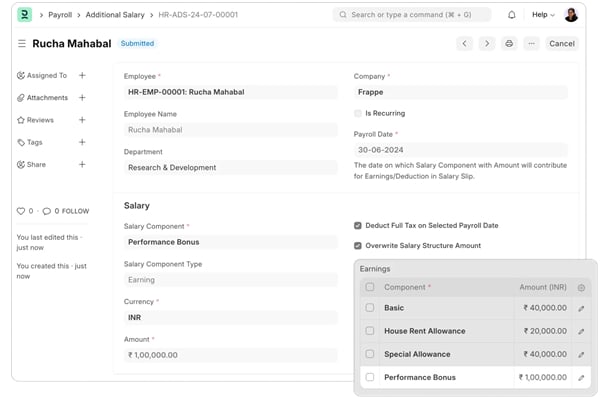
The main drawback is the technical configuration required, particularly when connecting payroll with ERPNext accounting. Horilla is a better alternative for businesses prioritizing everyday HR management, while Open HRMS offers more freedom to select individual HR and payroll modules.
Pricing
Frappe HR is free to self-host under its GPL-3.0 license. Businesses can also use Frappe Cloud for managed hosting.
- Self-hosted: Free software license; infrastructure costs apply.
- Frappe Cloud shared hosting: Starts at $5 per month for a single site or $40 per month for a server with multiple sites.
- Other managed hosting options: Pricing varies by server and hosting configuration.
- Implementation services: Custom pricing through Frappe partners.
Managed hosting includes services such as software upgrades, monitoring, and backups. Businesses that need help migrating employee information or configuring payroll policies can also work with an implementation partner for an additional fee.
Key features
- Multi-currency payroll: Manage compensation in different currencies, which can be useful for organizations with employees or operations across several countries.
- Flexible benefits and tax configuration: Define eligible benefit components and income tax slabs according to the employer’s payroll setup. These rules can then be applied to the relevant employees’ salary calculations.
- Additional salary management: Add bonuses, incentives, arrears, or temporary deductions without changing an employee’s regular salary structure. Recurring adjustments can also be scheduled for a defined period, such as a temporary allowance.
- Employee loans and repayment schedules: Record employee loans and apply scheduled repayments through payroll. This gives administrators a consistent way to track balances and deductions across pay periods.
- Employee expense claims: Employees can submit expense claims for approval and reimbursement. Payroll and finance teams can review those transactions alongside related accounting records.
Frappe HR pros and cons
| Pros | Cons |
|---|---|
| Mobile app supports employee check-ins and leave requests | Complex pay formulas require careful configuration |
| Includes expense approval workflows | Accounting setup requires ERPNext components |
| Supports custom integrations through the Frappe framework | Self-hosted deployments need ongoing maintenance |
Horilla: Best all-in-one HR and payroll tool

Horilla is an open-source HR and payroll platform for businesses that want to manage employees without switching between several systems. It combines payroll with recruitment, attendance, leave, and other HR functions, making it a practical choice for smaller HR teams handling several responsibilities.
Growing businesses may also appreciate having employee information in one place. As new people join, change roles, or leave the company, HR staff can maintain their records and manage related processes within the same platform instead of updating several applications.
Why I chose Horilla
Horilla connects recruitment and onboarding with employee administration. Once a candidate joins the business, HR staff can continue managing the employee’s information without creating an entirely separate record in another HR application. This makes it easier to keep personal details, employment information, and compensation records organized as the workforce grows.
The payroll module also uses attendance and leave information when calculating employee pay. Worked days, overtime, and unpaid leave can affect compensation according to the employer’s configured rules. For a retail or service business with changing schedules, this reduces the need to manually compare attendance reports with payroll records before every pay run.
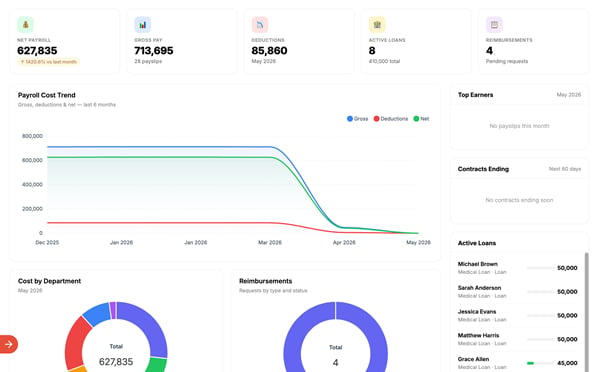
However, Horilla has less documented depth in specialized payroll accounting than Frappe HR. Frappe HR is the stronger alternative for businesses needing detailed compensation calculations and financial reporting. Meanwhile, Open HRMS makes more sense for organizations that prefer adding specific modules to an Odoo-based system.
Pricing
Horilla offers free self-hosting and a paid managed cloud service.
- Self-hosted: Free, with unlimited users and companies.
- Horilla Cloud: Starts at $7 per user monthly.
- Enterprise services: Custom pricing for additional deployment and implementation assistance.
The cloud subscription includes managed infrastructure, backups, software updates, and priority email support. Self-hosted customers handle their own server administration and updates, with access to community support.
Key features
- Employee self-service: Employees can retrieve payslips, submit leave requests, and access available HR information. This reduces routine requests for payroll documents and employee records.
- Loan and reimbursement management: Track employee loans, advances, and reimbursements, with eligible repayment arrangements incorporated into payroll according to configured rules.
- Performance management: Record employee evaluations and performance information within the HR platform. Managers can refer to those records when reviewing compensation changes or discussing career development.
- Payroll exports and reporting: Generate payroll registers, bank-transfer sheets, and related reports for finance reviews. Available payment and statutory formats depend on the supported jurisdiction.
- Employee offboarding: Manage employee exits and related administrative activities, helping HR teams coordinate account changes, outstanding tasks, and final compensation reviews.
Horilla pros and cons
| Pros | Cons |
|---|---|
| Includes HR asset management and employee helpdesk tools | Limited advanced payroll accounting |
| Supports different pay structures by grade or department | Some statutory features focus on specific regions |
| Offers employee record and approval workflows | Free users primarily rely on community support |
PHP Payroll: Best for flexible employee pay structures

PHP Payroll is an open-source payroll application for businesses that use various methods to compensate employees. Its vendor advertises daily, weekly, monthly, and task-based pay, making it worth considering for employers that don’t use one standard salary arrangement across their workforce.
Built with PHP and MySQL, the software is also an option for organizations with developers who can adapt its payroll processes. Smaller businesses with straightforward HR requirements can start with its basic employee and payroll management tools, then assess whether custom development is needed.
Why I chose PHP Payroll
PHP Payroll focuses on accommodating different payment arrangements. Consider a small service company that pays office employees a fixed monthly salary but compensates field staff according to days worked or completed assignments. PHP supports these arrangements, potentially reducing the need to manage separate payroll records for different worker groups.
Its MIT-licensed source code gives developers room to modify the application. They can adjust payroll calculations, create company-specific reports, or build connections with existing business systems. This can be useful when a company’s compensation policies don’t fit the standard settings offered by commercial payroll applications.
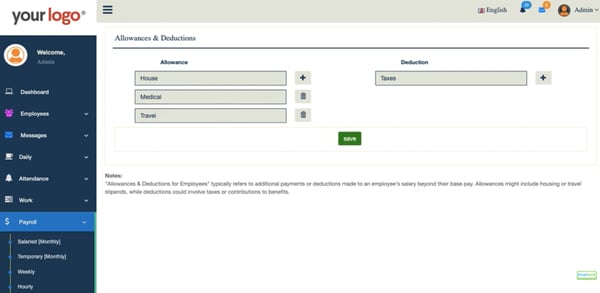
While its GitHub repository lists several pay types, it doesn’t fully explain how they work in the free edition. Businesses should test those calculations before processing live payroll. Frappe HR is a better alternative for companies that need more extensively documented payroll tools, while Open HRMS offers additional options for customizing HR processes.
Pricing
PHP Payroll offers a free self-hosted edition under the MIT license and a separate commercial cloud product.
- Open-source edition: Free to download, modify, and self-host.
- Commercial cloud edition
- Starter: $9.99 per month
- Standard: $19.99 per month
- Enterprise Payroll: $26.99 per month
- Development and support: Costs depend on any additional services required.
Self-hosting requires a compatible PHP environment, web server, and MySQL or MariaDB database. Businesses without these resources will need to account for infrastructure and maintenance expenses.
Key features
- Payroll generation: Create employee payroll records through the application’s payroll module. Employers should check that its calculations match their compensation policies before running live payroll.
- Attendance tracking: Record daily attendance and review employee workday information. This gives administrators a reference when checking pay for attendance-based workers.
- Leave management: Employees can submit leave requests and track their status. Administrators can use those records to review absences that may affect compensation.
- Employee dashboard: View workforce counts, attendance information, and pending leave requests from one screen. These summaries give administrators a quick view of outstanding tasks.
PHP Payroll pros and cons
| Pros | Cons |
|---|---|
| Source code can be modified for commercial use | Advanced payroll rules have limited documentation/instructions |
| Works with Apache or Nginx web servers | Customization requires PHP development skills |
Open HRMS: Best for customizable HR and payroll workflows
Open HRMS gives businesses the flexibility to build their HR and payroll system around specific requirements. Instead of relying on a fixed collection of functions, organizations can install the modules they need for employee administration, compensation, and related workforce processes.
Developed by Cybrosys, the platform runs on Odoo and is a good fit for businesses comfortable managing modular software. Companies already using Odoo may find it convenient to add payroll functionality to their existing environment, while others can configure a new deployment with the appropriate modules.
Why I chose Open HRMS
Open HRMS allows employers to create salary rules and structures through its community payroll module. Administrators can define earnings, allowances, and deductions for different employees or groups. For example, a company could maintain separate compensation arrangements for office and field staff while applying shared rules for company-wide allowances.
The system’s modular approach also makes it possible to add HR functions as business requirements change. Its public repository includes extensions for payroll accounting, employee transfers, salary advances, and other administrative processes. A company could start with its core payroll functions and introduce compatible modules when it needs additional controls or employee services.
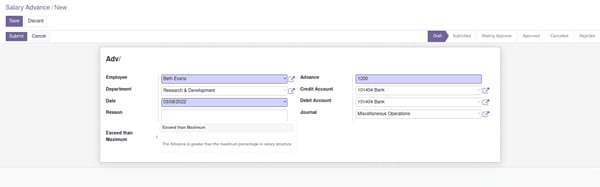
Businesses will also need to manage an underlying Odoo installation and check that their chosen modules work together. Horilla is a better alternative for companies seeking a more unified HR platform, while Frappe HR offers more extensive documentation for payroll accounting and large-scale pay processing.
Pricing
Open HRMS provides free community modules for compatible Odoo installations.
- Community modules: Free to download and self-host.
- Hosting: Costs depend on the server and Odoo environment.
- System implementation
- Package 1: $999
- Package 2: $1,999
- Package 3: $2,999
- Package 4: $3,999
- Additional implementation services
- SSL & domain configuration: $499
- Main server configuration: $499
- Support options
- Package 1: $499 monthly
- Package 2: $799 monthly
- Package 3: $1,099 monthly
Key features
- Payslip corrections: The community payroll module includes actions for canceling and refunding confirmed payslips. These can help administrators manage corrections while following the company’s accounting procedures.
- Employee transfers and history: Optional modules record changes in departments or work locations, allowing HR teams to keep employee history organized.
- Employee loan and salary advance modules: Track loans and advances through additional applications, giving administrators a way to manage these arrangements within the broader HR system.
- Attendance regularization: Employees and managers can address attendance discrepancies through a dedicated module. This can reduce manual record corrections before attendance information is used for payroll.
- Multi-company HR management: A separate module supports employee administration across multiple companies, helping organizations maintain distinct company records within their setup.
Open HRMS pros and cons
| Pros | Cons |
|---|---|
| Offers modules for disciplinary tracking and HR service requests | Requires an underlying Odoo installation |
| Supports employee benefits and other HR administration processes | Modules may need compatibility checks after updates |
Looking for something else? Read our best HR software guide to compare other options.
More payroll coverage
- A Complete Guide to Payroll Software
- The Best International Payroll Services
- The Best Payroll Software
- Choosing a payroll service: A guide for business leaders
- Verito vs. Rightworks: Which IT Provider Is Best for Your Firm?
How to choose open source payroll software
Choosing open source payroll software involves more than comparing feature lists or finding an application that’s free to download. Businesses need to know what the software can actually handle, whether it works with their existing systems, and what resources are needed to keep it running.
Here are five areas to review before selecting a platform.
1. Verify the open-source license and included features
Not every free payroll application is open source. Some vendors provide free software but keep the source code private, while others offer an open-source edition with additional features available only through paid products.
Check the application’s public repository, license, and documentation before making a decision. Confirm that the downloadable edition includes the payroll functions your business needs, rather than relying on a vendor’s general feature descriptions. If a capability isn’t clearly documented, request clarification or test it using sample payroll data before implementation.
2. Match payroll features to your compensation requirements
Start with how employees are actually paid. A company with fixed monthly salaries may only need recurring earnings and deductions, but hourly staff, commissions, bonuses, and changing schedules can make payroll more complicated. The software should accommodate these arrangements without requiring payroll administrators to calculate adjustments outside the system.
Test common situations before committing, including overtime, unpaid leave, mid-period salary changes, and off-cycle payments. These examples can reveal payroll mistakes and gaps that aren’t obvious when reviewing a product’s general payroll features. Also confirm that the system supports your required pay frequency, whether weekly, biweekly, semimonthly, or monthly.
Also Read: Our payroll schedule guide explains how common pay frequencies work and what employers should consider when choosing one.
3. Check U.S. payroll tax requirements
An open-source application may calculate wages and deductions without automatically updating U.S. tax tables, depositing payroll taxes, or filing government forms. Employers remain responsible for meeting applicable federal, state, and local obligations, even when payroll calculations are handled by software.
Before implementation, determine who will maintain tax rules, review withholding amounts, submit tax payments, and prepare required returns. For businesses without in-house payroll expertise, seek help from an accountant or external service provider.
4. Calculate hosting, implementation, and support costs
Free software doesn’t necessarily mean inexpensive payroll. A self-hosted system still needs a server, installation, backups, security updates, and someone to troubleshoot problems when they occur. Companies may also pay developers to customize payroll rules or connect the application to existing accounting and workforce tools.
Compare the expected setup and maintenance expenses with the cost of managed hosting or a commercial payroll service. For example: Frappe HR and Horilla provide hosted options that reduce server administration, although businesses must still configure their payroll processes.
Also Read: If full-service payroll and tax filing are higher priorities than software customization, our list of the best payroll software covers additional options.
5. Review maintenance, security, and integrations
Payroll applications hold sensitive employee information, including compensation records and personal details. Businesses need reliable access controls, secure data storage, software updates, and regular backups. When using a self-hosted system, the employer or its hosting partner generally manages those responsibilities.
It also helps to review the project’s development activity, support community, and available integrations. A well-maintained application with clear documentation will generally be easier to manage than one with little guidance or infrequent updates. Before deploying it, check whether payroll data can connect with your accounting and attendance systems, or whether those connections will require custom development.
For more on connecting payroll records with financial systems, read our guide to integrating payroll and accounting software.
Frequently asked questions (FAQs) about open source payroll software
Is open source payroll software the same as self-hosted payroll software?
No. Open source refers to the software’s licensing and access to its source code, while self-hosted describes where and how the application runs. Open-source payroll software can be self-hosted or offered through a managed cloud service. Proprietary software can also be self-hosted.
Can businesses legally customize open-source payroll software?
Yes. Businesses can use and modify open-source applications for commercial purposes, but they must follow the applicable license terms. Some licenses, such as the GPL and AGPL, have additional requirements when modified software is distributed or provided over a network.
Can I move payroll data from another system to open source payroll software?
Yes, provided the new system supports the necessary data imports. Some open source payroll applications support CSV and Excel imports. Before switching, confirm that employee details, salary information, deductions, and historical payroll totals can be transferred accurately.
Can open source payroll software handle international payroll?
Some platforms support multiple currencies and configurable payroll rules, which can help businesses manage employees in different countries. However, these features don’t automatically cover local tax calculations, statutory contributions, or government filings. Employers should verify payroll requirements for each country before implementation.
Can open source payroll software pay employees through direct deposit?
Not necessarily. Some systems generate bank transfer files or record salary payments without actually transferring money to employees. For example, Frappe HR can record payroll bank transactions, but the actual transfer must be completed separately. Check whether the software supports your bank’s payment requirements or needs an additional service.