


- Best overall: ESET Protect
- Best for beginners: NinjaOne
- Best free patch management: ManageEngine Patch Manager Plus
- Best for Microsoft enterprises: SolarWinds Patch Manager
- Best for small businesses: Avast Business Patch Management
- Best for multi-platform asset management: Heimdal Patch & Asset Management
Many security breaches can be avoided by applying software patches to known vulnerabilities as soon as they’re released by the vendor. Patch management software provides a centralized place for IT administrators to identify known vulnerabilities and deploy patches across most or all of the computer systems and applications in use across the organization.
The best patch management software offers an intuitive interface, affordable pricing, and automation to improve efficiency while mitigating risk. In this guide, I compare my top choices for business patch management to help you make the right choice for your organization.
Top patch management software comparison
Every patch manager on my list provides centralized management for at least one administrator to scan, approve, and deploy updates for multiple machines at once. The main differentiating factors, feature-wise, are their cost, supported platforms, and automation capabilities.
| Our rating (out of 5) | Starting price | Supported platforms | Centralized management | Automation | |
|---|---|---|---|---|---|
| ESET project | 5 | $287 per year for 5 devices | Windows, Linux, macOS | Yes | Scanning and deployments |
| NinjaOne | 4.8 | Custom quote | Windows, Linux, macOS | Yes | Scanning, approval, deployments, reboots, alerts, and notifications |
| ManageEngine Patch Manager Plus | 4.6 | Free | Windows, Linux, macOS | Yes | Scanning, testing, approval, deployments, and reboots |
| SolarWinds Patch Manager | 4.4 | $2,274 per year | Windows | Yes | Scanning and deployments |
| Avast Business Patch Management | 4.2 | $16.42 per device per year | Windows | Yes | Scanning |
| Heimdal Patch & Asset Management | 4.0 | Custom quote | Windows, macOS, Linux, routers, and more | Yes | Scanning, deployments, and compliance management |
ESET Protect: Best overall
Our rating: 5 out of 5
ESET includes patch management capabilities as part of several ESET Protect security software bundles. Its patch management features include automatic scanning and prioritization of vulnerabilities and automatic deployment of Windows, macOS, Linux, and third-party software updates.
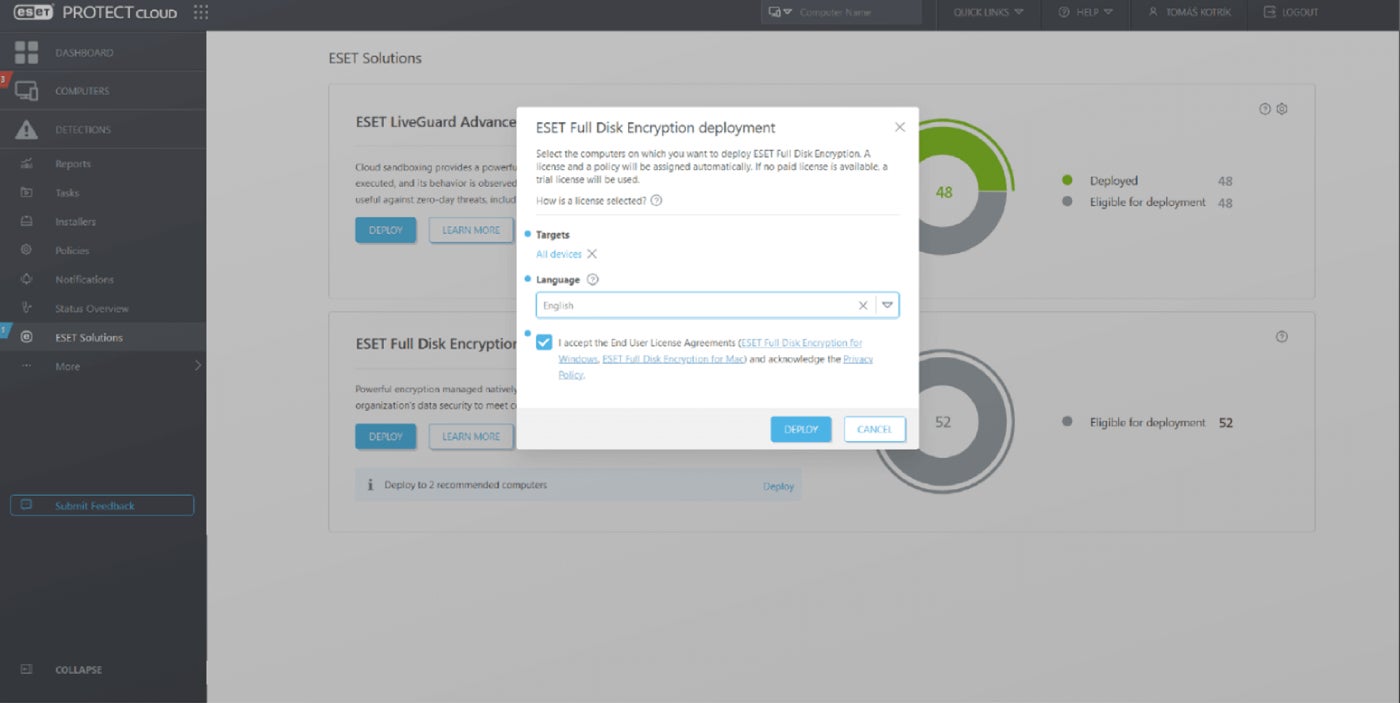
Other security functionality depends on the plan package you select, but at a minimum, all patch management bundles include endpoint protection for workstations, servers, mobile devices, and cloud applications, as well as full disk encryption. You can also upgrade to an extended detection and response or managed detection and response plan for comprehensive security management.
SEE: Patch Management Best Practices for IT Professionals (TechRepublic)
Why I chose ESET Protect
ESET provides a complete endpoint protection platform for businesses at a highly affordable cost. While I found the initial configuration to be a bit challenging, the Protect dashboard makes it easy to manage updates across operating systems and software applications. It provides comprehensive, instant reporting on your patch compliance and security posture.
Pricing
ESET’s patch manager comes bundled with three of the ESET Protect plans:
- ESET Protect Complete: Includes endpoint protection, server security, mobile device security, full-disk encryption, advanced threat defense, mail server security, and cloud app protection for $287.72 per year for 5 devices (promotional price).
- ESET Protect Elite: Adds extended detection, response, and multi-factor authentication; requires a custom quote.
- ESET Protect MDR: Adds managed detection, response, and premium support; requires a custom quote.
Visit ESET Project
Features
- Automated scanning with instant reporting.
- Severity-based prioritization of vulnerabilities.
- Automated and manual patching.
- Centralized visibility of endpoints and vulnerabilities.
- Additional business security features depending on chosen package.
Pros and cons
| Pros | Cons |
|---|---|
| Up-to-date CVE management. | Initial configuration has a steep learning curve. |
| Ease of use. | |
| Additional security features. |
NinjaOne: Best for beginners
Our rating: 4.8 out of 5

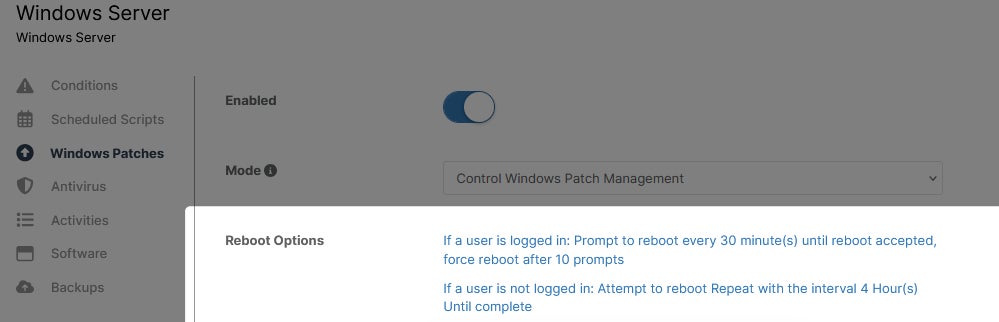
NinjaOne Patch Management is a standalone product that automatically identifies and deploys software updates for Windows, Linux, Mac, and third-party apps. It also automatically reboots systems to finish applying updates and generates automatic alerts and notifications when vulnerabilities are detected, or the vendor releases new updates.
I appreciated that the NinjaOne dashboard includes remote remediation tools to help teams troubleshoot and fix patch installation problems or system hangs without needing anyone on-site. The only reason I didn’t give it a perfect 5 out of 5 is that I found some of the automation features a little buggy, which could be frustrating for beginners.
SEE: Patch Management Policy (TechRepublic Premium)
Why I chose NinjaOne Patch Management
NinjaOne Patch Management is a beginner-friendly solution that provides many automation capabilities and remediation tools to streamline patch management for small, busy IT teams. NinjaOne also offers other endpoint security and device management products for those who need a more complete solution.
Pricing
NinjaOne does not publicly provide pricing information, requiring potential customers to request a custom quote. According to a Reddit user, the minimum spend is $180 per month.
Visit NinjaOne
Features
- Automated patch identification, approval, and deployment.
- Remediation tools including remote terminal, registry editor, and remote access.
- Pre-emptive patch approval.
- Automated reboots.
- Visibility into endpoint security with per-patch data.
- Automated alerts and notifications.
- Patch activity logs and reporting.
Pros and cons
| Pros | Cons |
|---|---|
| Easy to use for beginners. | Some features can be buggy. |
| Includes additional remediation tools. | Pricing isn’t transparent. |
| Provides lots of automation. |
ManageEngine Patch Manager Plus: Best free patch management
Our rating: 4.6 out of 5

ManageEngine Patch Manager Plus is a fully-featured patch management solution that businesses can use for free for up to 20 workstations and five servers. While all the other options on my list are cloud-only, ManageEngine’s software can also be deployed on-premises for businesses that want to keep everything in-house.
Its paid options are affordable, and the Enterprise plan adds updates for antivirus definitions, device drivers, and BIOS, as well as automatic patch testing, approval, and bandwidth optimization. ManageEngine agents are easy to deploy, but the management dashboard is challenging to configure, and I found its error codes less than helpful.
On the other hand, even the free version comes with response customer support to help with any setup issues.
SEE: Patch Management Plays a Critical Role in Layered Endpoint Cybersecurity (TechRepublic)
Why I chose ManageEngine Patch Manager Plus
ManageEngine offers a free business-class password manager, making it a great choice for startups or other companies on a strict budget. The affordable paid plans add device sets and extra patching capabilities for those who need them, and a responsive customer support team is standing by to help with any configuration frustrations.
Pricing
- Free for up to 20 workstations and 5 servers.
- Professional: $245 (on-premises) or $345 (cloud) per year for 50 machines and a single admin login.
- Enterprise: Adds antivirus definition updates, driver and BIOS updates, automatic patch testing and approval, patch download scheduling, and bandwidth optimization for $345 (on-premises) or $445 (cloud) per year for 50 machines and a single admin login.
Visit ManageEngine Patch Manager Plus
Features
- Available on-premises or in the cloud.
- Service pack deployment.
- Third-party patch management.
- Server application patch management.
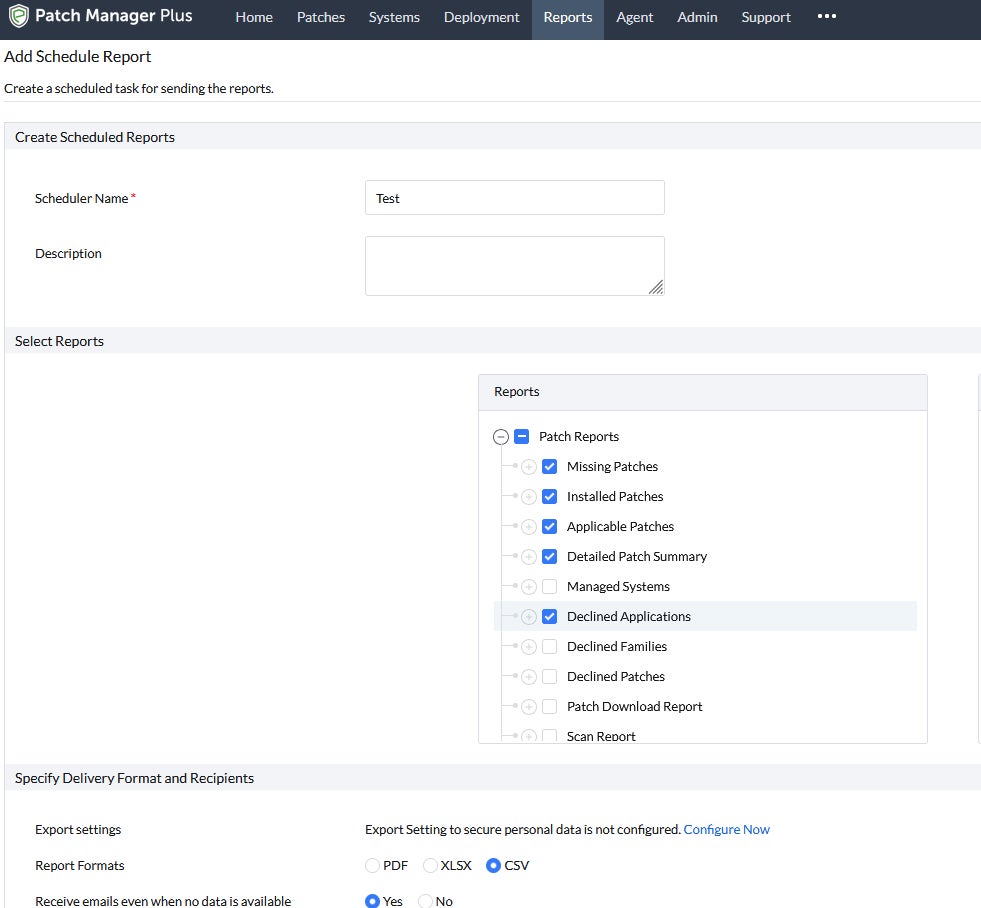
- Scheduled and on-demand reports.
- Multi-technician support.
- Remote reboot.
- Two-factor authentication.
Pros and cons
| Pros | Cons |
|---|---|
| Agents are easy to deploy. | Unhelpful error codes. |
| Available both on-premises and in the cloud. | Difficult initial configuration. |
| Responsive support. |
SolarWinds Patch Manager: Best for Microsoft enterprises
Our rating: 4.4 out of 5

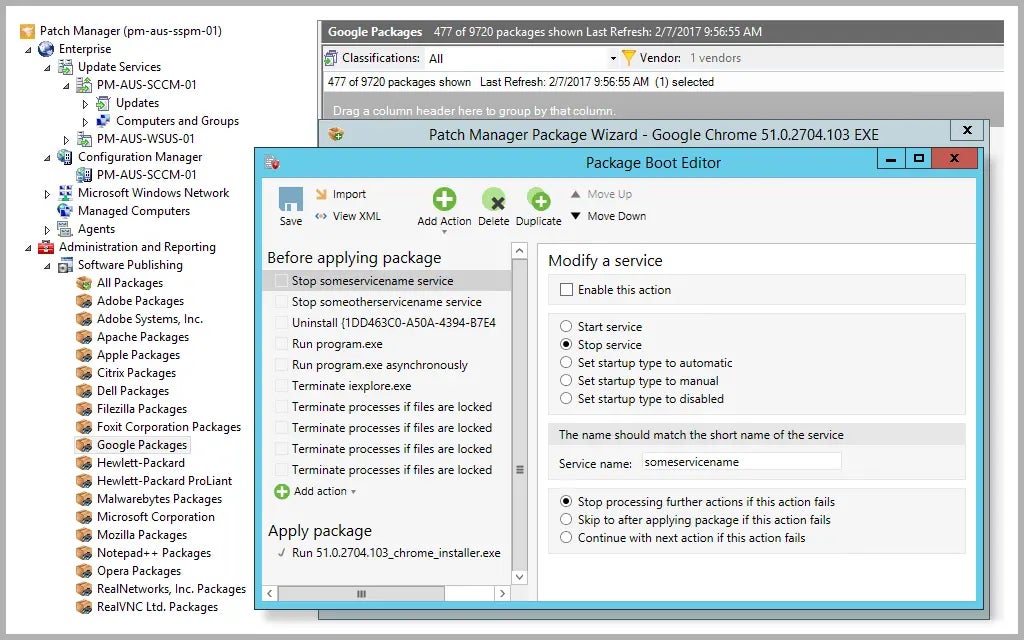
SolarWinds Patch Manager is a Windows-only solution that integrates with Windows Server Update Services and Microsoft System Center Configuration Manager. It focuses entirely on patch management, though SolarWinds offers many other solutions for asset management, network monitoring, and more. Its interface design is incredibly intuitive for Windows administrators, offering customizable patch logging to aid with compliance and executive reporting.
Unfortunately, one of SolarWinds’ other products recently suffered an extremely high-profile breach, which raises some security concerns. That said, the breached software had nothing to do with the Patch Manager solution.
SEE: Everything You Need to Know about the Malvertising Cybersecurity Threat (TechRepublic Premium)
Why I chose SolarWinds Patch Manager
SolarWinds provides one of the best patch management solutions for Windows-only enterprises using SCCM to install and manage their software. I found the interface easy to navigate and the software easy to configure, though I think it could use a bit more extra functionality at its high price tag.
Pricing
- Starts at $2,274 per year, but a custom quote is required.
Visit SolarWinds Patch Manager
Features
- Windows server and workstation patch management.
- Integration with WSUS (Windows Server Update Services) and SCCM (System Center Configuration Manager).
Pros and cons
| Pros | Cons |
|---|---|
| Integrates with Microsoft patch management. | High price. |
| Customizable reports. | Only works with Microsoft environments. |
| Intuitive interface. | SolarWinds recently suffered a high-profile breach. |
More cloud security coverage
- Blackpoint Cyber vs. Arctic Wolf: Which MDR Solution is Right for You?
- 6 Best Open Source Password Managers for Windows
- Unified by Design: The Smart Stack Advantage of NinjaOne and Microsoft Intune
- Free Business Email: I Found 8 Legit Ways to Get One
Avast Business Patch Management: Best for small businesses
Our rating: 4.2 out of 5

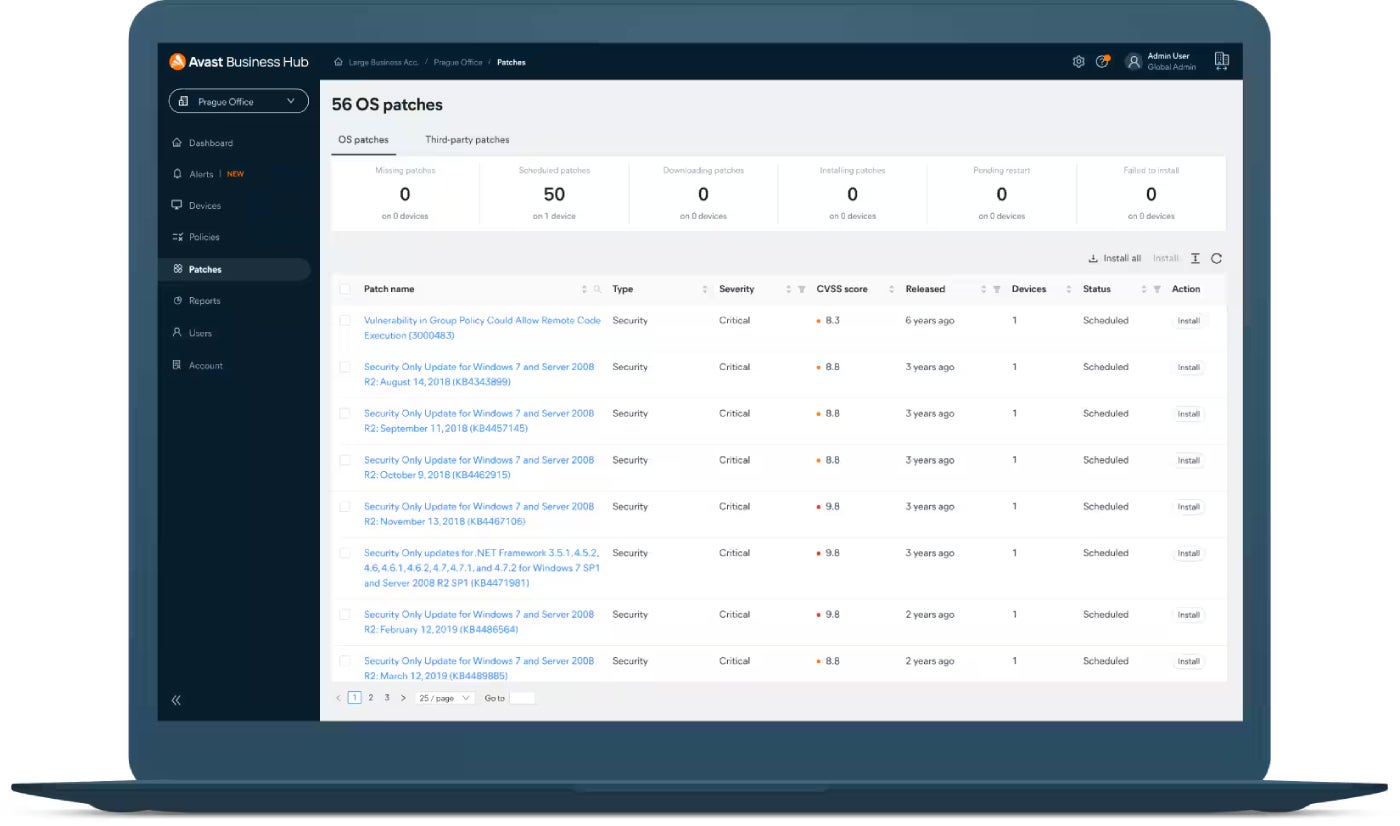
Avast offers a standalone business patch management solution and also includes a patch manager in its Ultimate Business Security plan. The standalone tool offers deployment scheduling, customizable patches, and roll-backs of failed or buggy patches. It also offers master agent capabilities, allowing teams to deploy updates to a single agent that distributes those patches to all managed devices on the network.
The Ultimate Business Security package also comes with endpoint, ransomware, phishing, data, USB, web protection, and a personal VPN service. Combined with an ultra-intuitive dashboard, these capabilities should earn this solution a higher rating. Still, I lowered my score due to Avast’s history of illegally selling data from its free antivirus users.
Why I chose Avast Business Patch Management
Avast provides an intuitive standalone patch management solution with automatic scanning and scheduled deployments at a very affordable price. Small businesses that need more protection can also upgrade to a complete security solution without breaking the bank.
Pricing
- Business Patch Management: $16.42 per device per year.
- Ultimate Business Security: Adds endpoint protection, ransomware & data protection, phishing protection, web protection, personal VPN, and USB protection for $227.08 per year for 5 devices.
Visit Avast Business Patch Management
Features
- Flexible deployment schedules.
- Master agent capabilities.
- Customizable patches.
- Automatic scans.
- Roll-back of failed or buggy patches.
Pros and cons
| Pros | Cons |
|---|---|
| Affordable standalone patch manager. | Windows only. |
| Customizable patching rules and schedules. | Avast was fined for selling customer data. |
| Intuitive dashboard. |
Heimdal Patch & Asset Management: Best for multi-platform asset management
Our rating: 4 out of 5

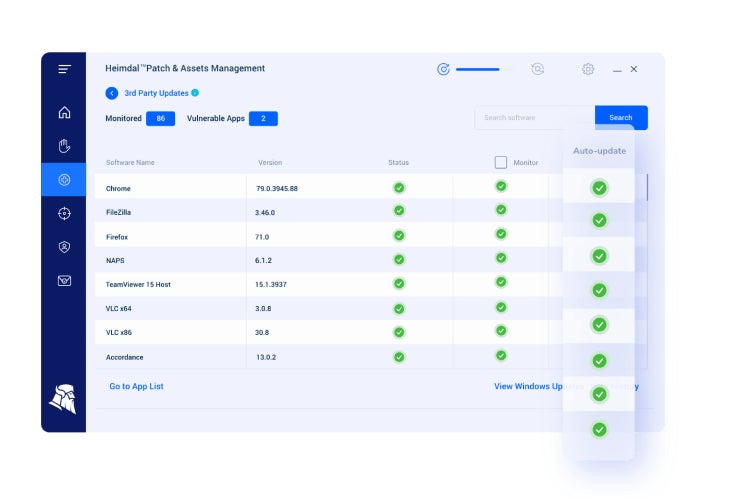
Heimdal offers an enterprise-grade patch and asset management solution focusing on security over features or design. The platform provides complete IT asset management for Windows, Mac, Linux, and routers. It is ideal for large organizations with distributed locations and many mobile or Internet of Things devices.
It offers a speedy, four-hour turnaround on newly released vulnerability patches to limit exposure times. Heimdal Patch & Asset Management also includes a policy and compliance management dashboard to simplify regulatory requirements. Heimdal offers a full range of integrated enterprise security products like DNS security and a next-generation firewall.
Why I chose Heimdal Patch & Asset Management
I picked Heimdal because its security-first approach to patch management and enterprise-grade IT asset management capabilities suit enterprise environments in regulated industries like healthcare and government contracting. It also offers other enterprise security products for a more integrated management experience.
Pricing
- No pricing info available.
Visit Heimdal Patch & Asset Management
Features
- Customizable or automated patch schedules.
- 4-hour turnaround on new vulnerability patches.
- Policy and compliance management.
- IT asset management.
Pros and cons
| Pros | Cons |
|---|---|
| Includes asset management. | Limited third-party app support. |
| Cross-platform support. | Only basic reporting. |
| Very fast patches. | Learning curve to use the platform. |
How do I choose the best patch management software for my business?
Each organization’s needs are different, but there are a few common factors to consider when choosing a patch management solution. It needs to work with your existing operating systems and business applications. Your staff needs the skills to configure and use it effectively; it must fit your budget and, crucially, be secured against breaches.
ESET was my top pick because it strikes a nice balance among all these characteristics. Still, every choice on my list has advantages and disadvantages that you’ll need to weigh according to your requirements.
Methodology
I chose patch management solutions that are popular among the IT professionals I know and have worked with in the past, as well as those rated highly by customers on platforms like Reddit. When possible, I downloaded free trials to test features first-hand, and otherwise, I watched demos to see the product’s capabilities in action. I also researched each vendor to gauge their trustworthiness and assess any known security risks or breaches.