


Because
computer speakers take up desk space, it might be helpful to share speakers
between computers, rather than having two sets of speakers for two computers
that are right next to each other. For example, two employees who work in close
proximity (and collaborate together) could use one set of speakers, as could an
administrator who has two systems connected to a single monitor, keyboard, and
mouse via a KVM switch.
By using a
set of cords that you can purchase from an electronics store, such as
RadioShack, you can easily use one set of speakers to provide sound for two
different computers.

Click this tag search to find other How do I… articles and downloads.
This
assumes that both computers are already equipped with a standard sound card or
have a built-in sound card. However, this is not a platform-specific solution.
Any computers that have a standard 1/8-inch sound jack can share speakers. This
includes two computers from different platforms such as Windows, Mac, Linux, UNIX,
etc.
Step-by-step
Here’s
what you’ll need:
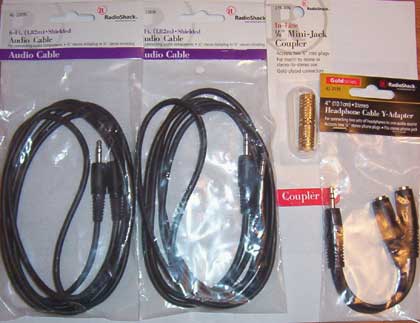
- Two 1/8-inch to 1/8-inch male-to-male stereo audio
cables (RadioShack part number: 42-2387A) - One stereo cable Y-adapter with two 1/8-inch female
connectors on one end and one 1/8-inch male connector on the other end
(RadioShack part number: 42-2570) - One 1/8-inch mini-jack female-to-female coupler
(RadioShack part number: 274-886)
Figure A provides a look at these items.
|
Figure A |
 |
| Connecting cables |
Once
you have the needed hardware, follow these steps:
- Connect the jack from your speakers to one end of the
coupler. - Connect the male end of the Y-adapter to the other end
of the coupler. - Connect both of the audio cables to the two female
jacks on the Y-adapter. - Connect the other ends of the audio cables to the
speaker jacks on the two computers.