


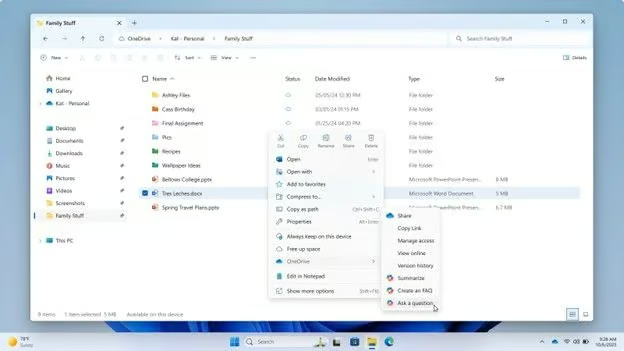
Eight Copilot shortcuts are disappearing from Windows File Explorer, but Microsoft isn’t pulling its AI assistant out of the file manager. Users will instead have fewer ways to launch familiar Copilot tasks.
In an October 19 Microsoft 365 Message Center notice, the company announced plans to retire eight OneDrive Copilot commands from File Explorer’s right-click menu. The worldwide rollout begins in mid-November 2026 and is expected to finish by early December, affecting eligible consumer and business users.
The change comes as Microsoft scales back some of its Copilot integrations across Windows 11. Individual subscribers and business users will retain other ways to access the assistant, although familiar file-management workflows may need adjusting.
Eight shortcuts are going away, but Copilot remains
Microsoft’s retirement notice for OneDrive Copilot actions identifies eight commands:
- Summarize
- Create FAQ
- Compare Files
- Ask a question
- Explain image
- Explain images
- Compare images
- Extract text
These commands let eligible users launch specific AI tasks from File Explorer. After their removal, users can still right-click a OneDrive file and select Ask Copilot, or hover over a file in File Explorer Home and select the Copilot icon.
Both options open a Copilot conversation with the selected file attached. The OneDrive activity center will also retain Copilot actions, although Microsoft has not detailed whether every retired shortcut has an identical replacement.
Microsoft says files attached through Ask Copilot remain subject to their existing permissions and protections. The change does not alter the underlying file-sharing permissions.
Availability depends on subscription eligibility and account type. Microsoft’s Copilot in OneDrive documentation covers eligible Microsoft 365 Personal and Family subscribers and appropriately licensed work or school accounts. Some features vary by plan and market.
The retirement follows Microsoft’s March 2026 commitment to reduce unnecessary Copilot entry points, initially targeting Snipping Tool, Photos, Widgets and Notepad. Other Windows improvements have focused on usability and reliability, including a July preview update addressing File Explorer and device-management issues.
How the change affects users and IT teams
For individual subscribers, the change means using Ask Copilot or the OneDrive activity center instead of selecting task-specific shortcuts. No file migration or replacement application is required.
Business users face the same interface changes, while IT departments may have additional preparation work. Microsoft says no administrative changes are required, but recommends notifying affected employees and updating help desk documentation or training materials referencing the retiring commands.
Organizations using Copilot in document workflows can prepare by taking four steps:
- Update user guidance: Remove outdated screenshots and instructions showing the retiring shortcuts.
- Test Ask Copilot: Open an approved, nonsensitive OneDrive file and confirm the correct document is attached.
- Check permissions: Verify that users can access only files permitted under existing organizational policies.
- Review alternative access: Check which Copilot actions remain available in the OneDrive activity center.
These checks are recommendations rather than Microsoft requirements. Testing representative accounts can help identify differences in feature availability before the rollout.
Microsoft has also been consolidating other AI experiences. Its August 2026 Copilot app merger brought previously separate consumer experiences together, while October Windows 11 Search testing introduced shortcuts for changing settings without opening the Settings app.
The November retirement will change familiar file-management workflows for eligible users. Organizations can prepare by updating their guidance and familiarizing employees with the remaining Copilot access points before the rollout begins.
Read more: For another upcoming Windows transition, Windows 11 26H2 upgrade eligibility determines which PCs can use Microsoft’s streamlined enablement-package update and which require a different path.