


Sage Intacct’s fast facts
- My rating: 4.5 out of 5
- Pricing: Custom
- Key features:
- Offers multidimensional reporting and multientity consolidation for complex operations
- Integrates natively with Salesforce and supports a marketplace of add-on solutions
- Includes interactive reporting tools and advanced analytics for finance insights
- Ensures customization for industry-specific needs and scalable platform growth
- Supports compliance (AICPA preferred, HIPAA with advanced audit trail)
- AI features:
-
- Automates subledger reconciliations and variance detection with Copilot AI
- Streamlines data import using AI-driven mapping and validation
- Flags unusual general ledger entries with AI outlier detection
- Extracts and categorizes expense receipt data automatically by AI
- Matches A/P invoices to purchase orders using AI automation
I conducted an evaluation of Sage Intacct to assess its features and overall capabilities and how it fares against its competitors. Sage Intacct earned a strong 4.5 in my evaluation, and its robust accounting features and advanced analytics stood out. Based on my experience reviewing accounting software, those strengths are no surprise. However, the custom price may make it less ideal if you have a smaller business with simple accounting needs. Read my in-depth Sage Intacct review and see how it stacks up against its competitors.
Why you can trust my advice
I use a rigorous evaluation framework to assess accounting software, focusing on the needs of tech-driven organizations. As a CPA who’s been reviewing accounting solutions since 2021, I combine hands-on testing with deep industry knowledge to deliver insights grounded in real-world application and not just surface-level research. All comparisons, inferences, and recommendations are valid only within the context of this article and should not be applied more generally.
Sage Intacct’s use cases
Choose Sage Intacct if you
- Need AI-powered accounting software: With Copilot AI, you can automate error detection, streamline reconciliation, and boost reporting accuracy.
- Require rapid invoice processing: You can automate invoice entry, quickly flag duplicates, and significantly accelerate accounts payable workflows with Sage Intacct.
- Manage multientity operations: Sage’s multientity consolidation enables you to customize structures, scale quickly according to growth needs, and manage global businesses.
- Seek to enhance compliance and controls: Audit trails and anomaly detection can strengthen regulatory compliance and protect assets against financial errors and fraud.
- Want to integrate finance with CRM: With the built-in Salesforce integration, you can unify finance and sales processes, enabling better data-driven decisions and operational efficiency.
Sage Intacct’s pricing
My score: 2.2 out of 5
Sage Intacct is custom-priced. This is understandable, as most ERP solutions follow a custom pricing model. The benefit of this approach is scalability, as Sage can tailor its pricing to meet your specific needs.
However, to keep my evaluation fair when comparing it with other software that disclosed clear pricing, I had to give Sage Intacct low points in this criterion.
Sage Intacct’s key features
Sage Intacct performed really well in my evaluation, which didn’t come as a surprise. As an ERP tool, it naturally brings robust accounting power and advanced functionality, making it a strong contender if your business has complex financial needs.
Core accounting features
My score: 4.8 out of 5
The solution’s core modules nearly aced my assessment. The general ledger really impressed me with real-time, AI-powered continuous accounting, multientity consolidation, and side-by-side reporting across standards. The A/P module also stood out with strong automation and new features like joint check workflows that streamline complex payments.
I found A/R very good, though slightly less documented in depth than A/P. Bank reconciliation, fixed assets, and inventory management were excellent, each offering robust automation, visibility, and seamless integration. Tax management was solid, too, especially with Avalara integration, making compliance far easier.
Automation and workflow
My score: 4.7 out of 5
I found Sage Intacct’s approval workflows excellent. The system supports structured, multilevel approvals with configurable rules, predefined templates, notifications, and full audit trails. It offers everything you’d expect in a strong procure-to-pay process. Recurring journal entries were very good, handling schedules and reversals well, though complex allocations may need extra modules.
Bulk processing was also strong, with support for imports, batch flows, and APIs; however, native mass editing is limited. Finally, bank feeds and reconciliations were impressive, especially with the new Sage Copilot assistant.
Reporting and analytics
My score: 4.8 out of 5
The tool’s reporting and analytics feature is outstanding. The balance sheet, income statement, and cash flow update in real time, with A/R and A/P aging and budget versus actual comparisons handled seamlessly. Exporting and scheduling are built in, covering every essential reporting need.
Beyond the basics, I was impressed with the flexible custom report writer and real-time dashboards, which are easy to use, highly visual, and role-based for tailored insights. I also found the advanced analytics to be very good for ad hoc analysis and multidimensional drill-downs, although deeper predictive capabilities still rely on integrations. Overall, I’d say Sage Intacct shines in reporting.
Compliance and security
My score: 4.7 out of 5
I found Sage Intacct’s foundational controls to be near-perfect. The system maintains a fully immutable audit trail, offers granular role-based access, and includes safeguards, such as preventing duplicate invoices and posting to closed periods. 2FA
At the enterprise level, I found it very good because it supports multientity, multicurrency, and global operations with strong reporting permissions and compliance certifications, like SOC and HIPAA. Still, some of the most advanced compliance and anomaly-detection features require add-ons, keeping it just shy of a completely autonomous compliance solution.
Integrations and scalability
My score: 4.8 out of 5
Another area where Sage Intacct shines in my review is in its core back-office connections. Payroll, banking, and expense management integrations are turnkey, requiring little IT setup while keeping reconciliations and journal entries automated and audit-ready.
I also found its Salesforce CRM integration highly effective. However, some e-commerce and project tracking connections may require third-party middleware or additional configuration.
Where Sage Intacct stands out is scalability: its multientity, multicurrency cloud architecture, stable open API, and strong performance at enterprise scale make it a robust ERP platform. These capabilities confirm its strength in both extensibility and long-term growth.
Ease of use
My score: 4.9 out of 5
In terms of usability, I found Sage Intacct excellent. Dashboards are fully customizable by user, with KPIs, quick links, and modules that persist for easy access. The global search is powerful, cutting across vendors, transactions, and reports, while keyboard shortcuts and role-based navigation make the system efficient for both accountants and executives.
I also found the onboarding and AI-assisted features impressive because the guided help, natural language queries, and Sage Copilot recommendations add intelligence and collaboration. However, these tools are still maturing compared with leading AI assistants. Overall, Sage Intacct balances efficiency and innovation, delivering a user experience that works well.
Sage Intacct’s pros and cons
| Pros | Cons |
|---|---|
|
|
Sage Intacct vs alternatives
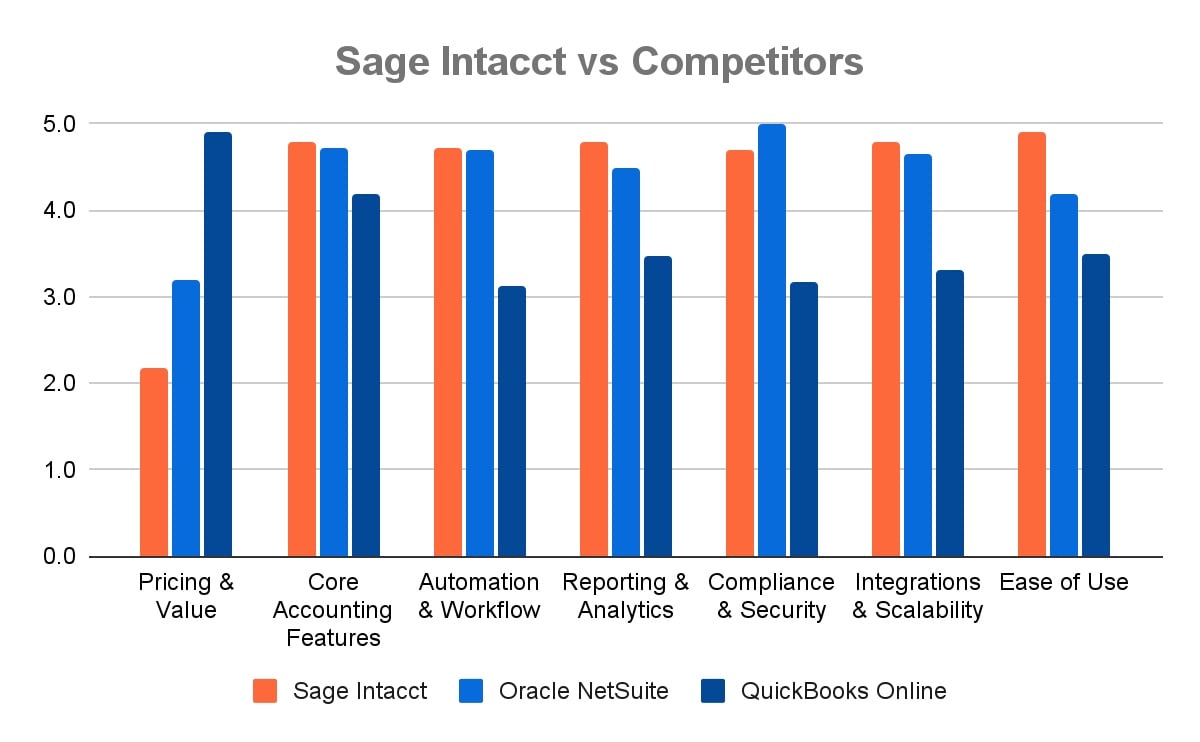
I compared Sage Intacct with QuickBooks Online and Oracle NetSuite to see how they stack up. In terms of features and capabilities, Sage and NetSuite are nearly head-to-head because both are full ERP solutions designed for companies with advanced accounting and operational needs, so that comes as no surprise.
QuickBooks Online, on the other hand, may lag behind in depth and customization, but its biggest advantage is accessibility. As a general-purpose accounting software, it’s affordable, easy to set up, and well-suited for SMBs that don’t require the power of an ERP.
My methodology
I evaluated Sage Intacct by first scoring whether each feature reliably delivered its core function out of the box. I then applied small merit boosts when features exceeded expectations with added automation, usability, or advanced capabilities.
- Pricing and value (10%): Pricing transparency and structure matter greatly. I evaluated whether Sage Intacct discloses clear costs, distinguishes per-user or flat-rate models, and provides upgrade flexibility, trial access, or cancellation policies. Since Intacct uses custom pricing, smaller businesses may face uncertainty, though the model ensures scalability and tailored value for complex organizations.
- Core accounting features (20%): I reviewed the strength of the general ledger, A/P, A/R, bank reconciliation, fixed assets, inventory, and sales tax management. Sage Intacct excelled here, delivering robust automation, audit trails, and real-time updates across financial modules, with only minor depth gaps in A/R and sales tax compared with A/P’s advanced features.
- Automation and workflow (15%): AI and workflow automation meaningfully reduce manual tasks while ensuring compliance. I assessed multistep approvals, scheduled journal entries, bulk actions, AI-powered matching, and intercompany eliminations. Sage Intacct performed very well, offering strong approvals and consolidations, although recurring journal entries and bulk editing have limits.
- Reporting and analytics (20%): Financial reporting and analytics were central to my review. Sage Intacct’s real-time reports, dashboards, and custom reporting tools are excellent, with self-service access for nontechnical users. Advanced analytics are very good, offering interactivity and predictive insights. However, the most sophisticated forecasting often relies on integrations with BI or planning tools.
- Compliance and security (15%): I evaluated foundational financial controls, audit trails, access management, and enterprise-grade compliance. Sage Intacct’s controls are excellent, with granular role-based permissions, 2FA, SSO, and SOC/HIPAA certifications. At the enterprise level, it supports global operations well, though some advanced anomaly detection and continuous compliance monitoring require add-ons or integrations.
- Integrations and scalability (10%): Core integrations with payroll, banking, and expense tools are excellent — largely turnkey and low-friction. Salesforce and marketplace apps broaden connectivity, but some e-commerce integrations may need middleware. Designed for ERP-level scalability, Sage Intacct handles multientity, multicurrency operations with a stable, open API, ensuring performance even as businesses grow.
- Ease of use (10%): I assessed usability through navigation, dashboards, onboarding, and AI assistance. Customizable dashboards, global search, and shortcuts make Sage Intacct efficient for daily users, whereas role-based navigation streamlines workflows by persona. Onboarding and Sage Copilot are very good, adding intelligent recommendations and collaboration, although it is still maturing compared with best-in-class assistants.
Frequently asked questions (FAQs)
What is Sage Intacct?
Sage Intacct is a cloud-based financial management and accounting system designed for growing and midsize businesses. It offers advanced features like multientity management, real-time reporting, automation, and strong compliance tools.
How does Sage Intacct differ from Sage 50/100 or QuickBooks?
- Sage 50 is a desktop product with limited cloud features, better suited for small businesses.
- Sage 100 is more traditional and can be hosted, but it’s not fully cloud-native.
- QuickBooks works well for small businesses but lacks the advanced multientity, reporting, and automation tools that Sage Intacct provides for mid-sized and larger organizations.
Is Sage Intacct fully cloud-based?
Yes. Unlike older desktop systems, Sage Intacct was built for the cloud from the start. You log in through a browser, and your data is always available and updated in real time.
Are updates included or extra?
Updates are included. Sage Intacct automatically delivers four updates each year at no extra cost, so your system is always current without manual upgrades.
How long does implementation take?
Most businesses can get Sage Intacct up and running in about 60 days. Smaller setups may be quicker, whereas larger companies with complex needs might take a few months.