


In 2025, having a well-designed website isn’t merely optional — it’s essential for small businesses seeking credibility, expanded reach, and sustained growth. With 97% of consumers turning to online searches for local businesses, your digital presence directly influences your business’s success.
This guide explores essential best practices, tips, and top tools for creating a small business website that effectively builds trust, enhances brand visibility, and converts visitors into loyal customers.
Why do small businesses need a website?
Everybody now goes online when they need to look up something. In fact, according to a BrightLocal survey, 97% of consumers search online for local businesses, and 12% even do so daily. Suffice to say, a professional website is no longer just optional for small businesses — it’s a necessity. As of 2023, 73% of small businesses in the US already had a website.
If these numbers haven’t convinced you yet, here are more reasons, backed by statistics, to convince you that your business needs a digital home — a website.
- To increase credibility: Having a website signals legitimacy and establishes trustworthiness. An astounding 81% of shoppers research businesses online before purchasing, with 47% specifically seeking out a business’s website. In addition, 75% of consumers judge a company’s credibility based on its website design alone since most transactions are now done online.
- To expand reach: Roughly 99,000 searches occur on Google every second — over 8 billion per day — making it critical for businesses to be visible online. A website allows your small business to reach customers far beyond your local community.
- To control their brand narrative: Owning your website ensures you fully control your brand story, accurately showcasing your values, mission, and unique offerings — 50% of consumers believe that a website is central to a business’s overall brand image.
- To increase visibility in search results: Over 90% of web traffic originates through Google searches, highlighting the importance of a website optimized for search engines. Without a search-friendly website, your business misses out on substantial organic traffic and growth opportunities.
- To build trust through social proof: Since 55% of consumers specifically search for online reviews when researching businesses online, prominently displaying testimonials and reviews on your site significantly increases consumer confidence, encouraging new customers to trust and buy from your business.
- To generate and convert leads: Your website can be a powerful marketing and sales funnel. A well-designed website captures visitor information and generates quality leads. With strategic calls-to-action and integrated tools, you can convert these leads faster.
Unfortunately, while the majority of small businesses have a website, many still lack an effective online presence. Without a well-designed and updated website, businesses risk appearing outdated, unreliable, or even invisible to potential customers actively searching online.
On the other hand, having a well-designed site does far more than just improve your online credibility — it also broadens your reach, attracts new leads, strengthens your brand’s reputation, and ultimately boosts revenue or sales.
How to design a small business website
Creating a small business website in 2025 requires more than just picking a nice layout and launching a few pages online. To truly stand out and effectively connect with customers, your website needs thoughtful planning, a clear purpose, and attention to modern design principles like mobile optimization, user-friendliness, and compliance with the latest online regulations. This step-by-step guide walks you through the specifics of how to design your small business website, from setting your objectives and mapping out your site’s content to selecting the right tools and ensuring your website is ready to deliver an exceptional customer experience from day one.
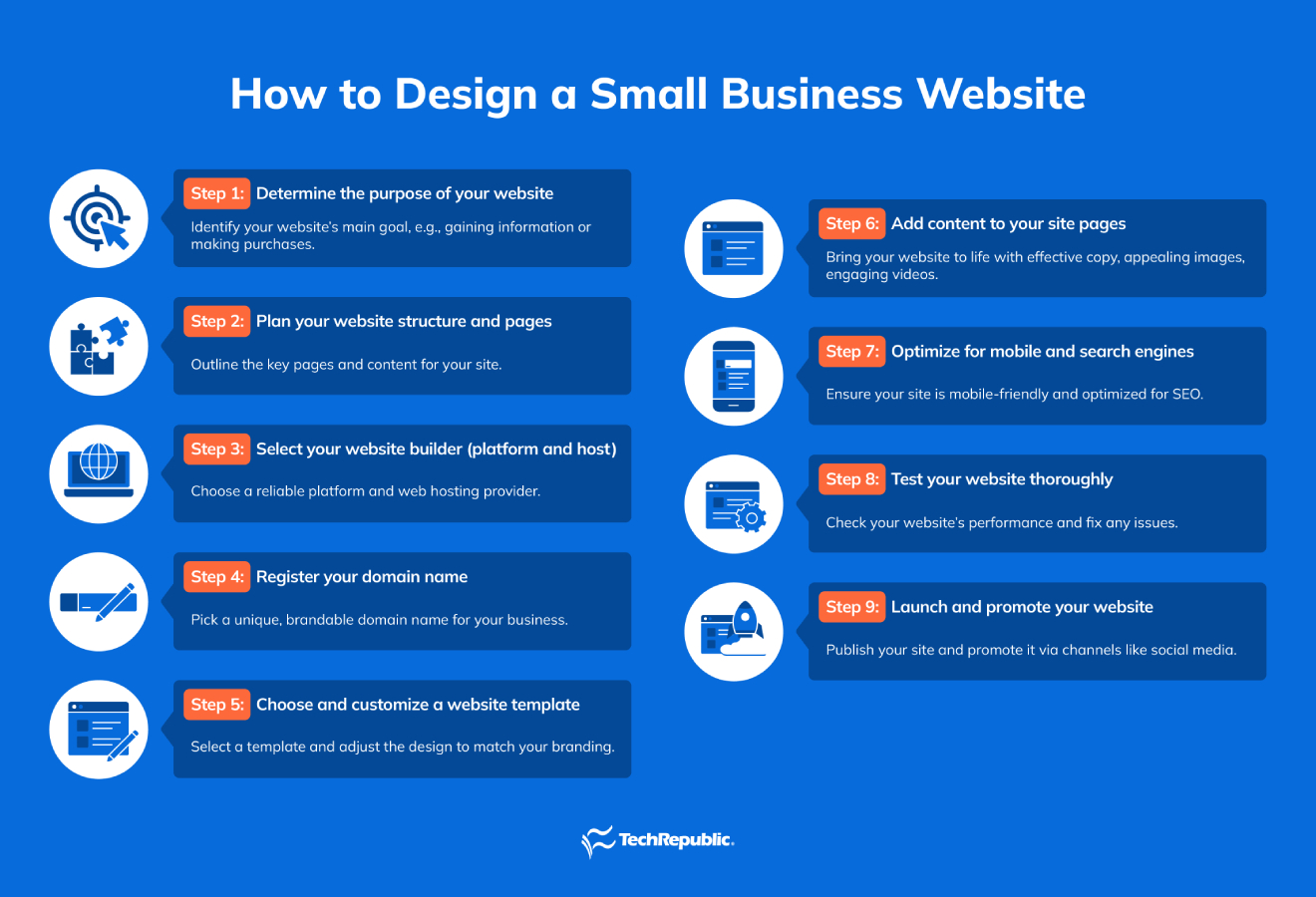
Step 1: Determine the purpose of your website
Building a website for a small business starts with clearly identifying its purpose. Doing so helps you make decisions from budgeting and hosting to design choices.
Consider how your customers will interact with your site — whether to gain information, make purchases, or contact you directly. For example, if you want your site to be a credible source of information for your business, then a simple landing page using a free website builder might work already.
However, if your website’s primary purpose is to book more clients or sell products, you need to consider additional security and features. These will also likely entail additional costs.
TIP: Part of determining your website’s purpose is to understand your audience or potential customers so you can design a customer-centric (user-friendly and intuitive) website. To do this, make sure to:
- Determine your ideal customer profile, including demographics, preferences, and behaviors.
- Map out a clear customer journey, from initial discovery through to conversion.
- Identify the content types your audience engages with most effectively.
Step 2: Plan your website structure and pages
The next step after determining your website’s purpose is to map out your website structure and identify non-negotiable website pages or key information to include. Here are my recommended site pages every small business website should have, regardless of industry and site purpose:
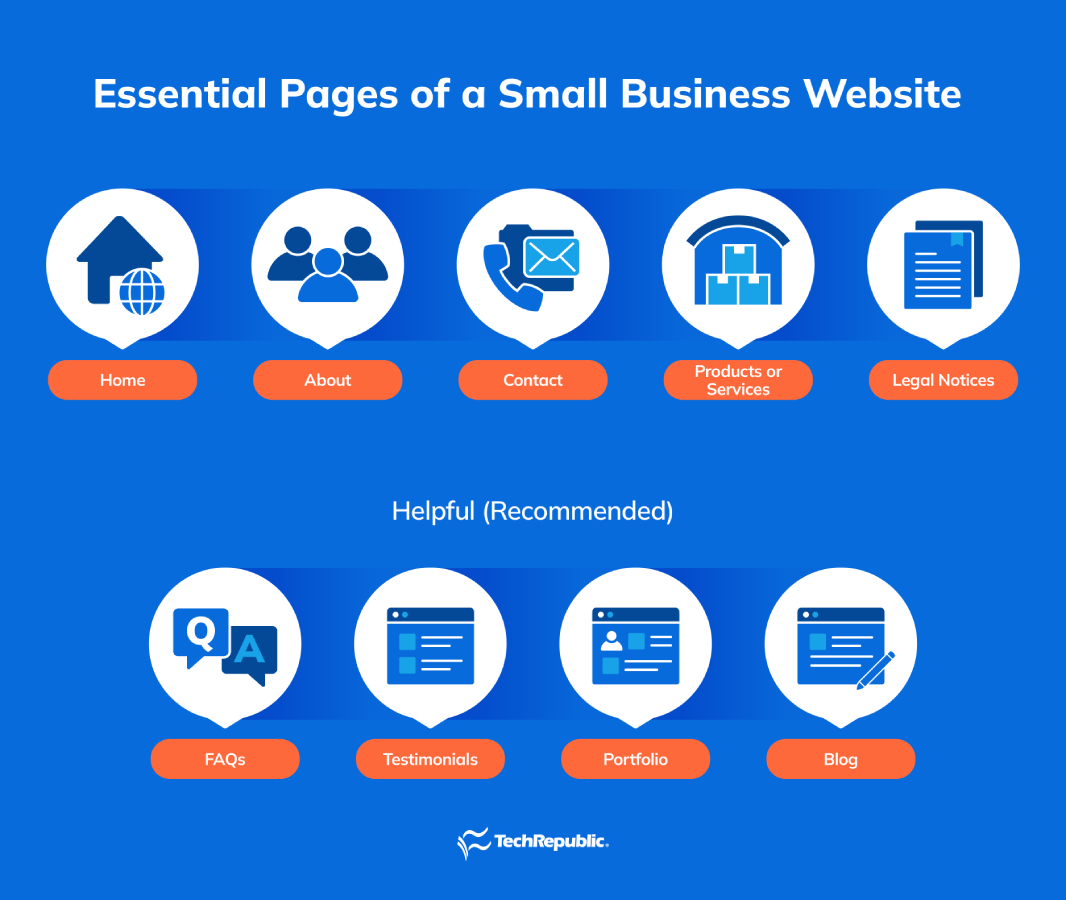
- Home: Think of your site’s homepage as the front door for visitors (with your site as your online home on the Internet). It will be the first impression of your brand, so make it engaging, clear, and easy to navigate.
- About: Use this page to share your company’s background, mission, and what sets you apart. A well-written “About us” section is frequently referenced by journalists, local business organizations, and content creators, making it a valuable resource for external exposure.
- Contact us: Clearly display your company’s location, phone numbers, professional email addresses, and social media accounts here so contacting your business is straightforward and convenient.
- Products or services: This is where you showcase what your company offers — whether you’re selling online or providing information. Provide detailed descriptions or images to help visitors easily understand your offerings.
- Legal notices: Websites now require more than just basic disclaimers or copyright notices. Increasing regulations mean you might need dedicated pages for privacy policies, data protection details, or cookie notices to comply with local and international laws. Examples of these are GDPR, ADA, and CCPA.
Beyond these foundational pages, I recommend you also consider adding these helpful sections:
- FAQs: A Frequently Asked Questions page can save time for both your customers and support staff by proactively answering common inquiries. It also provides opportunities for improved SEO by addressing relevant keywords.
- Reviews and testimonials: Including customer feedback adds credibility to your business and builds trust among potential customers.
- Portfolio: For businesses offering services — such as interior designers, hairstylists, or photographers — portfolio pages effectively demonstrate your expertise.
- Blog: Keeping and regularly updating a blog with industry-related content helps improve search engine visibility, keeps your audience engaged, and positions your brand as an authority in your field.
Step 3: Select your website builder (platform and host)
Choosing a platform and host greatly impacts your website’s functionality and scalability. Fortunately, since you spent time doing steps 1 and 2, you already have a list of what you need to build and host your website. This makes this step easier.
A quick note — if you go with a stand-alone website builder, an all-in-one platform, or a software-as-a-service (SAAS) (when it’s an ecommerce platform), it should have hosting plans attached to it. I recommend going with an all-in-one platform because providers take care of updating and maintaining your backend.
When choosing, remember to check for these functionalities:
- Ease of use: Intuitive, drag-and-drop interface requiring minimal technical expertise.
- Pricing and scalability: Budget will be a huge part of your decision so check for pricing transparency. Check for free trials, renewal options (price increase protection), and plans that can support your business once you scale operations.
- Customer and technical support: Small business owners are usually a one-man team, so having access to responsive customer support through chat, email, phone 24/7, and comprehensive help centers assures reliable technical assistance when needed.
- Templates and design: Mobile-first, modern, and professional templates — free or paid.
- Customization flexibility: Ability to adjust colors, layouts, and fonts to match your branding.
- SEO and marketing tools: Integrated SEO tools for metadata (at minimum), analytics, and marketing integrations.
- App integrations and plugins: Availability of third-party apps, including chatbots, email marketing, social sharing, and booking systems.
- Security features: Built-in SSL certificates, malware protection, regular automatic backups, and PCI-DSS compliance for ecommerce sites.
- Ecommerce capabilities (if selling online): Built-in online selling features such as product listings, secure payments, cart functionality, and inventory management.
If you decide to work with a developer to build your website, you will likely need a separate hosting platform. Specific hosting factors to consider are the following:
- Storage: Sufficient space to store website files, images, videos, and ecommerce data.
- Bandwidth: Appropriate limits to handle visitor traffic — especially important for ecommerce websites.
- Type of hosting: Clarify if it’s shared, VPS, dedicated, or cloud-based hosting.
- Control panel: Easy-to-use dashboard for managing your website, files, and hosting settings.
- Managed or unmanaged: Clearly indicate hosting management options and specify whether routine maintenance is handled by the provider or by you.
- Uptime: Minimum 99.9% uptime guarantee for consistent website availability.
Step 4: Register your domain name
Now, it’s time to choose the “address” of your website — your business’ domain name. First, prepare a shortlist of memorable, brand-relevant domain names. Aim for short, easy-to-spell, memorable names. Avoid complex or confusing spelling variations. Let ideas rest a few days before finalizing your choice.
Next, secure your domain through an independent registrar rather than through your hosting provider for greater control and flexibility. Compare domain registration fees and renewal terms.
Check domain transferability policies for future flexibility.
Step 5: Choose and customize a website template
Whether you’re using a standalone website builder like Wix or Squarespace, or an open-source content management system (CMS) such as WordPress, you’ll typically begin with a pre-designed template (also called a theme) as the base for your site. Most themes are now mobile-first, but be sure to check template previews when browsing to see if it translates well across devices.
Select a professionally designed template and personalize it to reflect your brand identity. From there, you can tweak it to reflect your brand personality. At a minimum, adjust core elements like colors, fonts, logos, and navigation menus. Don’t forget the favicon — the small icon in the browser tab — to further strengthen your branding.
Step 6: Add content to your site pages
Now it’s time to bring your website to life with effective copy, appealing images, engaging videos, and detailed product catalogs if you’re selling online.
Here are some tips to make your content engaging:
- Start with essential pages: At the very least, fill in your Home, About, Contact, Products or Services, and Legal Notices pages with clear, informative content.
- Use AI-generated content carefully: AI writing tools can quickly draft ideas, but always carefully review and edit to avoid inaccuracies or duplicated content.
- Ensure consistent branding: Place your business name and contact details in the header and footer so visitors can easily reach you. Ensure your tone reflects your brand identity, too.
- Avoid embarrassing content mistakes: Thoroughly proofread to prevent errors or posting generic AI-generated text like misspellings, wrong grammar, and more.
- Optimize your visuals: Resize images and videos specifically for web use, typically between 1068 and 1400 pixels wide for full-page graphics, to improve loading speeds. Smaller, optimized images improve page load times, enhancing visitor experience—particularly on mobile devices.
After adding content, preview how it appears on desktops, tablets, and mobile devices to ensure readability and proper formatting.
Step 7: Optimize for mobile and search engines
Once your content is in, the next step is to optimize for search engines. Search Engine Optimization (SEO) is the process of enhancing a website so it ranks higher and appears more prominently on search engine results pages (SERPs) such as Google.
The main goal of SEO is to increase organic (unpaid) traffic to your site by making it easier for search engines and users to find your website through your content.
Ensuring your website is optimized for both mobile users and search engines is critical for visibility, user experience, and business success.
To optimize for mobile:
- Simplify navigation: Use streamlined, easy-to-navigate menus and buttons. Avoid overcrowding the screen or using tiny elements that are difficult to tap.
- Optimize media: Compress images and videos for quick loading on mobile. Slow sites lose visitors quickly.
To optimize for search engines:
- Strategize for keywords: Keywords are words or phrases that you would want your business to be found on search engines (or are related to your industry). Identify and strategically place these keywords in titles, headings, introductory paragraphs, and naturally throughout your text.
- Optimize images: Use descriptive alt-text for all images to improve image search visibility and accessibility. Alt-text are descriptions for your images.
- Properly structure content: Use clear headings and subheadings (H1, H2, H3 tags) to help search engines understand the hierarchy and importance of your content.
- Keep metadata accurate: Write clear and concise page titles and meta descriptions that include your main keywords to attract clicks from search results.
- Regularly publish new content: Update your site regularly with fresh, relevant content—like blogs or articles—to increase your website’s authority in your industry.
- Check mobile SEO friendliness: Use tools to confirm that your site meets mobile SEO best practices.
Step 8: Test your website thoroughly
Before launching, check your website meticulously to ensure functionality, responsiveness, and error-free navigation. Click all links, test forms, and simulate purchases if you are running an ecommerce store. Have external parties test and proofread to spot unnoticed issues.
Step 9: Launch and promote your website
Your new small business website is ready—it’s time to go live and get noticed! But launching is about more than just clicking “publish.” Follow these tips to ensure your site hits the ground running:
- Soft-launch your website first: I suggest quietly publishing your site first instead of announcing it. This way, you can spend several days verifying everything is running smoothly in the live environment. Alternatively, there are platforms that have preview demos that you can share with other people so you can get feedback.
- Announce through multiple channels: Once you are done checking, promote your launch widely through email newsletters, social media posts, press releases, and even personal outreach to existing customers.
- Leverage your social platforms: Share engaging posts about your new website launch across platforms like LinkedIn, Instagram, Facebook, or X — wherever your audience is likely to spend more time on.
- Optimize local visibility: Set up or update your Google Business Profile and local directories to ensure customers can quickly find your website when searching for your services nearby.
Launching is just the beginning. Consistent promotion is key. Use analytics tools to track your website’s performance, including traffic sources, user behavior, and conversions. Regular monitoring helps refine your strategy and maintain momentum after launch.
Best website platforms for small businesses
As I’ve mentioned in the previous section, your choice of website builder significantly impacts your site’s function and ability to scale — and ultimately contributes to the success of your small business. Below, I’ve curated a list of the best website platforms available, specifically chosen from ease-of-use and affordability to powerful ecommerce features and seamless integrations.
| Hostinger | Budget-conscious businesses | Affordable pricing, intuitive website builder, built-in marketing and ecommerce tools | Starts at $2.99/month (annual billing) |
| Wix | Ease of use, design flexibility, and SEO | Drag-and-drop builder, AI-driven design, ecommerce capabilities | Free plan available; Paid plans start at $17/month |
| Squarespace | Creatives because of its visually appealing designs | Designer templates, built-in marketing tools, powerful ecommerce platform, analytics | Starts at $14/month; ecommerce plans from $24/month |
| Shopify | Ecommerce-focused businesses | Comprehensive ecommerce suite, multi-channel selling, robust payment options, extensive integrations | Starts at $39/month; social selling at $5/month |
| WordPress.com | Content-rich websites and blogs | Highly customizable, extensive plugins and themes, strong SEO capabilities | Free plan available; Premium plans from $9/month |
| GoDaddy | Fast and straightforward setup | Quick setup, domain registration integration, ecommerce capabilities, marketing tools | Starts at $9.99/month |
| Square Online | Small-scale retailers and local businesses | Integrated POS systems, simple online store setup, inventory management, seamless payments | Free plan available; Premium plans from $29/month (annual term) |
Related reads:
- Wix vs. Squarespace: Which Website Builder Is Best for You?
- Wix vs. GoDaddy: Which Website Builder is Right for You?
- Shopify vs. Squarespace: Which Platform Suits Your Business?
- 7 Best Web Hosting Services 2025: Features, Price & More
Key features of a small business website
To be a powerful tool to attract customers, build trust, and drive growth, a small business website should have essential site elements or functionalities that enhance user experience, improve and clarify communication, and convert visitors into loyal customers.
Some key components websites for small businesses should have include:
- Easy navigation: Clear, simple navigation helps visitors quickly find information. Keep menus straightforward, intuitive, and consistently positioned across all pages. It also reduces frustration and bounce rates — 68% of users leave a website if they have a poor navigation experience.
- Responsive design: A responsive website design means your site displays correctly and smoothly across all devices. It is crucial to use mobile-first website templates when designing your website since (stat).
- Clear calls to action (CTAs): An effective CTA encourages visitors to take actions such as making a purchase, signing up for a newsletter, or scheduling appointments. Use actionable phrases like “Book Now” or “Subscribe Today.”
- Contact information: Ensure your contact information is consistently placed (ideally in the header or footer). Display phone number, email and physical address, and consider a simple contact form. 44% of B2B buyers will abandon a small business website lacking clear contact details.
- Testimonials and customer reviews: With 55% of consumers searching specifically for online reviews, testimonials provide social proof, building trust and increasing the likelihood of converting visitors into customers. Display testimonials prominently on your homepage and relevant service pages.
- Speed optimization: Page load speed impacts user experience significantly — 53% of users will leave a website if it takes longer than 3 seconds to load. Optimize images, reduce unnecessary plugins, and use speed-testing tools like Google’s PageSpeed Insights.
- Frequently asked questions (FAQs): FAQs streamline customer service by providing instant answers to common questions, improving customer satisfaction, and reducing support calls and emails. Regularly update your FAQs to reflect current customer concerns.
- About Us page: The “About Us” page humanizes your business, sharing your mission, team, history, and unique values. Approximately 80% of website visitors check the “About Us” page first to assess credibility. Include authentic images and details about your team’s expertise and background.
- Social media buttons: Social media icons allow visitors to engage with your brand across platforms, expanding your online community and reach. Place icons in the footer or header for consistent visibility.
- Accessibility: Websites must be accessible to all users, including those with disabilities. Improved accessibility expands your audience and demonstrates inclusivity. Follow Web Content Accessibility Guidelines (WCAG) to make your website universally user-friendly.
- Clear branding: Strong branding, including logos, colors, typography, and consistent messaging, helps visitors immediately understand your business identity and builds recognition. 50% of consumers see website design as integral to a brand’s image. (Tip: Maintain consistent branding elements across your entire website.)
- Engaging blog: Regularly updated blogs increase site traffic, position your brand as an industry expert, and improve SEO. Companies with active blogs have 55% more website visitors. Tip: Post content frequently, ensuring it’s optimized with relevant keywords for SEO.
Best business software
- Blackpoint Cyber vs. Arctic Wolf: Which MDR Solution is Right for You?
- SS&C Intralinks DealCentre AI vs. Datasite: Which platform is built for the future of dealmaking?
- Unified by Design: The Smart Stack Advantage of NinjaOne and Microsoft Intune
- Still Not Backing Up Microsoft 365 Data? Here’s Why That’s a Risky Move
- Verito vs. Rightworks: Which IT Provider Is Best for Your Firm?
Best practices for a small business website
After covering an effective website’s essential features, the steps in designing one, and recommending website builders that help achieve your goal of creating one, it’s also imperative that I cover the best practices involved in designing an effective, engaging, and converting site.
Here are some best practices I stand by:
1. Simplify navigation.
Think of your site’s navigation as a friendly guide or the map that can help your visitors quickly find their way around your site. Navigation menus should be clear, concise, and logically arranged so anyone visiting your homepage intuitively understands where to click next. Keeping navigation straightforward ensures visitors stay longer, return frequently, and boosts your site’s visibility on search engines.
2. Design for mobile first.
When I say design for mobile first, I mean think about how your site looks on mobile when choosing arrangements within a page. Consumers are increasingly going online using their mobile devices, so your website must look great and function smoothly on smartphones.
Make sure content is easily readable, buttons are accessible (easily clickable), and navigation flows naturally. Once you perfect the mobile design, adapt it effortlessly for desktop views using platforms like Squarespace or Hostinger, known for seamlessly handling responsiveness.
3. Create a clear user journey.
Plan exactly how visitors should experience your website, guiding them logically through each page. Map out what you want visitors to do — like purchasing a product or exploring your brand story — by carefully organizing content and links.
A clearly defined user journey helps visitors feel comfortable and boosts your chances of conversions.
4. Make your calls to action (CTAs) stand out.
Your CTAs, like sign-up or purchase buttons, must immediately grab visitors’ attention. Employ active action words with urgency, such as “Buy Now” or “Sign-up No,w” and contrasting colors to ensure they stand out. Stick to one or two primary actions per page to avoid overwhelming users, making decisions easier, and improving user interaction.
5. Use white space effectively.
Strategically distribute white space throughout your site pages to avoid an overcrowded design. Don’t get me wrong; white space doesn’t mean wasted space. Instead, it can direct visitors’ attention exactly where you want it. Thoughtful spacing around content and buttons creates an organized site layout, simplifying navigation and highlighting key information.
6. Include accessibility options.
Make your website welcoming to everyone by including helpful accessibility features. Add clear alt text for images, video captions, and use straightforward fonts for readability. Regularly verify your site’s accessibility with tools like Accessibility Checker, ensuring all users have an equally positive experience.
7. Follow tried-and-true design principles.
Classic design principles, such as placing your logo in the top-left corner or using familiar icons, remain effective because they’re intuitive. These are tried and tested hacks that are implemented by most websites.
8. Integrate marketing features.
Strengthen your website by using marketing tools like newsletter subscriptions, optimized SEO content, and prominent social media links. These elements boost visibility, engage visitors effectively, and expand your online reach effortlessly.
Small business website design mistakes to avoid
Just as there are best practices, there are design mistakes to steer clear from. Avoiding the most common design pitfalls I list below helps ensure your website effectively attracts and retains visitors.
- Overly busy layout: Overloading pages with too much text, graphics, or links can overwhelm visitors and obscure your key messages. Aim for a clean, visually balanced layout.
- Slow loading times: Visitors tend to leave websites that load slowly. Optimize images, reduce plugins, and utilize reliable hosting services with service guarantees to maintain fast page speeds.
- Poor mobile experience: Failing to design mobile-first can result in losing a ton of potential customers.
- Confusing navigation: A complicated menu structure can frustrate visitors. Make sure navigation is intuitive, with clearly labeled menus and a logical content hierarchy.
- Weak or unclear call-to-action (CTA): Ambiguous or hidden CTAs can result in missed opportunities. Without a prominent, compelling CTA, visitors may not know what steps to take next. Clearly define and prominently display actions like signing up, buying, or contacting.
- Outdated content: Regularly updated content demonstrates professionalism and keeps visitors engaged. Remove or refresh obsolete information regularly.
- Neglecting SEO: Ignoring SEO can limit your website’s visibility. You don’t have to be an expert. Simple implementation of basic SEO strategies like keyword optimization and creating meta descriptions go a long way.
- Ignoring analytics: Without monitoring website analytics, you won’t understand visitor behavior or how to improve performance. Use tools like Google Analytics to regularly assess and enhance your site.
Conclusion and next steps
Creating a successful small business website involves more than aesthetics — it demands strategic planning, careful tool selection, and attention to best practices such as mobile optimization, clear navigation, and SEO. Avoiding common pitfalls, consistently updating content, and employing robust analytics will ensure your website remains effective in attracting, converting, and retaining customers. By implementing these insights, your business will not only enhance its online credibility but also unlock growth opportunities far beyond your local community.
FAQ
How much does it cost to design a website for a small business?
Small business website design typically costs between $500 and $5,000+, depending on complexity and functionality. DIY platforms can lower costs significantly while hiring professional designers raises the price.
What is the best website builder for small businesses?
Popular small business website builders include Wix (user-friendly and customizable), Squarespace (ideal for creative businesses), and Shopify (best for ecommerce). Choose based on your business goals, ease of use, and budget.
Can I build my own website for free?
Yes, platforms like Wix, Square Online, and WordPress.com offer free plans with basic features. However, free plans often include platform branding and limited customization.
Is it better to build my own website or hire a web designer?
Building your own site is cheaper and quicker with DIY tools, suitable for tight budgets and simple websites. Hiring a web designer is better if you need a customized, professional design with advanced functionality.