Discussion Locked

Mysterious Sounds

0 helpful
89 replies
Closed to new repliesThis discussion is closed. It stays readable, but it takes no new replies.

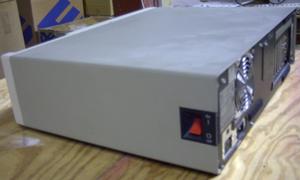
As I am sitting here, occasionally I hear a thump inside the old computer next to me, occasionally a grind, occasionally a growl, occasionally a tick, occasionally a perrrr.

I am a little worried to open it up and see what is in there.

So let's all take guesses at what could be inside that computer!

---------------
This is a discussion meant for some fun, I couldn't care less about this computer, it exploding could be rather entertaining.

89 replies

by charliespencer

There are only two components with moving parts - drives and cooling fans. If the noise occurs while the system is just sitting there idling, it's probably a cooling fan (power supply, CPU, or video card). If the noise occurs when you're actively using the machine, it could be cooling fan or a drive (hard drive or optical drive). No CD or DVD in it? You can eliminate the optical drive.

I'd do a backup NOW.

by slayer_

It's too old for that. SMART test on drive shows fairly good results. Runs perky too.

... I think I just heard a meow....

Correction, PSU fan is broken, like 8 years ago, someone.... stuck a pencil in it and jammed it up, it has been fine for this time though, maybe the pencil finally catching fire?

by the scummy one

HAL left a sheep behind?

or maybe a mouse found it's way in there. Hmmm -- meow -- kitten?

Power it up and see if there are suddenly other strange sounds!

by the scummy one

of the ensuing fire. We really would like to see both the flames and the explosion (and cloud of toxic smoke).

by slayer_

That's what really worries me, its currently running. So far I have just cranked up the music so I don't hear it.

by bfilmfan

Use the correct weapon on that critter:

And the Lord spake, saying, "First shalt thou take out the Holy Pin. Then shalt thou count to three, no more, no less. Three shall be the number thou shalt count, and the number of the counting shall be three. Four shalt thou not count, neither count thou two, excepting that thou then proceed to three. Five is right out. Once the number three, being the third number, be reached, then lobbest thou thy Holy Hand Grenade of Antioch towards thy foe, who, being naughty in my sight, shall snuff it."

by seanferd

My first visit to the page, there was a big arrow explicitly stating "Click on the cow".
Not there, now.

That's a good tip for those who don't see an arrow. :-bd

by bfilmfan

The pic of the week cracked me up.

I can just imagine 2 pilots talking about bird strikes and here comes Betsy, hooves a flailing, aimed at the windscreen!

by seanferd

Then we'll have MythBusters firing fresh and frozen cows at aircraft windscreens out of cannon.

And if Betsy goes for the engine intake...

by slayer_

Sadly it is not a gateway, it uh...... well there is a 32x on the CD drive.

Did I mention the CD drive is randomly opening and closing?

by morrisntex

...did it happen to be made of recycled materials did it?

Like perhaps a bright red '58 Plymoth Fury?

by slayer_

Not sure how, but it moved, it WAS sitting on a green rubber mat, but now I am fairly certain it has moved a full 3 millimeters forward.

by mjd420nova

I serviced a unit for a client that was hearing screaching sounds from inside the case. Then it would make scratching sounds and ticking noises. When I opened the case I couldn't see anything out of the ordinary. After leaving the cover off for a while and started filling out the call ticket, it did it again. It was the hard drive. I did a diagnostic and found a few bad sectors and a bunch of errors on a checkdisk scan. In the process of trying to figure out what was going on, I laid the unit on its side and the noise stopped and just for S and G I ran the diags again. The errors were gone. I backed it up while laying down and replaced the 500GB SATA with a new one and restored the data. Later when I had the chance to get it in the clean room, I found a bunch of nicks on one of the platter edges. The corresponding head had a tiny twist on it too. Really strange and I've never seen another one like that. I have seen some units that had mice and cockroaches in them but that's to be expected in a resturant.

by jang

Hi SinisterSlay,

I would immediately backed up all any data stored on this system first.

Then I would check if there's foreign object stuck on the fan's cover (for the cooling fan & power supply). Sometime, you can consider getting a clean brush to clear away the dust stuck on visible parts of the fan (Remember to switch off the power & disconnect the power cable first).

Next I would check the HDD. After a few years of usage, most HDDs 'll show signs of wear & tear (that what happens to my previous computer).

Just my 2 cents' worth. Cheers.

Johnny

by slayer_

That wouldn't turn off when not in use if a CD was in it. Well saddly one day it must have gotten something on the eye, cause i cut the outter centimeter of my worms armageddon disc completely off in a perfect circle. you can imagine I was pissed. Friend of mine had a CD repair drive, and actually managed to perfectly mend the disc, no lost data!

by the scummy one

just move the mouse over it -- lol
I went back right now and it does say to click, however, it goes away quickly not to return

by tonythetiger

I've seen some pretty nasty things with CDs.

One had been in for more than two years and had built up a rind of crud so thick the CD drawer wouldn't open without major brute force.

Every few minutes it would spin up and I guess the crud wasn't evenly deposited because it created one heck of a vibration, along with a noise sounding somewhat like sticking a toothpick in a fan.

by slayer_

Just to go see that movie :).

Also the CD drive has stopped opening and closing today, now its a loud thumping noise with the occasional growl.

by captbilly1eye

... in common only that there is an imaginary critter inside.

Hmmmmm.... gives me an idea for a new Intel logo "Critter Inside"
:-)

oh.... and no video. It was audio only from the Bob & Tom radio show - a good source for laughs.

by pvbenn

Mouse, once found a mouse nest in a PC in a remote building at a gas plant. Got in by a slot inthe back where the slot filler was missing. Pee'd on the circuit board and shorted out the system.
Or the hard rive getting ready to creater.

by captbilly1eye

Take a pic of the machine with the sticker on it and send it to Sonja along with the story. Who knows, maybe she'll send ya some swag.

... as long as I get credit for the graphic. ;-)

by slayer_

It's making thumping noises almost every 10 seconds! and they are random. The growling sounds have gotten louder too!

Maybe the critter is pissed off that I took the monitor off that machine and stuck it on my gaming machine?

WHOA that was a big thump, I felt it on the floor!

by nexs

i've seen at my old school, a document printed and posted to the hardware workshop window a situation where a client has come to a service store with hissing sounds coming from their computer... as it turned out, there was a lengthy snake coiled up inside the power supply!

I've seen the pictures, and as i sit here today, i still have no idea how a snake got into a PSU in the first place!

hopefully this is similar to your case and not a one way trip to data loss!

by slayer_

This machine only graduated to my server because my previous server's PSU died (after 15 years... lol). I just transfered the HDD over.

Reading the SMART tests is interesting though. The old 10gig fujitsu HDD (seriously) is at 98% fitness and 99% performance. While the newer 40 gig drive is at 92% fitness and 95% performance.

by rob miners

or it will attract the rusty nails. Don't want the hamster getting Tetanus now do we. :p

by peconet tietokoneet

1). Harddrive. Have not heard a harddrive doing a sound like that, if it did it would not be long before it gave up, so i will say a big NO.

2). Graphic card. If a graphic card did sound like this it would not be long before it ceased to work, so a big NO.

3). PSU (power supply unit). Funny sounds coming from a PSU does sound like it would be your culprit, so a big YES. This would be your first port of call, swap out for a new or used (non-sounding) PSU. :)
To be truthful i had a power supply unit that farted before it puffed out smoke, what a bummer, either that or it was smoking a joint and drank too much, it died. RIP. :)

by slayer_

I still got my 1997 machine with its dead PSU. Anyone got a working one they can mail me? Cause I wanna bring it back to life.

by peconet tietokoneet

I have a old desktop (not tower) with cd drive that still works. If you can sent me a picture i think i might be able help you on that. Well i am not using it for anything. No mice or any other forms of animals, insects, fish or dogs come with this computer. If you want these then they are Extra. :)

by slayer_

http://trevorsarchives.selfip.net/funpics/images/oldie/

FYI I have FINALLY cleaned my room lol.

I wanna bright that baby back to life. I read the PSU, it has NO information on it whatsoever on it. Not even a model number. I doubt it's anything more than a 150Watt.

The systems hardware is just
MOBO: P5TX-Bpro
http://www.motherboard.cz/mb/ecs/P5TX-Bpro.jpg

200mhz P2 CPU with MMX
256MB (2x 128mb) DIMM
CD Drive (52X)
HDD (40GB 9?00 RPM)
ATI Xpert@Play video card, 4mb PCI
Soundblaster 16 AWE64 ISA
Basic 10/100 network card PCI
Basic 56k Dialup modem ISA (Ah the days when the used to give you more than 2 expansion ports :))

I can only hope the dying PSU didn't take out the MOBO with it :(. That machine really hauled ass in its prime :). But in its old age it started to slow down, most framerates were halved, load times doubled :(. And it constantly ran hot at 50-60C. But it was always so damn stable :). It historically went down more often at the Win95 3 month glitch then actual BSOD's or system hangs or memory leaks.

by darryl~

I might have some 256 PC100 or PC133 DIMM's....I think I can find a power supply.....geez...probably even have a P2 kicking around....maybe a motherboard.

Send me a list of what you're looking for in a PM.

Darryl

by slayer_

But I am pretty sure I just need a powersupply to get that baby going again. The trick is, I do have various machines of around the same age, but that thing has different plugins on the board than all the others I have. I am not tech savy enough to fully understand the old ways, I just know they don't fit :).

I provided a picture of my mobo on the previous response.

I have one older 133mhz Compaq I have yet to check, only recently has the machine gone out of service. But it has pretty much gone through hell for its life, I am not sure how reliable the parts will be (I also wonder if the 1gig drive still works :)) The machine's last 6 years of life, was in... a body shop and mechanical shop..... Body shop dust is the worst! Its first bit of life was in a car dealership, were it was in use for 3 years, then thrown in a closet till the company went belly up, we bought it at an auction for 50 bucks lol.

by nicknielsen

If somebody has a power supply with P8/P9 connectors, you should be able to make it work. The PSU may not fit in the tower or you might have to drill some new screw holes in the chassis, but you should be able to make it work.

by slayer_

Since the switch is hard wired into it apparently, can the guts themselves just be moved?

by peconet tietokoneet

If you have, or you know of someone that has, it would help a bit more to see the power pins/socket. But by just looking on your picture i might have one. But to be sure (and to not waste your time and money) if you can shoot it with a 8 or 10mp camera and send it to me. Or post it on here. :)

by nicknielsen

I'm assuming the cable goes to the front panel power button?

If you can find a case with the proper power supply, you shouldn't have any trouble transferring the guts of your tower. If you're not mechanically inclined, you probably have a friend who is.

by slayer_

Those old reinforced cases ment to hold 30 lbs monitors on them. And with no ventiliation. Actually, that 133mhz doesn't even have a fan, just has an odd spiky heatsink on the CPU.
Moving all the guts wouldn't be easy.

Can I just take the PSU apart and move it's guts?

by nicknielsen

1. A tower is a desktop stood on edge.

2. "Moving the guts" as you asked it meant (to me) everything inside the PC--motherboard, drives, memory, etc.--not just the processor.

3. Yes, you can move the guts of the power supply, but I don't recommend it unless you are an electrical engineer or a very experienced tech.

by slayer_

The floppy, CD, whole front panel, all designed to be on its side. Inside the case, there is a double triangle brackets. Two points coming from each corner, third point, mounted through square holes in the motherboard to the casing on the other side.
At the connecting point of the triangle, there is a circle piece.

>()<

The monitor sits over this piece.

This discussion is closed to new replies.