


Every business has to recruit and hire new employees, but not every company does it the same way. A growing startup needs speed and efficiency. Dispersed teams need remote-friendly tools, and larger organizations need data they can trust. And since one-size-fits-all solutions don’t always align with your needs, you need a system that matches how your company works.
Below is a list of the best recruiting platforms, along with their ideal use cases, allowing you to determine which platform best suits your hiring needs.
- BreezyHR: Best for small businesses looking for an easy setup, and it doesn’t require a full recruitment team
- Rippling: Best for remote teams spread across multiple time zones
- Greenhouse: Best for companies with multi-step hiring processes, several departments, or different hiring paths
- HackerEarth: Best for companies that often hire engineers, product managers, and tech talent
- JazzHR: Best for high-growth startups that are scaling quickly and need to expand fast without sacrificing quality
- Best recruiting software quick comparison
- BreezyHR: Best for small businesses without a full recruitment team
- Rippling: Best for hiring across time zones and different countries
- Greenhouse: Best for teams with a more complex hiring process
- HackerEarth: Best for tech recruiters
- JazzHR: Best for high-growth startups
- Key features to look for in recruiting software
- How to choose the right recruiting software
- How AI and automation are changing recruiting technology
- Future trends in recruiting technology
- Methodology
- FAQs
Best recruiting software quick comparison
 |
| ||
 |
| ||
 |
| ||
 |
| ||
 |
|
BreezyHR: Best for small businesses without a full recruitment team
Why I picked BreezyHR
Small businesses need recruiting software that’s easy to set up, simple to use, and powerful enough to cover the essentials. I felt that BreezyHR fit that bill when I demoed the platform. It features a clean interface with drag-and-drop pipelines that make candidate organization simple. Even if you don’t have a full recruitment team, you can still post jobs quickly and easily move candidates through your hiring process.
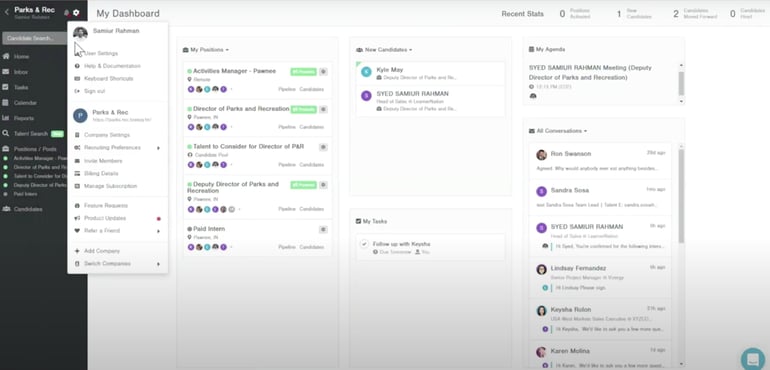
It also integrates with a wide selection of HRIS, background check, productivity, and assessment platforms, allowing you to continue using what you love most. I recommend BreezyHR for small businesses because of its ability to combine simplicity with robust features. But I do want to mention that if you’re new to recruitment and ATS platforms, you may encounter a slight learning curve. Some new recruiters say the interface isn’t as intuitive as they’d like, and other users report having difficulty getting it set up.
Pros and cons
| ✓ Mobile app lets hiring managers review and respond to candidates anywhere | ✗ Reporting is relatively basic compared to more advanced analytics platforms |
| ✓ Custom offer letter templates and approval flows | ✗ Some integrations may require higher-tier plans |
| ✓ Asynchronous video responses allow candidates to respond on their own time | ✗ Some users report that the system slows down with high volumes of applicants |
Pricing
Whether you have a few employees or thousands, BreezyHR has a plan to meet your company’s needs. Plus, all plans include unlimited users, candidates, and customer support. You can request a free demo to give you a tour of the platform, and they also offer a free 14-day trial.
- Bootstrap: Free and includes the basics for one position or talent pool.
- Startup: $189 per month or $157 per year
- Growth: $329 per month or $273 per year
- Business: $529 per month or $439 per year
- Custom Pro Plan: Custom pricing
Key features
- Job posting across major platforms with a single submission
- Candidate questionnaires and custom screening workflows
- Integrations with HR tools, payroll systems, and background check providers
- Mobile app to review and respond to candidates on the go
- Drag-and-drop candidate pipelines for easy organization
Rippling: Best for hiring across time zones and different countries

Why I picked Rippling
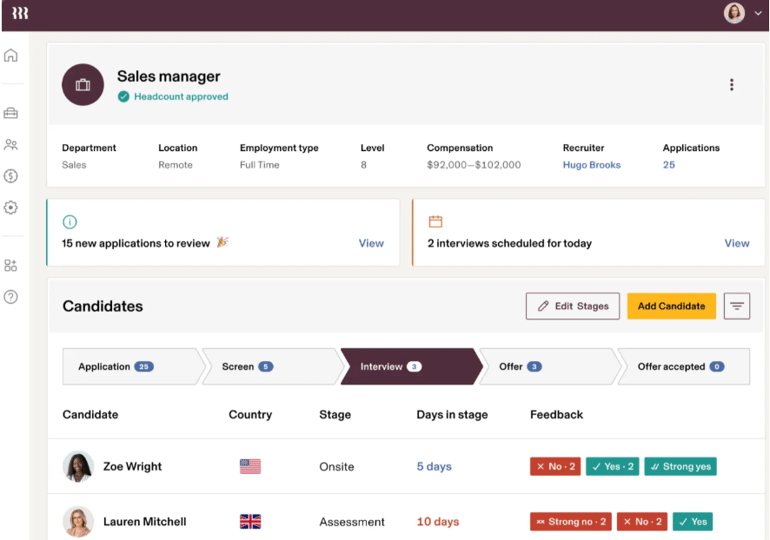
Hiring across time zones and borders can quickly get messy, but Rippling makes the recruiting process feel flawless. It combines applicant tracking with HR, payroll, and IT into a single platform. You can hire a new employee, onboard them, set up benefits, and even assign them a laptop in just a few clicks.
It’s the comprehensive support for the entire remote hiring process that impresses me the most. This level of integration is why I suggest them for globally dispersed teams, as it eliminates the headaches of going back and forth between various systems. Rippling allows you to customize your workflows, and you can select the features your business needs instead of being stuck with options you may never use.
However, I did find a few drawbacks when I vetted the platform. There isn’t a free trial available, and Rippling tends to be more expensive than other recruiting software. Given the amount of customization and the higher price tag, I wish they would grant prospective users a test drive before being locked into a contract.
Pros and cons
| ✓ Unified platform combines ATS, HR, payroll, and IT tools | ✗ Can be overwhelming for teams that only need recruiting features |
| ✓ Scale easily as teams grow across multiple locations | ✗ Some features require setup help, which can add to implementation time |
| ✓ Strong compliance support for global hiring | ✗ Lacks a free trial, making it harder to test before committing |
Pricing
Rippling tailors its pricing to each business, since costs vary based on the combination of services and modules you choose. Your custom quote will depend on your selection and the number of employees you have.
Key features
- Customizable recruiting pipelines and workflows
- Automation features to reduce repetitive admin tasks
- Video interviewing and scheduling across time zones
- Reporting dashboards to monitor recruiting activity
- Integrations with hundreds of third-party apps and collaboration tools
Greenhouse: Best for teams with a more complex hiring process
Why I picked Greenhouse
Greenhouse is a top choice for companies with complex hiring needs. Its strength lies in structured workflows that bring consistency to every stage of the process. Hiring managers can create distinct paths for interns, hourly workers, and leadership roles without compromising oversight.
The way Greenhouse handles these intricacies is what urges me to recommend them. However, I must admit that these benefits can also be cons. I’m pretty savvy when it comes to using recruitment technology, and when I first used Greenhouse, I had to take a step back to grasp how to use it.
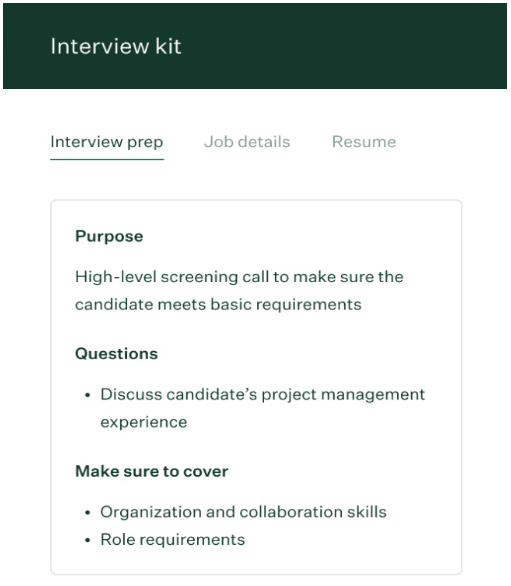
But once I did, I saw its value and how its features genuinely help you make smarter, unbiased hiring decisions with the use of scorecards, interview kits, and standardized evaluations. These functions allow you to assess candidates fairly across teams and departments. That’s a significant win for me.
And last, but certainly not least, I’d like to mention that Greenhouse offers the advanced reporting features that data-driven teams need. You can see who’s in your pipeline for each position, pull a report of your recruitment history, and add custom fields.
Pros and cons
| ✓ Built-in DEI tools, like anonymized resume review | ✗ Limited customization on lower-tier plans |
| ✓ Extensive list of integrations to connect with tools you already use | ✗ Implementation process can be time-consuming for larger teams |
| ✓ Strong API support makes it easier to connect with custom systems | ✗ Advanced analytics are only available on the higher-tier plan |
Pricing
Greenhouse provides customized pricing based on the size of your team and the complexity of your hiring needs. Instead of flat tiers, the platform tailors its costs to match your company’s specific recruiting challenges and goals. There isn’t a free trial, but you can request a demo.
Key features
- Structured interview kits and scorecards to ensure consistent evaluations
- Collaboration features to keep hiring managers and interviewers aligned
- Open API for connecting with custom or in-house systems
- Customizable pipelines for different hiring paths (interns, hourly, leadership)
- Large integration marketplace with HRIS, background checks, and assessment tools
HackerEarth: Best for tech recruiters
Why I picked HackerEarth
If you’re seeking tech talent but haven’t found a way to effectively test their skills, HackerEarth is a standout choice. I know how difficult it can be to find candidates who know a particular coding language or have the technical depth to accomplish what your company needs. The software includes automated skills assessments, real-time coding challenges, and data-backed evaluations that enable you to make confident decisions.
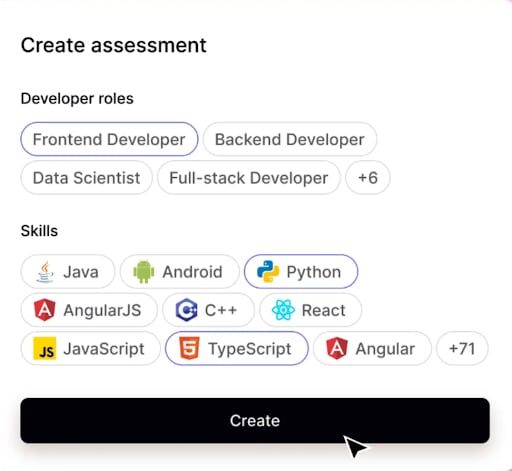
You can assess a wide range of technical skills and positions. When I tested the platform, it was simple and easy to set up assessments, even for non-technical recruiters. But I do advise that if you’re not technical, you double-check with the manager or team lead you’re hiring for to ensure you’re selecting the right skills.
In my opinion, what truly sets HackerEarth apart is its commitment to reducing bias. You can remove personally identifiable information from assessments, giving every candidate a fair opportunity. That’s a significant advantage for businesses prioritizing DEI.
Pros and cons
| ✓ Large library of coding assessments across multiple programming languages | ✗ Pricing jumps significantly as you add on features |
| ✓ Real-time coding environments simulate actual developer workflows | ✗ May feel overwhelming for non-technical recruiters |
| ✓ Customizable tests let you tailor evaluations to specific roles | ✗ Requires setup time to customize assessments effectively |
Pricing
HackerEarth’s pricing depends on the solution you need. For skills assessments:
- Starter plan: $99 per user, per month or $990 per user, per year
- To access a larger skill library: $399 per month or $3,990 per year
- Enterprise: Custom pricing only
If you’re looking to host hackathons and coding challenges in the developer community, you’ll need the Talent Engagement package. You’ll receive a custom quote after a consultation. Luckily, you can try before you buy. They offer a free 14-day trial that you can sign up for without inputting your credit card info.
Key features
- Automated skills assessments for hundreds of tech roles
- Real-time coding challenges that simulate developer workflows
- Bias-free evaluations by removing personally identifiable information
- Pipeline analytics to track skill distribution among candidates
- Instant candidate feedback option after assessments and interviews
JazzHR: Best for high-growth startups

Why I picked JazzHR
If you’re a high-growth startup that wants to scale quickly, JazzHR delivers a platform that doesn’t skimp on quality. When I first opened the platform, I noticed how minimalistic the interface is. I didn’t feel overwhelmed when I tried to set up workflows and create job posts. However, JazzHR is another example where one of its best benefits can also be a flaw, depending on the user.
Some report that it’s too simple and wish they had more customization options. I have to agree. As clean as the interface is, you can’t customize the dashboard or candidate page. I also ran into limitations with the platform’s reporting and metrics while using the Hero plan.
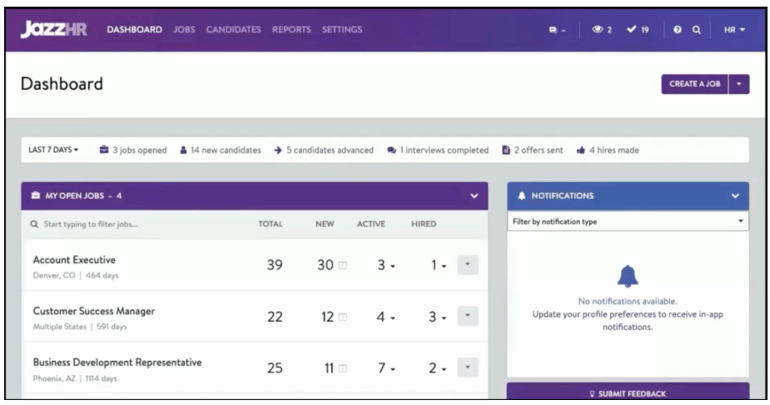
Unless you upgrade to the Plus or Pro plan, you won’t be able to pull any actionable insights. However, if you’re a startup, this won’t hinder you from recruiting, and you can always choose to upgrade when you’re ready for more advanced reports. What caught my eye about JazzHR is its approach to AI governance. The platform focuses on transparency and fairness with its Always-On AI Governance feature. It provides visibility into how candidates are evaluated and ensures you’re audit-ready if compliance questions arise.
Pros and cons
| ✓ Share and track your job posts across various social media channels and job boards | ✗ Advanced features like e-Signatures and custom reports require high-tier plans |
| ✓ Build a branded careers page or connect it to your existing page | ✗ Limited analytics compared to enterprise-focused platforms |
| ✓ Intuitive setup makes it simple to launch and adapt workflows | ✗ Limited global hiring abilities |
Pricing
Unlike most recruitment platforms, JazzHR doesn’t base its pricing on the number of admin users.
- Hero: $75 per month. This includes three active jobs to start, with a monthly billing rate of $9/job.
- Plus: $269 per month. This includes 200 active jobs to start.
- Pro: Custom pricing based on your needs.
A free 14-day trial is available without having to input your credit card information, but the features are limited.
Key features
- Customizable hiring workflows that can scale with your growth
- Structured interview guides and scorecards for consistent evaluations
- Integrations with popular HRIS and payroll systems
- Branded career pages with easy posting to major job boards
Key features to look for in recruiting software
Recruiting software comes with a variety of bells and whistles, but not every feature will actually help you hire better. The goal is to focus on the tools that save you time, improve collaboration, and create a smoother candidate experience. Here are the features that consistently make an impact in recruitment:
- Adjustable pipelines: A modifiable pipeline allows you to create a hiring process that aligns with your company’s workflow, whether that’s a straightforward three-step funnel or a more complex multi-stage journey. This flexibility ensures you can adapt as your hiring needs evolve.
- Job board integrations: Recruiting software that connects to multiple job boards allows you to post a role once and have it go live on multiple platforms. This saves time and broadens your reach, helping you tap into a larger pool of qualified candidates.
- Automation features: Automation handles repetitive tasks, like scheduling interviews, sending reminders, or updating candidate statuses. By reducing admin work, your team can spend more time engaging with candidates.
- Reporting and analytics: Reporting dashboards provide data on time-to-hire, source effectiveness, diversity, and other key metrics. These insights help you identify what’s working, pinpoint bottlenecks, and make more informed decisions.
- Candidate experience tools: Features like branded career pages, mobile-friendly applications, and automated updates create a professional and engaging candidate experience. A strong candidate experience improves your employer brand and helps attract top talent.
- Assessment and screening options: Built-in assessments or integrated testing tools let you measure skills and filter candidates early. This helps ensure that only the most qualified applicants advance to the later stages of your process.
- User-friendly interface: A clean, intuitive interface makes it easy for your team to navigate the software without a steep learning curve. The easier it is to use, the faster your team can adopt it and stay focused on hiring, rather than troubleshooting.
- Integrations: Recruitment software that connects seamlessly with HR, payroll, and collaboration systems reduces duplicate work. Integrations also provide a smoother handoff from hiring to onboarding.
- Compliance support: Features like document tracking, EEO reporting, and audit logs help you stay compliant with labor laws and industry standards. Having compliance built in reduces risk and gives you peace of mind during audits.
How to choose the right recruiting software
The right recruitment software depends on your company’s size, goals, and hiring challenges. Start by mapping out your hiring process:
- How many roles do you typically fill?
- How complex are your talent pipelines?
- Which tools does your team already use?
From there, determine what matters most, such as affordability, ease of use, advanced analytics, or global hiring support. It’s also important to consider your growth trajectory. A system that feels “good enough” today might fall short as your hiring needs expand.
Look for platforms that can scale with you, integrate easily with HR or payroll systems, and improve collaboration across your team. By aligning software capabilities with your real-world hiring needs, you’ll be able to choose a solution that saves time and helps you bring in top talent consistently.
How AI and automation are changing recruiting technology
AI and automation are opening up new possibilities in recruiting software. Recruiters can easily screen resumes, match candidates to roles, and surface top talent in minutes instead of hours. Automation takes care of the repetitive tasks, so teams can focus on building relationships with candidates.
Even better, AI-powered assessments and insights offer a clearer view of skills, enabling companies to make faster, more informed hiring decisions. By removing friction from the process and shining a light on data that once took weeks to gather, AI is enabling recruiters to compete in fast-moving talent markets.
Future trends in recruiting technology
Recruiting technology is evolving rapidly, and new challenges are shaping what comes next. As more states introduce guidelines and laws regarding AI hiring tools, platforms will need to adapt by incorporating stronger transparency, fairness, and compliance features into their systems.
At the same time, the rise of fake and fraudulent applicants will push vendors to develop more effective verification tools, so recruiters can trust the candidates they engage with. We’ll also see the candidate experience become more data-driven and predictive, helping recruiters spot risks, like when candidates are about to disengage. This will give them a chance to address the issue before top talent is lost.
Methodology
Drawing on my HR experience, I demoed and researched each recruitment platform to evaluate ease of use, the features that matter most, and overall scalability. I also considered pricing structures and how well each tool supports teams at different stages of growth. To balance my assessment, I reviewed feedback from HR professionals and real users to capture an inside look at each platform’s strengths and limitations.
FAQs
What is the best recruiting software?
The best recruitment software depends on your company’s specific needs. A small business may benefit from a simple platform that’s quick to set up, while larger organizations often need systems that handle complex hiring processes. Ultimately, the best software is the one that aligns with your team, workflow, and long-term hiring objectives.
Is there a difference between ATS and recruiting software?
Yes, there is a difference. An applicant tracking system (ATS) primarily focuses on managing candidates after they apply, including organizing resumes, tracking progress through various stages, and storing candidate information. Recruiting software typically includes ATS features but goes further with tools for sourcing, screening, scheduling, and onboarding.
Which recruiting software works best for remote teams?
The best recruiting software for remote teams is designed to support hiring across time zones and locations. Look for platforms that include video interviewing, automated scheduling, and digital assessments, allowing candidates and hiring managers to connect asynchronously. Strong remote tools also offer virtual onboarding features, ensuring new hires can get set up and engaged from day one.