


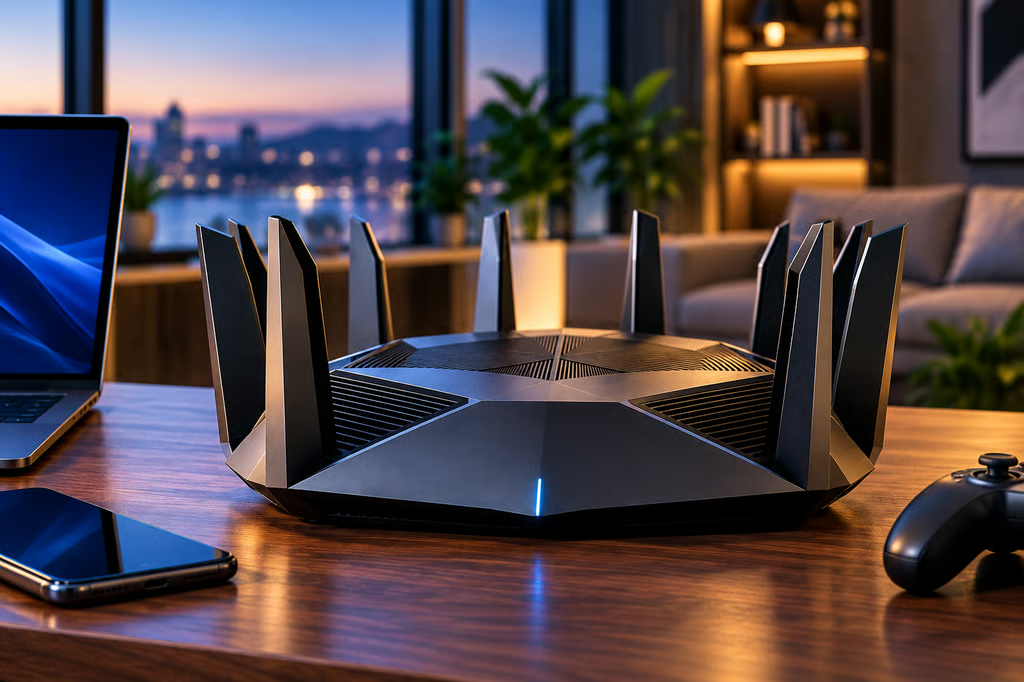
TP-Link’s Archer 8 Ultra is one of the first consumer routers built for Wi-Fi 8, promising more reliable connections in crowded homes rather than a major increase in peak speeds. Preorders opened Sept. 30, 2026, in the UK, Germany, Australia, Canada, and other markets, but its high price and limited device support make it difficult to recommend over Wi-Fi 7.
The router costs £669.99 during UK preorders, with a reported post-launch price of £899.99. In Australia, it carries an AU$1,499 recommended retail price. US pricing and availability remain unannounced, and Wi-Fi 8-compatible phones and laptops are not yet available to take full advantage of the new standard.
| Feature | Wi-Fi 7 | Wi-Fi 8 / Archer 8 Ultra |
|---|---|---|
| Standard | IEEE 802.11be | Draft IEEE 802.11bn |
| Main focus | High throughput, capacity, and multi-link connectivity | Reliability, coverage, and interference handling |
| Client devices | Supported by current phones, laptops, and tablets | Backward compatible; dedicated Wi-Fi 8 clients not yet widely available |
| Wireless speed | Depends on router model | Up to 19 Gbps combined across three bands |
| Pricing | Varies by model | £669.99 UK preorder; AU$1,499 Australian RRP |
| Availability | Widely available | Regional preorders |
| Feature maturity | Established standard | Some capabilities require future firmware updates |
| Best for | Most buyers upgrading now | Early adopters willing to pay a premium |
How we compared
We compared Wi-Fi 7 and the TP-Link Archer 8 Ultra based on wireless speeds, coverage, interference handling, latency, device compatibility, wired connectivity, pricing, and long-term upgrade value.
The comparison uses IEEE standards documentation and TP-Link’s published hardware specifications, supported features, and firmware roadmap. Device availability, regional pricing, and the practical benefits of each wireless standard also inform the recommendations for home and small-office networks.
TP-Link’s advertised performance gains are manufacturer claims. Actual performance depends on the router, connected devices, network environment, and interference levels.
What the Archer 8 Ultra offers
TP-Link opened regional preorders on Sept. 30 for the Archer 8 Ultra, its first Wi-Fi 8 router powered by Broadcom’s Wi-Fi 8 chipset.
The router combines TP-Link’s StabilityEngine technology with an 18-antenna design intended to improve connections at longer distances, reduce interference, and maintain performance when multiple devices share a network.
Its main specifications include:
- Tri-band Wi-Fi 8: Up to 19 Gbps combined theoretical wireless speed across the 2.4 GHz, 5 GHz, and 6 GHz bands.
- 18 internal antennas: Manufacturer-rated coverage of up to 3,600 square feet in the US or 3,000 square feet in Europe, with Multi-Floor Mode and Range Boost.
- Multigigabit Ethernet: Two 10 Gbps WAN/LAN ports, including one SFP+/RJ45 combo port, four 2.5 Gbps LAN ports, and one 1 Gbps LAN port.
- Aireal AI assistant: Network diagnostics, optimization, and management through TP-Link’s Tether app.
- Security features: Router-level VPN support, isolated guest and IoT networks, WPA3, and HomeShield protection, with additional features available through paid plans.
The 19 Gbps rating combines theoretical wireless speeds across three frequency bands. A single connected device will not achieve that figure.
Coverage also depends on building materials, router placement, interference, and the capabilities of connected devices. TP-Link’s advertised range is an estimate rather than a guaranteed result for every home.
In Australia, TP-Link lists the recommended retail price at AU$1,499. TechRadar reports a UK preorder price of £669.99, increasing to £899.99 afterward. Retailer prices may differ.
TP-Link has also announced the Deco 8 Ultra mesh system, with broader availability planned as its Wi-Fi 8 lineup expands.
Wi-Fi 8 vs Wi-Fi 7: What changes?
Wi-Fi 7 introduced major speed and capacity improvements, including 320 MHz channels, 4K-QAM, and multi-link operation (MLO), which allows compatible devices to communicate across multiple wireless links.
Wi-Fi 8 builds on those capabilities with a stronger focus on reliable connections. The draft IEEE 802.11bn standard aims to improve performance when signal strength drops, interference increases, or many devices compete for bandwidth.
For households, the potential benefits include steadier connections in distant rooms, fewer interruptions during video calls, and more predictable latency during gaming.
TP-Link claims its StabilityEngine delivers up to 33% higher throughput at mid-to-long range and up to 24% more consistent throughput under interference compared with Wi-Fi 7. These figures come from the company’s internal testing, with actual gains depending on network conditions.
Wi-Fi 8 also introduces technologies such as Dynamic Sub-band Operation (DSO), Enhanced Long Range (ELR), and Distributed Resource Units (DRU). These are designed to improve capacity, signal reliability, and performance for distant or low-power devices.
However, several features are not available at launch.
TP-Link’s official product specifications state that ELR, DRU, and DSO functionality is planned for free software updates between 2027 and 2028. Multi-access-point coordination capabilities, including Co-TDMA, Co-SR, and Co-BF, are also expected through future updates.
Early buyers will therefore receive hardware that supports the Wi-Fi 8 roadmap, but some advanced capabilities will depend on later firmware releases.
The Archer 8 Ultra remains compatible with existing Wi-Fi devices, including Wi-Fi 7 phones and laptops. TP-Link says some router-side improvements can benefit older clients, particularly when maintaining connections in difficult wireless conditions.
However, older devices cannot use Wi-Fi 8-specific client capabilities without compatible hardware.
For homes already using a reliable Wi-Fi 7 router, the immediate advantages are largely limited to the Archer 8 Ultra’s hardware, wired connectivity, and router-side network-management features.
Should you buy Wi-Fi 8 or stick with Wi-Fi 7?
For most buyers, Wi-Fi 7 remains the better purchase in October 2026.
Wi-Fi 7 routers are widely available, compatible client devices already exist, and buyers have more flexibility when choosing prices, coverage options, and mesh configurations.
Homeowners dealing with unreliable connections should first identify whether the problem comes from poor router placement, wireless interference, or outdated equipment. Basic Wi-Fi troubleshooting can help identify crowded channels and weak signals before replacing the router.
Wi-Fi 8’s greater emphasis on reliability could eventually help reduce wireless congestion and inconsistent performance. However, not every slowdown originates with the router. High network latency can also result from internet connection problems, routing delays, and overloaded services.
For small offices, connection stability is particularly important for video meetings and voice calls. A VoIP speed test can measure latency, jitter, and packet loss, helping identify whether poor call quality stems from the local network.
The Archer 8 Ultra is primarily an early-adopter purchase. It offers high-speed wired connectivity, advanced network-management features, and a platform for upcoming Wi-Fi 8 capabilities, but its price is substantial.
Its strongest appeal is to enthusiasts with multigigabit internet plans, many connected devices, or demanding home networks who want to adopt the newest hardware early. Even then, buyers should weigh its current features against the cost of a capable Wi-Fi 7 alternative.
For larger homes, a well-placed Wi-Fi 7 mesh system may address dead zones more effectively than a single high-end Wi-Fi 8 router. Small offices may also benefit more from dedicated access points and centralized network management than from upgrading the wireless standard alone.
If you already own a capable Wi-Fi 7 router, keep it. Moving to the Archer 8 Ultra solely for Wi-Fi 8 support offers limited immediate benefit without compatible client devices.
If your existing router is old or struggling, a suitable Wi-Fi 7 router or mesh system is the more practical choice today. Buyers whose current networks perform well can wait until Wi-Fi 8 devices become available, more features arrive through firmware updates, and pricing becomes more competitive.
Also read: Businesses prioritizing connection stability can compare the best VoIP routers for different office sizes, network configurations, and communication needs.