


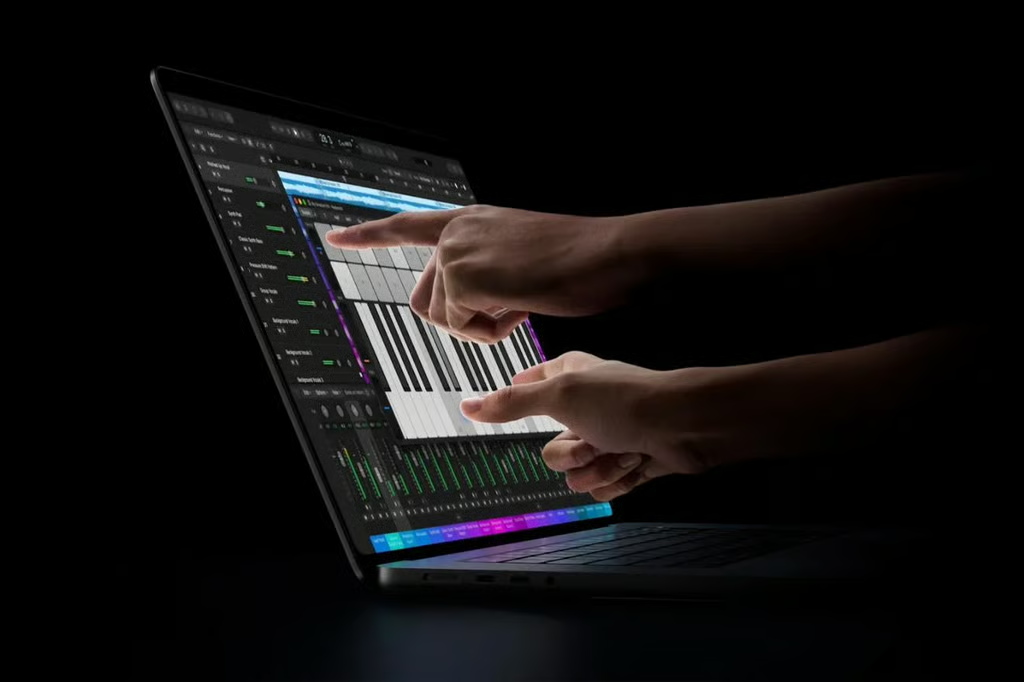
Apple has officially brought touchscreens to the MacBook Pro, introducing a redesigned laptop with an OLED display, M5 Pro and M5 Max processors, and a significantly higher starting price.
Announced Oct. 28, the new 14-inch and 16-inch MacBook Pro models feature Apple’s PROLED XDR tandem OLED display, touchscreen controls, and Dynamic Island. Preorders are open, with general availability beginning Nov. 6.
For professionals and IT buyers, the biggest questions are how much the new laptops cost, which configurations offer the best value, and whether the upgraded display and input options justify replacing an existing MacBook Pro.
- Apple touchscreen MacBook Pro: Key specifications
- How much does the touchscreen MacBook Pro cost?
- What’s new with the touchscreen MacBook Pro?
- Which processors are available?
- Which apps support the touchscreen MacBook Pro?
- What is the battery life?
- What ports and connectivity options are available?
- When is the touchscreen MacBook Pro release date?
- How does macOS 27 support the touchscreen?
- Is there also an M6 MacBook Pro?
- Should you upgrade to the touchscreen MacBook Pro?
- What IT departments should consider before buying
- Frequently asked questions
- The bottom line for business buyers
Apple touchscreen MacBook Pro: Key specifications
The new MacBook Pro combines Apple’s M5 Pro and M5 Max processors with a redesigned display and chassis.
| Feature | Specifications |
|---|---|
| Display sizes | 14.2 inches and 16.3 inches |
| Display technology | PROLED XDR tandem OLED |
| Touchscreen | Yes, with macOS 27 touch support |
| Processors | Apple M5 Pro or M5 Max |
| Memory | Up to 128GB unified memory |
| Storage | Up to 4TB with M5 Pro; up to 16TB with M5 Max |
| Refresh rate | Adaptive 10Hz to 120Hz |
| Peak brightness | Up to 2,000 nits for HDR content and outdoor SDR use |
| Sustained brightness | Up to 1,000 nits full-screen for HDR and SDR |
| Contrast ratio | 10,000,000:1 |
| Wireless connectivity | Wi-Fi 7 and Bluetooth 6 |
| Ports | Three Thunderbolt 5, HDMI, SDXC, MagSafe, headphone jack |
| Camera | 12MP Center Stage |
| Operating system | macOS 27 |
| Battery life | Up to 24 hours, depending on configuration |
| Starting price | $2,899 |
| Release date | Nov. 6, 2026 |
The maximum specifications are not available in every configuration. In particular, buyers who need more than 4TB of internal storage must select an M5 Max model.
How much does the touchscreen MacBook Pro cost?
Apple’s touchscreen MacBook Pro starts at $2,899 in the US, making it a premium option even within the company’s professional laptop lineup.
The starting prices vary by screen size and processor.
| Configuration | Starting price |
|---|---|
| 14-inch MacBook Pro with M5 Pro | $2,899 |
| 16-inch MacBook Pro with M5 Pro | $3,399 |
| 14-inch MacBook Pro with M5 Max | $4,499 |
| 16-inch MacBook Pro with M5 Max | $4,799 |
These are base prices. Upgrading memory, storage, or other configuration options will increase the total cost.
For businesses purchasing multiple devices, configuration choices can significantly affect the overall budget. Buyers should identify the processor, memory, and storage requirements for each employee group before ordering.
How does pricing compare with the previous MacBook Pro?
Apple’s earlier M5 Pro and M5 Max MacBook Pro models launched at lower starting prices.
| Configuration | Earlier MacBook Pro starting price | Touchscreen model starting price | Difference |
|---|---|---|---|
| 14-inch M5 Pro | $2,199 | $2,899 | $700 |
| 16-inch M5 Pro | $2,699 | $3,399 | $700 |
| 14-inch M5 Max | $3,599 | $4,499 | $900 |
| 16-inch M5 Max | $3,899 | $4,799 | $900 |
These figures compare advertised starting prices rather than identically configured laptops. Buyers should account for differences in memory, storage, display technology, and other specifications before treating the price difference as the cost of adding a touchscreen.
For organizations with recently purchased M5 Pro or M5 Max laptops, the new models are more likely to make sense as targeted upgrades than immediate fleet-wide replacements.
What’s new with the touchscreen MacBook Pro?
The biggest changes involve the display, touch controls, and physical design.
PROLED XDR tandem OLED display
Apple has replaced the previous display technology with a PROLED XDR tandem OLED panel.
According to Apple, the new display delivers:
- Up to 2,000 nits of peak brightness for HDR content.
- Up to 2,000 nits of peak SDR brightness outdoors.
- Up to 1,000 nits of sustained full-screen brightness for HDR and SDR content.
- A 10,000,000:1 contrast ratio.
- Support for P3 and Adobe RGB color gamuts.
- Adaptive refresh rates ranging from 10Hz to 120Hz.
- An optional nano-texture finish to reduce reflections.
The distinction between peak and sustained brightness matters. The 2,000-nit SDR figure applies to outdoor use and should not be interpreted as the display’s normal sustained brightness under indoor working conditions.
The 14-inch model has a 14.2-inch display with a resolution of 3024 × 1986, while the 16-inch version offers a 16.3-inch display with a resolution of 3472 × 2266.
For photographers, designers, and video editors, the wider color coverage and improved contrast could be meaningful upgrades. However, buyers should test the display with representative project files before assuming it can replace an existing reference monitor.
Touchscreen controls arrive on the Mac
The new MacBook Pro is Apple’s first Mac laptop with a touchscreen.
Users can scroll through webpages, pinch to zoom, drag objects, and interact directly with application interfaces. The touchscreen complements the existing keyboard and trackpad rather than replacing them.
Apple has also redesigned the hinge to improve stability during touch interactions.
The most useful applications may involve visual work, such as manipulating graphics, reviewing photographs, or interacting with software instruments.
For employees who primarily use email, spreadsheets, and web applications, the productivity advantage is less obvious. Organizations should evaluate whether touch makes common tasks faster or easier before paying for the upgrade.
Dynamic Island comes to MacBook Pro
Apple has also introduced Dynamic Island to the MacBook Pro. The interface provides access to features such as Live Activities and supported Siri AI interactions.
However, Siri AI requires macOS 27.2 and is available in beta, with access subject to device compatibility, supported languages, and regional availability. As a result, buyers should not assume that every Siri AI feature will be available when the MacBook Pro launches Nov. 6.
Apple also says that certain server-dependent Apple Intelligence features, including Siri AI, are subject to daily usage limits. Those limits may vary based on the feature, request complexity, system demand, and other factors. Apple plans to offer expanded access for a fee in the future, although it has not announced pricing.
Spotlight integration with Dynamic Island also depends on Siri AI being available and enabled.
For businesses, these limitations are particularly relevant when evaluating the laptop for employees working across multiple countries or languages. Organizations expecting to rely heavily on Siri AI should also consider potential usage restrictions and future costs before incorporating the features into essential workflows.
Dynamic Island may make certain notifications and controls more accessible, although it is unlikely to be a primary reason for most organizations to upgrade.
Thinner and lighter design
The redesigned MacBook Pro is also more portable.
Apple says the 14-inch model weighs approximately 3 pounds, while the 16-inch version weighs approximately 4 pounds. Actual weight varies by configuration.
The slimmer design may appeal to professionals who regularly travel or work away from a desk, particularly those who need the performance of a MacBook Pro without carrying as much weight.
Which processors are available?
The touchscreen MacBook Pro is available with Apple’s M5 Pro and M5 Max processors. Both chips are designed for demanding professional workloads, including software development, video editing, 3D rendering, and local AI processing.
The M5 Pro is positioned as the more balanced option for professionals who need substantial processing power without moving to the highest-priced configurations.
The M5 Max offers additional GPU resources and higher memory and storage options for users running particularly demanding applications.
M5 Pro and M5 Max configurations
| Processor | CPU cores | GPU cores | Memory options | Maximum storage |
|---|---|---|---|---|
| M5 Pro | 15 | 16 | 24GB or 48GB | 4TB |
| M5 Pro | 18 | 20 | 24GB, 48GB, or 64GB | 4TB |
| M5 Max | 18 | 32 | 36GB | 16TB |
| M5 Max | 18 | 40 | 48GB, 64GB, or 128GB | 16TB |
Available configurations depend on the model and purchasing options. The maximum storage figure for M5 Max does not mean every M5 Max configuration ships with 16TB.
For organizations evaluating AI development workloads, the appropriate processor depends on model size, memory requirements, and whether the software can effectively leverage additional GPU resources.
More expensive hardware does not automatically translate into meaningful productivity gains for every application.
Which configuration should you choose?
The best configuration depends on the workload rather than the highest available specifications.
| Primary workload | Configuration to evaluate | Main consideration |
|---|---|---|
| General professional work | 14-inch M5 Pro | Lower starting price and portability |
| Software development | M5 Pro with sufficient memory | Project size, build times, and development tools |
| Photography and design | M5 Pro or M5 Max | Display needs, file sizes, and application performance |
| Video editing and 3D rendering | M5 Max | GPU performance and memory requirements |
| Large local AI workloads | M5 Max with higher memory | Model size and unified memory requirements |
| Large on-device media libraries | M5 Max | Storage requirements above 4TB |
These are starting points for evaluation, not guarantees that a particular configuration will meet every workload.
Businesses should benchmark representative applications before committing to expensive upgrades.
Which apps support the touchscreen MacBook Pro?
The new MacBook Pro supports touch input throughout macOS 27, allowing users to tap, scroll, and interact with on-screen controls.
Apple says macOS can also translate touches into clicks. That means many existing Mac applications can respond to basic touch interactions without requiring developers to redesign their interfaces. However, basic touchscreen compatibility is different from having an application specifically optimized for touch.
Apple has identified several third-party applications that will receive specialized touchscreen experiences.
These include:
- Microsoft productivity apps: Word, Excel, PowerPoint, and Outlook.
- Collaboration apps: Notion, Canva, and Zoom.
- Photo and video tools: Adobe Lightroom and DaVinci Resolve.
- 3D applications: Blender, Cinema 4D, ZBrush, and Shapr3D.
- Music applications: Algoriddim djay Pro.
Apple says these third-party application updates will become available later in 2026. It has not provided individual release dates for every application, so availability may vary by developer.
Buyers should not assume that all specialized touchscreen features will be ready when the MacBook Pro launches Nov. 6 or that every application will receive its update at the same time.
Apple is also introducing touch-focused updates to its creative software through Apple Creator Studio, including Final Cut Pro, Pixelmator Pro, and Logic Pro. Those updates are scheduled for November.
For businesses, this distinction matters. Employees may be able to interact with existing applications using basic touch controls immediately, but more advanced touch workflows could depend on updates that have not yet been released.
IT departments should confirm the availability of specific touchscreen features with individual developers before approving purchases based on those capabilities.
For additional context on Apple’s professional software offerings, see TechRepublic’s Apple Creator Studio coverage.
Does the touchscreen MacBook Pro support Apple Pencil?
Apple has not announced support for the Apple Pencil on the touchscreen MacBook Pro.
Professionals who rely on stylus-based workflows should not assume that a laptop can replace an iPad or a graphics tablet.
What is the battery life?
Apple advertises up to 24 hours of battery life for the new MacBook Pro lineup.
However, battery performance varies by screen size, processor, and workload.
| Model | Up to video playback | Up to wireless web browsing |
|---|---|---|
| 14-inch M5 Pro | 22 hours | 14 hours |
| 14-inch M5 Max | 20 hours | 13 hours |
| 16-inch M5 Pro | 24 hours | 17 hours |
| 16-inch M5 Max | 22 hours | 16 hours |
These are Apple’s laboratory estimates, not guarantees of battery life under every workload. Tasks such as video rendering, software compilation, and local AI processing may consume substantially more power than video playback or ordinary web browsing.
Businesses should evaluate battery life using the applications employees actually run.
What ports and connectivity options are available?
The touchscreen MacBook Pro retains several connections important to professional users.
These include:
- Three Thunderbolt 5 ports.
- One HDMI port.
- One SDXC card slot.
- MagSafe charging.
- A 3.5mm headphone jack.
- Wi-Fi 7.
- Bluetooth 6.
The laptop also includes a 12MP Center Stage camera, studio-quality microphones, and an updated six-speaker audio system.
For users working with external monitors, the M5 Pro configurations support up to three external displays, while M5 Max configurations support up to four.
These features make the MacBook Pro suitable for more complex desk setups, although organizations should confirm compatibility with existing docks, monitors, and peripherals.
When is the touchscreen MacBook Pro release date?
Apple announced the touchscreen MacBook Pro on Oct. 28, 2026. Preorders opened the same day in 30 countries and regions, including the US.
The laptops will begin arriving to customers and become available through Apple Stores and authorized resellers on Friday, Nov. 6, 2026. The availability of specific memory, storage, and processor configurations may vary.
Organizations planning larger purchases should check delivery estimates before scheduling deployments.
How does macOS 27 support the touchscreen?
The new MacBook Pro ships with macOS 27, which introduces touchscreen controls while retaining traditional keyboard and trackpad functionality. Apple has also added developer tools that enable more advanced touch gestures and interactions within supported applications.
For IT departments, these changes make software compatibility an important consideration. Before deployment, organizations should verify that endpoint management platforms, security tools, VPN clients, and other business-critical applications work properly with the new operating system.
For a closer look at the update and its features, see TechRepublic’s macOS 27 cheat sheet.
Is there also an M6 MacBook Pro?
Yes. Apple has separately introduced a 14-inch MacBook Pro powered by the M6 processor. That model is distinct from the touchscreen MacBook Pro lineup, which uses M5 Pro and M5 Max chips. The distinction is important because buyers comparing Apple’s latest laptops may encounter different processor generations, display technologies, and prices.
A newer processor name does not necessarily mean a laptop offers every feature found in another model. Organizations should compare specific configurations rather than assume that all recently announced MacBook Pro models share the same touchscreen capabilities.
Should you upgrade to the touchscreen MacBook Pro?
The touchscreen MacBook Pro introduces meaningful changes, but its value depends on the work employees perform.
For some professionals, the OLED display and direct touch controls could improve daily workflows. For others, the higher price may be difficult to justify.
Who should consider upgrading?
The strongest candidates include:
- Creative professionals: Photographers, designers, and video editors who need accurate color reproduction and improved display performance.
- 3D artists and developers: Users who may benefit from direct manipulation of visual content.
- AI developers: Professionals whose workloads require substantial GPU resources and unified memory.
- Mobile professionals: Employees who need high-end performance in a lighter laptop.
Even for these groups, the purchasing decision should depend on whether the new features solve a real limitation in their existing equipment.
Who should probably wait?
Organizations may have less reason to upgrade employees who primarily work in:
- Email and messaging applications.
- Web browsers.
- Standard office documents.
- Cloud-based business platforms.
- Applications that do not yet offer meaningful touchscreen functionality.
Employees using relatively recent M5 Pro or M5 Max laptops should also consider whether their current hardware already meets their performance needs.
What IT departments should consider before buying
For enterprise buyers, the most important question is whether the touchscreen MacBook Pro offers sufficient practical value to justify its purchase and deployment costs.
The following steps can help organizations evaluate the upgrade.
1. Test the applications employees actually use
Start with a limited pilot involving employees who could benefit from the new display or touchscreen. Have them complete familiar tasks using both touch and traditional input methods to determine whether the new controls improve efficiency, precision, or overall usability.
Before expanding the rollout, confirm that the applications employees rely on support the necessary touchscreen features. Some specialized updates are still forthcoming, so businesses should verify availability rather than assume all advertised capabilities are ready at launch.
2. Compare display performance with existing equipment
Creative teams should test the OLED display using actual project files to assess color accuracy, brightness, reflections, and performance in everyday working conditions. These tests can also help determine whether the new display reduces the need for external monitors or if employees will still require their existing setups.
3. Evaluate processor, memory, and storage requirements
Organizations should choose between M5 Pro and M5 Max based on measured workload requirements.
For software development, AI workloads, and media production, benchmark the applications employees use rather than defaulting to the most expensive processor.
Storage requirements deserve particular attention. M5 Pro configurations are limited to 4TB, while the 16TB maximum requires M5 Max. Organizations needing more storage should determine whether higher-capacity internal storage or an external storage solution offers better value.
4. Account for deployment and support costs
The purchase price is only part of the total cost.
IT departments should also consider device management, security configuration, accessories, application licensing, employee training, and support requirements.
Apple’s deployment documentation provides guidance for organizations managing Macs.
5. Consider the remaining life of existing laptops
Replacing recently purchased MacBook Pro models may offer limited financial value if they continue to meet employee needs. Organizations should weigh potential productivity improvements against depreciation, support costs, and established replacement schedules.
For many businesses, a targeted rollout to employees with specialized requirements will be easier to justify than a company-wide upgrade.
Frequently asked questions
Does the new MacBook Pro have a touchscreen?
Yes. Apple announced its first touchscreen MacBook Pro on Oct. 28, 2026. The new 14-inch and 16-inch models support direct touch interactions through macOS 27.
How much does the touchscreen MacBook Pro cost?
The 14-inch M5 Pro model starts at $2,899 in the US. The 16-inch M5 Pro starts at $3,399, while M5 Max configurations start at $4,499 and $4,799, depending on screen size.
When can I buy the touchscreen MacBook Pro?
Preorders opened Oct. 28, 2026. General availability begins Nov. 6.
Does every Mac app support touch?
Many existing Mac applications can respond to basic touch interactions because macOS translates touches into clicks. However, specialized touch features require application-specific support. Apple says updates for its named third-party applications will arrive later in 2026, with timing varying by developer.
Can I configure the touchscreen MacBook Pro with 16TB of storage?
Yes, but only with an eligible M5 Max configuration. M5 Pro models support up to 4TB of internal storage.
Does the touchscreen MacBook Pro support Apple Pencil?
Apple has not announced Apple Pencil compatibility for the new MacBook Pro.
Is the touchscreen MacBook Pro worth buying?
It may be worthwhile for professionals who can benefit from its OLED display, touch interactions, or high-end processing capabilities. For employees whose existing laptops already handle their workloads effectively, the upgrade may offer limited value relative to its cost.
The bottom line for business buyers
Apple’s touchscreen MacBook Pro represents a substantial change to the company’s professional laptop lineup, combining OLED display technology, touch input, and high-end processors in a redesigned device.
However, the new capabilities come with higher starting prices, and some specialized touchscreen application updates will not be available immediately. Configuration limits also matter, particularly for organizations requiring more than 4TB of internal storage.
For IT leaders, the best approach is to begin with a focused pilot. Identify employees whose work could benefit from the display or touch features, verify that essential applications support the intended workflows, and measure the improvements against the cost of upgrading.
Related reading: For a more affordable alternative, see TechRepublic’s M6 MacBook Pro breakdown to learn what Apple’s $1,999 model offers and whether it’s worth upgrading.