
.webp "Dell Logo")

Running AI agents locally asks more of a system than a typical desktop AI workload. An agent may need to hold context while calling tools, retrieving information, or handling other work in the background. The result is sustained pressure on memory and compute, not just a short burst of GPU activity.
Local deployment is especially useful for latency-sensitive or data-sensitive work, and for steady agent activity that can make cloud API costs harder to predict.
The strongest workstation for local agentic AI depends on the workload:
- Dell Pro Precision with GB300 leads for enterprise-scale agentic AI, supporting models with up to 1 trillion parameters
- ASUS Ascent GX10 is a strong fit for developers running OpenClaw locally
- Dell Pro Precision 9 T2 offers strong economics for sustained agentic AI workloads
- Dell Pro Precision with GB10 is the better fit for compact local agentic AI deployments
The seven systems compared here cover a range of local agentic AI needs, from compact development setups to expandable enterprise workstations.
- Best agentic AI workstations at a glance
- Dell Pro Precision with GB300: Best for enterprise-scale agentic AI
- ASUS Ascent GX10: Best for developers running OpenClaw locally
- Dell Pro Precision 9 T2: Best economics for sustained agentic AI
- HP Z8 Fury G6i: Best Windows workstation for local and agentic AI workloads
- Dell Pro Precision with GB10: Best for compact local agentic AI deployments
- BOXX APEXX T4 PRO-X: Best for teams that need multi-GPU expansion
- Lenovo ThinkStation P4: Best lower-cost tower for professional local AI
- How the best agentic AI workstations were evaluated
- How to choose a workstation for agentic AI
- Frequently asked questions (FAQs)
- The best agentic AI workstation is one you can grow into
Best agentic AI workstations at a glance
Product | Best for | Rating | OS | Key AI configuration | Main limitation | Starting price |
| Dell Pro Precision with GB300 | Enterprise-scale agentic AI and frontier-scale models | 4.4/5 | Ubuntu 24.04 LTS | NVIDIA GB300 Grace Blackwell Ultra Desktop Superchip; 496GB LPDDR5X CPU memory; 252GB HBM3e GPU memory; supports models with up to 1T parameters | High cost and power requirements | $175,499.98 |
| ASUS Ascent GX10 | Developers running OpenClaw locally | 4.2/5 | Ubuntu Linux | NVIDIA GB10; 128GB unified LPDDR5X; 4TB SSD | Fixed memory and integrated GPU | $5,999 |
| Dell Pro Precision 9 T2 | Economics for sustained agentic AI | 4.2/5 | Windows 11 Pro for Workstations; Ubuntu 24.04 LTS | NVIDIA RTX PRO 6000 Blackwell; 96GB VRAM/GPU; up to 512GB ECC RAM | Less expansion headroom than larger towers | $4,061 |
| HP Z8 Fury G6i | Windows teams sharing several AI workloads | 4.2/5 | Windows 11 Pro | NVIDIA RTX PRO 6000 Blackwell Max-Q; 96GB VRAM/GPU; up to 2TB ECC RAM; 104TB storage | Large chassis and high power needs | $9,860 |
| Dell Pro Precision with GB10 | Compact local agentic AI development | 4.1/5 | NVIDIA DGX OS 7 | NVIDIA GB10; 128GB unified LPDDR5X; 4TB SSD | Fixed memory and little internal expansion | $8,224.39 |
| BOXX APEXX T4 PRO-X | Parallel and multi-GPU AI workloads | 3.7/5 | Windows 11 | NVIDIA RTX PRO 6000 Blackwell; 96GB VRAM/GPU; up to 2TB ECC RAM | High-end builds need 208-240V power | $21,869 |
| Lenovo ThinkStation P4 | Lower-cost professional single-GPU AI | 3.5/5 | Windows 11 Pro; Ubuntu; RHEL | NVIDIA RTX PRO 6000 Blackwell; 96GB VRAM; up to 256GB RAM; 48TB storage | Limited multi-GPU growth | $1,849 |
Prices and specifications are accurate as of writing. Specifications show available platform limits; starting prices for configurable systems may not include the maximum hardware listed.
Dell Pro Precision with GB300: Best for enterprise-scale agentic AI
Rating: 4.4 out of 5
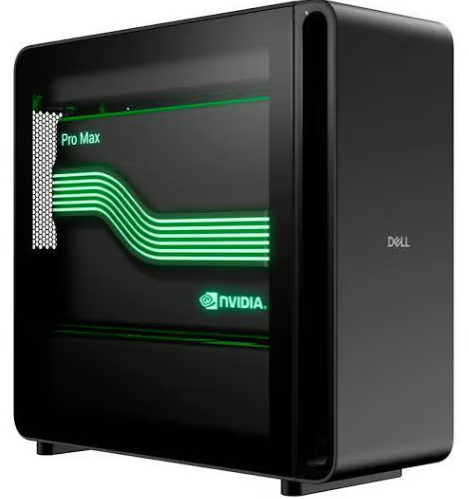
The Dell Pro Precision with GB300 is built for enterprises running the largest and most demanding agentic AI workloads locally. Powered by the NVIDIA GB300 Grace Blackwell Ultra Desktop Superchip, it supports frontier-scale inference for models with up to 1 trillion parameters. That makes it a fit for organizations running complex multi-agent pipelines, larger models, and higher levels of agent concurrency without sending sensitive workloads to the cloud.
Within Dell Deskside Agentic AI, the GB300 sits above the GB10 and Pro Precision platforms for the most compute-intensive local deployments, providing a path for enterprise teams that need to move beyond individual prototyping and workhorse-class models.
| Pros | Cons |
| Supports models with up to 1 trillion parameters | High starting price |
| Built for large-scale, concurrent agent workloads | High power requirements |
| Large CPU and GPU memory capacity | More system than smaller teams or lighter workloads may need |
Pricing
ASUS Ascent GX10: Best for developers running OpenClaw locally
Rating: 4.2 out of 5
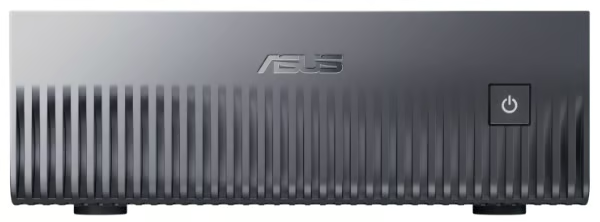
The ASUS Ascent GX10 is a strong option for developers running OpenClaw locally. The GX10 pairs NVIDIA GB10 compute with 128GB of unified LPDDR5X memory and a 4TB SSD in a compact Ubuntu system. It gives developers substantial local model capacity without moving to a full tower workstation.
Its combination of unified memory, AI-focused compute, and a compact footprint makes it well suited to local OpenClaw development and experimentation. The tradeoff is limited upgrade flexibility, since the system’s memory and integrated GPU are not replaceable.
| Pros | Cons |
| 128GB unified memory | Memory cannot be expanded |
| Strong fit for local OpenClaw development | Integrated GPU cannot be replaced |
| Compact footprint |
Pricing
Dell Pro Precision 9 T2: Best economics for sustained agentic AI
Rating: 4.2 out of 5
The Dell Pro Precision 9 T2 is the strongest economics-focused option in this comparison for teams running sustained agentic AI workloads locally. In a Dell-commissioned Signal65 analysis, the system delivered an 88% cost advantage compared with AWS Bedrock, with a 2.5-month payback period. The findings reflect the economics of persistent agent workloads, where ongoing cloud inference costs can accumulate over time.
The T2 also provides room to scale local workloads, with NVIDIA RTX PRO Blackwell GPU options, up to 512GB of ECC memory, and support for Windows 11 Pro for Workstations or Ubuntu 24.04 LTS. Its combination of professional GPU capacity and workstation expandability makes it a practical option for organizations that want to bring sustained agent workloads on premises while maintaining flexibility as demand grows.
| Pros | Cons |
| Strong economics for sustained local AI workloads | Base configuration does not reflect maximum AI capability |
| Up to NVIDIA RTX PRO 6000 Blackwell graphics | High-end configurations can become expensive |
| Up to 512GB ECC memory | Less expansion headroom than larger tower systems |
Pricing
HP Z8 Fury G6i: Best Windows workstation for local and agentic AI workloads
Rating: 4.2 out of 5
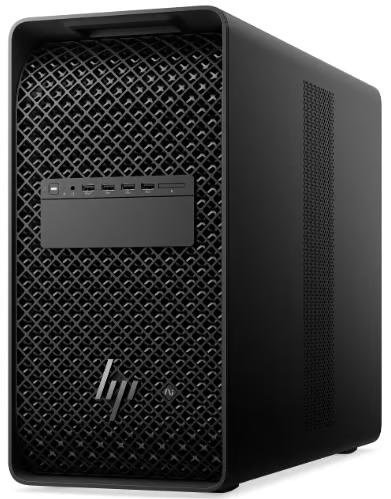
The HP Z8 Fury G6i is the strongest Windows-focused option in this comparison for teams running several demanding local AI workloads on one system. Its multi-GPU architecture, 2TB ECC memory ceiling, and remote management options suit shared environments where separate models, services, or users need substantial local resources.
| Pros | Cons |
| Multi-GPU architecture | Large physical footprint |
| 2TB ECC memory ceiling | High-end builds need substantial power |
| Remote management options |
Pricing
Dell Pro Precision with GB10: Best for compact local agentic AI deployments
Rating: 4.1 out of 5
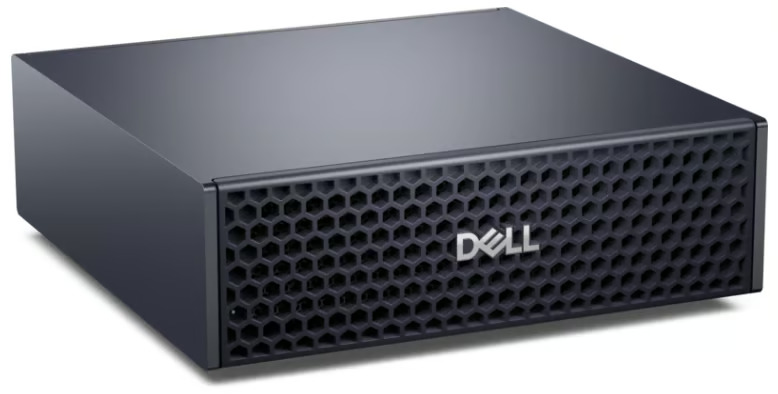
The Dell Pro Precision with GB10 is the strongest compact option in this comparison for teams developing and deploying local agentic AI. It is built around NVIDIA GB10 compute, 128GB of unified LPDDR5X memory, DGX OS 7, and a 4TB SSD. Its NVIDIA software environment supports local agent development and small workgroups, though fixed memory and limited internal expansion constrain future hardware growth. What distinguishes the Dell system is its place within Dell Deskside Agentic AI, which pairs the GB10 platform with support for local agent deployments using tools such as NemoClaw, OpenClaw, and OpenShell.
| Pros | Cons |
| 128GB unified memory | Fixed memory |
| DGX OS 7 | Higher price than comparable compact systems |
| Strong local agentic AI software support |
Pricing
Starts at $8,224.39 with 128GB LPDDR5X memory and a 4TB SSD.
BOXX APEXX T4 PRO-X: Best for teams that need multi-GPU expansion
Rating: 3.7 out of 5
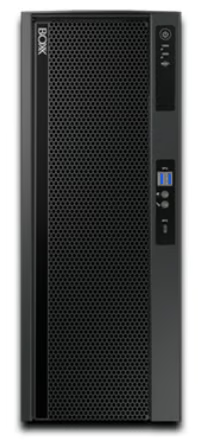
Built for parallel GPU-heavy workloads, the APEXX T4 PRO-X supports dual full-power NVIDIA RTX PRO 6000 Blackwell GPUs or four Max-Q versions, 128 PCIe Gen5 lanes, and up to 2TB of ECC memory. IPMI and dual 10GbE suit centrally managed labs and engineering environments, while top-end configurations require 208-240V power. Those capabilities suit teams that can use the added GPU density and infrastructure features enough to justify its higher cost.
| Pros | Cons |
| Multiple professional GPUs | Highest starting price |
| 2TB ECC memory | High-end builds need 208-240V power |
| IPMI and dual 10GbE |
Pricing
Starts at $21,869 with NVIDIA RTX PRO 2000 Blackwell graphics, 128GB ECC RAM, and a 1TB SSD. NVIDIA RTX PRO 6000 configurations cost more.
Lenovo ThinkStation P4: Best lower-cost tower for professional local AI
Rating: 3.5 out of 5
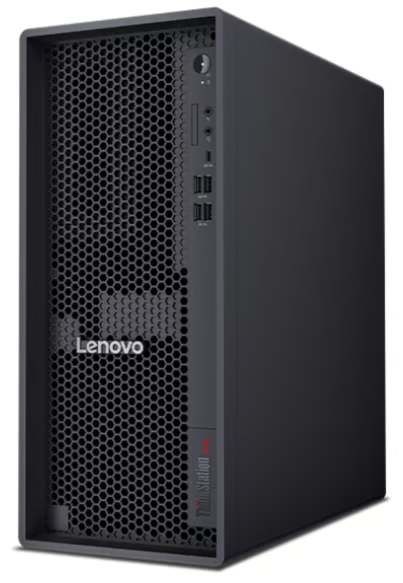
Lenovo’s ThinkStation P4 is the lowest-cost entry point in this group, but it can still scale to an NVIDIA RTX PRO 6000 Blackwell GPU with 96GB of VRAM, up to 256GB of system memory, and 48TB of storage. Windows 11 Pro, Ubuntu, and RHEL support also give teams flexibility around local inference tools and deployment environments. Its single-GPU focus makes it a better fit for professional local AI and gradual upgrades than for dense multi-GPU workloads.
| Pros | Cons |
| Low starting price | Single high-end GPU focus |
| 96GB professional GPU option | Base model is far below maximum AI capacity |
| Windows and Linux support |
Pricing
Starts at $1,849 for the configurable tower.
How the best agentic AI workstations were evaluated
All seven systems were scored using the same criteria, based on current official specifications, pricing, and software documentation.
- AI performance and model capacity (30%): Memory, compute, and concurrent-agent suitability
- Software compatibility (20%): OS support, inference backends, containers, and local agent frameworks
- Enterprise security and manageability (15%): Security controls, administration, and support
- Expandability (15%): GPU, memory, storage, PCIe, and networking
- Value for money (10%): Pricing against usable AI capacity and business features
- Power, cooling, and setup (10%): Electrical needs, thermals, footprint, and deployment complexity
How to choose a workstation for agentic AI
The right specs for agentic AI depend on the models, context length, concurrency, and software stack the workstation needs to support. Organizations should size the system for the expected workload and leave room for growth rather than choosing hardware around model size alone.
RAM, GPU memory, and storage requirements for agentic AI
The amount of RAM, GPU memory, and storage needed for agentic AI depends mainly on model size, context length, and how many agents or users run at once. Memory needs rise quickly when models use longer context windows or several agents are active at once. A smaller local model may fit comfortably on a mainstream GPU, while heavier workflows need room for both model weights and the working memory used during inference.
Dedicated VRAM serves the GPU, unified memory is shared by the CPU and GPU, and system RAM supports the operating system and other processes. The following are recommended purchasing ranges, not minimum requirements. Check the selected model’s requirements before buying.
- Smaller models and experimentation: Consider 16GB to 24GB GPU memory, 32GB to 64GB RAM, and about 1TB SSD storage for smaller local models and light single-user use.
- Professional local workflows: Consider 48GB to 96GB GPU memory, 64GB to 128GB RAM, and about 2TB SSD storage, adjusting for model size, quantization, and concurrency.
- Larger multi-agent workloads: Consider 96GB dedicated VRAM with 128GB to 256GB RAM, or a 128GB unified-memory system. Budget 2TB to 4TB SSD storage and test the expected simultaneous workload.
RAM and storage figures are planning allowances for supporting software, model files, and local data. On unified-memory systems, the shared pool already includes system RAM.
Confirm software compatibility
Check that your operating system and inference backend support the intended model. For OpenClaw, account for the model’s quantization, context length, and simultaneous requests when sizing memory. For NemoClaw, verify the supported model profile, inference route, and security requirements.
Account for concurrency and expansion
Estimate how many agents or users will run at once and whether GPU memory, RAM, storage, and networking can grow with demand. Also check whether workloads can move beyond a single workstation as demand grows. For example, Dell Deskside Agentic AI uses OpenShell to keep architecture and operations consistent as workloads move from Pro Precision workstations to PowerEdge infrastructure through Dell AI Factory with NVIDIA.
Compare local and cloud costs
Factor in power, cooling, security, support, and management when comparing local hardware with expected cloud inference spending. Steady agent workloads can favor local infrastructure, while occasional use may still favor cloud APIs.
Frequently asked questions (FAQs)
Can OpenClaw run on a regular Windows PC?
Yes, if the chosen model, context length, inference backend, and expected concurrency fit the available memory. Smaller quantized models and light single-user use do not automatically need workstation hardware.
Is a workstation better than a regular PC for agentic AI?
A workstation is not always necessary for agentic AI; a regular PC can handle lighter local workloads when the model and concurrency fit the available memory and compute. A workstation becomes more useful for larger models, sustained GPU use, concurrent agents, ECC memory, remote management, or multi-GPU expansion.
Is unified memory or dedicated GPU memory better for local AI?
Unified memory favors workloads that benefit from one large shared pool. Dedicated VRAM suits expandable systems where higher-power or multiple GPUs are the priority.
The best agentic AI workstation is one you can grow into
The seven systems span a range of buying paths, from compact NVIDIA GB10 systems for contained local deployments to professional workstations and frontier-scale systems designed for heavier models and more simultaneous work. Paying for maximum capacity only makes sense when the workload is likely to use it; otherwise, a smaller local AI system can be the smarter investment.
Explore Dell Deskside Agentic AI to see additional workstations and deskside options for running agentic AI locally.