


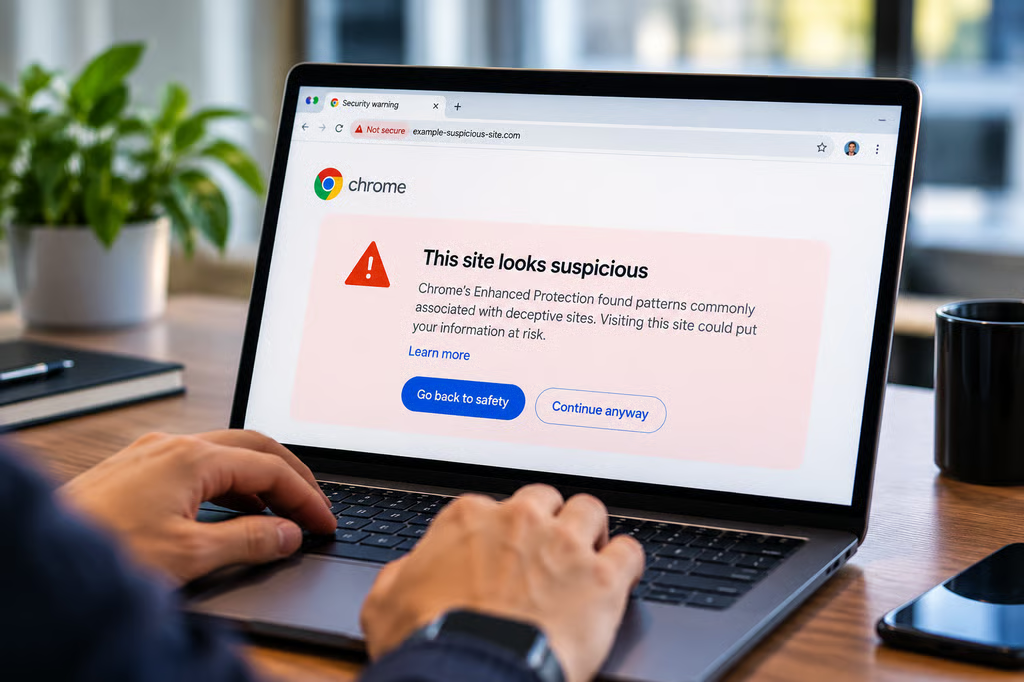
Chrome is introducing two new security features designed to catch online scams before users fall for them: a lower-severity warning for suspicious websites and a detector for malicious commands copied from scam pages.
Google announced the changes on Oct. 20 as part of its Safe Browsing Enhanced Protection mode. The features use AI-assisted analysis to identify deceptive websites and ClickFix attacks, but Google has not confirmed that they will also become available to users relying on Chrome’s default Standard Protection.
Chrome now distinguishes suspicious and dangerous websites
Chrome’s new warning system separates potentially deceptive pages into two categories.
- Suspicious sites: Pages exhibiting patterns associated with malicious websites, but where Google’s assessment carries lower confidence.
- Dangerous sites: Websites identified with high confidence as malicious, presenting a substantial risk to users.
The suspicious-site warning uses different text, colors, and icons to communicate the lower-confidence assessment. Dangerous sites continue to trigger Chrome’s familiar full-page red warning.
According to Google’s security announcement, the distinction allows Chrome to warn users about more potentially harmful pages without treating every suspicious website as a confirmed threat.
The new detection system also changes how Google uses Gemini.
Previously, supported devices used an on-device Gemini Nano model to help identify tech-support scams. Google has now moved that analysis to a more powerful server-side Gemini model for Enhanced Protection users.
The model examines website content, including the brand being represented, the page’s apparent purpose, and its likelihood of being a scam.
Safe Browsing combines that assessment with domain reputation and other signals before deciding whether to display a warning.
Google says page text is submitted for server-side analysis only when the website already exhibits strong scam indicators. The company also says submitted content is processed temporarily and is not retained or used to train its AI models.
The change builds on Google’s existing Chrome security protections, which address other threats such as stolen browser sessions and account hijacking.
New ClickFix detection targets malicious copied commands
Chrome’s second new defense targets ClickFix, a social-engineering technique that persuades users to copy malicious commands from a webpage and execute them on their computers.
Attackers commonly disguise these instructions as browser repairs, software updates, or verification steps.
Instead of downloading malware through Chrome, the victim runs a command through a system tool such as PowerShell or Command Prompt.
That approach can bypass protections designed to inspect browser downloads.
TechRepublic previously reported on ClickFix attacks that trick users into launching malware by following fake troubleshooting instructions.
Google’s new detection system examines potentially malicious commands copied from suspicious webpages.
When Chrome detects a possible ClickFix command, Google says it removes personally identifiable information from the clipboard content before sending the command to Safe Browsing for analysis.
If the service determines that the command is dangerous, Chrome displays a warning.
The system is designed to minimize unnecessary alerts during legitimate developer work, although Google has not published independent detection-rate or false-positive figures.
Similar attacks have previously used fake CAPTCHA verification pages to persuade Windows users to execute PowerShell commands that install information-stealing malware.
Chrome’s new protection targets the copying stage, before the user executes the command outside the browser.
How to enable Chrome Enhanced Protection
Google identifies Enhanced Protection as the required mode for both newly announced features.
To check the setting in Chrome:
- Open Chrome and select Settings.
- Choose Privacy and security.
- Select Security.
- Under Safe Browsing, choose Enhanced protection.
Standard Protection remains Chrome’s default mode and already includes real-time checks against known dangerous websites.
However, Google’s announcement does not confirm that Standard Protection users receive the new suspicious-site warnings or ClickFix command detection.
Google reported that more than 1 billion Chrome users had enabled Enhanced Protection by February 2025.
The company also claims Enhanced Protection users receive ten times the protection of Standard Protection users, based on a comparison of average safety-warning volumes. That figure is Google’s own measure, not an independently verified reduction in successful attacks.
What IT administrators should check
Organizations managing Chrome installations should confirm which protection mode their browsers use and whether security policies allow Enhanced Protection.
Google’s announcement does not identify specific Chrome version requirements, regional rollout dates, or new enterprise reporting controls for the features.
Administrators should therefore avoid assuming that every managed Chrome installation already has access to both protections.
The changes also reinforce an existing security-training concern: employees should never execute commands supplied by unexpected webpages, even when those pages claim to be fixing browser errors or completing verification.
Enhanced Protection provides an additional warning layer, but it cannot guarantee that every malicious command or deceptive website will be detected.
For now, Chrome users who want Google’s newly announced scam defenses should check that Enhanced Protection is enabled and continue treating unexpected instructions to run system commands as potential attacks.
Also read: Apple’s Terminal malware warning provides another defense against ClickFix-style scams by alerting Mac users before they paste potentially harmful commands.