
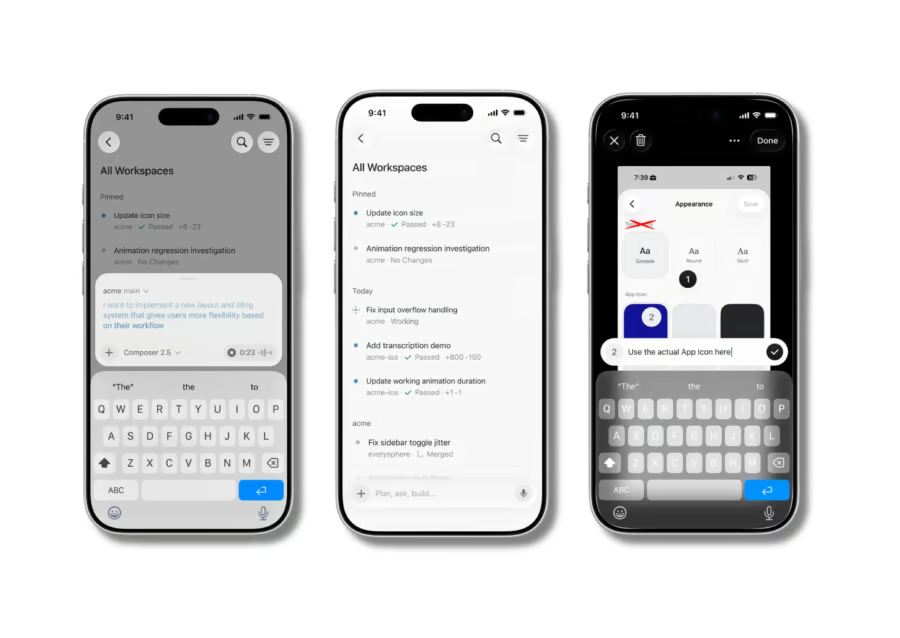


AI coding agents are moving from desktops to iPhones.
Cursor, the AI coding platform reportedly acquired by SpaceX, has launched a public beta of its first iPhone and iPad app, giving paid subscribers a way to start, monitor, and review AI coding agents from mobile devices. The app lets developers oversee cloud-based coding tasks without keeping a laptop open all day.
For developers and engineering teams, the release makes agent oversight less tied to a desk. Users can check progress, respond when an agent needs more direction, and review proposed changes before they are merged.
What Cursor’s iOS app can do
Cursor’s iOS app lets users launch coding agents, manage active engineering work, review screenshots and videos of changes, annotate images, inspect diffs, merge pull requests, and talk to agents through voice conversations, according to 9to5Mac.
The app is designed to support both cloud and local workflows. Cursor noted that its longer-term goal is to make moving between those environments feel seamless.
“Over time, the experience of running agents in the cloud will become indistinguishable from running them on your local machine,” the company said, quoted by 9to5Mac.
BigGo Finance reported that the public beta allows developers to deploy cloud-based virtual machines for autonomous coding tasks without keeping a local computer running. The app is free for paid Cursor subscribers, and Cursor is offering 75% off Composer 2.5 runs in the mobile app through July 5, 2026.
The app is available now on the App Store for iPhone and iPad. An Android version has not been announced.
Cursor co-founder Chris Browder described the app as a bridge between local and cloud-based agent work. “Until then, we want to make it easy to work with agents across both environments,” Browder said, as cited by BigGo Finance.
More must-read AI coverage
- SS&C Intralinks DealCentre AI vs. Datasite: Which platform is built for the future of dealmaking?
- SS&C Intralinks FundCentre AI vs. Juniper Square: Which platform better supports modern private markets fund managers?
- Why Data, Not Models, Determines AI Success
- The Rise of the AI-Native Factory: How Physical AI Is Transforming Manufacturing
How Cursor’s iPhone app changes developer workflow
For developers using AI coding agents, the pain point is often not starting a task but staying close enough to guide it.
A laptop may need to stay awake while the agent works, and someone still has to check progress, respond to errors, or review proposed changes before anything gets merged.
Cursor’s iPhone app moves that oversight to mobile. Developers can get push notifications when an agent finishes a task, needs feedback, or has work ready for review, while Live Activities can show progress from the iPhone lock screen.
According to The Mac Observer, Cursor’s agents run in isolated virtual environments and can continue working without the app staying open. Users can select a repository, provide instructions via text or voice, and review the results when the agent finishes.
The app also includes remote control features for developers who still want agents running on their own machines. A user can leave a desktop session active, step away from the computer, and continue guiding the work from an iPhone.
Cursor plans more flexible AI chats and integrations
Cursor said it is working on chats that do not require full codebase context, making it easier to start tasks not tied to a specific repository. The company is also expanding Model Context Protocol integrations, including workflows that can query Datadog logs or summarize Slack activity.
For now, the iOS release gives paid Cursor subscribers a way to test whether AI coding agents can fit into smaller moments of the workday, from reviewing pull requests on the go to sending visual feedback from a screenshot.
The bigger question is how much software work can move away from a traditional desk setup.
Cursor’s mobile app does not remove the need for human review, testing, or judgment, but it does make AI coding agents easier to supervise outside the desktop environment.
Learn more about OpenAI’s Codex desktop app for Windows and how it brings AI coding agents to PC developers.