


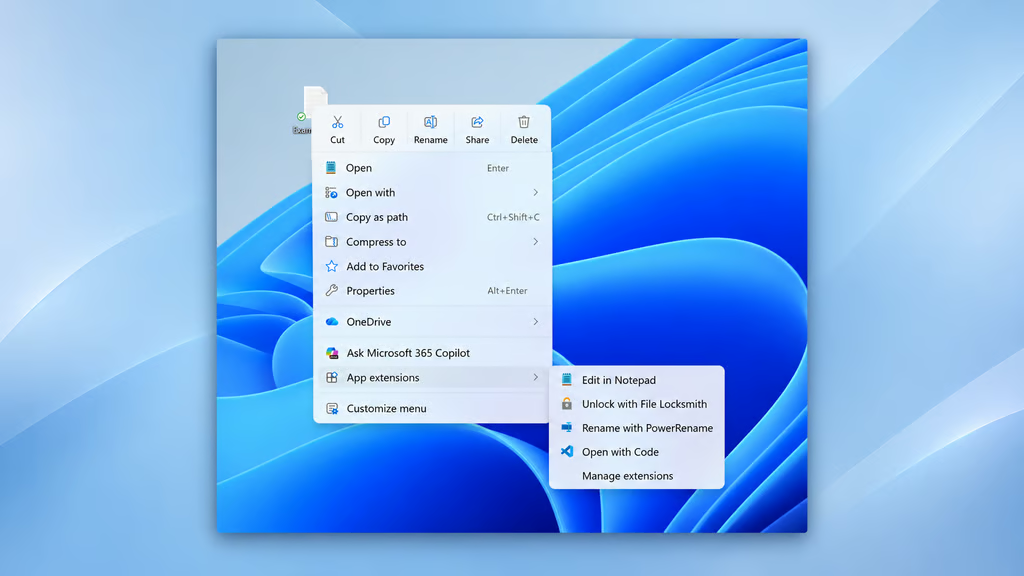
Windows 11’s right-click menu has frustrated users with hidden commands and unfamiliar icons. Microsoft is now giving them more control over how it works.
The optional KB5127936 update, released October 28, 2026, introduces built-in customization for File Explorer’s right-click menu on Windows 11 versions 25H2 and 26H2. Users can rearrange commands, manage third-party app extensions, and replace action icons with text labels. The feature is rolling out gradually, so not every eligible PC will display the settings immediately.
The controls offer a simpler way to organize everyday file actions without registry workarounds. They follow other interface improvements, including a Windows Search redesign focused on local results and reducing clutter.
Customize commands and menu layout
Microsoft acknowledged in an August 2026 File Explorer announcement that application extensions had contributed to slower, increasingly cluttered context menus. The redesign aims to make frequently used commands easier to access.
According to the October 28 release notes, users can right-click a file or folder in File Explorer and select “Customize menu.” This opens the Context menu page under Settings > Personalization.
The available controls include:
- File actions: Turn built-in commands such as Send to and Create shortcut on or off, or add Print.
- App extensions: Choose whether supported third-party application commands appear in the main menu or a submenu. Users can also hide the extensions submenu.
- Command layout: Replace the horizontal row of Cut, Copy, Paste, Rename, Delete and Share icons with text entries. Properties can also be moved to the bottom of the menu.
The vertical list resembles Windows 10’s context menu but does not fully restore the older interface. Users can also enable the legacy “Show more options” entry to access additional commands.
Independent hands-on testing by Windows Latest identified further controls for Copy as path and image rotation. Available commands may differ depending on the selected file type and installed applications.
Which Windows 11 versions get the new controls?
KB5127936 is an optional, non-security preview for Windows 11 25H2 (build 26200.9818) and 26H2 (build 26300.9818). Eligible users can check for it under Settings > Windows Update > Advanced options > Optional updates.
Microsoft is introducing the feature in phases. Even after installing the preview, some users may need to wait for the customization option to become available.
Windows 11 version 24H2 is excluded from this preview. Its Home and Pro editions reached end of support on October 13, while Enterprise and Education editions remain eligible for security updates until October 2027. None receive further non-security preview updates.
The new settings do not permanently restore Windows 10’s classic context menu. Users can still access additional commands by holding Shift while right-clicking, without changing their default menu configuration.
For organizations, Microsoft’s release notes do not specify whether administrators can enforce the new layouts through Intune or Group Policy. IT teams should verify management options before standardizing configurations. Separately, organizations reviewing Windows configurations can consult the Windows 11 Security Cheat Sheet for guidance on BitLocker, passkeys and Microsoft Defender.
For users frustrated by Windows 11’s original context menu, the update offers a more straightforward way to restore familiar commands and reduce clutter. Access will expand as Microsoft continues its phased rollout.
Read more: Microsoft is also working to improve Windows 11 performance on PCs with 8GB of RAM, part of its wider effort to make everyday computing more responsive.