


AI is now almost synonymous with automation, with businesses viewing it as a powerful way to streamline processes and improve efficiency. In accounting, the profession has seen notable gains as AI automates routine tasks, reduces errors, and speeds up reporting cycles. These changes are reshaping the way accountants work while also transforming how businesses use accounting insights to drive smarter decisions.
In this article, I’ll show you a closer look at how AI is revolutionizing the accounting landscape and the trajectory it sets for the future of business accounting.
Key takeaways:
- Firms are upping tech spend and prioritizing AI automation; 64% plan AI investments, 45% automation, and 46% of accountants use AI daily — nearly double small businesses.
- OCR + ML extract invoice data, automated matching validates against POs/contracts, and intelligent workflows route approvers, integrate to ERP, and prevent duplicates, freeing teams for higher-value work.
- ML replaces manual matching, flags unusual items in real time, and adds real-time cash visibility, funds-in-transit tracking, and predictive cash-flow analysis.
- Continuous reconciliation and automated workflows shorten close cycles; AI also generates variance explanations, executive-ready narratives, and consolidations across entities/currencies.
- Organizations are exploring committee-based AI governance and new leadership roles (e.g., Chief AI Officer), while addressing data privacy, retention, and liability concerns as AI use expands.
The state of AI in accounting
The 2025 Intuit QuickBooks Accountant Technology Report highlights just how quickly AI is becoming part of everyday accounting. On average, firms spent about $19,000 on technology last year and plan to raise that to $20,000 in the year ahead.
A big chunk of that is going toward smarter tools, with
- 64% of firms saying they’ll invest in AI
- 45% in automation
- 40% in marketing apps and software
Moreover, nine out of 10 accountants already use AI to support strategic advisory services, whether that’s offering suggestions to strengthen client relationships, pulling together financial summaries, or sharing real-time insights in meetings. Many firms are also going a step further, with 82% building or planning to build their own custom AI systems to better fit their needs.
The shift toward AI and automation is gaining momentum each year. Back in 2023, less than half of firms were planning to invest in AI. Now it’s nearly two-thirds. Automation has become almost universal, with 95% of firms using it to handle tasks like payroll, accounts payable and receivable, and transaction processing.
What stands out most is how often accountants are leaning on AI. Intuit also reports that 46% of accountants say they use it daily, almost double the rate among small businesses. This growing adoption shows how accountants are putting technology to work not just to crunch numbers, but to deliver more valuable guidance to their clients.
Core uses of AI in accounting
AI is transforming accounting by automating invoices, reconciliations, and month-end close while strengthening compliance and forecasting. Intelligent systems handle data capture, approvals, and anomaly detection, which gives finance leaders real-time visibility into cash, controls, and performance.
With faster processes, predictive insights, and continuous monitoring, teams can shift from manual work to strategic guidance, improving accuracy, efficiency, and decision-making across the business.
Accounts payable and expense automation
AI-powered accounts payable automation starts with advanced Optical Character Recognition (OCR) and machine learning. Systems can read and extract data from any invoice format without relying on templates, while natural language processing (NLP) interprets the text to understand context. Automated matching then validates invoices against purchase orders and contracts in real time, removing much of the manual effort that used to slow the process down.
The impact goes beyond faster data capture. Intelligent workflows do the following:
- Route invoices to the right approvers
- Integrate instantly with ERP systems
- Prevent duplicate payments
Some platforms even use AI agents to handle approvals, flag anomalies, and optimize processes on their own. In fact, Intuit’s Accounting Agent automatically categorizes transactions, reconciles books, and detects anomalies with 95% accuracy, while the Payments Agent predicts late payments with 78% accuracy and automates reminder sequences.
On top of this, custom approval workflows can be set up through QuickBooks Bill Pay, allowing you to define who can create, approve, and pay bills. This shift frees up your finance team from repetitive tasks so that it can focus more on strategic work and delivering value to the business.
Bank reconciliations and cash management
AI has redefined bank reconciliation by replacing manual, error-prone matching with intelligent automation that delivers instant cash visibility. Machine learning algorithms quickly align transactions between bank statements and records, adjusting for timing differences and inconsistent descriptions. These systems continuously learn from historical data and flag unusual items in real time to reduce both errors and fraud risks.
QuickBooks Online’s Plus and Advanced plans even extend this capability further with AI-powered reconciliation that can automatically import bank statements and compare them to QuickBooks transactions. Key features include the following:
- Automated bank statement extraction with AI assistance
- Real-time detection of reconciliation issues with explanations
- Improved layout showing statements and QuickBooks transactions in the same view
On the cash management side, AI extends beyond reconciliation into broader liquidity control. Key capabilities include the following:
- Real-time monitoring of cash across multiple accounts and currencies
- Funds-in-transit tracking for immediate visibility into payment status
- Predictive cash flow analysis that incorporates patterns, behaviors, and external factors
In fact, QuickBooks Online’s Plus and Advanced also include a Cash Flow Planner that enhances visibility and control. It delivers real-time monitoring across connected bank accounts, provides 90-day cash flow forecasts based on historical data, and uses predictive analysis to model different income and expense scenarios. It even offers interactive tools for scenario planning without affecting actual records, giving your finance leaders the flexibility to test strategies before making decisions.
Month-end close and reporting acceleration
AI is changing the month-end close from a stressful, manual scramble into a smoother, ongoing process. Continuous reconciliation and automated categorization keep books updated daily, while smart workflows assign tasks and track completion, trigger next steps automatically based on general ledger events, and reduce bottlenecks and manual errors. In QuickBooks, these improvements show up through the following:
- AI agents that continuously categorize transactions and maintain updated books
- Month-end review in QuickBooks Online Accountant, which automatically identifies incomplete transactions and unreconciled accounts
- Progress tracking tools that help teams manage closing tasks efficiently
The payoff shows up in both time savings and productivity. Firms using AI-driven close tools shorten their close cycles and free up more capacity for higher-value work, shifting finance teams away from chasing entries and toward delivering insights.
On the reporting side, QuickBooks further accelerates the process with:
- AI-powered narrative generation that explains budget vs. actual variances in plain English
- Finance Agent capabilities that analyze financial data and issue alerts for deviations
- Customizable QuickBooks reporting that consolidates real-time data across entities and currencies without manual exports
Audit trail, controls, and compliance support
AI is strengthening audit and compliance by replacing manual, reactive processes with continuous monitoring and automated evidence collection. Modern audit trail systems can
- Capture every interaction with tamper-proof records, complete with timestamps and user IDs
- Automatically classify and organize compliance documents
- Adjust to policy or configuration changes without manual updates
QuickBooks Online adds to this with a comprehensive audit trail that maintains a detailed audit log. It captures every transaction change with timestamps and user IDs, records all account activity, including sign-ins and settings changes, and tracks customer, supplier, and employee modifications. For compliance purposes, it also retains two years of event history.
Control testing is also shifting from periodic checks to ongoing oversight. With AI-driven Continuous Control Monitoring, organizations can
- Validate controls automatically instead of relying on manual testing
- Receive real-time alerts when failures or risky changes occur
- Reduce the overall time spent on compliance checks
In QuickBooks, control testing and monitoring are reinforced through user roles and access controls that allow customized permissions for different team members. Anomaly detection features flag unusual transactions based on historical patterns, while real-time monitoring through bank feeds keeps suspicious activities under review.
Fraud detection is another area where AI makes a difference. Machine learning models
- Analyze transaction patterns, user behavior, and system activity to flag anomalies
- Detect suspicious activity faster and with greater accuracy than manual processes
- Use predictive risk assessment to spot vulnerabilities before they turn into violations
QuickBooks strengthens this with fraud prevention tools, such as the following:
- Transaction pattern analysis through customizable reports
- Exception reporting for duplicate payments and unusual expenses
- Real-time visibility into bank balances and transaction details
- Automated alerts for unusual account activity
Forecasting and financial planning assistance
AI is turning financial forecasting into a dynamic, predictive process that adapts continuously to shifting business conditions. Instead of relying on periodic, backward-looking reports, machine learning engines now build models from both historical patterns and real-time data. In QuickBooks Online, these capabilities show up in dynamic forecasting tools.
- Cash flow forecast reports that incorporate historical patterns and real-time data
- Scenario modeling through the cash flow planner
- Integration with external indicators and seasonal patterns for more accurate projections
Tools such as scenario modeling and optimization generate forecasts under multiple assumptions, while NLP interfaces let finance teams ask questions in plain language and get instant narrative insights with visual support. QuickBooks enhances this with intelligent analysis features, including
- Conversational AI through Intuit Assist, which provides instant insights in plain language
- Predictive analytics for payment patterns and cash flow optimization
- Visual dashboards with charts and graphs for better decision-making
The business impact is clear. AI-powered forecasting improves accuracy by factoring in external indicators, seasonal patterns, and operational data that spreadsheets often miss. Real-time updates keep forecasts current as conditions evolve, enabling faster and better decisions.
Intelligent analysis tools further enhance this process by doing the following:
- Explaining forecast variances in plain language
- Flagging anomalies that point to risks or opportunities
- Providing conversational AI partners that deliver insights and supporting charts on demand
By combining prediction, automation, and intelligent analysis, AI shifts forecasting from a static reporting exercise into a strategic tool for growth, risk management, and long-term planning.
More about Accounting
- What Is Accounting? Definition, Types, Importance and Examples
- Best Accounting Software and Services
- Verito vs. Rightworks: Which IT Provider Is Best for Your Firm?
- Top Free Accounting Software
- Accounting Glossary
Organizational and professional impact of AI
Research from OpenAI, OpenResearch, and University of Pennsylvania shows that accountants, auditors, and tax preparers are fully exposed to AI. While this might sound like AI is replacing CPAs, the study defines “exposure” as the extent to which GPTs can reduce the time needed to complete tasks. In other words, AI is designed to make accountants’ work easier by offloading repetitive tasks.
In the sections below, I’ll break down how AI is reshaping the accountant’s role and transforming an organization’s accounting systems.
Redefining the accountant’s role
The accounting profession is undergoing a fundamental transformation, moving away from transactional processing and compliance work toward high-value activities like analysis, planning, and strategic consulting. Accountants are no longer seen as number crunchers but as strategic partners and advisors who deliver real-time insights, predictive analytics, and forward-looking guidance that directly influence business decisions.
This evolution is driven by AI’s ability to automate routine tasks such as data entry, reconciliation, and basic reporting. As technology handles the repetitive work, clients now expect more real-time insights, strategic guidance, and advisory support. Firms that fail to adapt risk being left behind as traditional services become commoditized and less valuable in a competitive market.
To enable this shift, organizations must equip accountants with new skills and capabilities. Key areas include the following:
- Developing AI literacy and learning how to critically assess AI-generated outputs
- Building data analytics and visualization expertise for forecasting and risk assessment
- Strengthening business acumen, consultative approaches, and communication skills to turn technical insights into actionable strategy for leaders
Integrating AI into systems
AI systems integration means connecting new AI tools with existing ERP and accounting platforms without disrupting day-to-day operations. This often involves
- Choosing between cloud-based or on-premise AI solutions
- Addressing data compatibility and normalization challenges
- Building middleware and API connections for smooth system communication
Many organizations adopt hybrid models like migrating some functions to AI-powered platforms while keeping legacy systems that still handle essential operations. To make this work, integration requires careful data preparation, system audits, and phased rollouts that focus on compatibility, security, and real-time synchronization.
Integration is challenging because legacy systems often run on proprietary formats that don’t align easily with modern AI platforms. These systems power critical functions like inventory management, compliance reporting, or billing, which makes replacing them outright too risky.
At the same time, regulatory requirements mean audit trails must cover both old and new systems, and AI effectiveness depends on continuous, real-time data access. The result is a delicate balance between upgrading to smarter tools and preserving stability in mission-critical areas.
To execute integration successfully, organizations need to start with a full audit of existing systems to map data formats, integration points, and custom logic. From there, a phased approach works best.
- Pilot projects in high-ROI areas like accounts payable or bank reconciliation reduce risks while building experience
- Middleware platforms and API wrappers bridge legacy systems with AI tools without forcing immediate replacement
- Partnerships with AI specialists ensure best practices are followed, whereas phased rollouts spread costs and minimize disruption
This step-by-step approach makes it possible to modernize gradually, leveraging AI’s benefits without jeopardizing core business operations.
Considering cost implications
AI implementation brings a range of costs that depend on the complexity of the project.
- Smaller initiatives typically involve basic tools such as chatbots, simple OCR for invoice processing, and rule-based automation.
- Mid-scale efforts expand into predictive analytics, fraud detection, and financial forecasting, which require more advanced platforms, data infrastructure, and integration.
- At the enterprise level, organizations invest in autonomous workflows, real-time analytics, and AI-powered audit systems, supported by high-performance computing, compliance measures, and large-scale change management.
These costs are substantial because AI demands more than just software licenses. The systems must process massive volumes of financial data securely, requiring robust infrastructure whether cloud-based or on-premise.
Organizations also face skill gaps that call for significant training and upskilling, or the hiring of specialized talent. They must also account for additional challenges, such as:
- Cleaning and normalizing data before it can be used effectively
- Resolving compatibility issues with legacy systems
- Building custom solutions to bridge integration gaps
To manage these demands, organizations typically prioritize the following:
- Developing secure and scalable infrastructure
- Investing in training programs and hiring AI-skilled professionals
- Establishing continuous optimization and maintenance processes
- Embedding compliance and governance into every stage of deployment
Labor impact
Many in the accounting profession worry that AI will take their jobs, and that’s a normal and valid concern. AI is here to disrupt, but disruption doesn’t always mean sudden replacement. What’s actually happening is a slower, more managed shift — where routine work is automated, roles are redesigned, and new opportunities open up in advisory and analytics.
- Layoffs and redeployment: Firms are not broadly cutting jobs but are automating tasks like bookkeeping, payroll, and basic reconciliations. This reduces demand for clerical roles while redeploying staff into exception handling, analytics, and client-facing advisory. Employers often rely on hiring freezes or natural attrition in routine roles, while using outsourcing selectively to manage workloads.
- Upskilling and training: Organizations are prioritizing AI literacy, data analytics, and judgment-oriented skills. Accountants who can supervise models, validate outputs, and translate insights into strategy are becoming more valuable. Training programs combine hands-on tool use, data storytelling, and professional development, offered through certificates, CPD pathways, or on-demand learning. This equips staff to shift into advisory, forecasting, and oversight roles rather than risk displacement.
- Hiring expectations and labor costs: Firms are tilting hiring toward AI-literate profiles such as data-savvy accountants, FP&A analysts, and governance specialists, while demand for manual processing roles declines. Job descriptions now emphasize skills like data quality stewardship and AI model oversight. Although training and specialist hires increase costs in the short term, automation reduces reliance on overtime, temp staff, and repetitive headcount. Efficiency gains allow leaders to reinvest savings into building long-term capabilities.
KPI measurement of AI impact
The only real way to know if AI is making a difference in your accounting operations is by measuring it. While there are many ways to track impact, the focus should always be on the areas where AI touches your business most. By tying performance to clear KPIs, you’ll see whether AI is driving real efficiency, accuracy, and value.
To give you an idea, here are some examples of KPIs that can measure AI impact.
| Activity | Activity driver | AI impact | KPI on AI impact |
|---|---|---|---|
| Reviewing and approving invoices | Hours spent on invoice review and coding | OCR and GenAI to extract, validate, and code invoices |
|
| Auditing expenses | Hours spent in expense review and policy checks | OCR and GenAI policy checks and anomaly flags |
|
| Reconciling bank accounts | Hours spent matching bank and ledger records | Automated matching through machine learning and GenAI |
|
| Reviewing suspicious transactions | Hours spent in investigating transactions and documents | Anomaly detection with ML and GenAI |
|
| Forecasting cash flow | Hours spent in making forecasts | ML forecasting with GenAI narrative and scenario generation |
|
AI governance and leadership
AI is reshaping businesses of all sizes, reaching as far as the boardroom where hybrid governance models are beginning to take shape. In these setups, AI systems:
- Assist in board decision-making
- Actively participate in discussions or evaluations
- In some cases, hold experimental positions as algorithmic board members
This evolution creates new responsibilities for governance. Organizations now need clear AI policies and oversight structures to ensure ethical and fair use. A growing number of companies are turning to committee-based governance, where AI-literate board members and subject-matter experts form specialized committees. AI committees evaluate AI proposals in detail and create rulings and guidelines, then recommend those to the board of directors for approval and enforcement.
To strengthen oversight, tech-driven companies are also creating new leadership roles. Positions such as Chief AI Officer or AI Ethics Officer ensure that AI adoption does the following:
- Maximizes business opportunities and align with the speed at which AI technology develops and moves
- Aligns with responsible and ethical practices while ensuring that the business gets efficiency boosts and productivity gains
- Stays transparent and accountable across the organization
Safety and risk management
AI’s growing role in business also raises safety and privacy concerns. Many AI tools use customer data to train models, which creates risks if sensitive information is mishandled. To address this, some companies are looking into building their own AI systems, ensuring confidential data stays protected within their control.
Data retention and reuse are also major issues. When AI systems store or repurpose data, organizations must put safeguards in place to prevent unauthorized access or misuse. This is especially critical for tools used in safety monitoring, where personal and sensitive information is collected.
The integration of AI into safety management further introduces complex liability questions. For example, AI systems may
- Fail to identify a hazard
- Make incorrect predictions or answers
- Generate inaccurate recommendations
Liability could fall on AI developers, the implementing organization, safety professionals, or even a combination of all three, making clear accountability frameworks essential.
Sample workflow
I’ll show you a sample workflow that uses AI agents in automating and speeding up expense tracking. This is a generic flow, and you’ll need an automation platform like n8n to set up a workflow like it.
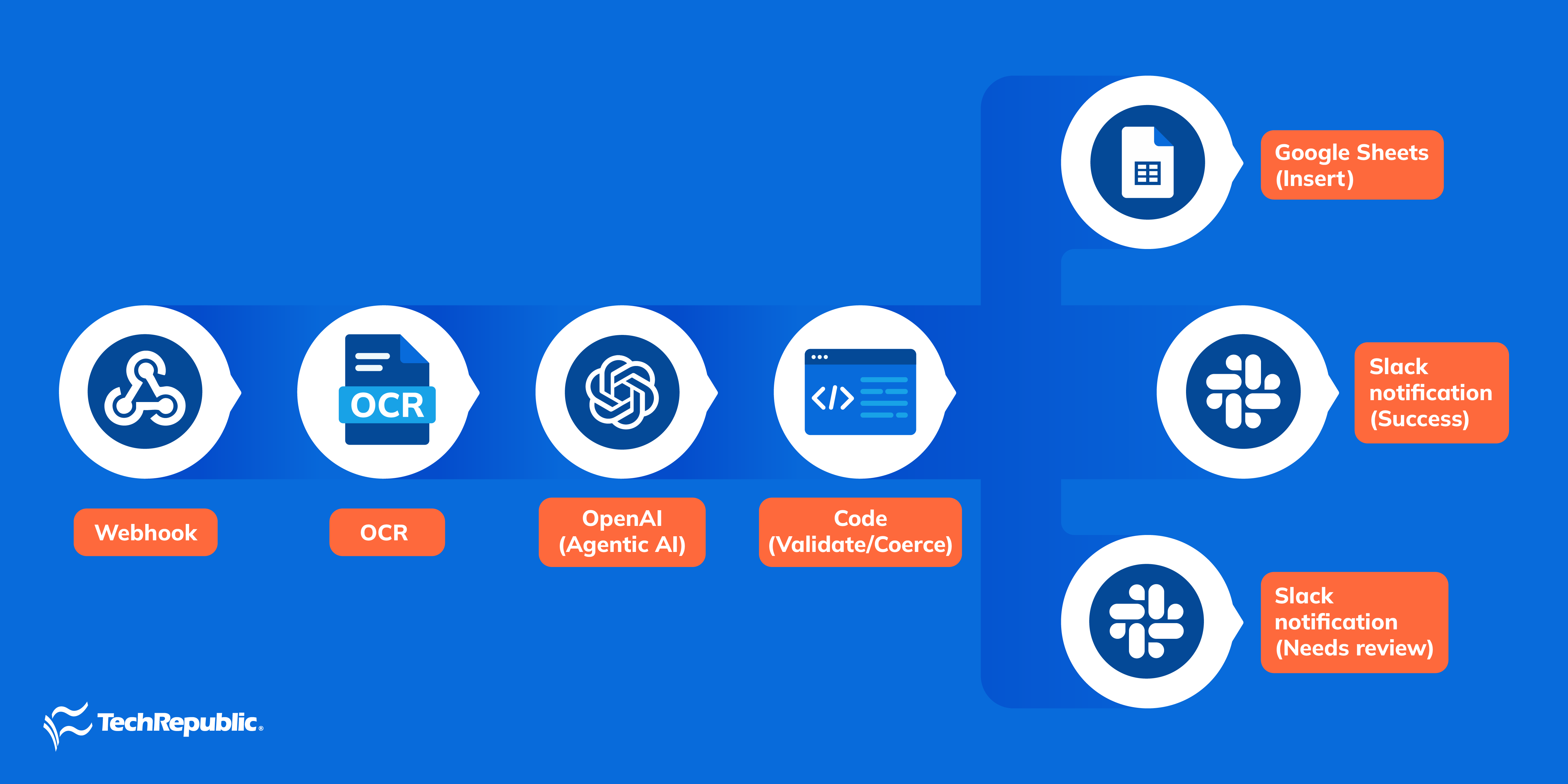
Setting up automated workflows costs you money. You’ll need to pay for API calls and monthly subscriptions. The more automation runs, the higher the costs for automation. But in my experience with OpenAI API, plus to put price into perspective, simple requests are around $0.01 to $0.05 per API call, while more complex requests can cost more depending on the number of tokens used.
Webhook
The webhook node is the entry point of the workflow. It listens for incoming data like a new receipt, invoice, or expense record, and kicks off the automation. You submit a receipt through a mobile app (e.g., Slack, WhatsApp, Telegram, and iMessage), and it sends the data to your n8n webhook URL. That instantly triggers the expense tracking flow.
OCR
The OCR node converts images or scanned PDFs or images into text. This is important when receipts come in as photos or attachments instead of structured text. You need to connect to tools like Tesseract OCR, Google Cloud Vision, or AWS Textract.
OpenAI (Agentic AI)
This is the intelligent extraction and categorization step. The AI reads the raw text (from email or OCR) and outputs structured data: date, merchant, amount, category, payment method, etc. It can also apply reasoning. For example, “Starbucks” gets auto-categorized as “Meals/Drinks.” If set up with function-calling tools, it becomes agentic AI by checking duplicates, normalizing merchant names, or flagging anomalies.
Code (Validate/Coerce)
This is the cleanup step. Sometimes AI outputs messy or inconsistent data (like “09/22/25” instead of “2025-09-22,” or “1245.60” as text instead of a number).
- Validate makes sure required fields (amount, date, merchant) exist.
- Coerce fixes formats and converts everything into a consistent structure (e.g., JSON).
Google sheets (Insert)
If the data passes checks, it’s logged into Google Sheets. This creates a permanent record of expenses that you can later analyze or export into accounting software.
Slack notification (Success)
When an expense is logged correctly, a success message goes to Slack, or to your messaging app of choice.
Slack notification (Needs Review)
If there’s a problem such as a duplicate expense, low confidence from AI, or missing fields, the workflow sends a Slack message asking for human review.
Frequently asked questions (FAQs)
How do accountants use AI?
Accountants use AI to automate data-heavy tasks like invoice processing, reconciliations, and expense coding. AI can extract and link evidence from documents, flag anomalies or potential fraud, speed up technical research, draft memos, and assist with tax or policy monitoring. It also supports internal controls and audit analytics by continuously testing control performance and transaction flows in near real time.
Will AI replace accounting jobs?
Yes, only if your responsibility is tied to repetitive and rules-based tasks, rather than the profession itself. Clerical work is declining, but roles are shifting toward advisory, risk management, and strategy. Human judgment, client context, ethics, and attest responsibilities remain essential. Firms are actively hiring for AI literacy, especially in data analysis, controls, and advisory skills, as transaction processing becomes increasingly automated.
What are the risks of AI in accounting?
Key risks include the following:
- Data privacy and security like sensitive financial data must be protected from breaches or misuse
- Algorithmic bias like skewed training data may distort estimates, scoring, or fraud detection
- Lack of explainability like “black box” outputs can create audit or compliance challenges
- Operational risks like misclassifications, hallucinations, or over-reliance without review can cause errors
- Governance gaps like poor vendor oversight, weak documentation, or inadequate monitoring can expose firms to liability and regulatory issues
How can AI improve financial reporting?
AI enhances reporting by automating data collection, validation, and consolidation across sources, which reduces errors and cycle times for month-end and quarter-end closes. It enables continuous control testing and anomaly detection across entire ledgers, surfacing issues earlier than periodic sampling. AI models also improve compliance by checking policies automatically, generating variance explanations, and identifying anomalies or potential misstatements at scale.