


AI-driven search is redefining product discovery. Instead of entering keywords, customers now use natural-language prompts such as “Which wireless headset supports Teams and Zoom, has 20+ hours of battery life, and costs under $300?” Search engines and AI assistants respond with curated product cards, comparison lists, and direct links.
For ecommerce and IT leaders, this shift requires more than SEO. It demands structured data governance, compliance controls, feed integrations, and monitoring of AI-generated recommendations. Done right, AI search optimization increases visibility, reduces manual merchandising work, and improves conversion rates.
This article provides a step-by-step optimization plan, optional technical checks for IT teams, and a 90-day rollout framework with ROI and governance guardrails.
Key takeaways:
- AI search optimization bridges buyer intent and product discovery by aligning natural language queries with structured catalog data.
- Structured schema, crawlability settings, and merchant feeds form the foundation of AI search visibility.
- Conversational queries, multimedia content, and personalization improve inclusion in AI-driven recommendations.
- Automation reduces manual SEO overhead, while governance and compliance safeguard accuracy and trust.
- Tangible business outcomes include higher conversions, reduced zero-result queries, and measurable ROI within 12 months.
- Step 1: Validate structured data on product pages
- Step 2: Review crawlability and implement llms.txt
- Step 3: Optimize for conversational queries
- Step 4: Keep content and metadata fresh
- Step 5: Strengthen external signals and governance
- Step 6: Join merchant feeds
- Step 7: Enhance with multimedia
- Implementation checklist and 90-day rollout
- ROI and cost considerations
- Privacy, compliance, and data handling in AI search optimization
- Fallbacks and handling hallucinations in AI search optimization
- Frequently asked questions (FAQs)
Step 1: Validate structured data on product pages
Structured data, also known as schema, is how AI systems recognize and correctly interpret your products. While customers see product names, prices, and availability on the page, search engines and AI assistants rely on schema markup embedded in the site code. The two essential schema types for ecommerce are Product and Offer. Without them, AI tools may misread your catalog or skip over your listings entirely.
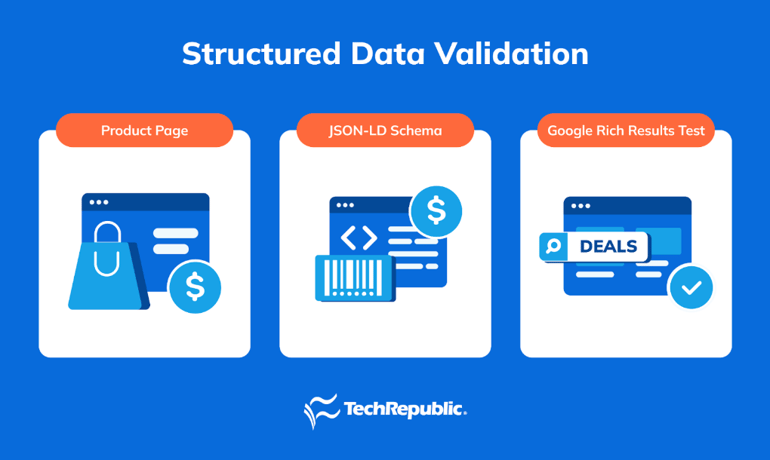
Accurate schema ensures your products display correctly in AI-generated results, reducing the risk of wrong prices, missing stock information, or incomplete details. This not only prevents errors but also strengthens the trustworthiness of your brand in AI-driven shopping environments.
Accurate schema ensures your products display correctly in AI-generated results, reducing the risk of wrong prices, missing stock information, or incomplete details. This not only prevents errors but also strengthens the trustworthiness of your brand in AI-driven shopping environments.
Here’s how to validate your structured product pages:
- Run a quick check from the command line to confirm schema blocks are present:
curl -s https://www.example.com/product-page | grep -i “application/ld+json”
- Copy the JSON-LD block into Google’s Rich Results Test and review the results.
- Confirm all core fields — product name, description, images, price and currency, stock status, ratings, and identifiers like SKU or GTIN — 1match what’s visible on the product page.
- Correct any inconsistencies, such as mismatched prices or missing attributes, through your ecommerce platform’s product editor or theme settings.
You can go further to strengthen accuracy by:
- Automating periodic schema validation through the Google Rich Results API.
- Keeping a simple change log to track edits and diagnose issues if AI assistants show stale data.
- Cross-checking schema values against your product feeds in Google or Microsoft Merchant Center to prevent conflicts.
Step 2: Review crawlability and implement llms.txt
For AI systems to index and recommend your products, their crawlers need to be able to reach your site. If catalog pages are blocked, AI tools will overlook them, no matter how complete the content is. At the same time, private areas, such as dashboards or carts, must remain restricted. Striking the right balance ensures AI search engines access the right information without exposing sensitive paths.
Correct crawl settings make your products discoverable to AI assistants and reduce errors in search-generated recommendations. Adding an llms.txt file to your site’s root directory provides a direct signal to AI crawlers about which pages matter most. This file serves as a guide, directing crawlers to high-value pages, including best sellers, categories, FAQs, shipping, and returns. When present, it reduces the risk of crawlers missing or undervaluing priority content.
Here’s how to review your site’s crawlability:
- Check your robots.txt file to confirm product and category pages are allowed, while private paths like /admin/ and /cart/ are disallowed.
- Make sure your sitemap is listed so crawlers can easily locate your full catalog.
- Avoid blocking reputable crawlers, such as Googlebot, Bingbot, OpenAI’s ChatGPT-User, and PerplexityBot.
- Add an llms.txt file with absolute links to your most important pages — for example:
https://www.example.com/best-sellers
https://www.example.com/laptops
https://www.example.com/shipping
https://www.example.com/returns
https://www.example.com/faq
This file doesn’t replace a sitemap, but it highlights priority URLs AI assistants should pay attention to.
- Test product pages with JavaScript disabled to confirm that key details like title, price, and schema load properly without requiring scripts.
You can go further by monitoring crawl logs to check which bots access your site and ensuring they aren’t blocked, using prerendering if product details don’t appear without JavaScript, and keeping crawl configuration changes under version control for quick rollbacks.
Step 3: Optimize for conversational queries
Buyers are increasingly phrasing their searches as full, context-rich questions instead of short keywords. Instead of typing “conference room headset,” a prospective customer might ask, “What enterprise-grade headset works with both Microsoft Teams and Zoom, supports noise cancellation, and costs under $300?” AI systems are built to parse these natural-language prompts and return curated recommendations that align with specific use cases. If your product pages don’t anticipate these kinds of detailed queries, AI tools may skip over your catalog in favor of competitors that do.
By optimizing for conversational questions, you equip AI assistants with the language they need to map buyer intent directly to your catalog. This increases the likelihood of your products being surfaced in recommendation lists or featured product cards, ultimately improving both visibility and conversion.
Here’s how to adapt your content for conversational queries:
- Add a short FAQ section to high-traffic product pages or maintain a central FAQ page that addresses recurring buyer questions.
- Place concise, two-sentence answers under major product headings to directly address likely use cases.
- Pull real phrasing from customer support tickets, sales calls, or product reviews to capture authentic language.
- Call out constraints that matter in purchasing decisions, such as budget thresholds, certifications, compatibility, or warranty coverage.
- Write in simple, declarative sentences that can be quoted directly by AI tools without losing clarity.
You can further improve results by regularly updating FAQs to reflect emerging customer needs, validating each answer for accuracy, and embedding schema markup (FAQPage or QAPage) to enable AI systems to parse and present your responses more effectively.
Step 4: Keep content and metadata fresh
AI systems prioritize current and accurate information. If your product pages show outdated pricing, discontinued SKUs, or stale FAQs, AI tools may exclude your site or, worse, surface incorrect details in their recommendations. Even a small mismatch between your schema and your live product feed can lead to failed validation, missed visibility, and customer frustration when reality doesn’t match the answer.
Maintaining freshness across product data builds trust with both AI search engines and customers. It signals that your catalog is active, reliable, and aligned with real-time availability. This increases the likelihood that AI-generated shopping results include your products and reduces the risk of irrelevant or misleading recommendations.
Here’s how to keep your product pages updated:
- Establish a monthly update cycle: check top sellers for accurate prices and stock, review new arrivals for complete schema and media, refresh FAQs and policy pages, and redirect discontinued products to suitable alternatives.
- Compare your onsite product data against external feeds (Google Merchant Center, Microsoft Merchant Center) to confirm consistency.
- Re-run schema validation after any major catalog change to ensure structured data still matches what’s visible on the page.
- Maintain a lightweight change log, noting the date and nature of updates so issues can be traced if AI tools display outdated details.
You can strengthen this process by automating alerts when prices or availability change, scheduling a recurring task for schema validation, and setting review cadences by product tier (weekly for bestsellers, monthly for long-tail SKUs). This approach keeps your catalog aligned with AI expectations and prevents costly errors from stale or mismatched data.
What's hot at TechRepublic
- Blackpoint Cyber vs. Arctic Wolf: Which MDR Solution is Right for You?
- Why AWS Sellers Choose Deepgram Over Other Voice AI Tools
- SS&C Intralinks DealCentre AI vs. Datasite: Which platform is built for the future of dealmaking?
- SS&C Intralinks FundCentre AI vs. Juniper Square: Which platform better supports modern private markets fund managers?
- Verito vs. Rightworks: Which IT Provider Is Best for Your Firm?
Step 5: Strengthen external signals and governance
AI search engines don’t just read your website — they aggregate signals from across the web. Reviews, comparison articles, directory listings, and forum discussions all shape whether your products are recommended. If those external signals are sparse, outdated, or inconsistent, AI systems may deprioritize your catalog in favor of competitors with stronger off-site validation.
Building a healthy stream of external mentions increases the credibility and visibility of your products. At the same time, you need governance processes to monitor AI-generated outputs. Left unchecked, AI assistants may recommend irrelevant items or even display out-of-stock SKUs. A governance layer ensures your organization stays in control, correcting misinformation quickly and maintaining buyer trust.
Here’s how to strengthen external signals and add governance:
- Encourage customers to leave reviews on both your site and trusted third-party directories.
- Pitch products for inclusion in honest comparison articles and roundups published by industry blogs or creators.
- Engage in professional communities, forums, or Q&A platforms where your products can be referenced naturally.
- Keep business details (name, address, URL, and hours) consistent across directories, such as Google Business Profile and Yelp.
- Monitor AI recommendations for accuracy, setting up workflows to review them regularly and flag incorrect outputs.
- Document fallback rules, such as redirecting queries for discontinued SKUs to relevant category pages, so customers are not left with dead ends.
You can reinforce this effort by tracking sentiment in new reviews, responding promptly to recurring complaints, and maintaining an escalation path for fixing incorrect AI citations. This dual focus—strengthening your off-site reputation while governing how AI tools represent you — ensures your products remain both discoverable and trustworthy in AI-driven shopping environments.
Step 6: Join merchant feeds
AI systems increasingly rely on structured product feeds from major merchant platforms to populate recommendations. If your catalog isn’t present in these feeds, your products are far less likely to appear in AI-generated shopping results, regardless of how well your site is optimized. Feeds act as a trusted data source: they provide clean, machine-readable information about pricing, stock, and product attributes.
Submitting and maintaining feeds ensures your catalog is visible where buyers are searching. It reduces the risk of mismatched details between your site and AI outputs, and it opens the door to new surfaces such as shopping cards inside search engines or conversational assistants.
Here’s how to set up and maintain merchant feeds:
- Use Google Merchant Center to upload product titles, descriptions, prices, currencies, stock availability, and identifiers such as GTIN or MPN. Automate updates with the Content API if possible.
- Submit your catalog to Microsoft Merchant Center, using incremental updates for price and availability to keep feeds accurate in near real time.
- Monitor emerging options like the Perplexity Merchant Program and ChatGPT Shopping feeds, which are expanding visibility in conversational AI.
- Keep titles, attributes, and images consistent across platforms to avoid discrepancies.
- Validate your feeds by fetching them directly and checking timestamps to confirm freshness. For example:
curl -I “https://www.example.com/product-feed.xml”
A 200 OK response with a recent Last-Modified header confirms the file is accessible and up to date.
You can strengthen this process by automating feed refreshes daily for fast-moving SKUs, setting up alerts for feed errors in Merchant Center dashboards, and ensuring any price or stock changes are reflected simultaneously in both your site schema and external feeds. This alignment ensures AI tools are confident in recommending your products and reduces the likelihood of inaccurate or rejected listings.
Step 7: Enhance with multimedia
AI systems do more than parse text — they increasingly rely on visuals to understand and recommend products. A single flat image with minimal context is rarely enough for AI tools to confidently surface your product in curated cards or lists. Multiple angles, clear alt text, and short videos provide the context machines need to classify and rank products accurately, while also improving user trust when they see your listing.
Investing in strong multimedia signals ensures your catalog is not only considered by AI crawlers but also showcased effectively in the results they generate. This leads to higher engagement, as buyers prefer listings with complete, trustworthy visuals over sparse or unclear product pages.
Here’s how to enrich your product pages with multimedia:
- Upload multiple images per SKU, including front and back views, close-ups of details, scale shots, and lifestyle or in-use examples.
- Add descriptive alt text to every image that clearly names the product and variant, improving accessibility and machine readability.
- Compress images before upload to maintain fast load speeds while preserving clarity.
- Produce a 30- to 60-second demo video for top products, including captions to aid accessibility and indexing.
- Encourage customers to upload their own photos or short clips in reviews to add authentic third-party validation.
- Use straightforward, descriptive filenames (e.g., enterprise-headset-black-usb.jpg) so files remain both human- and machine-friendly.
You can further improve results by standardizing your media formats across the catalog, running periodic audits to identify broken images or missing alt text, and embedding videos using lightweight players to prevent performance issues. These practices make it easier for AI systems to feature your products in rich shopping experiences while simultaneously improving buyer confidence and conversions.
Related:
- AI in E-commerce: The Ultimate Guide to Growth & Automation
- Top Ecommerce Trends Shaping Online Business in 2025
- AI Search: 5 New Ways to Search the Web
Implementation checklist and 90-day rollout
AI search optimization can feel broad, but breaking it into a phased rollout makes the work manageable and measurable. A structured 90-day plan ensures each team knows their role, milestones are clear, and progress can be tracked without overwhelming resources. By focusing first on technical foundations, then aligning content, and finally scaling into monitoring and governance, organizations can build a repeatable workflow that keeps their ecommerce site AI-ready.
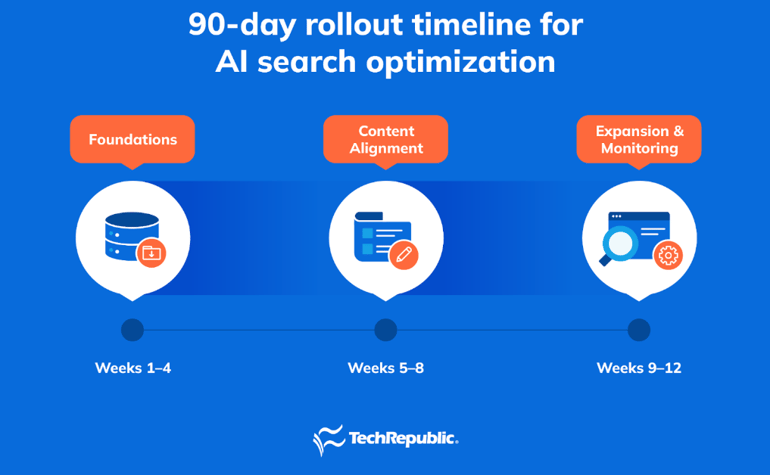
Phase 1 (Weeks 1-4): Foundations
The first month should be spent building a technical baseline so your catalog is crawlable and machine-readable. This ensures AI systems can even “see” your products before more advanced steps are added.
- Validate Product and Offer schema across top SKUs, fixing any missing or inconsistent fields.
- Review and confirm robots.txt and sitemap entries to ensure crawlers can index public-facing catalog pages.
- Publish an llms.txt file with absolute URLs to high-priority content such as best sellers, categories, FAQs, shipping, and returns.
Outcome: Lays the groundwork for AI visibility, preventing indexing gaps and ensuring structured product data is reliable from the start.
Phase 2 (Weeks 5-8): Content alignment
Once technical foundations are stable, shift to improving the quality and clarity of content. AI tools prioritize sites that directly answer buyer questions and include rich, well-structured visuals.
- Add FAQs to top-performing SKUs that address real-world buyer questions in concise, clear language.
- Refresh product visuals with multiple images and produce short demo videos for priority items.
- Begin a recurring monthly content refresh cycle to keep pricing, availability, and policies accurate.
Outcome: Improves AI assistants’ ability to map buyer intent to your catalog while building trust with fresh, engaging product data.
Phase 3 (Weeks 9-12): Expansion and monitoring
In the final month, extend optimization into external feeds and establish governance to ensure outputs remain accurate.
- Submit and test feeds in Google Merchant Center and Microsoft Merchant Center, and monitor early-stage AI shopping programs, such as Perplexity and ChatGPT feeds.
- Track key performance metrics, including AI mentions, site search conversion rate, zero-result queries, and revenue per search.
- Implement governance workflows for reviewing AI-generated recommendations, adding fallbacks for discontinued products, and correcting inaccurate citations.
Outcome: Positions your catalog for inclusion in third-party AI shopping surfaces while adding monitoring and safeguards to maintain accuracy and compliance.
Team responsibilities
A successful rollout depends on collaboration across teams. Each group plays a distinct role in ensuring the technical foundations, content updates, and governance measures are executed consistently. Defining responsibilities upfront prevents gaps, reduces duplication, and keeps the optimization process sustainable.
- IT team: Owns schema validation, feed submissions, governance workflows, and compliance with privacy regulations.
- Marketing team: Creates FAQs, updates visuals, manages off-site reviews, and supports external reputation building.
- Operations team: Manages monthly updates, redirect handling for discontinued SKUs, and ensures data consistency across systems.
By aligning these roles within the 90-day rollout, organizations can systematically prepare their ecommerce sites for AI search inclusion without spreading resources too thin. The result is a sustainable workflow that scales as AI-driven shopping evolves.
ROI and cost considerations
Optimizing an ecommerce site for AI search requires upfront effort and ongoing maintenance, which translates into real costs. At the same time, the return on investment (ROI) is measurable: improved visibility in AI-generated answers, fewer failed searches, and higher conversions from site search traffic. Treating this as an investment with a clear timeline helps set expectations for leadership and ensures teams can track progress against business outcomes.
Costs to anticipate
Every optimization initiative requires resources, and AI search is no exception. The main costs come from development time, content creation, and ongoing monitoring. These investments ensure your catalog is machine-readable, customer-facing pages remain current, and governance processes keep AI outputs accurate.
- Developer hours: Required for schema fixes, automating product feed updates, and addressing technical crawlability issues.
- Content updates: Covering the creation of FAQs, multimedia enhancements like demo videos, and refreshing product pages on a recurring schedule.
- Ongoing monitoring: Compliance checks, governance workflows for AI recommendations, and analytics tracking to ensure accuracy over time.
ROI timeline
The benefits of AI optimization don’t appear overnight, but they build steadily as systems begin indexing your products and recognizing the signals you provide. Organizations should plan for a gradual lift in visibility and conversions over the first year.
- 0-3 months: Initial visibility gains as AI systems begin surfacing products in answers and curated lists.
- 3-6 months: Reduction in zero-result queries and an uptick in on-site conversion rates as schema, FAQs, and feeds align.
- 6-12 months: Sustained growth, with a larger share of sales influenced by AI mentions and recommendations across external platforms.
Measuring success
Tracking the right performance indicators is critical to showing ROI and making informed adjustments. A lightweight dashboard helps leadership see progress at a glance while giving teams actionable insights for continuous improvement.
Building a simple KPI dashboard helps teams monitor the effectiveness of their AI optimization efforts. Key metrics include:
- AI mentions: Track when your products appear in ChatGPT, Perplexity, or similar AI search results (screenshot monthly to document changes).
- Site search conversion rate: Monitor whether buyers using your site’s internal search are completing more purchases.
- Zero-result query count: Fewer dead-end searches signal stronger content coverage.
- Revenue per search: Tracks whether improved product visibility translates into higher order values.
By balancing these costs against measurable ROI, organizations can demonstrate returns within the first year. The combination of early visibility wins and longer-term sales growth makes AI search optimization a defensible investment for IT and business decision-makers alike.
Privacy, compliance, and data handling in AI search optimization
AI search optimization for ecommerce must align with privacy regulations such as General Data Protection Regulation (GDPR) and California Consumer Privacy Act (CCPA). Because AI crawlers scan public-facing content, structured data, and merchant feeds, organizations need to ensure only catalog information is exposed. Mishandling personally identifiable information (PII) or failing to document consent can weaken your AI search optimization efforts, introduce compliance risks, and erode customer trust.
Strong privacy and compliance practices make your AI search optimization strategy more sustainable. By embedding governance into how product data is structured and shared, you enable AI systems to safely index and recommend your catalog without risking regulatory violations.
Here are the key practices to follow:
- Do not expose PII in schema or feeds. Structured data and merchant feeds should only include catalog details like product name, description, price, stock status, and identifiers such as SKU or GTIN. Never include customer names, emails, order IDs, or other personal data.
- Store consent records for customer reviews. If your site displays user-generated content, such as reviews or product Q&A, obtain and log consent. This protects your organization if that content is surfaced in AI-driven answers.
- Document how AI crawlers access and use catalog data. Track which crawlers are allowed in your robots.txt or llms.txt files, and maintain a change history. This gives compliance teams visibility into how AI systems interact with your catalog.
By aligning privacy and compliance with AI search optimization, ecommerce teams reduce risk while improving trust. Customers are more likely to purchase from brands that demonstrate responsibility in how data is handled, making compliance not just a legal safeguard but also a driver of long-term visibility and growth in AI-powered search.
Fallbacks and handling hallucinations in AI search optimization
AI recommendations are not always accurate. Even with strong schema, feeds, and content, AI systems may surface irrelevant products, show outdated prices, or recommend out-of-stock items. These errors, often called “hallucinations,” undermine buyer trust and can result in lost sales. For ecommerce sites investing in AI search optimization, guardrails are just as important as visibility.
Planning fallbacks ensures that when AI systems misrepresent or misinterpret your catalog, customers still land on relevant and useful content. This reduces frustration, protects conversion rates, and shows that your site is resilient to errors in AI-driven answers.
Here’s how to put safeguards in place:
- Redirect discontinued products: Automatically send visitors to the closest category page or a comparable SKU instead of leaving them at a dead end.
- Keep schema and feeds synced: Regularly validate that your product schema, site content, and merchant feeds all show the same price and availability.
- Implement recommendation guardrails: Create rules in your ecommerce platform that suggest alternative products when stock runs out.
- Monitor AI-generated citations: Periodically run realistic shopping queries in ChatGPT, Perplexity, or other AI tools to check for incorrect mentions.
- Escalate and correct: Establish a workflow for fixing hallucinations, whether that’s updating schema, refreshing feeds, or correcting information on third-party review sites.
The flowchart below illustrates a simple governance model for handling AI recommendations, from monitoring to escalation and correction.
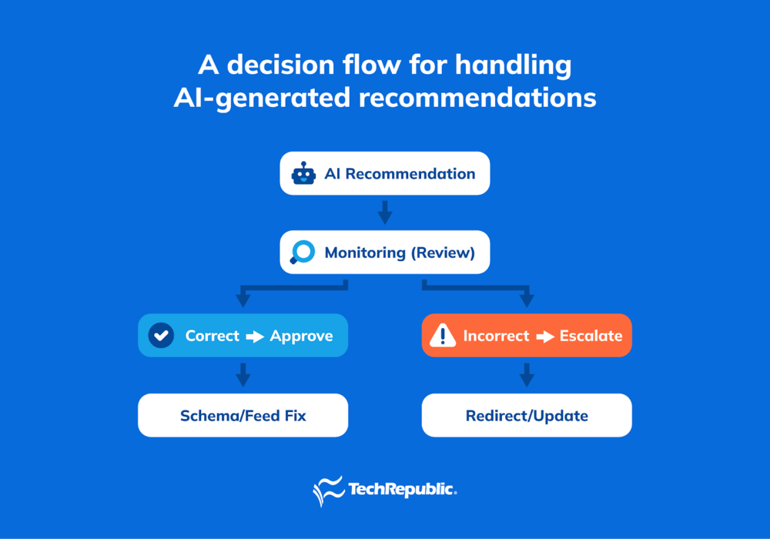
By treating hallucination handling as a core part of AI search optimization, you build a safety net that preserves customer trust even when AI outputs fall short. The combination of proactive monitoring, consistent data management, and clear fallback rules ensures that your products remain discoverable and reliable in AI-driven search results.
Frequently asked questions (FAQs)
What is AI search optimization for ecommerce?
AI search optimization for ecommerce means structuring your product data, content, feeds, and external signals in ways that AI tools (like ChatGPT, Perplexity, or Google’s SGE) can understand and use. It’s not just traditional SEO; it involves schema markup, merchant feeds, conversational content, and off-site trust signals.
How is AI search different from traditional keyword-based SEO?
Traditional SEO tends to focus on ranking pages for specific keywords and link authority. AI search, by contrast, works more with intent, natural language queries, and structured data. Instead of targeting “running shoes,” you optimize for queries like “best lightweight trail running shoes for humid summer runs under $150,” with schema, FAQ content, and feed accuracy.
How do I perform long-tail keyword research for AI search optimization?
Start by analyzing customer queries, support tickets, tools like “People Also Ask” (PAA), voice search logs, and autocomplete suggestions. Look for multi-word phrases that reflect real user intent and match the solutions your catalog provides. Then map those into FAQ content or product page copy. Long-tail keywords tend to have lower search volume but much higher conversion when they match intent.
What role do FAQs and PAA content play in AI search visibility?
FAQs and “People Also Ask” content allow you to directly serve answers to conversational queries. Embedding these on product or category pages (with proper schema like FAQPage or QAPage) helps AI tools pick up your content to satisfy search prompts. They frequently appear in featured snippet sections and answer boxes, boosting relevance for question-based queries.
When should I track performance metrics to assess AI search optimization?
Tracking should begin right away. Establish a baseline for KPIs such as zero-result queries, site search conversion rate, AI mention volume, and revenue per search. Continue monitoring over 3, 6, and 12 months. As schema and feeds improve, you should see measurable shifts in those metrics.
How can I ensure compliance and protect customer data while using AI search optimization?
Ensure that structured data (schema, merchant feeds) contains only catalog information—never PII like customer names, emails, or personal identifiers. Obtain and log user consent for reviews or Q&A content. Use tools like robots.txt and llms.txt to prevent exposing private pages. Regular audits confirm compliance with regulations such as GDPR or CCPA.
What if AI tools surface incorrect or out-of-stock recommendations?
Implement governance workflows to review AI-generated recommendations regularly. Establish fallback rules, such as redirecting to similar items or categories when stock is unavailable. Keep product feeds and schema synchronized with inventory to minimize errors.
How long does it take to see ROI from AI search optimization?
Organizations typically see some visibility improvements within 0 to 3 months as products begin to appear in answer boxes or chat assistants. By 3 to 6 months, zero-result queries usually decline and conversion rates rise. Over 6 to 12 months, the return becomes clearer in increased traffic, more sales influenced by AI mentions, and higher revenue per search.