

Accepting card, wallet, and online payments is now essential for small businesses, but the market is crowded with providers promising speed, savings, and security. It’s essential to consider contract terms, fee structures, and hardware options to select the best payment processor.
The right partner can handle every swipe, tap, and click while protecting customer data and moving your money to the bank fast. To help you choose, we’ve ranked the six best payment processing companies for 2025, highlighting the strengths that matter most to growing businesses.
- Best payment processing for small business: Helcim
- Best for omnichannel POS: Square
- Best for API-driven global payments: Stripe
- Best payment processor for embedded PayFac infrastructure: Finix
- Best for high-risk merchants: PaymentCloud
- Best for high-volume merchants: Stax
Top payment processors comparison
We evaluated over 30 payment processors using 20+ data points to find the best options for small businesses in 2025. Each provider was scored across four key areas: pricing and contract terms, feature set, security and reliability, and overall ease of use.
The table below highlights how the top contenders stack up on these core criteria to help you quickly spot the right fit before diving into the full reviews.
| Processor | |||||
|---|---|---|---|---|---|
| Helcim | |||||
| Square | |||||
| Stripe | |||||
| Finix | |||||
| PaymentCloud | |||||
| Stax |
Helcim: Best payment processing for small business

Our rating: 4.58
For my best overall payment processor in 2025, I chose Helcim. It stands out for offering transparent interchange-plus pricing with no monthly fees or long-term contracts — a huge benefit for small businesses looking to reduce costs without sacrificing features. Unlike providers that charge flat-rate markups, Helcim passes along true wholesale rates and automatically applies volume-based discounts as your business grows.
Helcim also provides a full suite of tools that many processors reserve for premium plans, including invoicing, recurring billing (with an additional 0.4% per transaction), customer management, and both in-person and online payment support. With no setup or cancellation fees, it’s an accessible and flexible solution that scales along with your business.
I particularly appreciate that Helcim publishes its rates and fees clearly, so you always know what you’re paying. For small business owners who want predictable costs and a processor they can grow with, Helcim delivers the best balance of value, features and transparency.
Why I chose Helcim
I picked Helcim for its transparent pricing, lack of hidden fees, and full-featured platform that doesn’t add extra charges for basic tools. It’s a rare processor that combines low cost with powerful capabilities.
Pricing
- Monthly account fee: $0.
- Virtual terminal fee: $0/month.
- Card-present rate: Interchange plus 0.15% + $0.06 to 0.4% + $0.08.
- Card-not-present rate: Interchange plus 0.15% + $0.15 to 0.50% + $0.25.
- Keyed-in rate: Interchange plus 0.15% + $0.15 to 0.50% + $0.25.
- American Express transactions: + 0.10% + $0.10.
- ACH fee: 0.5% + $0.25 per transaction.
- Invoice fee: $0.
- Chargeback fee: $15 refundable.
Visit Helcim
Features
- Interchange-plus pricing with volume discounts
- No monthly or cancellation fees
- Online, mobile, and in-person payments
- Invoicing and recurring billing
- Customer management tools
- PCI compliance and fraud prevention tools
- Optional surcharging feature

Pros and cons
| Pros | Cons |
|---|---|
|
|
Square: Best for omnichannel POS

Our rating: 4.55
Square is ideal for small businesses that sell both in person and online and need to get up and running quickly. It’s one of the few payment processing services that offers a complete omnichannel experience out of the box without requiring any third-party integrations or developer resources.
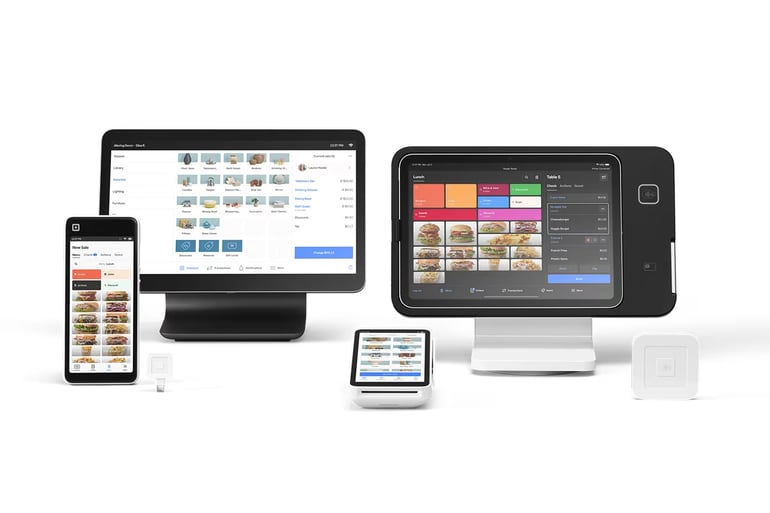
What sets Square apart is its tightly integrated ecosystem. It supports in-person payments via mobile readers, countertop registers, and self-serve kiosks; online payments through a free website builder and hosted checkout links; and remote payments with features like invoices, virtual terminals, QR codes, and even text-to-pay.
All tools feed into a single dashboard that tracks sales, inventory, customer data,er4frgt and more across every channel. Square also includes buy now, pay later (BNPL) with Afterpay, digital wallet support (Apple Pay, Google Pay), and optional same-day deposits for a fee, which are features not consistently offered by Stripe, Helcim or Stax.
I especially like how easy it is to get started with Square. There are no long-term contracts or monthly fees, and the hardware is plug-and-play. For small teams with limited time and tech resources, Square delivers a fast, affordable path to full-service payment processing.
Why I chose Square
Square offers a complete payment and POS solution with no monthly fees, making it ideal for small businesses that sell both in person and online.
Pricing
- Monthly account fee: $0 to $165 (with POS software).
- Virtual terminal fee: $0/month.
- Card-present rate: 2.6% + $0.15.
- Card-not-present rate: 2.9% + $0.30.
- Keyed-in rate: 3.5% + $0.15.
- ACH fee: 1%, minimum $1.
- Invoice fee: $0 to $20.
- Chargeback fee: Waived up to $250 per month.
Visit Square
Features
- Flat-rate pricing with no monthly fees
- Free POS software with inventory and customer tracking
- Mobile, countertop, and kiosk hardware options
- Online store, invoices, and appointment booking tools
- Same-day payouts available for a fee
- Supports Apple Pay, Google Pay, and BNPL options like Afterpay
Pros and cons
| Pros | Cons |
|---|---|
|
|
Stripe: Best for API-driven global payments

Our rating: 4.49
Stripe is the go-to payment processor for businesses that sell online and want full control over the checkout experience. It’s especially well-suited for startups, SaaS platforms, and digital-first businesses that need global reach, developer-friendly tools, and advanced billing features like subscriptions and usage-based pricing.
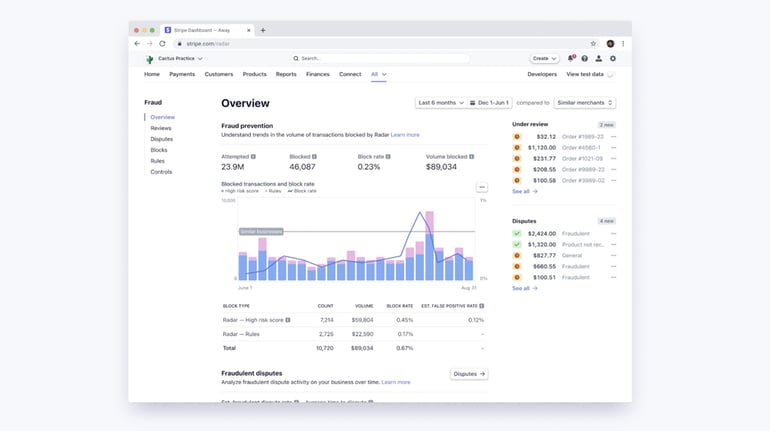
It supports payments in over 135 currencies and offers a wide range of integrations, from e-commerce platforms like Shopify and WooCommerce to accounting and CRM tools. Its powerful APIs let developers embed custom payment flows, while built-in fraud detection, 3D Secure authentication, and tokenization help secure every transaction.
What makes Stripe stand out is its flexibility and scale. Whether you’re accepting one-time payments, managing recurring billing, or building a global marketplace, Stripe provides the infrastructure to do it efficiently and grow as your business evolves.
Why I chose Stripe
I picked Stripe for its developer tools, international capabilities, and advanced billing features that support a wide range of online business models.
Pricing
- Monthly fee: $0 per month.
- Card processing fee: 2.9% + $0.30 per transaction.
- Manually-entered: +0.5% per transaction.
- International cards: +1.5% per transaction.
- Currency conversion: +1% per transaction.
- In-person card processing via Stripe Terminal: 2.7% + $0.05 per transaction.
- Tap to Pay transactions: + $0.10 per transaction.
- ACH payment processing fee: 0.8%, capped at $5 per transaction.
- Instant payout: 1.5%, minimum of $0.50 per payout.
- Chargeback fee: $15 per chargeback, non-refundable.
- Stripe Billing: 0.7% of billing volume.
- Stripe Invoicing: 0.4% per paid invoice.
Visit Stripe
Features
- Customizable checkout with robust APIs and SDKs
- Supports 135+ currencies and 40+ payment methods
- Built-in subscription billing and invoicing
- Advanced fraud detection and 3D Secure support
- Developer tools for embedded payments and marketplaces
- Integrates with platforms like Shopify, QuickBooks, and Salesforce
- Instant payouts available for a fee in eligible regions
Pros and cons
| Pros | Cons |
|---|---|
|
|
For more information, read our full Stripe review.
Finix: Best payment processor for embedded PayFac infrastructure

Our rating: 4.46
Finix gives software platforms and high-volume merchants the tools to own the entire payments stack. Its PayFac-as-a-service model lets you control onboarding, pricing and payouts while keeping interchange costs at wholesale rates.
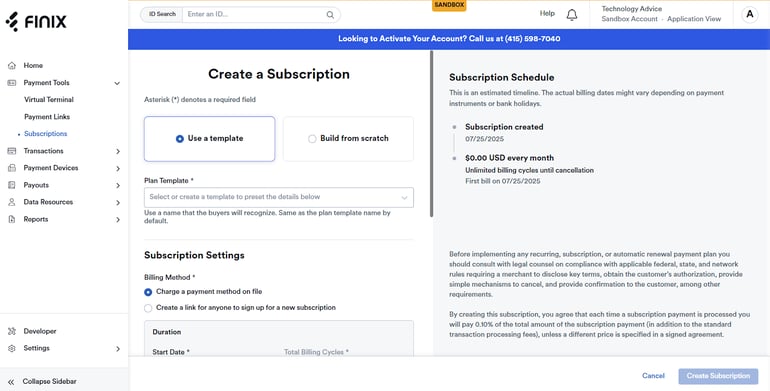
It now supports direct merchants too: a subscription plan starts at $250 per month with 0% markup on interchange and tiny per-transaction fees (from $0.08 card-present). Every new account that goes live also receives a free PAX payment terminal, making in-person acceptance easier for retail and service businesses.
Developers can stand up custom checkouts in a day using Finix’s REST APIs, low-code/no-code hosted pages and pre-built webhooks. For omnichannel sellers, Finix offers a fleet of countertop, portable and tap-to-pay devices managed from a single dashboard, plus online, ACH and digital-wallet support through one integration.
Finix is best suited for platforms and larger businesses that process a high volume to offset the subscription fee and want complete control over their payment experience.
Why I chose Finix
Finix is the rare platform that lets SaaS and marketplace providers generate revenue from payments while giving their small-business customers a seamless, branded checkout, whether online or at the point of sale.
Pricing
- For direct merchants
- Monthly fee: starts at $250.
- Card present transaction fee: Interchange + $0.08.
- Card not present transaction fee: Interchange + $0.15.
- Amex processing: Interchange + $0.30.
- Subscription billing: 0.4%.
- ACH processing: $0.50 per transaction.
- ACH validation: $0.50.
- ACH returns: $2.
- Next-day funding fee: 1% per same day entry ($1 min; $10 max).
- ACH instant payout: 1.5%
- Chargeback fee: $15
- For platforms
- Transaction fees:
- Flat-rate: 2.75% + $0.30.
- Dynamic: Interchange + Card Brand Fees + 0.3% + $0.30.
- Amex transaction fees:
- Flat-rate: 2.75% + $0.30.
- Dynamic: Interchange + Card Brand Fees + 0.3% + $0.30.
- International processing:
- Flat-rate: 1.5%.
- Dynamic: Included.
- ACH processing fee: 0.75% ($0.25 min, $5 max).
- Next-day funding: Free ($1 min).
- ACH return: $5.
- Instant payout: 1.5%.
- Chargeback fee: $15
- Transaction fees:
Visit Finix
Features
- Subscription pricing with 0% interchange markup
- Free in-person payment terminal after implementation
- REST APIs, low-code checkout pages and no-code payment links
- Range of PAX devices for countertop, mobile and tap-to-pay use
- ACH processing and optional same-day/instant payouts (fee applies)
- Built-in machine-learning fraud monitoring and dispute tools
- Real-time analytics, split payouts and WooCommerce plugin integration
Pros and cons
| Pros | Cons |
|---|---|
|
|
What's hot at TechRepublic
- Blackpoint Cyber vs. Arctic Wolf: Which MDR Solution is Right for You?
- Why AWS Sellers Choose Deepgram Over Other Voice AI Tools
- SS&C Intralinks DealCentre AI vs. Datasite: Which platform is built for the future of dealmaking?
- SS&C Intralinks FundCentre AI vs. Juniper Square: Which platform better supports modern private markets fund managers?
- Verito vs. Rightworks: Which IT Provider Is Best for Your Firm?
PaymentCloud: Best for high-risk merchants

Our rating: 4.39
PaymentCloud specializes in getting hard-to-place industries approved for credit-card processing. With a 98+% approval rate and multiple acquiring-bank partners, it opens doors for CBD, firearms, nutraceuticals, adult content, and other high-risk verticals that mainstream processors often decline.
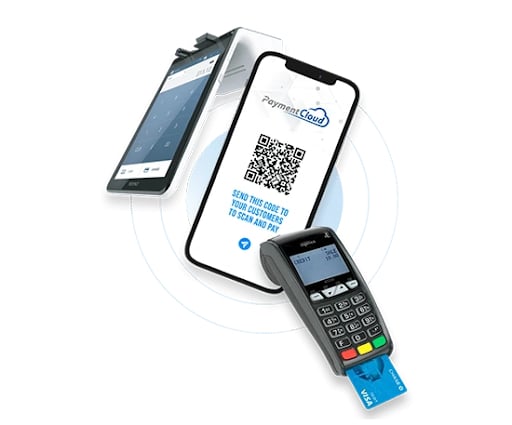
Once you’re onboarded, PaymentCloud assigns a dedicated account manager who scrubs your website, sets up the gateway, and guides you through fraud-mitigation best practices. It supports in-person, online, and keyed-in transactions, plus extras like ACH, e-checks and even cryptocurrency processing. Next-day deposits are available when you sync sales to QuickBooks, helping high-risk merchants keep cash flowing despite added underwriting.
PaymentCloud advertises competitive, low rates with no setup fees. All pricing is quote-based and tailored to your industry and risk level. Most merchants start on tiered rates, while businesses with solid processing history can qualify for interchange-plus pricing.
Why I chose Payment Cloud
High-risk businesses need a processor that can actually get them approved, manage chargebacks, and still offer competitive pricing. PaymentCloud delivers on all three, making it the best match for merchants other providers turn away.
Pricing
- Monthly account fee: $10 to $45.
- One-time virtual terminal fee: $15 to $45.
- Low-risk transaction fees: 2% to 3.1%.
- Mid-risk transaction fees: 2.25% to 3.4%.
- High-risk transaction fees: 2.7% to 4.3%.
- Payment gateway monthly fee: $15.
- Chargeback fee: $25 to $45.
Visit PaymentCloud
Features
- 98% approval rate for high-risk industries
- Dedicated account manager and support during onboarding
- Supports card-present, online, MOTO, ACH, e-check, and crypto payments
- Built-in chargeback and fraud-prevention tools
- Compatible POS hardware and 100+ e-commerce integrations
Pros and cons
| Pros | Cons |
|---|---|
|
|
Stax: Best for high-volume merchants

Our rating: 4.38
Stax uses a subscription-based model with 0% markup on interchange, so once your monthly fee is covered, you only pay a tiny per-transaction charge: 8 cents + interchange for card-present sales or 15 cents + interchange for online sales. Plans start at $99 per month for up to $150K in annual volume and scale to $139 or $199+ as you grow
For businesses that process thousands of dollars a month, this structure can slash total processing costs compared with flat-rate providers. Beyond pricing, Stax packs a full commerce toolkit: invoicing, Text2Pay links, hosted checkout pages, recurring billing, advanced analytics, and two-way QuickBooks Online sync, all included in the dashboard.
Compatible terminals (or your existing POS devices) handle in-person payments, and an optional next-day funding add-on speeds deposits when cash flow is critical.
Why I chose Stax
High-volume small businesses can keep more of every sale thanks to Stax’s flat monthly fee and zero-markup pricing, while still getting next-day deposits and enterprise-grade reporting tools.
Pricing
- Monthly fees:
- $99 for businesses that handle transactions up to $150,000 per year.
- $139 for businesses that handle transactions between $150,000 and $250,000 per year.
- $199 for businesses that handle transactions more than $250,000 per year.
- Payment processing fees:
- Interchange plus 8 cents per card-present transaction.
- Interchange plus 18 cents per card-not-present transaction.
Visit Stax
Features
- Subscription pricing: $99-$199 +/month, 0% interchange markup
- Low per-transaction fees: Interchange + 8 cents (in-person)/Interchange + 15 cents (online)
- Optional next-day funding for faster cash flow
- Free analytics dashboard with multi-location views
- Digital invoicing, Text2Pay, and hosted payment pages built in
- Extensive integrations
- PCI Level 1 compliance, tokenization, and fraud-monitoring holds

Pros and cons
| Pros | Cons |
|---|---|
|
|
How do I choose the best payment processor for my business?
No two businesses accept payments in the same way. Whether you’re running a storefront, managing subscriptions online, or selling services on the go, choosing the best payment processor depends on how you operate, how quickly you need your money, and what tools you already use. Here’s what to consider when evaluating payment processing services.
Pricing, fees, and transparency
Start with a full look at pricing, not just the transaction fee. The best payment processing for small business will offer a clear fee structure, including any monthly charges, hardware costs, or gateway fees. If you’re processing high volumes, look for interchange-plus models that scale with your growth.
Even the best payment system for small businesses won’t be a good fit if it buries hidden fees in the fine print. Always ask for rate sheets and contract terms up front.
Security, uptime, and reliability
Payment processors handle sensitive financial data, so security and stability are non-negotiable. The best payment processors for small business offer PCI DSS compliance, tokenization, and built-in fraud tools like chargeback protection and 3-D Secure.
You should also look into reliability, such as 99.99% uptime or better to ensure you won’t lose sales during outages. Look for real-world uptime reviews, not just promises on a sales page.
Compatibility and flexibility
The best payment processing for small business integrates easily with your existing tools, such as POS systems, online stores, accounting software, and CRM platforms. Confirm compatibility before signing up, especially if you’re already using systems like QuickBooks, Shopify, or WooCommerce.
If you need both in-person and online payment options, make sure the platform offers flexible tools that can grow with your business.
Speed and support
The best payment processors for small business offer fast deposit options, typically next-day funding, with instant payouts available for a fee. Cash flow matters, so check deposit speed and cut-off times closely.
Support is just as important. A processor might offer great tools, but if you can’t reach a real person when your terminal goes down, you’ll feel it. Prioritize 24/7 support or responsive service teams.
Fit for your business
Not all payment processing services are built for every industry. Some excel in high-risk categories, while others are tailored to SaaS platforms, restaurants, or retail. Consider your needs, whether that’s recurring billing, ACH payments, crypto acceptance, or mobile point-of-sale.
Your business model should guide the choice. The best payment processors for small business are the ones that align with your sales channels, transaction volume, and support needs.
Choosing the best payment system for small business isn’t about finding a one-size-fits-all provider. It’s about finding the processor that offers the right balance of cost, support, speed and compatibility for your unique workflow. Taking the time to evaluate your options now can help you avoid hidden costs and disruptions later.
Methodology
For this list of payment processing providers, we built a list of the most popular candidates with positive reputations and user reviews. Then, we reviewed candidates based on a number of critical core factors, including cost, pricing transparency, contract terms, security and stability, compatibility and integrations, and how chargebacks were handled.
To gather information, we consulted the processors themselves, tested hands-on demos and free trials, and solicited feedback/reviews from current and past users. We paid particular attention to areas of functionality that were non-standard, if they were mentioned in the brand’s marketing as an available feature, and whether or not reviews indicated it worked as described.