

Video conferencing software is now a core part of daily business communication, whether teams are fully remote, hybrid, client-facing, or spread across multiple offices. The best platforms do more than host video calls. They support screen sharing, team chat, meeting recordings, AI summaries, calendar integrations, webinar hosting, security controls, and collaboration both before and after meetings.
With this context in mind, I compared the top video conferencing platforms based on pricing, participant capacity, collaboration features, AI tools, security, ease of use, integrations, and overall fit for business users in 2026.
To dive deeper into the best options available, check out my top picks:
| Video conferencing platforms | ||
|---|---|---|
- What are the best video conferencing platforms in 2026?
- GoTo Meeting: Best overall for video conferencing software
- Zoom: Best for collaboration tools
- Microsoft Teams: Best for Microsoft 365 users and virtual meeting spaces
- Google Meet: Best for AI meeting assistance
- Webex by Cisco: Best for meeting security
- Zoho Meeting: Best for Webinars and event hosting
- How do I choose the best video conferencing software for my team?
- Review methodology
- Frequently asked questions (FAQs)
What are the best video conferencing platforms in 2026?
The leading video conferencing software offers both free and paid plans, including collaboration tools and apps that enhance meetings across various platforms and devices.
For more details, see the chart below for a quick overview of my top picks and how they compare in terms of features and prices.
| Video conferencing platforms | |||
|---|---|---|---|
| |||
| |||
| |||
| |||
| |||
|
GoTo Meeting: Best overall for video conferencing software
My rating: 4.74 out of 5

Why I chose GoTo Meeting
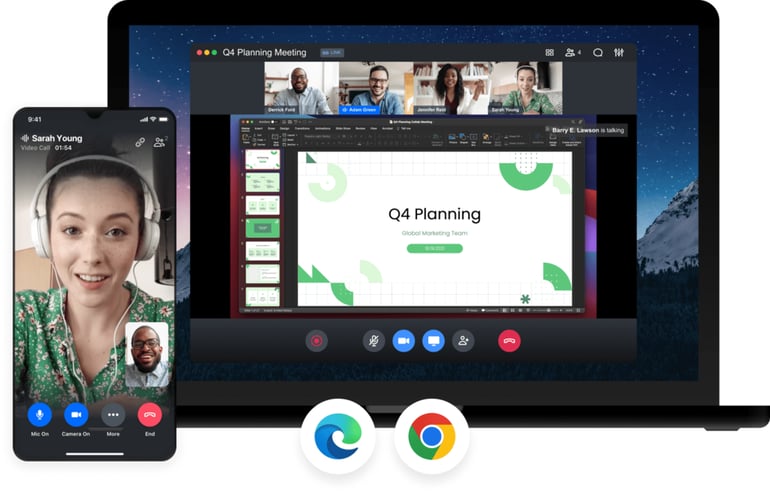
GoTo Meeting ranks at the top of my list as the best overall video conferencing software because of its extensive range of advanced features and collaboration tools. With the Smart Assistant and AI meeting summaries, you no longer need to worry about missing an important action item or meeting detail, as the AI can track your calls.
One of my favorite GoTo Meeting features is Commuter Mode, which offers a color-coded interface and a distraction-free environment for participating in meetings from your phone. At the same time, the meeting software is limited to 250 participants, which isn’t ideal for hosting large events. If you need a more scalable subscription, consider Zoom, which allows hosting meetings with up to 300 participants and offers a large meeting add-on for up to 5,000 participants.
Pricing
- Free: GoTo Meeting offers free video conferencing software for up to three participants.
- Professional: $14/organizer biller monthly; $12/organizer/month billed annually
- Business: $19/organizer biller monthly; $16/organizer/month billed annually
- Enterprise: Contact sales for pricing
Pros and cons
| Pros | Cons |
|---|---|
|
|
|
|
|
|
Features
- HD quality video with encrypted audio and secure content sharing
- Closed captioning and real-time meeting transcriptions provided by the Smart Assistant
- Share automated meeting records and save them locally or in the cloud
- Admin and presenter controls allow you to share content and manage who can access your meeting
- Integrations with communication platforms and CRMs such as Slack, Outlook, Chrome, or Salesforce
Zoom: Best for collaboration tools
My rating: 4.70 out of 5

Why I chose Zoom
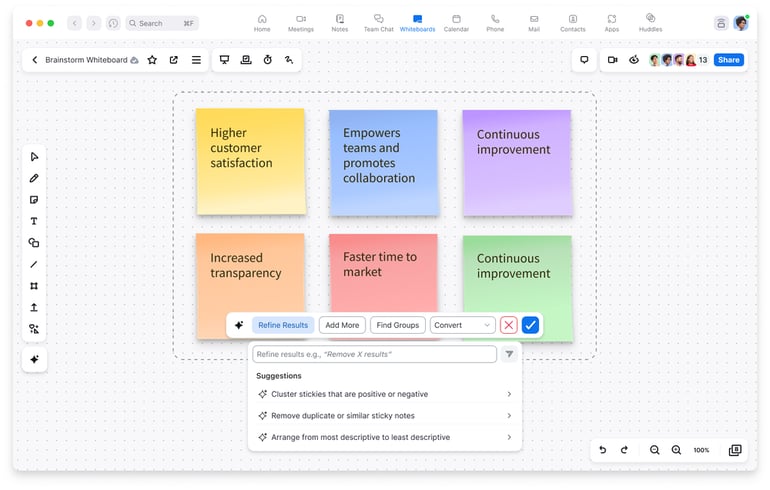
It is impossible to list the best video conferencing software without mentioning Zoom. For many of us, Zoom has been the default platform for remote work and hosting events. However, I included Zoom in this list because of its collaboration features. While many video conferencing services integrate external collaboration tools, Zoom offers built-in features such as whiteboards, team chat, and notes to support teamwork during meetings.
Like many other platforms on this list, Zoom has enhanced its artificial intelligence features over the years, now offering an AI companion that handles automated task management and content creation to help brainstorm ideas. However, Zoom only offers unlimited whiteboard access on its highest-tier plan. If you want unlimited whiteboards and access to other tools across plans, consider Webex by Cisco.
Pricing
- Basic: Free plan for one user
- Pro (1-99 users): $16.99/user billed monthly; $13.33/user/month billed annually
- Business (1-250 users): $21.99/user billed monthly; $18.33/user/month billed annually
- Enterprise: Contact sales for pricing.
Pros and cons
| Pros | Cons |
|---|---|
|
|
|
|
|
|
Features
- Meetings can accommodate up to 300 participants, with the option to upgrade to a large meeting subscription
- Virtual whiteboards and notes for team collaboration and brainstorming
- The AI companion offers team chat and meeting summaries
- Native task management across plans to gather action items and assignments
- Offers automated captions in multiple languages for diverse teams
Microsoft Teams: Best for Microsoft 365 users and virtual meeting spaces
My rating: 4.69 out of 5

Why I chose Microsoft Teams
Although many people associate Microsoft Teams with its iconic MS Teams notification and collaboration tools, I often choose this video conferencing platform for its futuristic, immersive virtual meeting spaces. While many providers offer simple features like avatars or virtual backgrounds to make online meetings more engaging, MS Teams takes it a step further by offering different types of video conferencing.
Specifically, immersive spaces are 3D meeting rooms that mimic face-to-face communication, allowing you to connect and collaborate using full-scale avatars and the option to add virtual reality. However, while many other providers on this list include AI companions in all plans, Microsoft only offers access to its CoPilot features at an extra cost. If you want to use this technology at no additional charge, consider Google Meet.
Pricing
- Free: Microsoft Teams offers a free plan for individual users that includes video conferencing.
- Microsoft Teams Essentials: $4.80 per user per month, billed monthly; $4 per user per month, billed annually.
- Microsoft 365 Business Basic: $7.20 per user per month, billed monthly; $6 per user per month, billed annually.
- Microsoft 365 Business Standard: $15 per user per month, billed monthly; $12.50 per user per month, billed annually.
- Microsoft Teams Rooms Basic: Free for up to 25 rooms. Requires a certified Teams device.
- Microsoft Teams Rooms Pro: $40 per room per month, billed annually.
Pros and cons
| Pros | Cons |
|---|---|
|
|
|
|
|
Features
- Customizable backgrounds to create a personalized space for meetings
- 30 hours of meeting time with up to 300 participants
- Meeting avatars that can represent you during virtual gatherings
- 99% uptime guarantee for more reliable service during video conferencing
- Offers up to 1TB of cloud storage for meeting recordings and transcriptions

Google Meet: Best for AI meeting assistance
My rating: 4.56 out of 5

Why I chose Google Meet
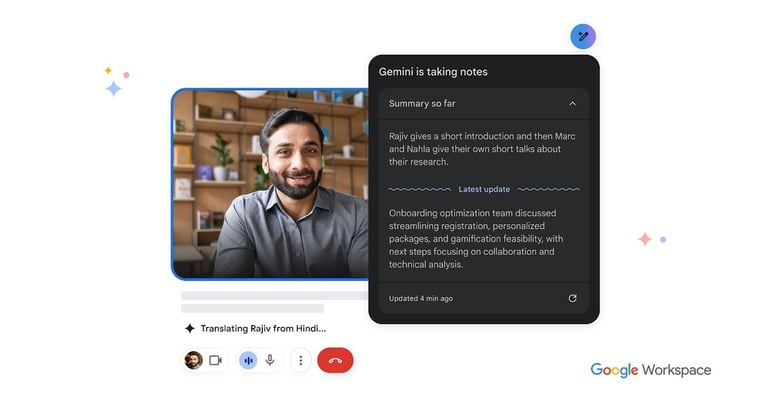
Although many of the providers on this list offer AI companions, when it comes to video conferencing and collaboration, I prefer using Google Meet. Within the Google Meet platform, Gemini provides real-time meeting transcriptions and automatically generates AI meeting notes. This is especially useful if you arrive late to a meeting and need to catch up on what was discussed.
At the same time, Google Meet requires a Gmail or Google Workspace account to host meetings, which may not be the best option for teams that already use a suite of productivity apps or those who prefer a standalone video conferencing platform. For more straightforward features, I recommend GoTo Meeting, which offers integrations with multiple workspace tools and a Smart Assistant.
Pricing
Google Meet is available with a free Google account and is also included with Google Workspace business plans.
- Free: Google Meet is included with a free Google account and supports basic video meetings.
- Business Starter: $8.40 per user per month, billed monthly; $7 per user per month, billed annually.
- Business Standard: $16.80 per user per month, billed monthly; $14 per user per month, billed annually.
- Business Plus: $26.40 per user per month, billed monthly; $22 per user per month, billed annually.
- Enterprise Plus: $42 per user per month, billed monthly; $35 per user per month, billed annually.
Pros and cons
| Pros | Cons |
|---|---|
|
|
|
|
|
|
Features
- Integration with Google Workspace enables access to collaborative documents
- Automated meeting summaries and transcripts using Google Gemini
- AI-powered real-time and context-aware translation of speakers
- Studio-quality noise cancellation and adaptive audio for hybrid meetings
- Generate virtual backgrounds and images with artificial intelligence
Webex by Cisco: Best for meeting security
My rating: 4.45 out of 5

Why I chose Webex by Cisco
For those who remember the “Zoom bombing” incidents of the early 2020s, the significance of having a secure platform for virtual meetings is clear. This is why I chose Webex as the best video conferencing software for meeting security. Webex not only offers video meetings that comply with HIPAA and BAA regulations but also provides end-to-end encryption for added safety.
Additionally, you can set meeting passwords for both phone and video conferencing and enable meeting locks to prevent unauthorized access. However, some users find Webex complex or overwhelming due to its wide range of video conferencing and telephony features. If you’re looking for a more user-friendly platform, consider using GoTo Meeting.
Pricing
- Webex Free: $0 per license per year.
- Webex Meet: $14.50 per user per month, billed monthly; $12 per user per month, billed annually.
- Webex Suite: $25 per user per month, billed monthly; $22.50 per user per month, billed annually.
- Webex Enterprise: Custom pricing. Contact sales for a quote.
Pros and cons
| Pros | Cons |
|---|---|
|
|
|
|
|
|
Features
- Administrators can create passwords for each meeting and secure the call by locking it
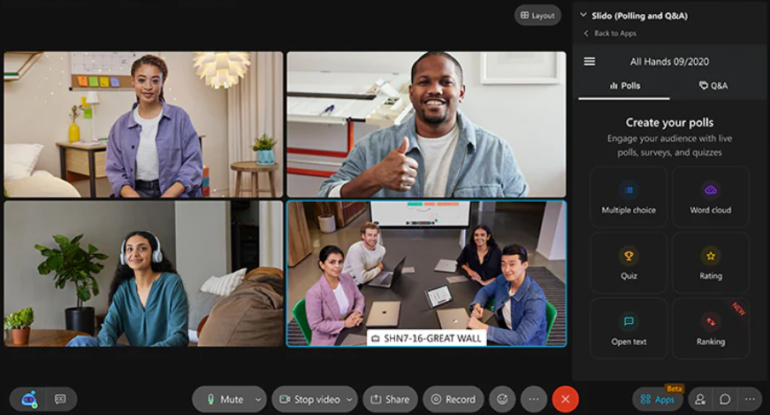
- Interactive polling, surveys, and Q&A features make meetings more interactive
- Mobile phone integrations simplify the process of attending meetings while on the go
- Collect custom analytics for each call in the Control Hub
- Enterprise plans are FedRAMP authorized for use by federal and government agencies
Zoho Meeting: Best for Webinars and event hosting
My rating: 4.22 out of 5

Why I chose Zoho Meeting
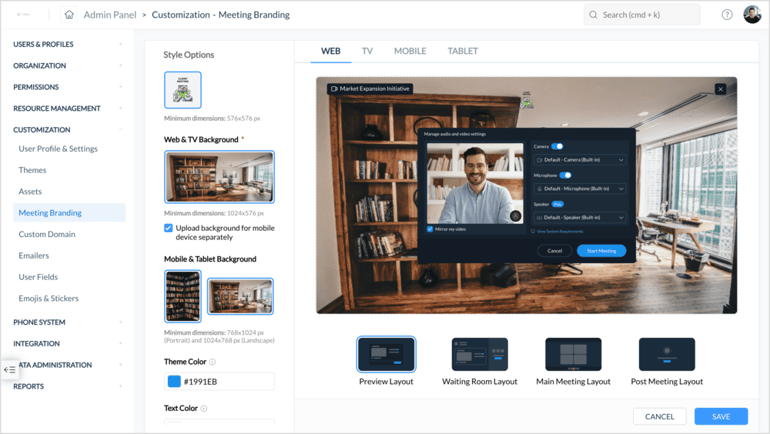
Video conferencing platforms are often the preferred choice for virtual meetings, but they are also useful for hosting large-scale events. For businesses that need to host both meetings and live events, a platform like Zoho Meeting is a great option thanks to its webinar features. With multiple scalable plans, you can select between traditional meeting conferencing and webinar plans that let you increase the number of participants for your events.
Additionally, Zoho Meeting provides customizable meeting rooms and domains, making it easier to promote your business and handle registrations for virtual meetings. However, the different plans mean that collaboration tools, like breakout rooms, are not included in every subscription. If you want more flexibility with collaboration features, consider Zoom, which also offers event hosting plans.
Pricing
Zoho Meeting offers a free plan for video meetings and webinars. Paid plans are split into two categories: meeting software for smaller video meetings and webinar software for larger online events. The prices below reflect starting monthly rates; annual discounts are also available.
- Meeting
-
- Standard: Starts at $2 per host per month for 10 attendees.
- Professional: Starts at $3 per host per month for 10 attendees.
- Webinar
-
- Standard: Starts at $9 per organizer per month for 25 attendees.
- Professional: Starts at $19 per organizer per month for 25 attendees.
- Enterprise: Starts at $79 per organizer per month for 500 attendees.
Pros and cons
| Pros | Cons |
|---|---|
|
|
|
|
|
Features
- Hold department-specific meetings or training sessions using video conferencing software
- Record meetings or webinars, then view them in your browser or download and save them for later use
- Allow participants remote access to the presenter’s screen and collaborative documents
- Display up to 50 active feeds to view more attendees during meetings or webinars
- Quickly join a meeting with the Zoho Meeting browser extensions for Chrome and Firefox
How do I choose the best video conferencing software for my team?
With so many platforms available, it’s important to carefully evaluate your options. By focusing on a few key factors, you can find a tool that not only meets your organization’s needs but also improves your team’s connection and productivity. To learn more about how to select the best video conferencing software, check out the list below to make the best choice for your business or team.
- Ease of use: The platform should be easy for all users, regardless of their technical proficiency, to join, host, and manage meetings. This includes straightforward navigation, clear controls for audio and video, and an easy process for sharing screens or documents. If not, a steep learning curve can hinder adoption and productivity.
- Meeting capacity: The solution must accommodate the required number of participants for your typical and maximum meeting sizes. Whether you primarily host one-on-one calls, small-team discussions, or large webinars with hundreds of attendees, the platform should reliably support the required participant volume without performance issues.
- Security features: Look for robust security measures, such as end-to-end encryption, password-protected meetings, waiting rooms, and administrative controls, to effectively manage participant access and ensure data security. Compliance with relevant data protection regulations (e.g., GDPR, HIPAA) is also a critical consideration for those in regulated industries.
- Integrations: The ideal video conferencing solution should integrate effortlessly with your calendar applications (e.g., Google Calendar, Outlook), project management software, CRM systems, and other communication platforms to streamline scheduling, information sharing, and follow-ups.
- Pricing: No one wants to go over their budget, so remember to evaluate the cost structure, including subscription tiers, per-user fees, and any additional charges for advanced features or increased capacity. Consider the long-term total cost of ownership and ensure it aligns with your financial planning.
- Reliability: Consistent performance with minimal downtime is crucial for uninterrupted communication. The platform should offer stable connections, low latency, and high availability to ensure meetings run smoothly without unexpected interruptions or technical glitches. Reputable providers often publish uptime guarantees and track the reliability of their service through data.
- Video quality: High-definition (HD) video quality is standard, but also consider factors like adaptive bitrates that adjust to varying internet speeds and features that optimize video for different lighting conditions, ensuring participants can see and be seen clearly.
- Advanced features: Beyond basic functionality, consider options that enhance productivity and collaboration. This might include features such as breakout rooms for group discussions, AI transcription to convert speech to text, and recording options for later review.
Review methodology
To find the best video conferencing software, I used a five-part evaluation process focused on the factors that matter most to business users:
- Core and advanced features: I reviewed essential meeting tools, including HD video, screen sharing, chat, meeting recording, calendar integrations, breakout rooms, polls, whiteboards, and webinar support. I also considered advanced capabilities such as AI meeting summaries, transcription, noise cancellation, admin controls, and security features.
- Pricing and value: I compared free plans, starting paid prices, annual discounts, participant limits, meeting duration, storage, and feature access to determine which platforms offer the strongest value for different team sizes and use cases.
- Ease of use: I evaluated interface design, setup process, meeting controls, device compatibility, browser and mobile access, and overall usability for both technical and nontechnical users.
- Customer support and user experience: I considered available support channels, documentation, reliability, product reputation, and user feedback on stability, call quality, responsiveness, and problem resolution.
- Practical business fit: I used my experience with video conferencing software and collaboration tools to assess how well each platform supports real-world needs, including hybrid meetings, client calls, internal collaboration, webinars, training sessions, and cross-functional teamwork.
Frequently asked questions (FAQs)
Is free video conferencing software good enough for team use?
It depends on the size of your team. While free video conferencing software can work well for solopreneurs or small teams, these plans often lack the advanced security features and collaboration tools needed for larger teams or company events.
What security features should the best video conferencing software have?
The best video conferencing platforms should include key security features such as end-to-end encryption (E2EE), meeting passwords, and multi-factor authentication. These elements help ensure that only authorized participants can access the meeting. Additionally, admin controls allow hosts to manage who can enter and engage, enhancing security against unauthorized access.
Which video conferencing software offers the best collaboration features in 2026?
Zoom is my top recommendation for team collaboration due to its robust features. It offers digital whiteboards and team chat for brainstorming, along with in-meeting polls and surveys that enable participants to provide feedback. This makes it an excellent choice for enhancing collaboration among remote and hybrid teams.