

In recent years, companies have changed how they think about work and where employees can work for a number of reasons. With this paradigm shift to hybrid and remote work environments, it is imperative for businesses to ensure both offsite employees and on-premises workers complete tasks and assignments in a timely, efficient manner.
SEE: 7 steps for onboarding remote employees (TechRepublic Premium)
One helpful way to track and boost employee performance across the board is by using employee monitoring software. In this in-depth product comparison guide, we’ve reviewed several of the top employee monitoring solutions on the market today.
- Best employee software: Comparison table
- Best employee monitoring software products
- What are the key features of employee monitoring software?
- What is employee monitoring software?
- How does employee monitoring software work?
- Why is employee monitoring software important?
- How I chose the best employee monitoring software
- Bottom line
Best employee software: Comparison table
| Product | Employee monitoring reports | Keystroke logging | Location tracking | Free plan available |
|---|---|---|---|---|
 | Yes | Yes | Yes | No |
 | Yes | Yes | No | No |
 | Yes | No | Yes | Yes |
 | Yes | Yes | Yes | Yes |
 | Yes | Yes | No | No |
 | Yes | Yes | No | No |
 | Yes | Yes | No | No |
 | Yes | Yes | No | No |
 | Yes | No | Yes | No |
 | No | No | Yes | No |
Best employee monitoring software products
SentryPC
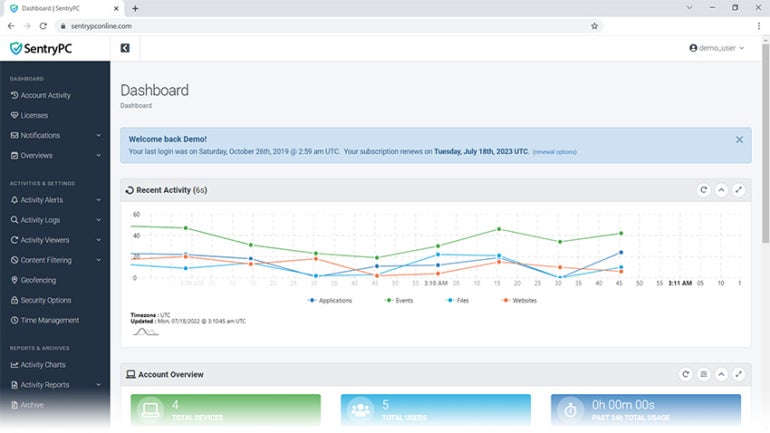
SentryPC is one of the top employee monitoring solutions for a number of reasons, but its ability to covertly allow managers to track user activity makes it one of the premier options. Through the use of its platform, SentryPC enables those in supervisor roles to remotely monitor what a particular user is viewing; it even allows the supervisor to take screenshots of an employee’s screen to verify their work output. In addition, SentryPC is fairly affordable for those at the enterprise level.
Features of SentryPC
- Geofencing
- Central user and device management
- Real-time monitoring of user activities
- Remote settings management for employee computers
- Compatible with Android, Chromebook, Mac and Windows devices
- Administrative keyword and phrase banning
- Time scheduling to set weekly and daily schedules and monitor usage
Pros of SentryPC
- Feature-rich
- Relatively affordable
- User-friendly interface
Cons of SentryPC
- Complex setup and installation process
- Software infrequently crashes
- Customer support could be improved
Pricing
SentryPC offers a Basic plan and five Business plans for different team sizes. Organizations can also request pricing tailored to their needs.
- Basic plan: $69.95 billed annually; $29.95 per additional license
- Business 50: $1,495 billed annually; $29.90 per additional license
- Business 100: $2,495 billed annually; $24.95 per additional license
- Business 250: $4,995 billed annually; $19.98 per license
- Business 500: $7,495 billed annually; $14.99 per license
- Business 1,000: $9,995 billed annually; $9.99 per license
SentryPC
Teramind

Teramind is another employee monitoring solution and, based on cost, it may be a more feasible option for small to medium-sized businesses than SentryPC. In addition to taking screenshots of employees’ work activity, Teramind can also record screen activity remotely and track everything from emails to individual keystrokes. Teramind also offers a stealth monitoring option, although organizations should review applicable privacy, consent, and labor requirements before enabling it.
Features of Teramind
- Optical character recognition engine
- Employee productivity level metrics and identification
- Endpoint monitoring for remote employees and contractors
- Automated compliance management
- Live recording and screen recording
- Integrations with project management software such as Jira, Trello and Basecamp

Pros of Teramind
- Free trial available for all plans
- Intuitive UI and dashboard
- Extensive monitoring features
- Keystroke logger
- Online meeting monitoring
Cons of Teramind
- Minimum of five-seats
- Application infrequently disconnects
- Lacks support for the Linux platform
Pricing
Teramind requires a minimum of five users and offers monthly or annual billing. Annual subscriptions include one month free.
- Starter: $14 per user, per month, billed annually; $15 per user, per month
- UAM: $28 per user, per month, billed annually; $30 per user, per month
- DLP: $32 per user, per month, billed annually; $35 per user, per month
- Enterprise & Government: Contact sales
Teramind
ActivTrak

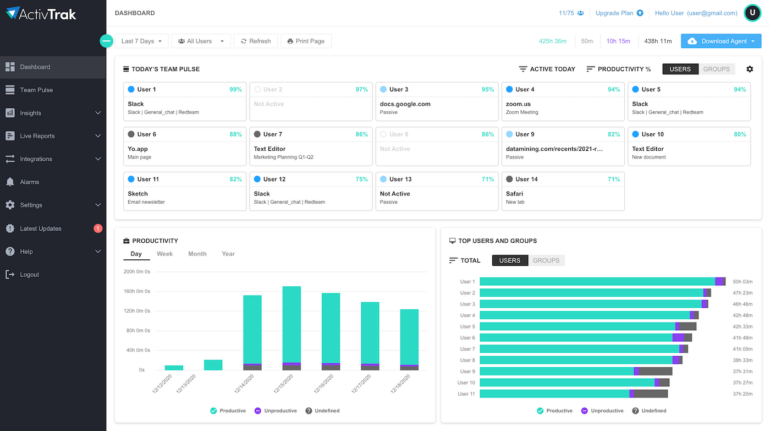
ActivTrak is one type of employee monitoring software that allows for timesheet tracking, a key component for organizations that use this type of software. Timesheet tracking is one of the basic features of many types of employee monitoring software, but ActivTrak is recommended for those working with remote employees to make sure they remain logged in and engaged with assignments and tasks. ActivTrak’s platform is much like Teramind’s, since it is priced per tracked user, but ActivTrak offers a free option with some reduced capabilities.
Features of ActivTrak
- Employees’ activity monitoring and reporting
- Productivity insights into top performers
- Advanced analytics and insights
- Reporting and alerts
Pros of ActivTrak
- Ease of use
- Comprehensive dashboard
- Free plan available for up to three users
Cons of ActivTrak
- No option for monthly payment
- App integrations are offered as an add-on with extra fees
- Lacks keystroke logging
Pricing
ActivTrak offers a free plan with basic features and three paid plans with advanced features. This vendor also provides a 14-day free trial of premium features to test the software before buying it. All paid plans require a minimum of five users.
- Free: $0 for up to three users
- Work Activity Tracking: $10 per user, per month, billed annually
- Workforce Management: $15 per user, per month, billed annually
- Productivity Optimization: $17 per user, per month, billed annually
ActivTrak
Hubstaff

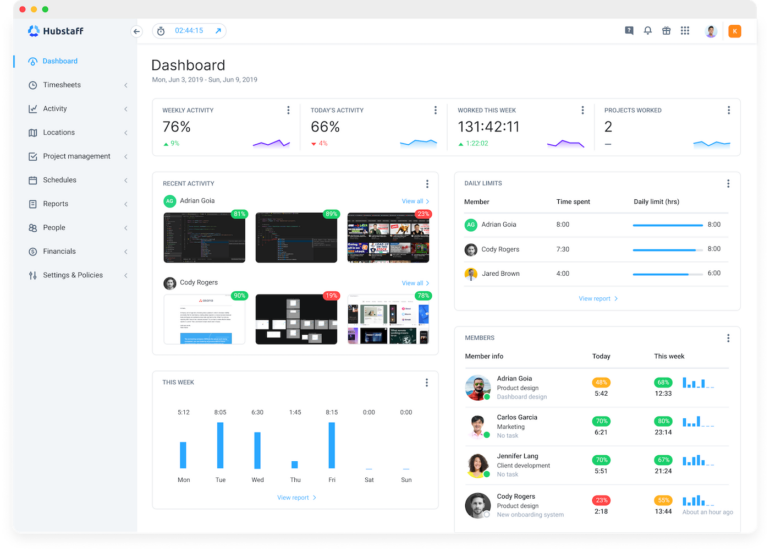
Hubstaff also boasts the ability to keep up with individual employees and their timesheets; the platform even compiles a report to show how much time has been spent on certain pages. These in-depth reports allow those in executive positions to track employee hours and automate tracking for accurate employee timesheets. Hubstaff also gives employees intuitive mobile, desktop and web time-tracking apps to assist with the timesheet-tracking process.
Features of Hubstaff
- Web tracking app tracking, idle prompts and other activity monitoring capabilities
- Time management and scheduling
- Integrations with over 30 apps, including Trello, Asana and QuickBooks.
Pros of Hubstaff
- Free plan available
- Intuitive user interface
- Achievement badges
Cons of Hubstaff
- Support could be improved
- Reporting could be improved
Pricing
- Free: For one user only
- Starter: $4.99 per user, per month, billed annually; $7 per user, per month
- Grow: $7.50 per user, per month, billed annually; $9 per user, per month
- Team: $10 per user, per month, billed annually; $12 per user, per month
- Enterprise: $25 per user, per month, billed annually
Hubstaff
iMonitorSoft

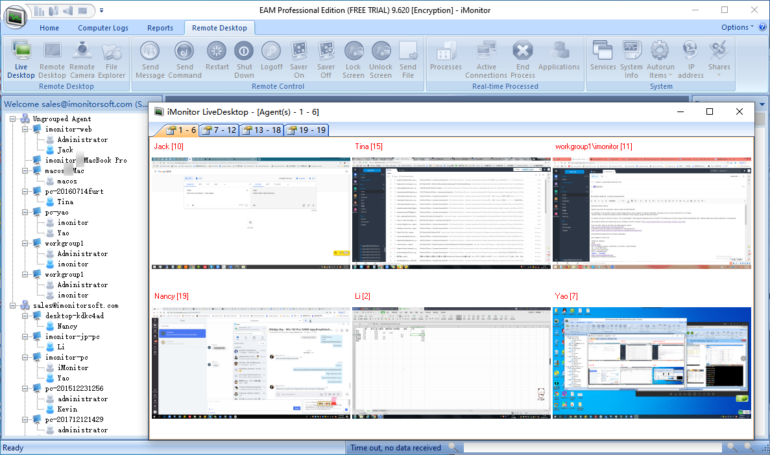
iMonitorSoft is one of the best employee monitoring software solutions for making sure staff members are staying on task when at work. The iMonitor platform allows organizations to track up to 1,000 computers from a single location. As part of its task management tracking, iMonitorSoft allows administrators to run up to ten different remote desktops simultaneously to monitor employee actions in real-time. They can also set notifications for when employees finish certain tasks or alert supervisors when employees are on certain websites.
Features of iMonitorSoft
- Online activities monitoring for URLs, instant messages, email and attachments, and online searches and downloads.
- Multiple live remote desktops with up to 30 screens in one window
- Real-time alerts for various activities, including when a removable disk is connected or disconnected
- Centralized management console
- Reporting and analytics
Pros of iMonitorSoft
- Comprehensive monitoring
- Large user base
- Support for Windows, macOS, and Terminal servers such as Citrix and VMware
Cons of iMonitorSoft
- Complex pricing model
- May require antivirus to be uninstalled before installation
- User interface could be improved
Pricing
This product has three licensing options:
- EAM Lite: $49.95 per device, requiring a minimum of three devices
- EAM Standard: $59.95 per device, requiring a minimum of three devices
- EAM Professional: $79.95 per device, requiring a minimum of five devices
iMonitorSoft
InterGuard
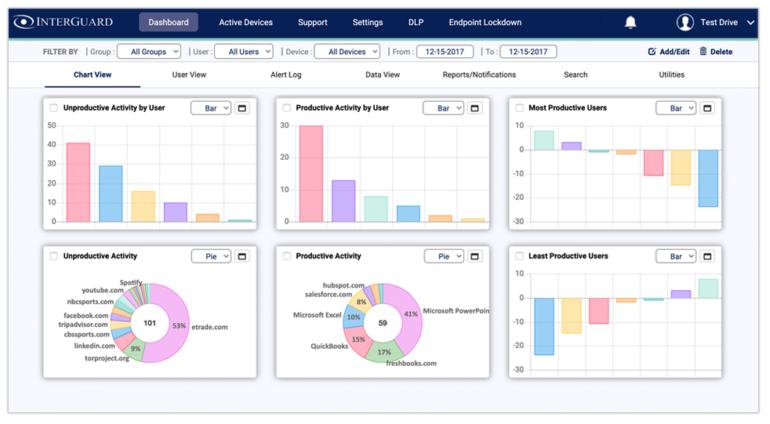
InterGuard is another type of employee monitoring software that has task management capabilities tied to alerts. These alerts can be sent to those in management roles via regularly scheduled emails.
Alerts can detail what individual tasks are being worked on and how long employees have been working on them. The notification emails can also be color-coded and grouped to signify severity, allowing the emails to be viewed in order of how time-sensitive they are. In addition, InterGuard is useful for organizations that have to abide by policies such as HIPAA, as alerts can be sent to the organization when one of these policies has been violated.
Features of InterGuard
- Productivity and idle time monitoring
- Security features such as insider threat detection, data loss prevention and remote incident response
- Investigation and compliance audits
- Advanced reporting and blocking
Pros of InterGuard
- Feature-rich
- Compatible with Windows, macOS, Terminal Servers (VMWare Citrix), Chromebook, Android and iOS devices
- Customizable dashboard
- Security-conscious
Cons of InterGuard
- Steep learning curve
- Support could be improved
Pricing
InterGuard does not publicly list its pricing. To get pricing details, users must submit their information and wait for a representative to follow up with available options.
InterGuard
Veriato
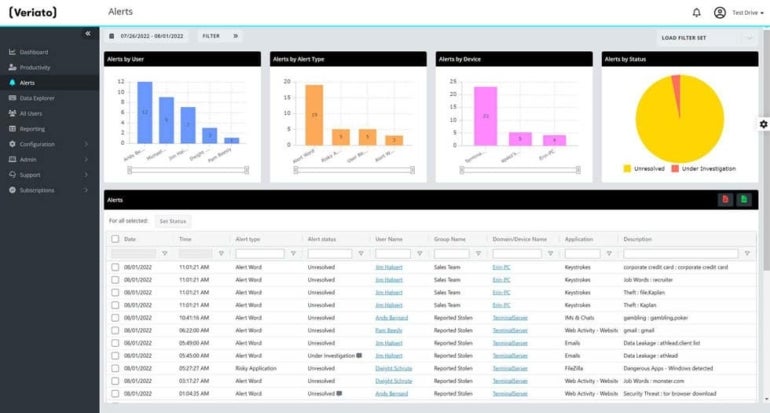
Veriato is top-tier employee monitoring software that affords organizations productivity evaluation reports. These reports can either be preconfigured or completely customizable based on the company’s needs, with employee activity reports viewable online in real-time or sent at the end of the day via email.
Finding the employees that are most productive can be beneficial in the short term and the long term. These reports can be especially helpful when looking for employees who are more suited for promotions or compensation increases, while also highlighting employees who need to increase their productivity levels.
Features of Veriato
- Idle and active time tracking
- Custom dashboards and alerts for audits and investigations
- Web and application usage monitoring
- Omni-device user activity monitoring, blocking and reporting
Pros of Veriato
- Screen recording and screenshots
- Real-time alerts
- AI and machine learning functionality
- Straightforward setup process
Cons of Veriato
- Customer support could be improved
- Steep learning curve
Pricing
- Veriato UAM: $18 per user, per month, billed annually
- Veriato IRM: Contact sales
Veriato
Controlio
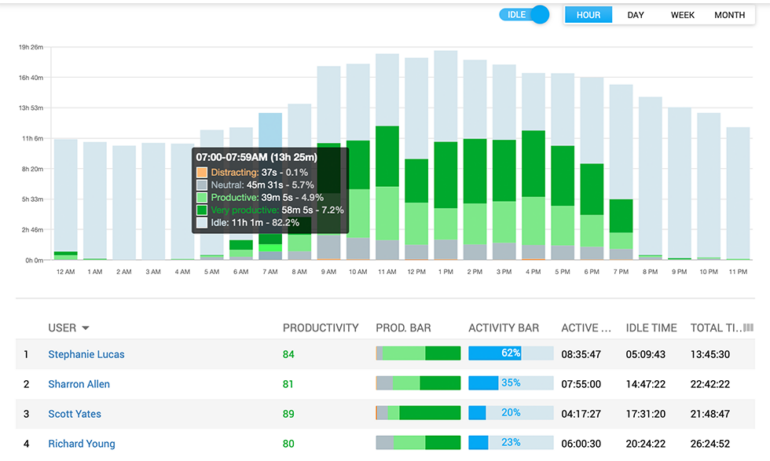
Work Examiner Controlio’s cloud-based productivity evaluations are also some of the best in the industry when it comes to tracking employees’ time spent on tasks. The Work Examiner Controlio platform comes with a robust number of statistics for each worker. It includes automatic tracking for both productive and distracting activities, a productivity score for users and departments, productivity graphs and user activity ratio tracking. The ability to group both individuals and departments into the graphs gives organizations the ability to verify that employees are making the best use of their time. It also makes it easier to sort through a large enterprise’s workforce data.
Features of Controlio
- Application and web tracking
- Rule-based user behavior monitoring
- Alerts based on suspicious activity
- Cloud-based, on-premises and private AWS cloud deployment options
- Multi-login dashboard access
- Remote client agent deployment
Pros of Controlio
- Automated app and website categorization
- Live screen streaming
- Keystroke logging
Cons of Controlio
- Complex pricing model
- Lacks location tracking
Pricing
- Basic: $6.67 per user, per month, billed annually; $7.99 per user, per month
- Advanced: $9.99 per user, per month, billed annually; $11.99 per user, per month
- Enterprise: Contact sales
Controlio
VeriClock
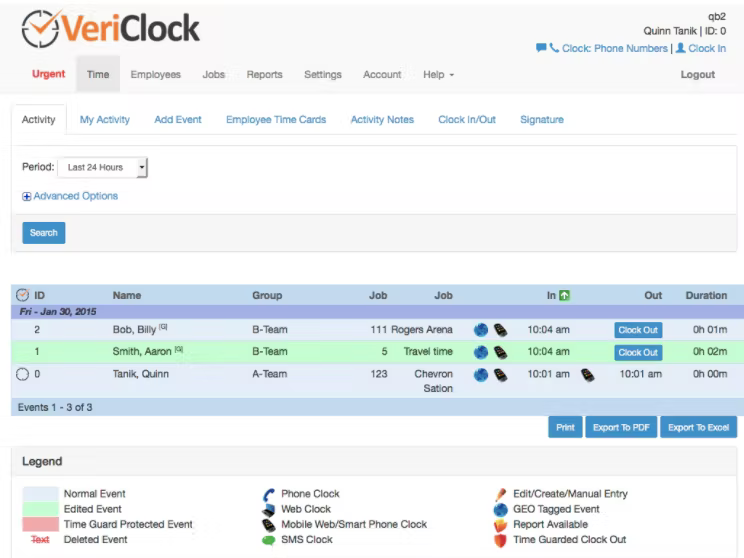
VeriClock’s employee monitoring solution includes location management capabilities, permitting organizations to track where their employees are working at any given time. VeriClock’s platform includes GPS tagging to see where employees are clocking in and out from in real-time, making it a popular option for enterprises with a number of different locations or courier and distribution services. This clock-in data is also time-stamped and geotagged, giving organizations proof of where and when an employee started and ended their shift each day.
Features of VeriClock
- Apps for both iOS and Android
- Integrations with QuickBooks and Sage 50
- Multiple export formats, including CSV, XLSX, and PDF
Pros of VeriClock
- Affordable
- One-month free trial
- Geofencing
- Toll-free clocking
Cons of VeriClock
- The user interface could be improved
- Steep learning curve
Pricing
- Standard: $5 per user, per month + $10 per month account fee
VeriClock
Hourly
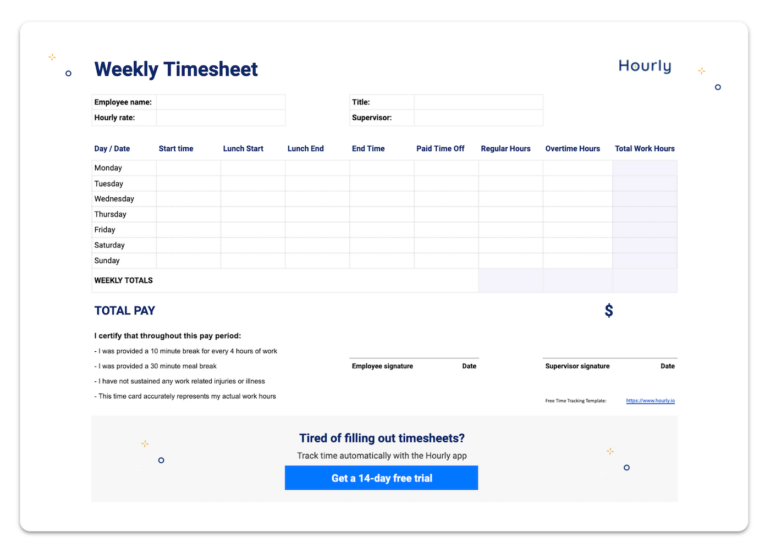
Hourly is another popular option for companies that need to verify the location of their employees, although it is primarily a workers’ comp and payroll management solution.
Location verification is largely handled on the workers’ end through the Hourly mobile app, with employees opening the app on their phones and tapping the clock to start their working timer. While using Hourly’s app, organizations can enable GPS and geofencing settings to make sure workers are where they say. In addition, managers can ensure that employees can only clock in once they’re in their correct working location.
Features of Hourly
- Time, task and location data gathering
- Quickbooks integration
- GPS and geofencing
- Mobile app for end users
Pros of Hourly
- Doubles as a payroll system
- Intuitive user interface
Cons of Hourly
- Some limited employee monitoring features
Pricing
- Hourly Payroll: Contact sales
Hourly
What are the key features of employee monitoring software?
Stealth tracking
Some employee monitoring tools offer stealth tracking, but organizations should review applicable privacy, consent, and labor requirements before using it. Clear policies and employee notice can help reduce legal and workplace trust risks. By using stealth tracking, businesses can see all activity or time spent on different tasks. They can also identify who within their personnel is productive and who needs improvement discreetly.
Timesheet tracking
Timesheet tracking is useful for companies with freelance or hourly employees. It helps organizations verify recorded work hours, improve payroll accuracy, and understand how time is distributed across assignments and projects.
SEE: Research How to successfully navigate the technical and management challenges of a remote workforce (TechRepublic Premium)
In addition, with automated tracking capabilities, staff in payroll management roles can receive weekly reports indicating how much an employee should be compensated based on their time spent working on assignments or projects.
Task management
One of the more hands-on features for employee monitoring is task management, which can enable business leaders to remotely monitor and control employee devices while on the clock. Many platforms that offer task management capabilities can also block websites and even certain keywords if an organization deems it necessary. For enterprises looking to actively manage their workers’ activities, task management is a feature that they’ll certainly want to look out for.
Productivity evaluations
For companies simply wanting a well-thought-out and assembled report, several employee monitoring software solutions offer productivity evaluations. These evaluation metrics and reports can be especially useful when working with a large swath of workers, giving supervisors detailed information about how long personnel took to complete projects and how many assignments were completed in a given period of time.
Location tracking
With many enterprises having delivery or location-based services, ensuring that an employee is at the right location for their shift can be crucial. A number of platforms allow those in executive roles to monitor employee locations via GPS, ensuring employees are where they say they are. This feature can also assist with timesheets by authenticating how long a worker was in a certain working location.
What is employee monitoring software?
Employee monitoring software is a type of software that allows managers and other designated administrators to monitor and supervise employee computer activity from a central location. Employee monitoring software is typically deployed over a number of different devices and supports centralized viewing of data and features via one networked PC.
Using this software, those in supervisory positions can monitor what employees are working on or what software and websites have been used and visited on company computers. Some can also identify and categorize if the software or the website in question falls within a deemed “productive” or “unproductive” category.
SEE: Employee Performance Review Policy (TechRepublic Premium)
With employee monitoring software, business leaders can more easily track employee productivity with a simplified, organized view of their daily history. This ultimately allows them to make decisions or determinations based on how much time an employee spent on a task or assignment.
How does employee monitoring software work?
Employee monitoring software works once the monitoring program is installed onto a PC or a set of PCs for remote viewing by the centralized administrative computer. Once the program is installed, admins can follow several courses of action, whether they simply want to view what an employee is looking at or whether they want to verify where an employee is working from.
In addition, there are more active roles administrators can take, from restricting access to certain programs or websites to even seeing if a removable drive has been placed into a device and what files have been transferred onto the removable drive.
By recognizing which type of employee monitoring software best fits the needs of the organization, businesses can streamline the processes of their workforce to ensure that productivity is maximized.
Why is employee monitoring software important?
Increasing remote work productivity
This type of employee tracking software can be beneficial to organizations for a number of reasons. Namely, the move to offsite work due to the pandemic has left many businesses without a way to ensure employees are spending their time on assignments and tasks as needed rather than spending time on social media or leisure activities.
There are a number of ways businesses can use this software to ensure employee time is appropriately spent and productivity is maximized; they can track the location of a user’s PC, remotely view an employee’s desktop, and see what websites have been accessed, among other monitoring techniques.
Securing company’s intellectual property
Employee monitoring software can also better secure corporate intellectual property, as alerts can be received by those in admin positions if a worker engages in suspicious activity, such as transferring files off of a company server onto another device. Receiving these types of notifications can save an enterprise a lot of time and money when trying to recoup lost or stolen IP in the long run.
Assessing employee performance and career advancement opportunities
Another major reason for employing this type of software is to track which employees are more productive than others. This type of software documents an employee’s track record of being efficient and capable, using analytics to back up future hiring or compensation increases.
As a result of detailed documentation about performance, managers will have ample information about who may be more suited for promotions in the long run. Alternatively, managers can closely monitor who is underperforming and offer them additional training or performance improvement plans as necessary.
How I chose the best employee monitoring software
I evaluated employee monitoring software based on how well each platform helps businesses track work activity, manage remote or mobile employees, and understand how time is spent across tasks and projects.
I also considered the visibility each tool provides into company devices and networks, including employee activity, device usage, login history, productivity data, and reporting. Features such as supported devices, integrations, ease of use, security tools, and pricing also influenced my selections.
Not every organization needs highly intrusive features such as keystroke logging, stealth tracking, or continuous location monitoring. I therefore considered whether each platform offers a practical balance between workforce oversight, business needs, employee privacy, and trust.
Bottom line
Employee monitoring software can provide valuable insights into workforce productivity, accountability, and operational efficiency. For businesses with remote teams, mobile employees, or productivity-focused roles, these tools can be especially beneficial.
That said, implementation matters. Monitoring employees too aggressively can negatively affect morale and loyalty if workers feel they are not trusted. Ultimately, business leaders should carefully select both the software and the specific monitoring features they enable, ensuring they support business goals without creating unnecessary friction within the workforce.
Read next: Best onboarding software for new employees (TechRepublic)