


Expensify fast facts
- Pricing: From $5 per member, per month
- Key features:
-
- Automates receipt capture with SmartScan OCR
- Syncs seamlessly with major accounting systems
- Offers a corporate card with real-time controls
- Provides AI-powered expense categorization and compliance
- Supports multicurrency reporting and global tax handling
Expensify streamlines expense management with tools that automate every step, from receipt capture to reimbursement. Its platform supports card integration, accounting sync, mileage tracking, and global tax compliance, making it adaptable for small businesses and large enterprises alike. With features like the Expensify Card, SmartScan technology, and AI-powered Concierge, it reduces manual work, enforces policies, and provides real-time insights, all at competitive pricing.
Why you can trust my advice
I use a rigorous evaluation framework to assess accounting software, focusing on the needs of tech-driven organizations. As a CPA who has been reviewing accounting solutions since 2021, I combine hands-on testing with deep industry knowledge to deliver insights grounded in real-world application, not just surface-level research.
All comparisons, inferences, and recommendations are valid only within the context of this article and should not be applied more generally.
Expensify’s use cases
I recommend that you choose Expensify if you
- Capture receipts and code automatically: Expensify’s mobile photo capture with OCR extracts date, merchant, and amount for automated expense creation. Policy checks flag duplicates, enforce rules, and validate exchange rates, while ACH reimbursements expedite approvals and reduce administrative time.
- Connect and reconcile cards: Linked cards auto-import transactions, match receipts, and sync with accounting to cut manual entry. Multicard programs can be centrally managed with visibility into unsubmitted or out-of-policy spend.
- Want to sync with accounting systems: Two-way sync with QuickBooks, Xero, NetSuite, and Sage Intacct keeps categories, classes, projects, and tax codes aligned. Automated journal creation ensures books remain current and month-end closes run smoothly.
- Import travel and mileage automatically: E-receipts from rideshare and travel vendors automatically generate expenses for easy policy compliance. GPS-based mileage tracking calculates reimbursable miles with standardized rates and documentation.
- Standardize multilocation operations: Pre-set categories and role-based approvals let large or temporary teams submit accurate expenses with little training. Real-time dashboards highlight overspending and compare performance across stores or regions.
- Analyze costs and control budgets: Custom reports surface top categories, vendors, and anomalies to refine policies and sourcing. Scheduled summaries keep stakeholders proactive in managing budgets and explaining variances.
- Tag projects, grants, and jobs: Client, project, job, or grant tags allow precise allocation for billing, capitalization, or reimbursement. Data exports by dimension support chargebacks and accurate cost accounting.
- Support international and tax compliance: Multicurrency features handle conversion and tax automatically for standardized reporting. GDPR-compliant data management and granular access controls secure distributed team operations.
Expensify’s pricing
- Collect: $5 per member, per month
- Control: Custom priced, but can be as low as $9 per member, per month
Expensify’s key features
Expensify combines automation, integrations, and AI to simplify expense management, helping your business save time, reduce errors, and stay compliant.
Expense management
Expensify, one of our best expense management software, lets you automate the entire expense cycle by creating, submitting, approving, and reimbursing reports with ease. SmartScan captures receipts in seconds, offers customizable workflows to enforce policies, and directly integrates with accounting and HR systems to keep everything synced.
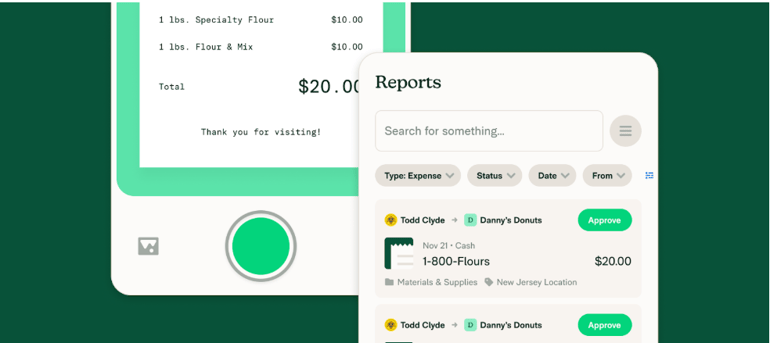
Credit card imports, multilevel GL coding, and advanced tax tracking make expense reporting faster, more accurate, and fully compliant. Expensify scales from small businesses to Fortune 500 companies, helping finance teams process expenses in up to 75% less time than traditional methods.
Employees and admins benefit from unlimited receipt scanning, mileage tracking, next-day reimbursements, and secure data handling. Meanwhile, real-time analysis, custom reports, and expense splitting provide the insights and control needed to manage spend effectively.
AI capabilities
Expensify uses AI to make expense management faster, smarter, and more reliable. Concierge AI captures receipts, categorizes expenses, and checks policy compliance in real-time. Fraud detection, corporate card reconciliation, and IRS-compliant mileage rates ensure accuracy and control at every step.
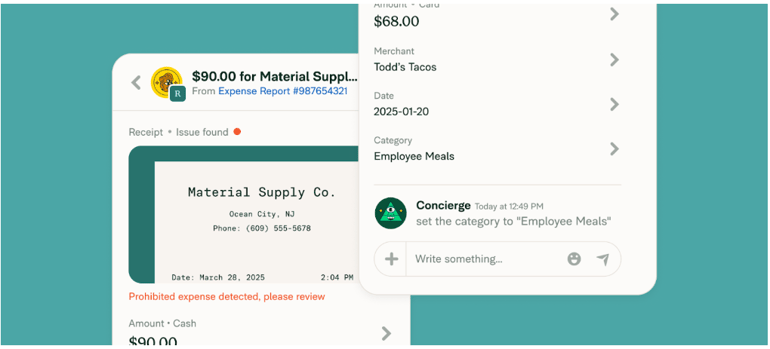
Instead of wasting time on manual entry or separate bots, Concierge works directly inside reports, chats, and transactions. It guides employees, answers questions, and even submits or approves expenses on your behalf. Scalable to any team size, Expensify’s AI automates the routine so finance teams can focus on growth.
Receipt scanning
Expensify, which made it to our roundup of the top receipt scanning apps, eliminates manual entry by pulling key details like merchant, date, amount, and currency directly from any receipt.
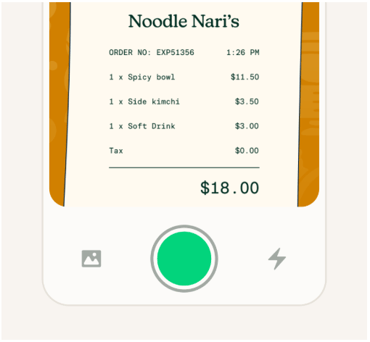
Just snap a photo, email, or text a receipt, and SmartScan instantly creates an expense. Receipts are matched to card transactions, automatically categorized, and filed in the correct report. SmartScan works with both paper and digital receipts, processes them in real time, and even functions offline.
Global currency support makes it ideal for international travel, whereas custom rules flag prohibited expenses, such as alcohol or gambling. With clean, accurate data every time, expense reporting becomes as simple as snapping a photo.
Expensify Card
Use the Expensify corporate card to automatically import, categorize, and report company expenses in real time.
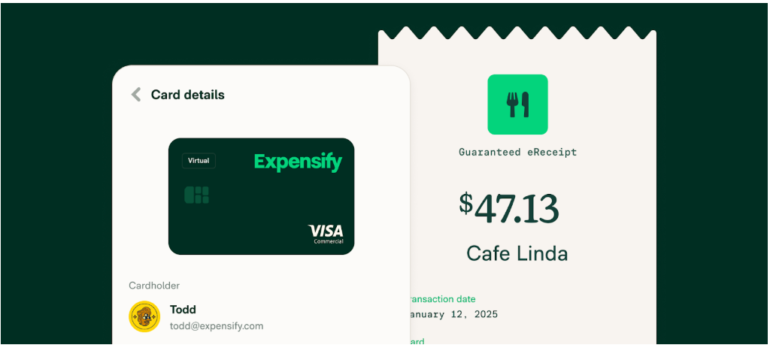
The card scales from small businesses to global enterprises, helping every team keep personal and business expenses separate. Setup takes minutes, with virtual cards ready instantly and physical cards arriving in days.
With it, you can enjoy
- Up to 2% cash back
- 50% savings on Expensify bills
- Built-in fraud detection
- Revenue share opportunities for accountants
Features like SmartScan, expense limits, eReceipt coverage, and next-day reimbursements keep everything seamless while ensuring tax compliance. With immediate transaction sync, unlimited virtual cards, and robust integrations, expenses are handled the moment you swipe.
Third-party corporate card integration
Connect company cards from over 10,000 banks worldwide and automate transaction imports instantly. Expensify matches receipts in real-time, applies coding rules, and keeps reconciliation accurate. Employees spend less time on reports, while admins close the books faster.
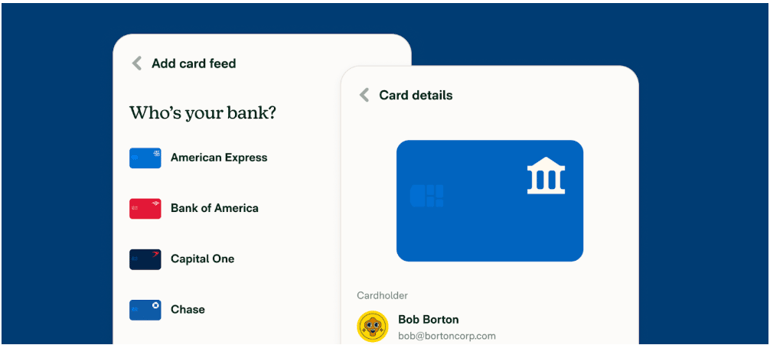
You can get set up in seconds and assign cards to employees with just a few steps. Transactions sync immediately, receipts attach automatically, and expenses are coded to your defaults or accounting system. Built-in security with modern encryption ensures every connection stays safe.
Expensify’s pros and cons
| Pros | Cons |
|---|---|
| Captures receipts quickly with SmartScan OCR | Delivers inconsistent support across tiers and regions |
| Automates policy checks to reduce errors | Requires training when shifting from old workflows |
| Controls spend using smart card features | Has a steep admin learning curve during setup |
| Syncs accounting data to close faster | |
| Handles multicurrency and tax consistently |
Alternatives to Expensify
| Best for | ||||
| Monthly pricing | ||||
| Corporate cards | ||||
| Card policy enforcement |
Ramp
Ramp shines over Expensify by issuing and managing its own corporate cards with real-time controls, unlimited virtual cards, merchant/category limits, and proactive savings insights that block out-of-policy spend before it posts, delivering preventative governance rather than after-the-fact categorization and reimbursements typical of Expensify workflows.
Zoho Expense
Zoho Expense outperforms Expensify for travel and expense suites with configurable multi-step approvals, per-diem and mileage, robust policy enforcement, and budget-friendly tiers, plus deep QuickBooks Online integration that cleanly separates reimbursable versus non‑reimbursable flows and maps categories/tags for streamlined accounting handoff beyond Expensify’s core receipt-to-report model.
QuickBooks Online
QuickBooks Online excels when expenses must be closely tied to accounting, offering a native general ledger, reconciliation, and reporting capabilities with direct bank and card feeds. This reduces tool sprawl and ensures books are up-to-date without the need for exporting/importing between systems, thanks to Expensify-centered workflows.
My methodology
In evaluating Expensify, one of our leading expense tracker apps, I examined its features, pricing, and limitations to see how it performs as an expense tracking solution. I tested the software firsthand and reviewed user feedback to understand how it works in real-world scenarios.
I paid close attention to its expense tracking capabilities, including receipt scanning, OCR accuracy, ease of use, and the quality of its accounting integrations. I also considered how quickly expenses are categorized, how policies are enforced, and how smoothly reports sync with accounting systems to support accurate and efficient financial management.
Frequently asked questions (FAQs)
Does Expensify connect to corporate cards?
Yes. Company and personal cards from thousands of banks can be connected to auto-import transactions and reconcile with matched receipts in Expensify.
How fast are reimbursements through Expensify?
Reimbursements can arrive as quickly as the next business day, depending on bank processing and configuration, once a report is approved and ACH is set up.
Can multiple receipts be scanned at once?
Yes. Expensify supports batch scanning by snapping multiple photos consecutively, and it auto-processes each receipt.
Does Expensify integrate with accounting systems?
Yes. It integrates with QuickBooks, Xero, NetSuite, Sage Intacct, Workday, Gusto, Uber, Lyft, and more for bi-directional syncs and workflows.
Is there a free plan?
Yes, but it’s only for individuals, not businesses, which is what this article discusses. Individuals can use Expensify for free with limits like monthly SmartScans.