


Some of the links on this website are affiliate links meaning we may earn a commission if you make a purchase through them. This is at no additional cost to you.
You have an active follower base on your Facebook and Instagram profiles and post content regularly, but how do you turn those “likes” and followers into real leads you can reach out to and sales you can measure?
That’s where Facebook and Instagram ads (aka Meta ads) come in. More than anything, ads help you accomplish a specific and measurable goal in a certain time period. For example, they can help you drive sales for your holiday campaign or collect sign-ups for your event. When done the right way, Meta ads can support your organic marketing strategies and make them work even more effectively. That’s the best part about Meta ads: you have complete control over them and can use them however supports your business best — because you know your business best.
5 Ways to Use Meta ads (aka Facebook and Instagram ads) to Bring In Leads and Sales for Your Small Business
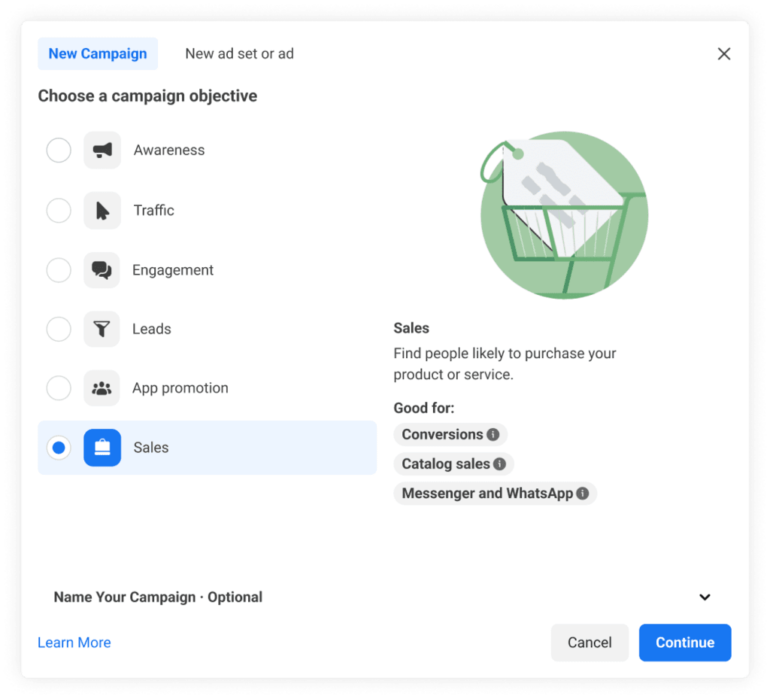
Facebook and Instagram ads, as I’ve mentioned, have the major advantage of being super versatile, so you can use them in any way you see fit to grow your business’s Facebook and Instagram profiles. You set your own objectives, campaign length, and ad budget. Meta ads can help bring brand awareness, increase traffic or engagement, bring in new leads, promote app downloads, or drive conversions.
These are the official objectives you can choose from when you’re setting up your Meta ads campaign. They also follow the stages of the customer journey. They’re also your biggest helpers in turning your followers into customers. For example, if you have an online store, Meta ads can bring in traffic from your Facebook or Instagram community to your online store. If you’re promoting a webinar or other event, using the “Leads” objective will let you create a sign-up form within your ads.
Use collection ads to put your products in front of people most interested in them
Does your business have an online store, whether on your website or on a third-party platform like Shopify or Etsy? Posting about your products on Facebook or Instagram doesn’t always cut it, no matter how consistently you post. People don’t respond to organic content that’s trying to sell.
Ads across Meta technologies, though, are a different story. Collection ads, especially, showcase products catalog-style. When clicked, they lead straight to your products’ checkout page.
Ads across Meta technologies also let you be super precise with the audience you’re trying to reach. You’ll be able to deliver your ad to audiences specifically interested in your business. For example, when I was managing the Facebook page for a brand that sold cooking ingredients, I focused my ads on adults whose profile interests included “cooking” and who had previously interacted with food-related content on social media. You might even choose to reach an audience of a specific demographic and local area.
Advertise testimonials or product demos to entice audiences to try your brand
Videos are consistently the highest-performing content format on social, and they’re a great way to showcase how your products are used, your services, or even testimonials from satisfied customers. They’re also the type of ad content I opt for most because they consistently elicit responses, whether by clicks, sign-ups, or conversions. Testimonials are especially effective at converting end-of-funnel audiences, aka audiences who just need that final push to complete a purchase.
For instance, if you have a cleaning service, you might launch a video ad campaign on Facebook and Instagram featuring a testimonial from a previous customer, with the call to action to send its page a message. When people click on that ad, they’ll automatically be directed to your inbox, where you can nurture them into becoming a customer.
Direct followers to your inbox through Facebook and Instagram Story ads
The nature of Facebook and Instagram Stories makes them a natural fit for capturing leads because they take up the whole screen, creating an immersive experience, and people can instantly reply to them and land in your inbox.
Like video ads, the most effective Story ads are the most authentic-feeling ones. Think “get ready with me” or unboxing-style videos with a call to action to send you a message to learn more.
Promote a limited-time offer to encourage new customers
Nothing motivates people to take action more than a limited-time offer; for instance, a limited sale on your store or an early-bird discount for your new product line. And the best way to get the word out about your limited-time offer to the right people is through an ad. It’s also a great way to encourage first-time customers among your followers.
Set up your Meta ads campaign to go live at the same time as your limited-time offer. Then, emphasize in your ad copy when your offer ends to build that feeling of scarcity, and give a clear call to action (i.e., “Save your seat” or “Get your copy”).
Promote UGC to capture a creator or influencer’s fan base
UGC, aka user-generated content about your brand, gives you a sense of authenticity because they don’t feel like ads. That’s precisely why they work so well. Promoting UGC content as ads gives your brand an “unpolished” feel that makes you feel more relatable. They also often come with a built-in audience from the content creator, who you can convert into leads for your business.
Collaborating with a creator often starts with a partnership deal for the creator to create content for your profile, which you can then promote as an ad. Another way is if a creator makes content about your brand, which you can then repost as an ad — with the creator’s permission, of course.
What's hot at TechRepublic
- Blackpoint Cyber vs. Arctic Wolf: Which MDR Solution is Right for You?
- Why AWS Sellers Choose Deepgram Over Other Voice AI Tools
- SS&C Intralinks DealCentre AI vs. Datasite: Which platform is built for the future of dealmaking?
- SS&C Intralinks FundCentre AI vs. Juniper Square: Which platform better supports modern private markets fund managers?
- Verito vs. Rightworks: Which IT Provider Is Best for Your Firm?
Getting Started with Meta ads in the Meta Business Suite
One of my favorite parts about Meta ads is their accessibility — you can set them up and have them go live in one day. However, I will also caution that the Meta ads manager can sometimes be complicated to navigate and have a confusing interface if you haven’t used it before.
But it’s certainly not impossible. It all comes down to setting up your Meta ads Manager Account, exploring all the tools you can use, then setting up your campaign.
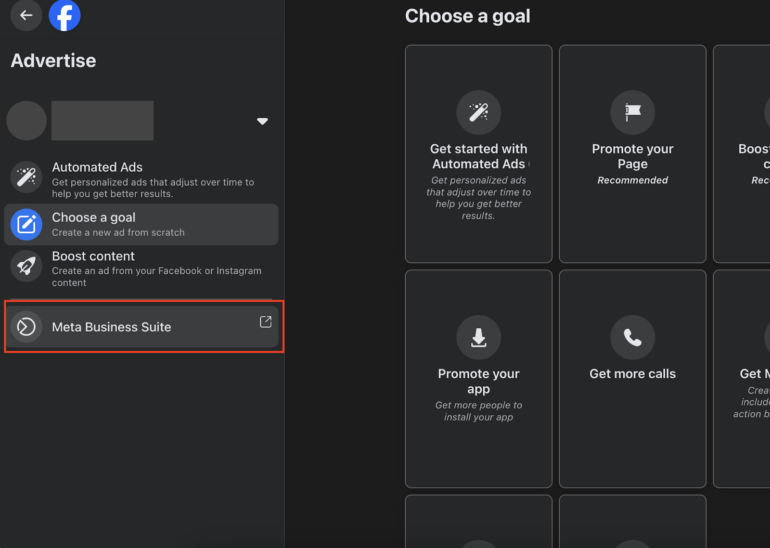
1. Create a Meta ads Manager account. Before anything else, you’ll need a Meta ads Manager account. Open the Facebook Page for your business and navigate to the Ad Center to start setting up ads. Inside the Ad Center, open the Meta Business Suite. It’s where you’ll set up and manage all your Meta ads.
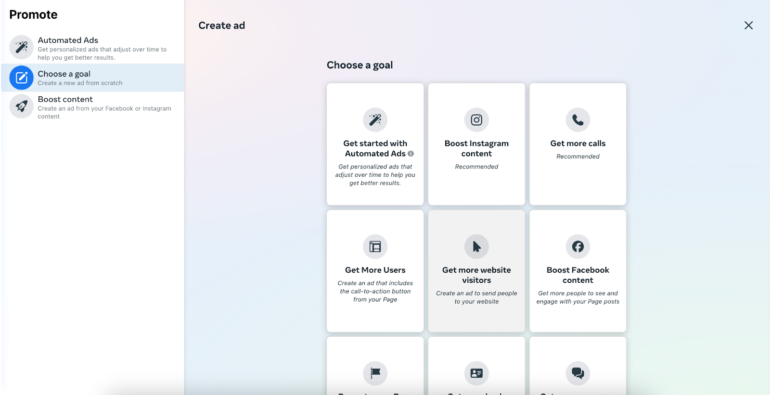
2. Start your first campaign by choosing an ad objective. Inside the Meta Business Suite, set up your first ad by clicking on Create Ad and then choosing your ad objective (generating leads, website traffic, etc.). Your ad objective will help determine the right call to action that will appear on your ad.
3. Upload your ad creative and set your daily budget, audience, and campaign length. After determining your ad objective, upload your ad image or video, type in your ad copy, and then choose an audience set. You can select audiences of a certain location, demographic, and specific interests and behaviors to market to. For instance, you might select an audience of women over 18 who are interested in gardening and home improvement.
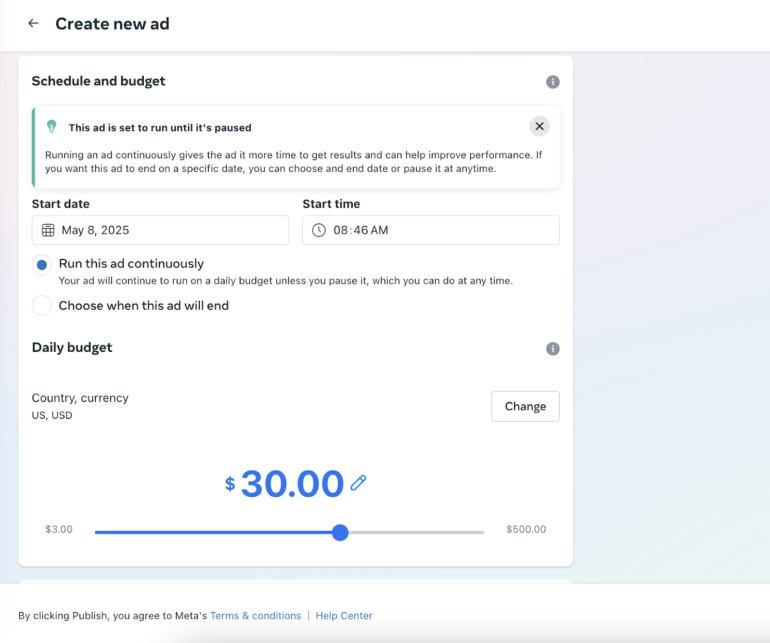
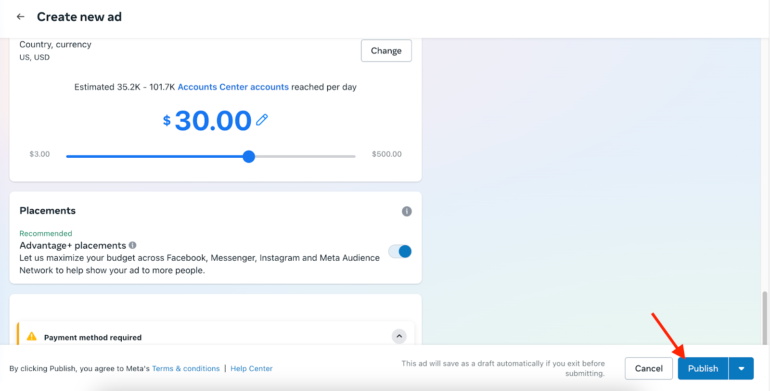
Then, set your average daily ad budget, which is the average daily amount you’ll spend on your ad. Note that your actual spend on Meta technologies can go higher or lower each day depending on your ad’s competition. Finally, set your ad’s campaign schedule, or let it run continuously.
5. Publish your ad and measure its effectiveness. Finally, all that’s left is to publish your ad by clicking on the Publish button on the bottom right corner. You’ll also be able to track your ad’s effectiveness against your objectives in the Meta Business Suite.
Bottom Line
Ads across Meta technologies are a great way to take your Facebook and Instagram marketing to the next level and gain more measurable results from your content. All it takes is learning how to best use these tools to grow your small business, whether you want your content to generate more leads or direct sales to your store. If you have a Facebook or Instagram account for your business, you’re already halfway there. Set up your ads account in the Meta Business Suite and start creating ads that bring in results.