


Android virtual private networks encrypt mobile internet traffic and mask device IP addresses, allowing users to browse privately, connect to work resources and access location-restricted content. This article offers step-by-step guides for configuring and using multiple types of Android VPNs before providing advice on choosing the right solution.
SEE: Brute Force and Dictionary Attacks: A Guide for IT Leaders (TechRepublic Premium)
- How to set up Android’s built-in VPN
- How to set up an Android VPN app
- How to connect to an Android VPN
- How to disconnect from an Android VPN
- How to forget an Android VPN
- How to use Android’s VPN settings
- How to use OpenVPN on Android
- Why do I need a VPN on Android?
- How do I choose the best VPN app for Android?
How to set up Android’s built-in VPN
Android includes a built-in IPSec VPN that allows you to connect to a third-party VPN server, such as one administered by your organization, to enable remote work. To use Android’s built-in VPN:
- Open the Android Settings.
- Tap Network & internet.
Figure A
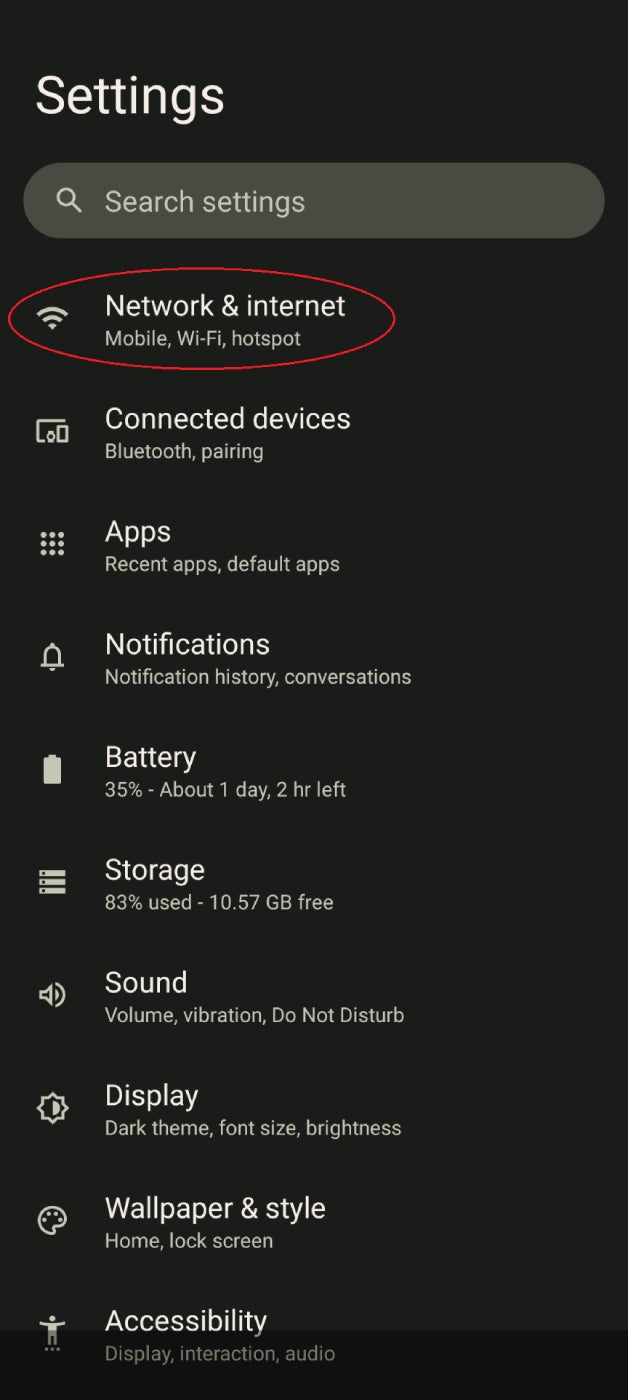
- Tap VPN.
- Tap the + sign.
Figure B
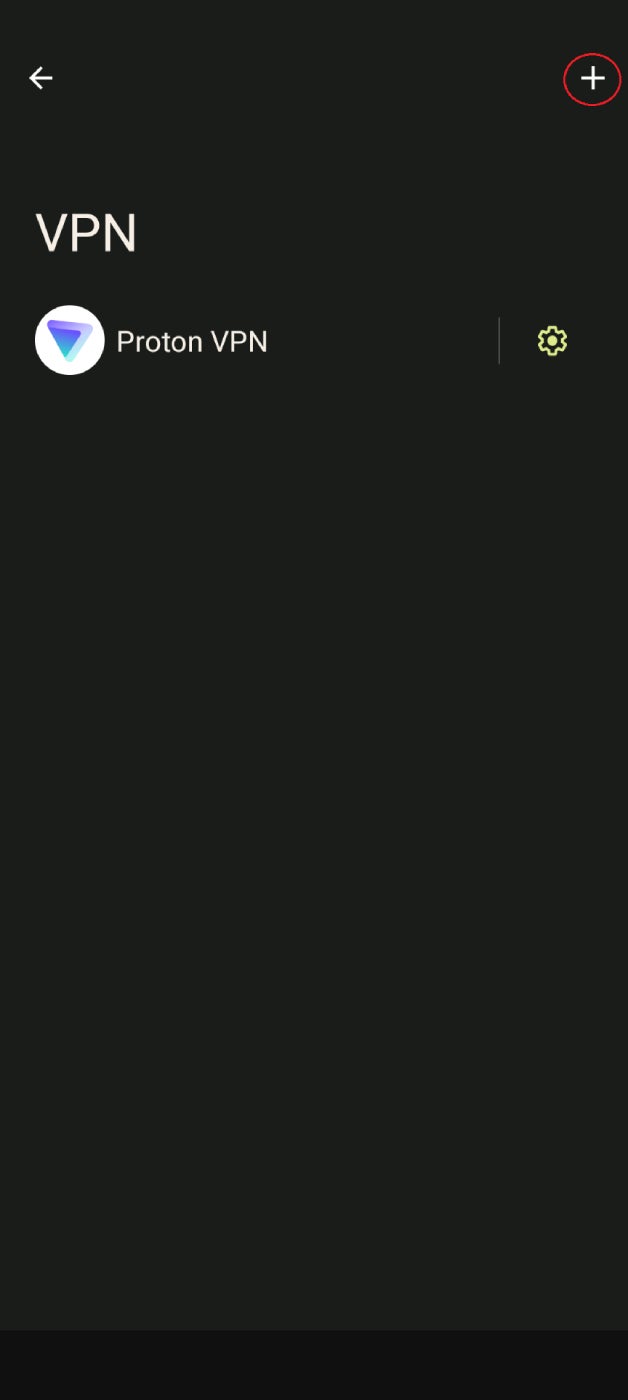
- Enter the information provided by your VPN administrator.
How to set up an Android VPN app
If you don’t already have a VPN server to use, you’ll need an Android VPN app that provides this service. To install and configure an Android VPN app:
- Download and install the app from the Google Play store.
- Create and/or sign in to your account.
- Choose a server.
- Tap Connect.
Figure C
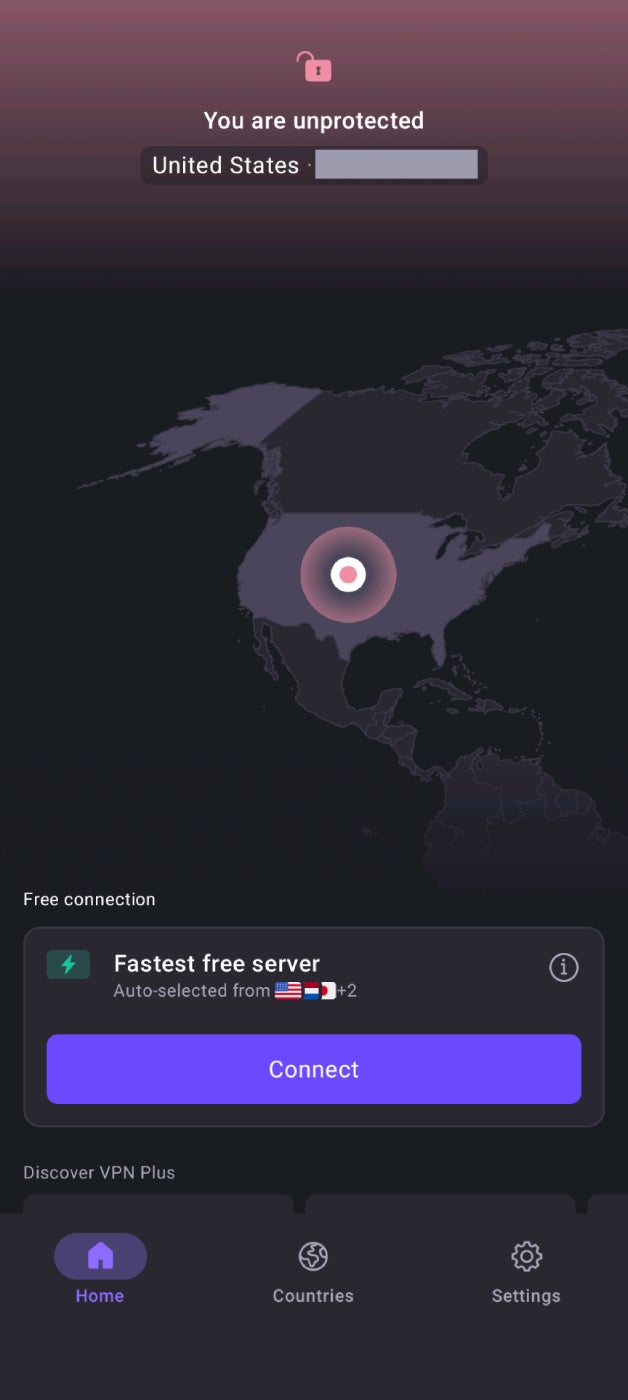
- If necessary, confirm or allow the connection request.
To learn more, read How to Use a VPN: 4 Easy Steps to Get Started.
How to connect to an Android VPN
If using an Android VPN app, the easiest way to connect is by opening that app and selecting Connect. Otherwise, you can:
- Open the Android Settings.
- Tap Network & internet.
- Tap VPN.
- Tap the name of the VPN you wish to connect to.
- Tap Connect.
How to disconnect from an Android VPN
You can disconnect from within your Android VPN app or:
- Open the Android Settings.
- Tap Network & internet.
- Tap VPN.
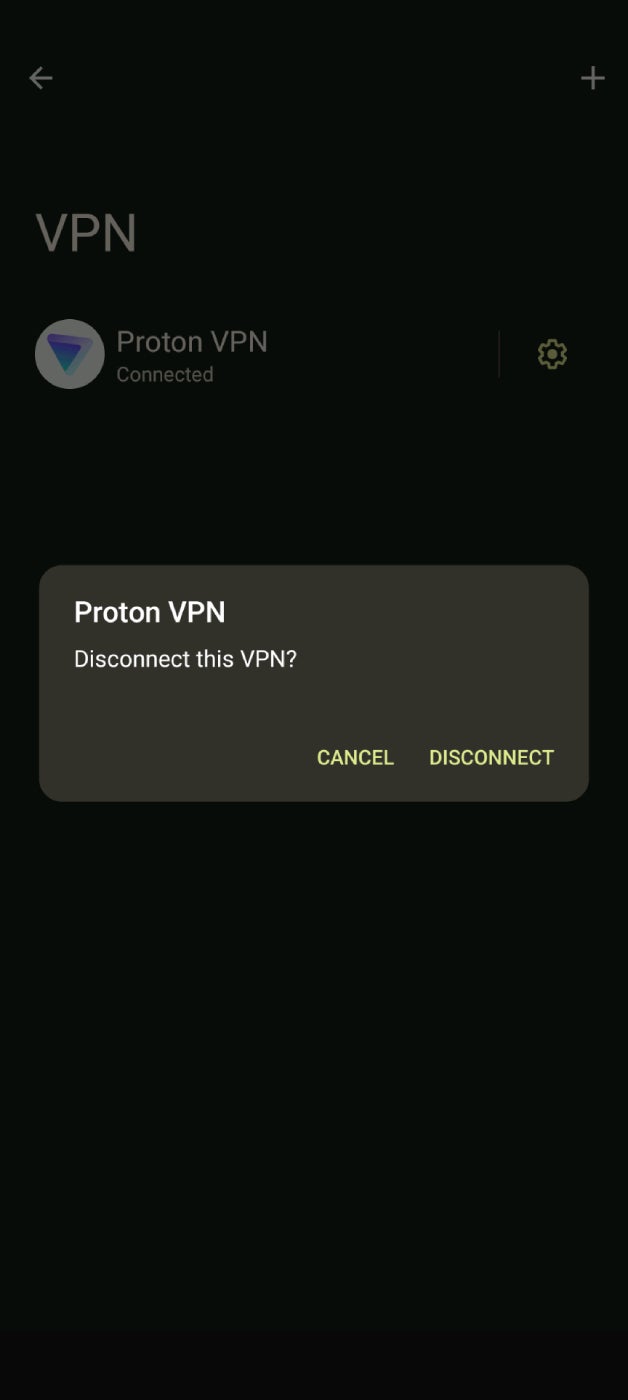
- Tap the name of the connected VPN.
- Tap Disconnect.
Figure D
How to forget an Android VPN
Uninstalling a VPN app will automatically remove that connection profile from the Android VPN list. To manually “forget” an Android VPN:
- Open the Android Settings.
- Tap Network & internet.
- Tap VPN.
- Tap the Settings icon next to the name of the VPN.
Figure E
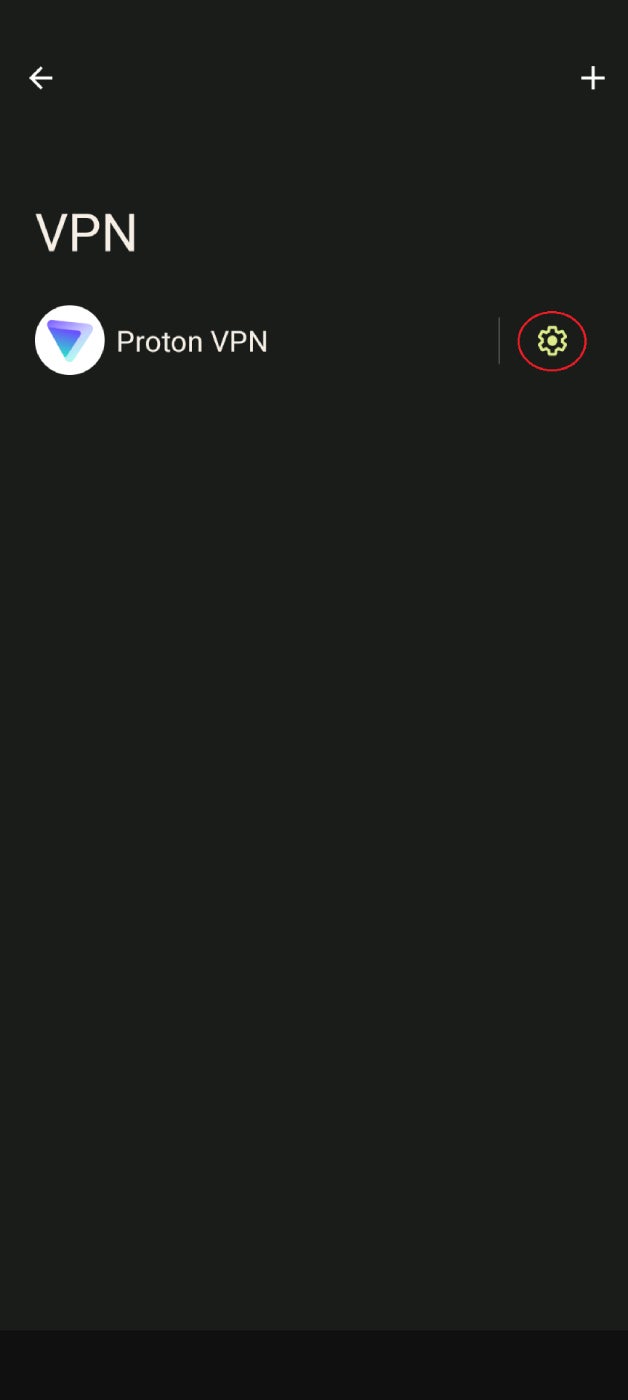
- Tap Forget VPN.
Figure F
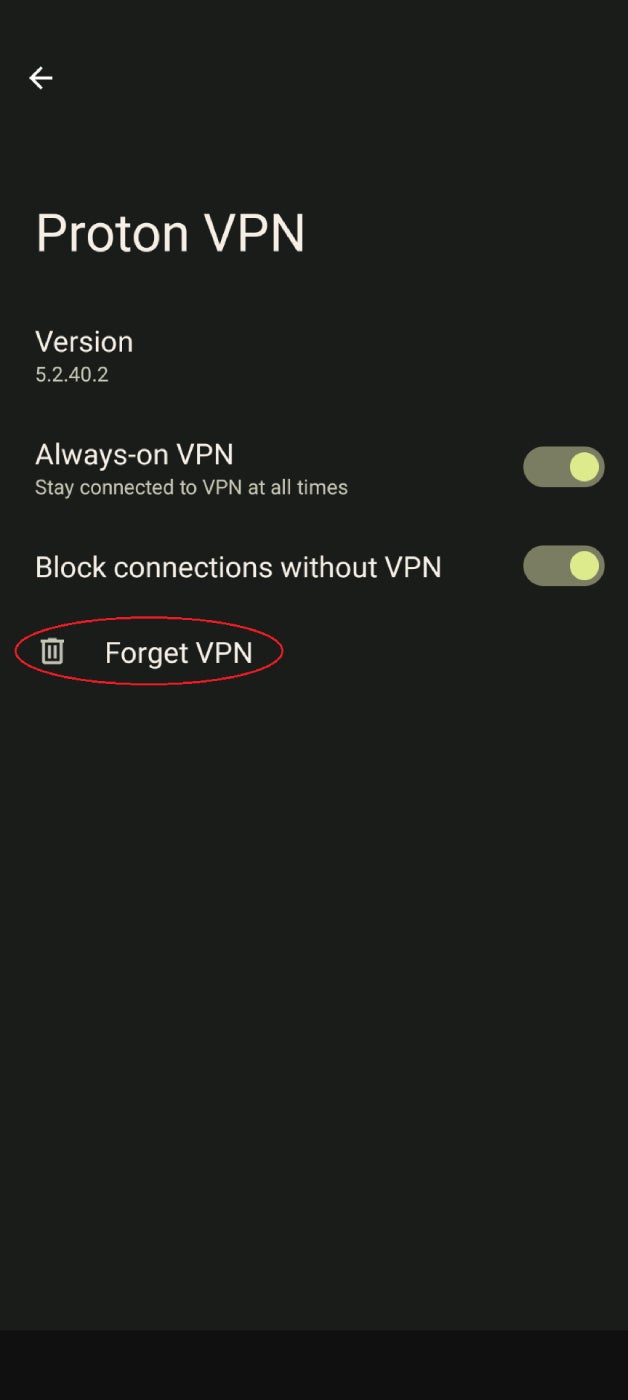
- Tap Forget on the pop-up to confirm.
How to use Android’s VPN settings
Since each VPN app has a different configuration screen, it’s best to enable, disable, and change the settings within the app itself. You can also change the settings of these apps and Android’s built-in VPN service from the Settings menu:
- Open the Android Settings.
- Tap Network & internet.
- Tap VPN.
- Tap the settings icon next to the name of the VPN.
- Edit the VPN settings.
Android Always-on VPN
The Always-on VPN setting in Android keeps the VPN enabled by default every time you use your phone, ensuring continuous protection. To configure this feature:
- Open the Android Settings.
- Tap Network & internet.
- Tap VPN.
- Tap the settings icon next to the name of the VPN.
- Toggle the Always-on VPN slider to the on position.
Figure G
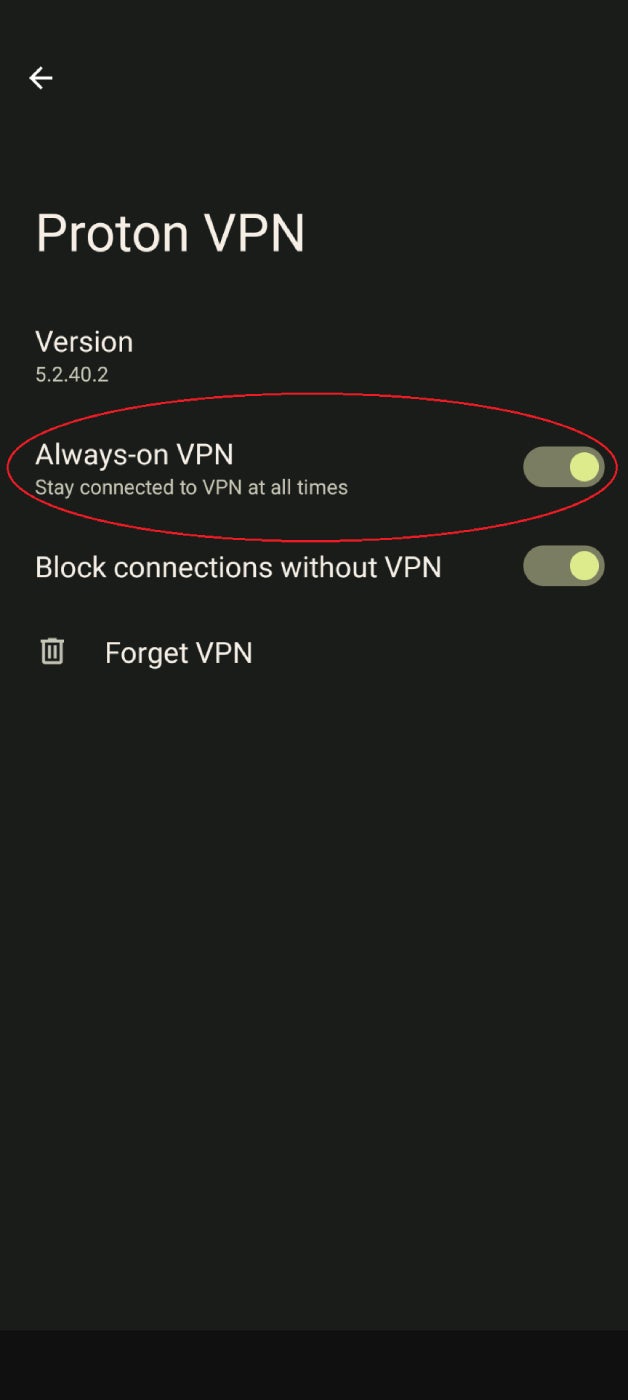
Note: If the VPN connection stops working for any reason, you’ll get an alert that stays in your phone’s notifications until you reconnect. To clear that notification, you need to disable the Always-on feature for that VPN until you’re ready to reconnect.
Android VPN kill switch
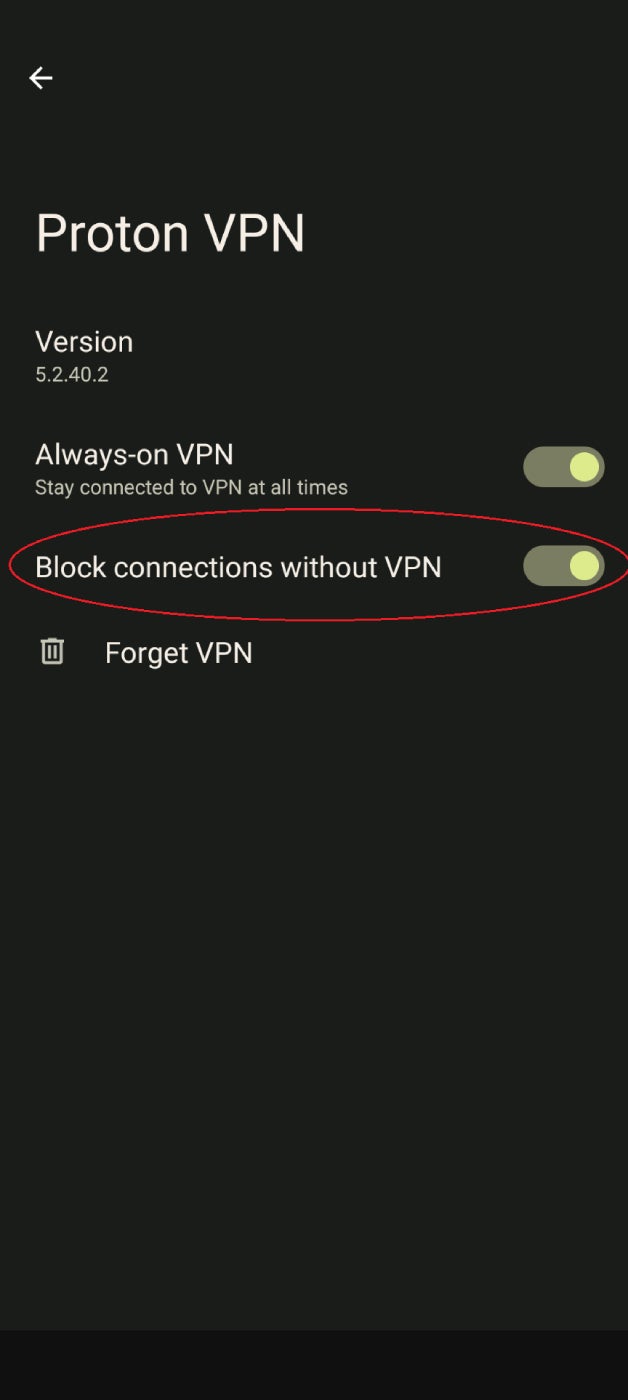
A VPN kill switch disables the phone’s internet connection if the VPN goes down for any reason, ensuring you don’t inadvertently expose your IP address or activity. This feature only works when Always-on VPN is enabled. To enable Android’s VPN kill switch:
- Open the Android Settings.
- Tap Network & internet.
- Tap VPN.
- Tap the settings icon next to the name of the VPN.
- If you haven’t already, toggle the Always-on VPN slider to the on position.
- Toggle the Block connections without a VPN slider to the on position.
Figure H
Android VPN work profiles
An Android VPN work profile automatically enables the VPN only for the specific apps you use for work. Work profiles are configured by an administrator and added to your phone when you enroll it with your organization’s Google or Microsoft management solution. To check if your device has work profile enabled:
- Open the Android Settings.
- Tap Passwords and Accounts.
- If you see a Work tab with Work Profile settings listed underneath, then you have a work profile enabled.
How to use OpenVPN on Android
OpenVPN is a popular open-source VPN protocol. Android does not natively support the OpenVPN protocol, but you can use a third-party app like OpenVPN Connect to get around this limitation:
- Download and install the OpenVPN Connect app from the Google Play store.
Figure I
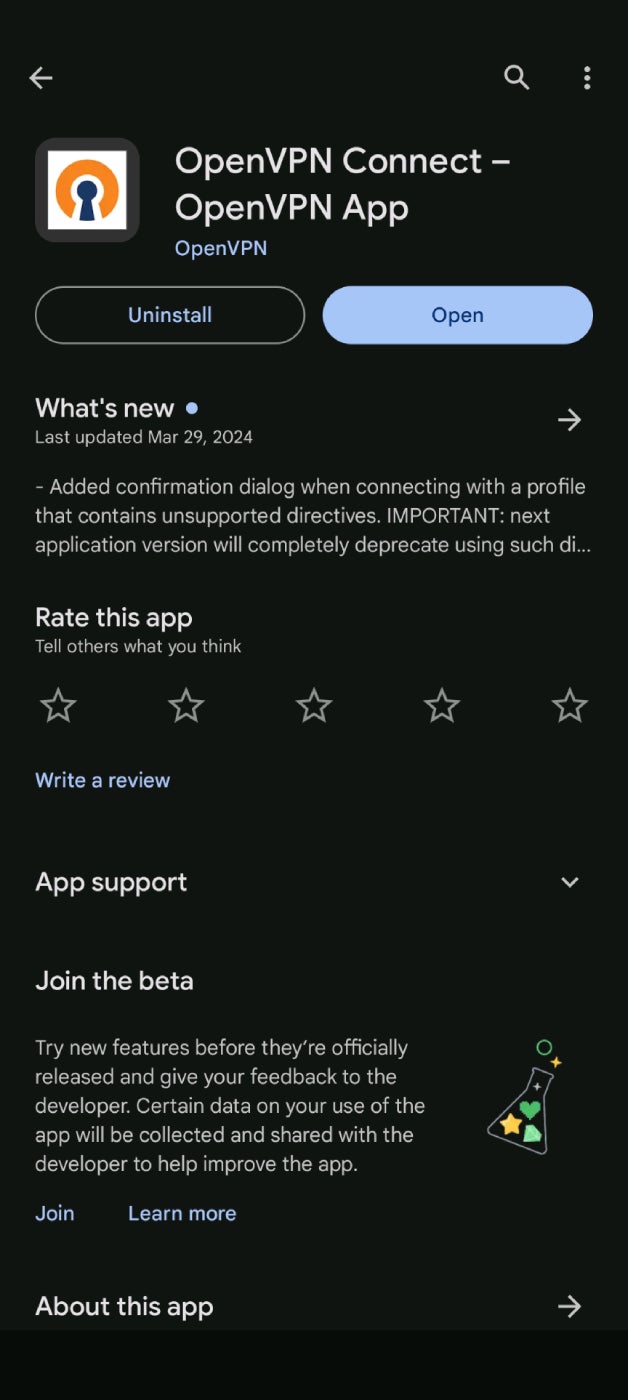
- You can configure the VPN manually with a server address or import an OpenVPN profile as a .ovpn file.
-
- Manually: Type in the server address or cloud ID, which you can get from your VPN provider or company VPN administrator, and tap Next.
Figure J
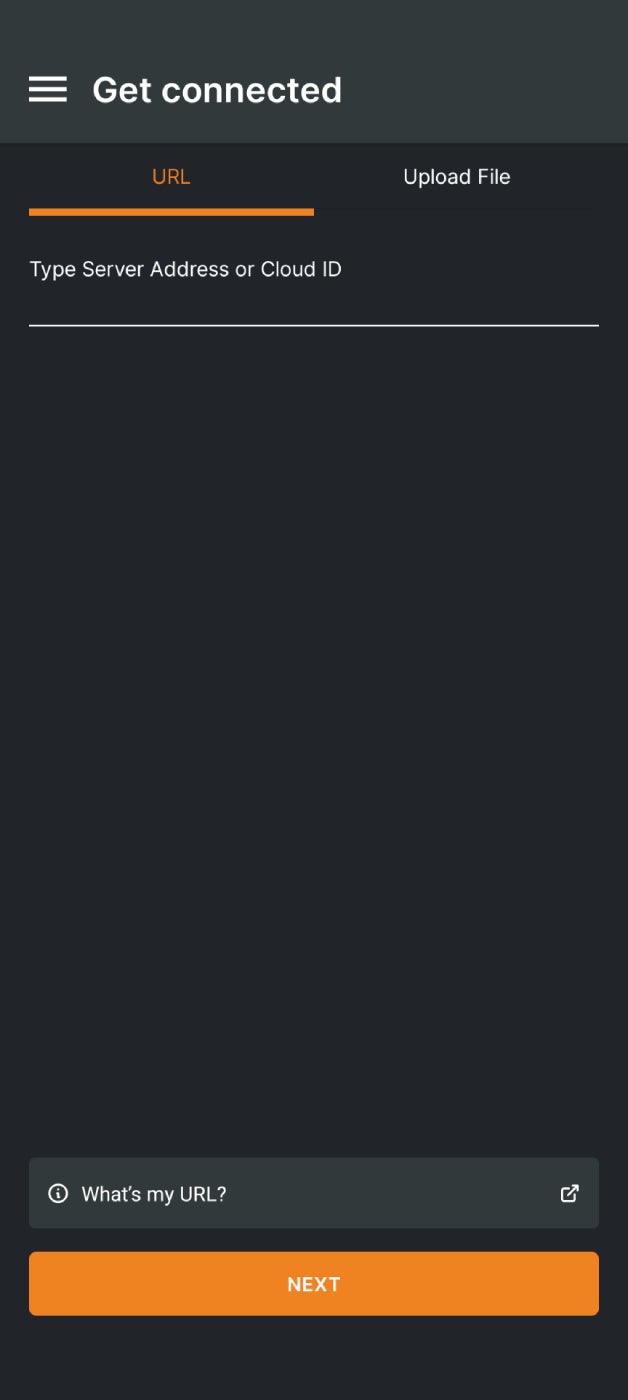
Then, enter your username and password to import your profile.
Figure K
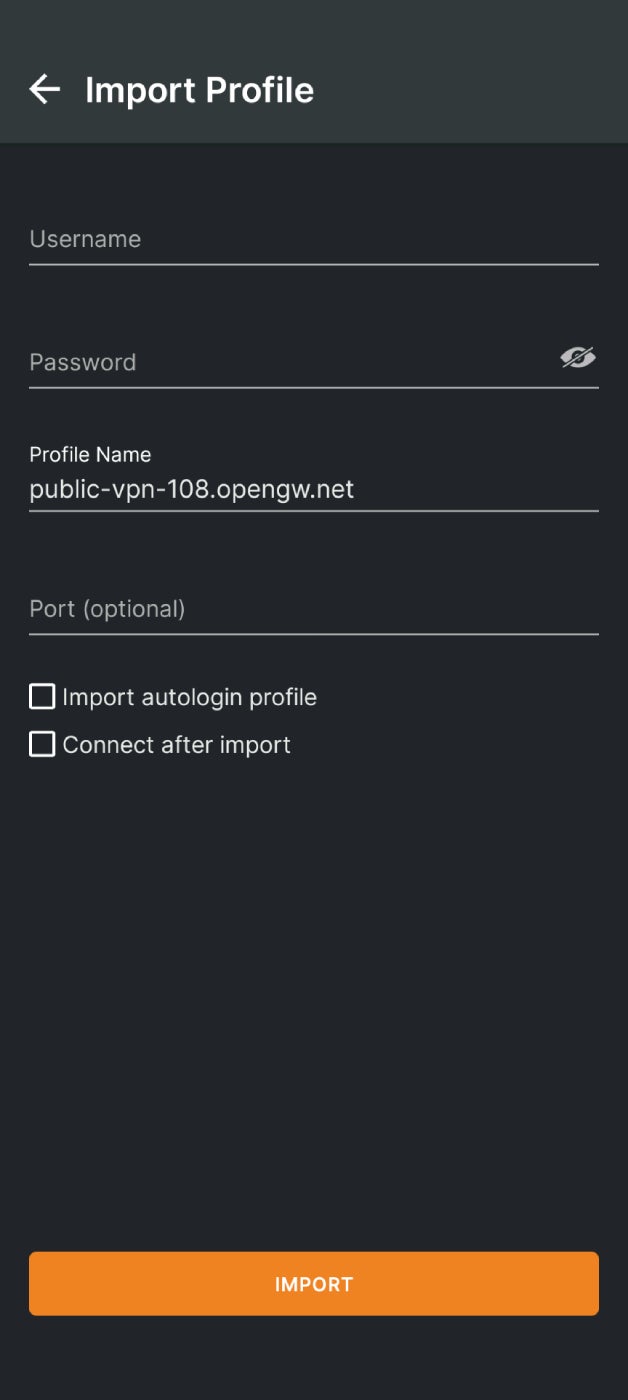
-
- File Upload: Switch to the Upload File tab, and then browse for and upload the .ovpn file containing your VPN profile.
Figure L
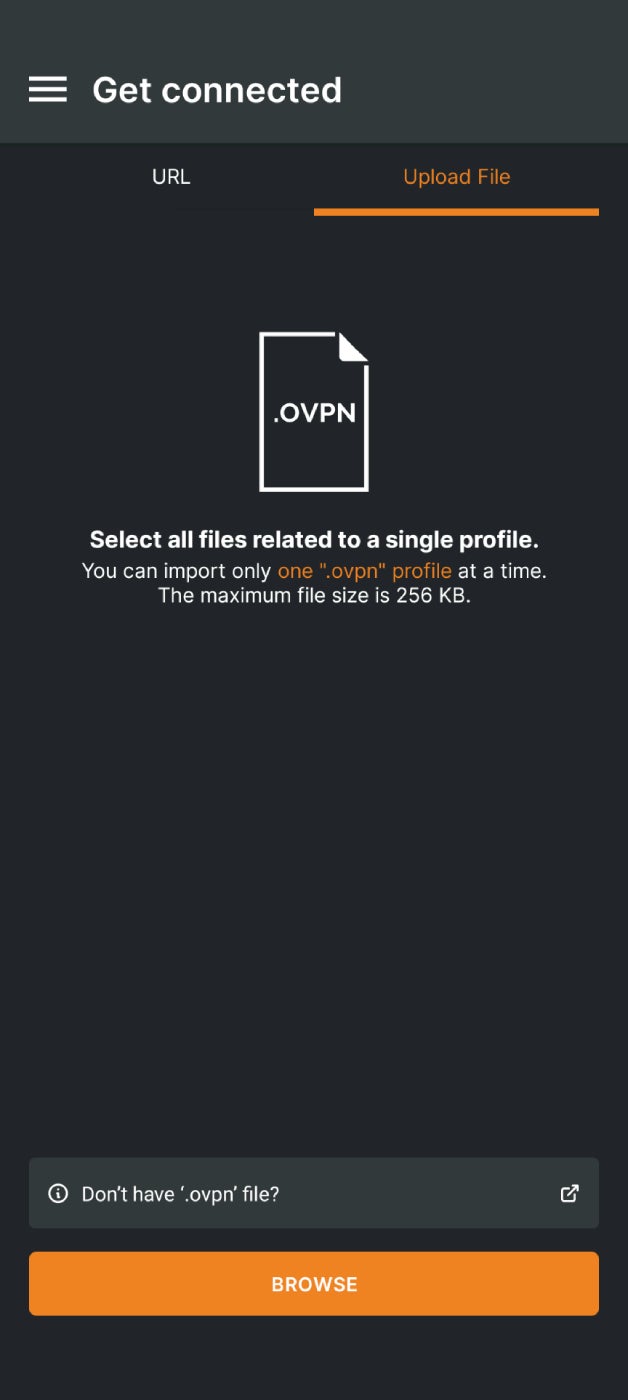
- The Settings menu lets you enable a VPN kill switch (called Seamless Tunnel) and set up a battery saver mode, among many other options.
More cloud security coverage
- Blackpoint Cyber vs. Arctic Wolf: Which MDR Solution is Right for You?
- 6 Best Open Source Password Managers for Windows
- Unified by Design: The Smart Stack Advantage of NinjaOne and Microsoft Intune
- Free Business Email: I Found 8 Legit Ways to Get One
Why do I need a VPN on Android?
Some potential uses for Android VPNs include:
- Remote work. A VPN lets you securely access company resources from your Android phone while you’re traveling or working from home.
- Streaming region-locked content. You can use a VPN server in another country to stream location-restricted TV shows and movies to your Android device.
- Using public Wi-Fi. An Android VPN masks your phone’s private IP address while you use public hotspots and unsecured wireless networks.
- Bypassing censorship. Masking your IP allows you to bypass internet restrictions and hide your location, so you can freely browse in countries like China and Russia with heavy censorship laws.
How do I choose the best VPN app for Android?
Android’s built-in VPN functionality works great if you have an existing VPN service through work, but many users need a third-party app to get full VPN functionality. The most important things to look for in an Android VPN app include:
Server options
VPN apps offer multiple connection servers in a variety of regions, but the exact number and location of those servers will differ based on vendor and subscription plan. If region-based streaming or censorship are concerns, then it’s important to confirm that your chosen VPN app provides servers in the specific location you need.
Strong encryption
A secure Android VPN app uses AES-256 encryption to protect mobile traffic. Some apps also use ChaCh20 encryption algorithms for certain VPN connection protocols, like WireGuard.
No-logs policy
Many Android VPN providers have no-logs policies promising they will not record or store any of your data, ensuring your browsing activity and personal information are protected from breaches or subpoenas.
Pricing
Beware of any VPN app advertising itself as completely free, as it usually makes money by selling your data to third parties. Most Android VPN apps are highly affordable, and some vendors offer free plans that include the same protections as a paid subscription but with slower speeds and fewer server options.
For more help choosing an app, read the 5 Best VPNs for Android in 2024.