


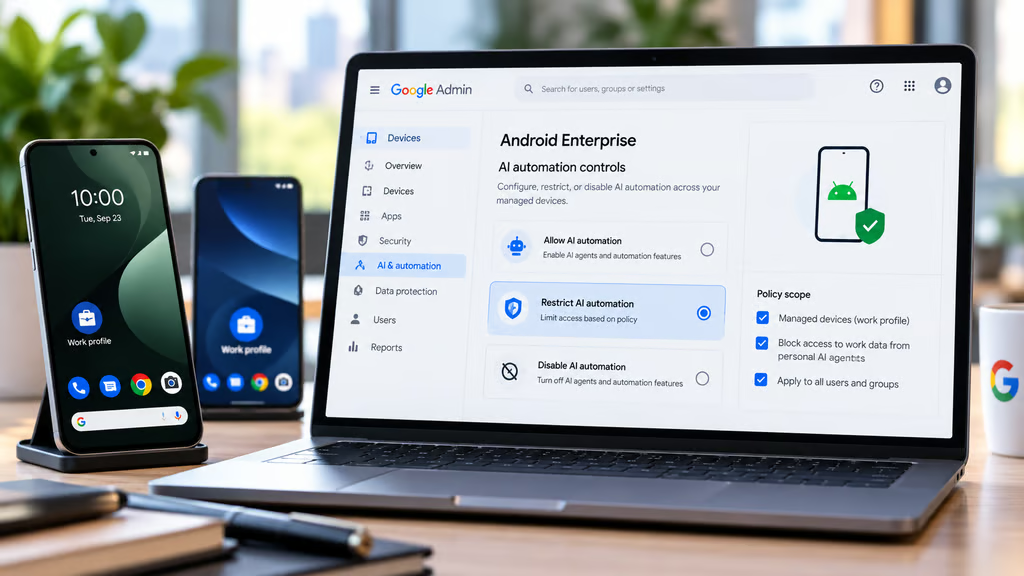
Google has announced new Android Enterprise controls that let IT administrators configure, restrict, or disable AI automation across managed devices. The features, outlined Sept. 23, 2026, are designed to help organizations adopt AI agents while keeping corporate data protected.
The changes come as Gemini gains the ability to carry out more complex tasks across Android apps. An AI agent might search emails, check a calendar, and use information from a browser to complete a request, making access to work data an important consideration for businesses.
Google says Android Enterprise policies will give administrators control over AI automation across their device fleets. However, the company has not specified which devices and management platforms currently support those controls or how individual policies are configured.
What Android Enterprise’s new AI controls can do
In its September announcement, Google describes three capabilities intended to balance AI automation with enterprise security.
Control AI automation across managed devices
Google says administrators can configure, restrict, or disable AI automation across their fleets using Android Enterprise management policies.
That could allow businesses to set limits on how employees use automated AI features on managed phones and tablets rather than relying entirely on individual user settings.
Google has not published the specific policy settings or management commands for these controls. It also hasn’t explained whether administrators can restrict individual agents, particular actions, or specific data sources.
As a result, IT teams should confirm the available settings with Google or their enterprise mobility management (EMM) provider before adding the controls to deployment plans.
Keep personal AI agents away from work data
Work-profile separation is another part of Google’s announcement.
Google says built-in safeguards prevent personal AI agents from accessing corporate apps and data within an Android work profile.
This is particularly relevant to organizations that allow employees to use personal phones for work. Android work profiles separate business applications and information from personal activity on the same device.
For administrators, the key requirement is making sure that separation remains in place as AI agents begin working across multiple apps.
Google describes this protection as part of Android Enterprise’s built-in security model, although the announcement doesn’t provide technical details about how every cross-app interaction is handled.
Support more complex Gemini tasks
Google says Gemini can now use real-time on-screen context to complete multi-step tasks across applications.
For example, an agent could consult calendar events, emails, and browser information while working on a request, reducing the need for users to switch between apps manually.
Those capabilities create new productivity opportunities, but they also raise questions about which information an agent can access and what actions it can perform.
Google’s announcement connects Gemini’s expanded automation with enterprise management and work-profile safeguards. It does not specify whether the new policies separately control cloud processing or individual Gemini workflows.
Organizations evaluating AI agents should verify those details before allowing automated tasks involving sensitive business information.
What else is changing for Android Enterprise?
Google’s September update includes additional management and security features that administrators may need to consider alongside AI automation.
Quick Share adds stronger work-profile protections
Google says updated Quick Share functionality respects work-profile boundaries and administrative restrictions when transferring files between devices.
The feature supports sharing contacts, media, and business documents while applying existing enterprise protections.
For organizations using Android work profiles, that could help reduce accidental transfers of corporate information into personal environments.
The protections are part of Google’s broader effort to maintain separation between personal and business data.
New controls simplify software updates
Google also announced Unified Update Controls, a framework designed to bring several Android update channels under a more consistent management system.
These include manufacturer operating-system updates, Google Play system updates, and Google Play system services.
Administrators will be able to manage update timing around business requirements, including periods when critical operations should not be interrupted.
A related Feedback API will provide information about update rollouts, helping IT teams track deployment progress.
Google says the Feedback API will launch alongside Unified Update Controls later in 2026. Organizations should not assume those capabilities are already available across their fleets.
For businesses planning Android upgrades, software support remains an important consideration because device makers have different update schedules and support commitments.
Additional device security features are coming
Google also announced several protections aimed at device identity, network access, and patch visibility.
These include:
- Attestable Identifiers: A planned feature that will let security and management partners cryptographically verify device hardware identity.
- Security patch visibility: More precise reporting about available security patch levels and device eligibility.
- Local network permissions: Additional restrictions on apps accessing local network devices, with administrator approval options through the Android Management API.
- Certificate transparency: Checks designed to strengthen protection against fraudulent digital certificates and network interception.
Attestable Identifiers are scheduled for later in 2026. Availability requirements for the other features may vary.
Google previously introduced additional Android security protections through Android Enterprise, including Advanced Protection and device-management improvements.
What IT teams should verify before enabling AI automation
Google has confirmed its plans for fleet-wide AI management, but administrators still need implementation details before using the controls in production policies.
Organizations should check several points with their EMM providers:
- Policy availability: Whether their management console currently supports the announced AI automation controls.
- Supported devices: Which Android versions, manufacturers, and device configurations are eligible.
- Control options: Whether AI automation can be restricted by application, action, or data source.
- Work-profile protection: How the controls apply when agents interact with personal and corporate apps.
- Cloud processing: Whether policies affect AI tasks that process information outside the device.
- Monitoring: What information administrators can access to confirm policies are applied.
These checks can help businesses distinguish announced platform capabilities from features they can configure and enforce today.
Organizations should also test any available controls on a small group of managed devices before extending them across an entire fleet.
Google has not provided a general availability date or complete policy configuration guide for the AI automation controls in its September announcement.
Until those details are published, IT teams can review their existing work-profile protections, identify where employees use AI automation, and work with EMM vendors to establish which new policies are supported.
The central question for businesses is how much control administrators will have over automated actions and access to corporate data once the announced capabilities are widely available.
Also read: Our Android 17 software support coverage explains how update commitments affect enterprise device planning and long-term compatibility.