


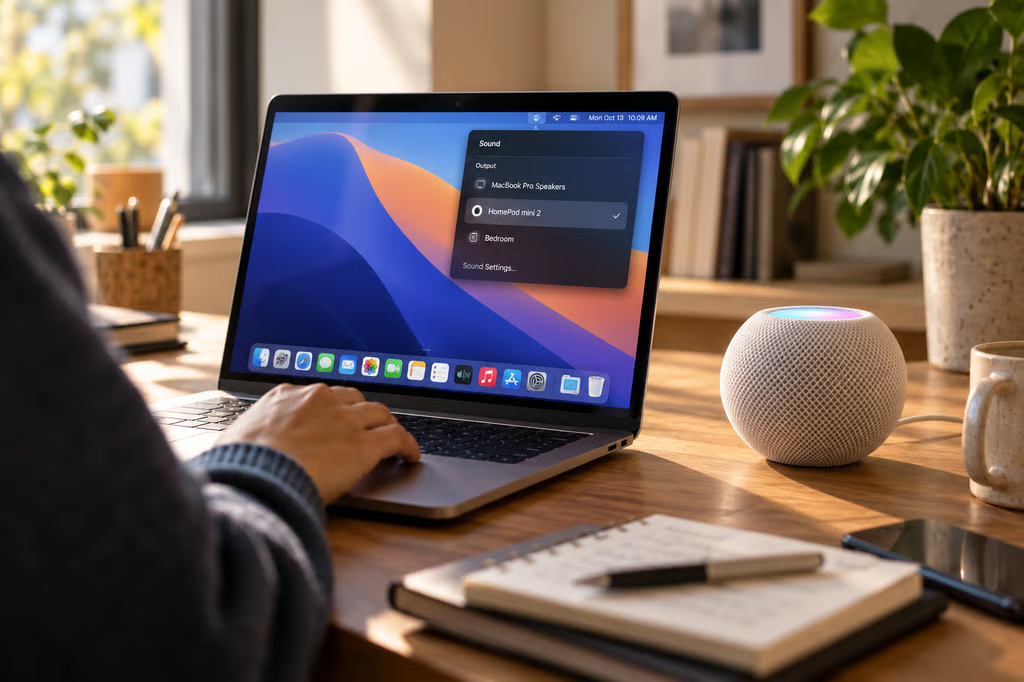
Apple’s HomePod mini 2 can serve as a Mac’s default speaker for movies, gaming, FaceTime, and video calls, giving users an alternative to built-in speakers or a separate desktop audio system.
The feature supports Macs with Wi-Fi 6E or later and works with either a single HomePod mini 2 or a stereo pair. Apple’s new speaker costs $149 in the US, with preorders open and general availability beginning Oct. 30.
Announced as part of Apple’s Oct. 13 smart-home launch, the feature expands HomePod mini beyond music playback and smart-home controls. However, Apple has not yet published a dedicated setup procedure for the new Mac integration.
Which Macs support HomePod mini 2?
According to Apple’s official announcement, the Mac-speaker feature supports all Mac computers equipped with Wi-Fi 6E or later.
That requirement applies to the Mac’s wireless hardware, not simply the Wi-Fi network it connects to. A Mac limited to Wi-Fi 6 or an earlier standard does not meet Apple’s stated compatibility requirement.
Apple has not published a complete model-by-model compatibility list for this feature, so buyers should check their Mac’s technical specifications before ordering.
HomePod mini 2 supports two arrangements for Mac audio:
- Single speaker: One HomePod mini 2 handles audio output for the Mac.
- Stereo pair: Two HomePod mini 2 speakers provide separate left and right audio channels.
Each HomePod mini 2 costs $149, putting the hardware cost of a stereo pair at $298 before taxes.
Apple also confirms compatibility with HomePod software 27.2. It has not identified an additional Mac-specific software requirement in its launch announcement.
The Mac-speaker feature is separate from the new four-HomePod surround system, which requires the fourth-generation Apple TV 4K. Mac users do not need the new Apple TV to use HomePod mini 2 as a desktop speaker.
How to set up HomePod mini 2 with a Mac
Apple’s existing macOS documentation explains how to select wireless AirPlay speakers as an audio-output device.
The company has not yet provided HomePod mini 2-specific instructions for its newly announced default-speaker functionality, so the existing controls are a useful starting point rather than a confirmed complete setup procedure.
Select a HomePod as your Mac’s audio output
According to Apple’s Mac sound settings guide, users can select available wireless speakers through System Settings.
For the existing AirPlay audio-output process:
- Open System Settings on your Mac.
- Select Sound in the sidebar.
- Under Output, look for the available HomePod or other wireless audio device.
- Select the device to route supported Mac audio through it.
- Adjust the output volume as needed.
Apple says the Output menu lists available AirPlay devices alongside built-in speakers and other connected audio equipment.
The company has not confirmed whether HomePod mini 2’s new Mac-speaker mode will use this exact process or introduce additional configuration options.
Users should therefore check Apple’s updated support instructions when the speaker becomes available Oct. 30.
Set up a HomePod mini 2 stereo pair
Apple’s HomePod stereo-pair documentation explains how compatible HomePod speakers can be grouped into left and right channels using the Home app.
The existing procedure is:
- Open the Home app on an iPhone or iPad.
- Make sure both HomePod speakers are assigned to the same room.
- Select a HomePod and open its settings.
- Choose Create Stereo Pair.
- Follow the onscreen instructions to assign the left and right speakers.
Apple’s established stereo-pair system requires matching HomePod models.
The company explicitly confirms that HomePod mini 2 works as a stereo pair with Mac, although it has not yet published separate instructions describing how that pair appears in the Mac’s audio-output settings.
Can HomePod mini 2 handle FaceTime and video calls?
Apple specifically lists FaceTime and video calls among the supported Mac use cases.
That confirms speaker playback during calls, but Apple’s announcement does not clarify whether HomePod mini 2’s built-in microphones can act as a Mac microphone input.
Until Apple documents the behavior, buyers should not assume the HomePod will replace both their speakers and microphone.
For workstations used regularly for meetings, the Mac’s built-in microphone or an external microphone remains the safer planned input option until HomePod mini 2’s call-audio capabilities can be tested.
Users should also verify compatibility with their preferred conferencing applications rather than assuming that Apple’s FaceTime support guarantees identical behavior in every third-party app.
What Mac owners should know before buying
HomePod mini 2 introduces a wireless desktop speaker option, but several details remain relevant to buyers considering it for everyday Mac use.
Mac compatibility: Apple’s Wi-Fi 6E requirement excludes older hardware that does not support the standard.
Stereo configuration: Two speakers cost $298 before taxes. Buyers should confirm that stereo-pair selection works as expected with their particular Mac and software version.
Microphone support: Apple confirms video-call audio but has not explained whether the HomePod’s microphones can be selected as Mac input devices.
Gaming and video performance: Apple advertises support for gaming and movies, but independent testing will be needed to assess audio latency and synchronization.
Software: HomePod mini 2 is compatible with HomePod software 27.2, while the exact Mac-side software requirements remain unspecified.
Apple also plans to bring Siri AI to HomePod mini 2 through a future software update. That feature has separate device and regional requirements and is not necessary for the announced Mac-speaker functionality.
For Mac owners with compatible Wi-Fi hardware, one HomePod mini 2 offers a $149 starting point, while a stereo pair costs $298. Those primarily interested in music and entertainment have a straightforward buying choice.
Anyone relying on a Mac for frequent calls or latency-sensitive gaming should wait for Apple’s final setup documentation and hands-on testing before replacing an existing desktop audio system.
Also read: Apple’s HomeView vs Echo Show 11 comparison covers the features, compatibility, and pricing of two competing smart-home displays.