


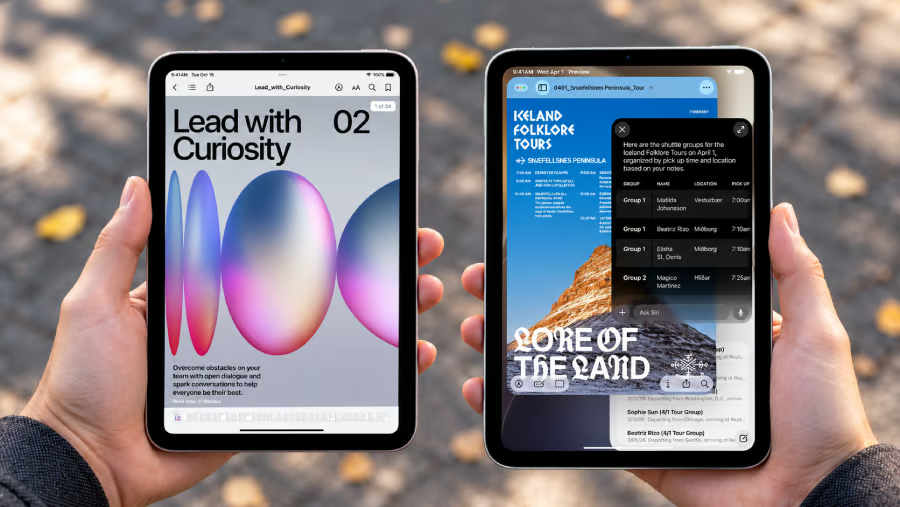
Apple finally gave the iPad mini an OLED display, but whether that makes it worth $699 is another question.
Announced Oct. 26, the new compact tablet pairs an 8.5-inch OLED screen with the A20 Pro chip, a lighter design, faster charging, and water resistance. Apple also moved the front camera to the landscape edge, yet still rates battery life at 10 hours, the same as the 2024 A17 Pro model.
For existing owners, the question is whether those improvements justify replacing a tablet that still handles everyday tasks. First-time buyers face a different decision: pay more for the latest hardware or look for a discounted A17 Pro model.
- iPad mini OLED vs A17 Pro: Specs compared
- OLED looks better, but the screen still runs at 60Hz
- A20 Pro offers more power, with a storage catch
- Camera, charging, and portability may matter more
- Which iPad mini is worth buying?
- What to check before upgrading your iPad mini
- The verdict: Is the OLED iPad mini worth upgrading to?
iPad mini OLED vs A17 Pro: Specs compared
According to Apple’s announcement, the new iPad mini starts at $699 for 128GB with Wi-Fi or $849 with cellular connectivity. Preorders begin Oct. 28, ahead of its Nov. 6 release.
The A17 Pro model launched at $499 in 2024 before its starting price climbed to $599 in June 2026, MacRumors reported. Apple has replaced the older model, but remaining retailer stock may offer better value.
| Feature | iPad mini OLED (A20 Pro) | iPad mini (A17 Pro) |
|---|---|---|
| Display | 8.5-inch OLED | 8.3-inch LCD |
| Refresh rate | 60Hz | 60Hz |
| SDR brightness | 600 nits | 500 nits |
| Processor | A20 Pro | A17 Pro |
| Storage | 128GB, 256GB, 512GB | 128GB, 256GB, 512GB |
| Weight (Wi-Fi) | 255g | 293g |
| Thickness | 5.4mm | 6.3mm |
| Water and dust resistance | IP67 | No published IP rating |
| Front camera | 12MP Center Stage, landscape | 12MP Center Stage, portrait |
| Connectivity | Wi-Fi 7 | Wi-Fi 6E |
| Battery rating | Up to 10 hours | Up to 10 hours |
| Apple Pencil | Pro and USB-C models | Pro and USB-C models |
| US starting price | $699 | $599 before replacement |
The $599 figure reflects the A17 Pro model’s final listed starting price before replacement, not necessarily what buyers will pay today. Remaining stock may be discounted, so the actual price difference could be larger than the $100 gap shown here.
The figures come from Apple’s new iPad mini specifications and its A17 Pro specifications. Both generations support Apple Intelligence and Apple Pencil Pro, so existing owners won’t lose those capabilities by sticking with the older tablet.
OLED looks better, but the screen still runs at 60Hz
The display is the most obvious reason to upgrade.
OLED can produce deeper blacks and stronger contrast than the A17 Pro’s LCD panel, making photographs, films, and illustrations look richer. The viewing area is also slightly larger, which may help when you’re reading or sketching on a small tablet.
There’s a limit to the improvement, though. Standard brightness rises from 500 to 600 nits, while Apple’s headline 1,200-nit figure applies to peak HDR content rather than everyday browsing. Both models also refresh at 60Hz, so you won’t get the smoother scrolling of a ProMotion iPad.
Apple offers optional nano-texture glass to reduce glare, but it adds $100 and is limited to 256GB and 512GB versions. As MacRumors noted, the cheapest Wi-Fi configuration with that option costs $899.
If you draw, review photos, or work under bright lighting, OLED could be worth paying for. If your A17 Pro spends most of its time displaying emails and notes indoors, the screen upgrade alone is a tougher sell.
A20 Pro offers more power, with a storage catch
Apple has confirmed the A20 Pro upgrade previously rumored for the iPad mini. The company claims the chip delivers up to 60% faster multithreaded CPU performance, 2.7 times faster graphics, and 4.5 times faster AI performance than the A17 Pro.
Those figures come from Apple’s testing, so it’s too early to say how much faster everyday applications will feel.
There’s also a catch: the chip configuration depends on how much storage you buy. The 128GB and 256GB models have a five-core CPU and one 16-core Neural Engine. According to 9to5Mac, only the 512GB version includes a six-core CPU and dual 16-core Neural Engines. The Wi-Fi model starts at $999, making it $300 more expensive than the entry-level version.
For demanding graphics work or supported on-device AI applications, the additional processing hardware could be useful, although independent testing is still needed. But if your A17 Pro already handles documents, video calls, and creative apps without slowing down, a newer processor alone probably isn’t enough reason to upgrade.
Camera, charging, and portability may matter more
Not every worthwhile upgrade shows up in a benchmark. Three smaller changes could affect how comfortably you use the iPad mini every day:
- Video calls and scanning: The 12MP Center Stage camera now sits on the landscape edge, a more natural position when the tablet is on a stand. An Adaptive True Tone flash also aims to improve document scans, useful for capturing receipts or paperwork away from a desk.
- Weight and durability: The Wi-Fi version drops from 293g to 255g and is just 5.4mm thick. Apple also adds an IP67 rating for dust and water resistance, although that doesn’t make the tablet waterproof, and protection can decline with wear.
- Charging and battery: Apple says a compatible 35W-or-higher adapter can charge the new model to roughly 50% in 30 minutes. The adapter is sold separately, and both generations still carry the same advertised 10-hour battery rating.
If you travel frequently, carry your tablet through a workday, or join meetings with it propped horizontally, those changes may be easier to appreciate than extra processing power. Anyone upgrading specifically for longer battery life should wait for independent tests rather than assume the OLED model lasts longer.
Which iPad mini is worth buying?
The newer model is more capable overall, but the best value depends on what you already own and what you do with it.
| Buyer | Better choice | Main reason |
|---|---|---|
| Existing A17 Pro owner | Keep the A17 Pro | Similar everyday features and battery rating |
| First-time buyer | OLED A20 Pro | Better display and newer hardware |
| Artist or photographer | Consider OLED | Contrast and optional glare reduction |
| Remote worker | Depends on use | Landscape camera and portability |
| Budget shopper | Discounted A17 Pro | Potentially lower purchase cost |
| Demanding on-device AI user | Compare 512GB OLED | Additional processing hardware |
A first-time buyer who uses the iPad mini daily may get enough from the improved display, lighter design, and updated hardware to justify the higher price. Existing A17 Pro owners face a different calculation: if their tablets still work smoothly, there’s no urgent reason to replace them.
If editing spreadsheets or switching between apps already feels cramped on the iPad mini, a bigger screen might make more sense than upgrading to OLED. Larger tablets like the Galaxy Tab S12 Ultra and iPad Pro offer more room to work, especially if multitasking is part of your daily routine.
Must-read Apple coverage
- iOS 27 AI Shortcuts: What Changed and 5 Useful Things to Try
- iPhone Duo Camera Tricks: Smart Take, Kid Cue, Duo Preview, and More
- macOS 27 Cheat Sheet: Compatible Macs, Siri AI, Features and What Changed
- Common Mistakes When Using One Apple Account on Multiple iPhones
- 9 Hidden macOS Features That Feel Like Productivity Hacks
What to check before upgrading your iPad mini
Before preordering, consider whether your current iPad mini is actually holding you back. A few checks can help you decide whether the new model is worth the expense:
- Performance and battery condition: If demanding applications run slowly or your battery no longer lasts through the day, check whether upgrading makes sense or whether a battery service could extend your current tablet’s usefulness.
- Total upgrade cost: Compare prices across storage configurations and factor in extras such as nano-texture glass, a compatible case, or a faster charger. Trade-in offers and retailer return policies are also worth checking, especially if you’re considering a preorder.
- Compatibility with your setup: Both generations support Apple Pencil Pro, but older cases may not fit the redesigned model. If you rely on specific apps or accessories for work, confirm compatibility before replacing your device.
Businesses purchasing iPad minis for employees should take a similar approach. Testing the OLED model with a small group can help determine whether it works with existing applications, VPN connections, and device management policies before committing to a larger purchase.
The verdict: Is the OLED iPad mini worth upgrading to?
For first-time buyers, the OLED iPad mini is an attractive option, particularly if you plan to use it regularly for work, reading, or creative projects. Its improved display, lighter design, and updated hardware make a compelling package, although a discounted A17 Pro could offer better value for less demanding users.
Existing A17 Pro owners have less reason to rush. The older tablet still supports Apple Intelligence and Apple Pencil Pro, and it remains capable of handling common productivity tasks. Unless there’s something about your current device that you find limiting, the OLED model may not offer enough to justify replacing it.
Independent performance and battery testing after the Nov. 6 release should provide a clearer picture of whether the upgrades justify the cost.
Those performance gains may matter most in demanding creative applications, graphics-heavy games, and software that takes advantage of the newer Neural Engine. Everyday tasks such as browsing, reading, and taking notes may feel much less different, particularly if the A17 Pro already runs them smoothly.
Also read: If you’re weighing a tablet against a larger phone, TechRepublic’s iPhone Duo vs iPad mini comparison examines the trade-offs of carrying one device instead of two.