


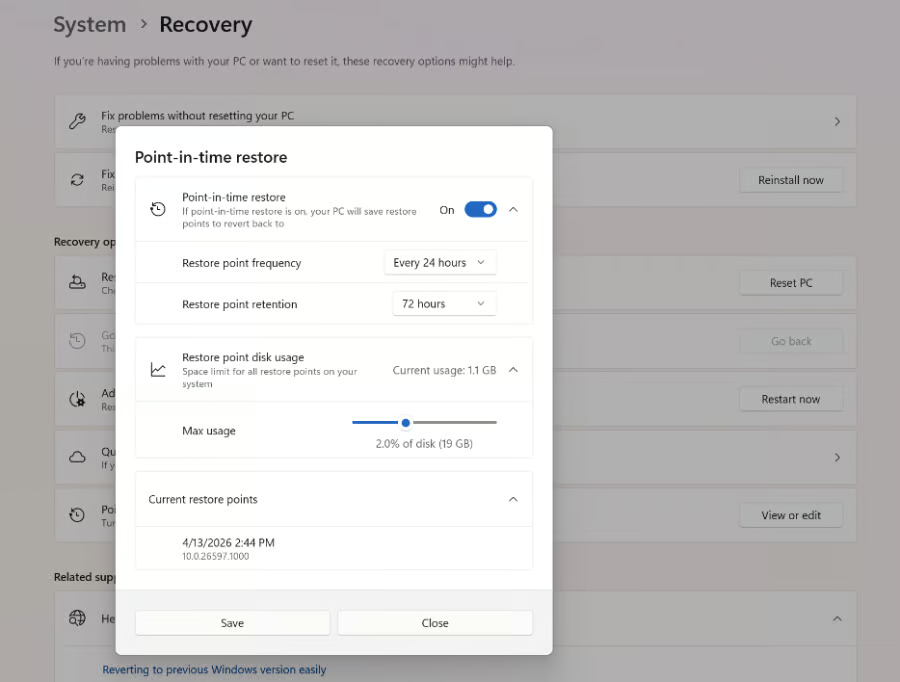
Microsoft has officially made its new Point-in-Time Restore feature generally available for Windows 11, introducing a built-in recovery tool that lets users roll a PC back to an earlier state after software problems, failed updates, driver issues, or system corruption.
The feature is now available on Windows 11 version 24H2 and later across Home, Pro, and Enterprise editions. It is part of Microsoft’s broader Windows resiliency initiative, which aims to reduce downtime for both consumers and businesses.
Announcing the release, Microsoft’s Lia Vargas said, “Every minute of downtime matters,” adding that IT departments often face lengthy troubleshooting sessions or complete system rebuilds when devices fail.
How point-in-time restore works
Point-in-Time Restore automatically creates local recovery snapshots on a regular schedule; by default, Windows captures a restore point every 24 hours. Each snapshot stores the operating system, installed applications, settings, configurations, and local user files.
If something goes wrong, users can restore the PC to one of those saved states through the Windows Recovery Environment (WinRE), allowing the system to return to its previous condition in minutes rather than requiring a fresh installation.
Microsoft described the feature as being designed to “recover in minutes instead of hours,” making it suitable for everything from faulty Windows updates and broken drivers to application corruption or configuration mistakes. Restore points are kept for up to 72 hours by default and use up to 2% of available disk space, although Enterprise administrators can customize those settings.
More capable than System Restore
Although Point-in-Time Restore relies on the same Volume Shadow Copy Service (VSS) technology as the long-standing System Restore feature, Microsoft says the new tool is considerably more comprehensive.
Unlike System Restore, it includes local user files, integrates directly into the Windows Settings app, follows stricter retention policies to improve reliability, and is designed to work with modern Windows management tools. Microsoft also plans to add remote recovery through Intune in a future update, allowing IT administrators to trigger restores without requiring physical access to affected devices.
Since entering public preview, Microsoft says the feature has been enabled on more than two million devices before reaching general availability.
More Microsoft news
- Inside Microsoft’s Real-Time War Against Cybersecurity Threats
- Project Ire: Microsoft Tests AI That Autonomously Detects Malware
- Microsoft Targets ‘Critical AI Talent’ from Meta to Dominate Next AI Breakthroughs
- Windows 10 Support Ends Soon, Though Extended Security Updates Offers Are Available
Important limitations
The recovery process is not without tradeoffs.
Any files, applications, or settings created after the selected restore point will be removed during the rollback. Microsoft recommends storing important files in cloud services to reduce the risk of data loss. BitLocker-protected devices also require a recovery key before the restore can begin. For now, restores must be initiated locally from the Windows Recovery Environment, though Microsoft has confirmed that remote initiation is planned for a future Intune release.
Why it matters
Windows recovery has traditionally meant lengthy troubleshooting or reinstalling the operating system after major failures. By creating automatic snapshots that include both applications and user data, Microsoft aims to make recovery significantly less disruptive for individual users and organizations alike.
The timing is notable as Microsoft continues expanding its Windows recovery toolkit. Alongside Point-in-Time Restore, the company is testing Cloud Rebuild, a feature that can reinstall Windows from cloud-hosted images, as well as other resiliency tools to reduce downtime after system failures.
Point-in-Time Restore also reflects Microsoft’s growing focus on resilience rather than simply on preventing failures. As Windows devices become more dependent on frequent updates, drivers, and enterprise management policies, the ability to quickly undo problematic changes has become increasingly valuable.
For businesses, the feature could reduce support costs and employee downtime after failed updates or software deployments. For consumers, it offers a more complete safety net than the aging System Restore feature. However, its relatively short default retention period and the loss of any changes made after a restore point mean it should complement, not replace, regular backups and cloud storage.
Also read: For more on Microsoft’s latest security research, read how attackers are targeting hotel staff in Japan with convincing phishing emails disguised as guest complaints.