

Nonprofit organizations play a unique and crucial role in society. But just like any company, 501(c)(3) organizations still need to pay their employees, calculate and remit payroll taxes, and budget for payroll costs.
For nonprofits, payroll software has to do more than pay employees and calculate taxes. It should keep labor costs organized and produce clean records for grant reporting, board oversight, audits, and the general ledger. Messy payroll data can distort program costs and force lean finance teams to rebuild reports by hand.
For this guide, I compared popular nonprofit payroll software based on pricing, payroll and tax administration, reporting, accounting connections, HR support, and day-to-day usability. The best choice depends less on the longest feature list and more on whether the platform fits your funding structure, locations, and accounting workflow.
Here are my top picks:
| Software | Best for | Starter monthly pricing |
|---|---|---|
| OnPay | Value for price | $49 base fee + $6 per payee |
| SurePayroll by Paychex | Affordable software | $29 base fee + $7 per payee |
| Gusto | Ease of use | $49 base fee + $6 per payee |
| Rippling | Payroll flexibility | Call for quote |
| Justworks | PEO for nonprofits | $79 per payee |
| QuickBooks Workforce (formerly QuickBooks Payroll) | QuickBooks Online integration | $50 base fee + $7 per payee |
| Paychex | Payroll tax compliance support | Call for quote |
Best payroll for nonprofits compared
| Software | Multistate payroll | Time tracking | Built-in HR tools | Non-profit accounting integrations |
|---|---|---|---|---|
| OnPay | Yes | Via integrations | Standard | Accounting tools only |
| SurePayroll by Paychex | Costs extra | Via integration + costs extra | Basic | Accounting tools only |
| Gusto | In higher tiers | In higher tiers | Standard | Yes |
| Rippling | Yes | Paid add-on | Extensive | Yes |
| Justworks | Yes | Paid add-on | Standard | Yes |
| QuickBooks Workforce (formerly QuickBooks Payroll) | Yes | In higher tiers | Standard | Native QuickBooks accounting |
| Paychex | Yes | Paid add-on | Extensive | Accounting tools only |
OnPay: Best value for price
Our rating: 4.7 out of 5
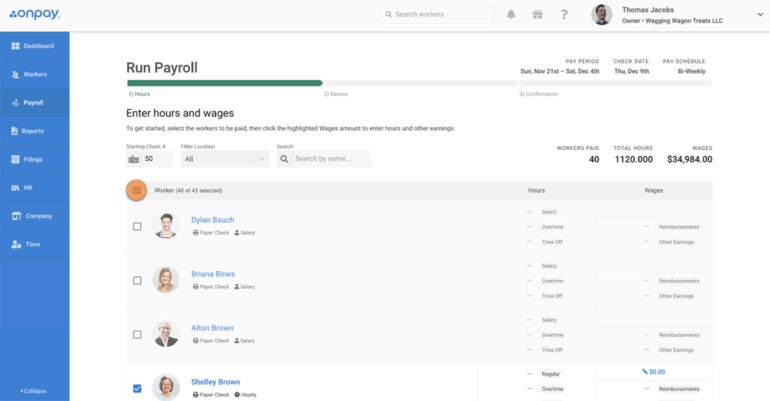
OnPay is my top value pick for nonprofits that want capable payroll software without a complicated plan structure. It works particularly well for small nonprofit organizations that need to control administrative spending while still giving a lean payroll or finance team the tools to pay employees accurately and manage routine payroll responsibilities.
Why I like OnPay
In my experience, OnPay is at least as user-friendly as Gusto. OnPay’s team of professionals will set up your payroll software for you at no cost, and the payroll company’s excellent customer service team is available at extended hours to ensure you can resolve any payroll problems quickly and easily.
OnPay has fewer fees and hidden costs than just about any nonprofit payroll service on our list.
You don’t pay extra for just about anything, including wage garnishment, W-2 and 1099 form generation, accounting software integration, and multi-state tax filing — all payroll features that most other services charge extra for.
OnPay brings the same low-cost, high-value mentality to its nonprofit features as well. For instance, unlike Paychex, which charges extra for federal and state unemployment tax administration, OnPay helps nonprofits manage FUTA exemptions for 501(c)(3) organizations at no extra charge.
Learn more by reading our OnPay review.
Pricing
OnPay has just one payroll plan that costs $49 per month plus $6 per employee paid per month. Every organization that uses OnPay gets the same nonprofit payroll features. There are no hidden fees, and the only price difference is determined by the number of people you pay.
If you want to add more tools to manage paid time off, onboarding workflows, documents, and HR insights, OnPay has an HR add-on, which costs $15 per month plus $2 per employee monthly. It even comes with equipment and software provisioning tools, org chats, HR insights, and a searchable employee directory.
Visit OnPay
OnPay top nonprofit payroll features
- Automatic tax administration.
- Optional employee benefits in all 50 states.
- Built-in, fee-free benefits administration.
- Accounting and time-tracking software integrations.
- Manages FUTA exemptions for 501(c)(3) organizations.
OnPay pros and cons
| Pros | Cons |
|---|---|
|
|
SurePayroll by Paychex: Most affordable software

Our rating: 4.7 out of 5
If affordability is your top payroll consideration, SurePayroll deserves a close look.
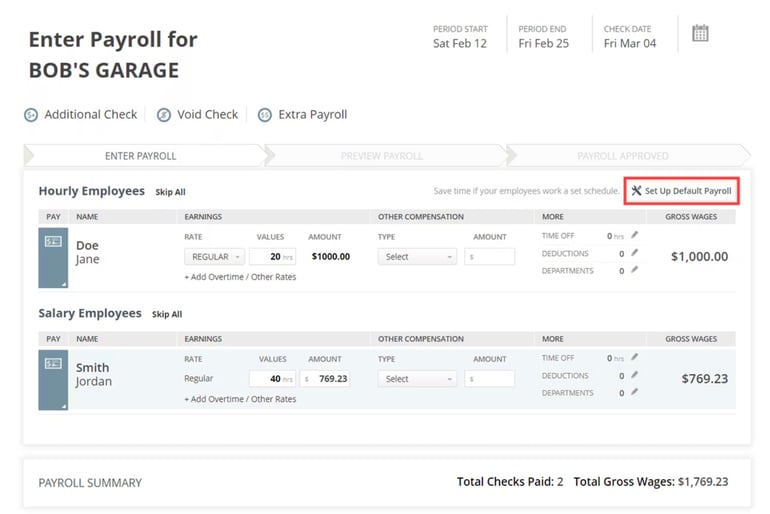
It has a full-service option that handles payroll calculations, including tax payments and filings. For a lower fee, its self-service plan computes payroll taxes while leaving deposits and filings to your organization, if that’s your preference.
While it offers budget-friendly plans, SurePayroll is only best for nonprofits with straightforward pay processing needs. If your organization expects rapid growth, more complex reporting, or broader HR support, you may outgrow it faster than a more scalable platform like Gusto, Paychex, or Rippling.
Why I like SurePayroll
Both SurePayroll’s self-service and full-service options are among the cheapest payroll plans on the market. That said, SurePayroll doesn’t sacrifice features and quality for the sake of price.
Using SurePayroll will ensure your employees can access top-notch benefits without requiring you to devote more of your budget than necessary to running payroll.
Our SurePayroll by Paychex review can tell you more.
Pricing
SurePayroll has only two plans, which means it isn’t particularly scalable for growing organizations. However, it’s nearly impossible to beat SurePayroll by Paychex’s low monthly and per-payee fees:
- Self-Service Payroll: $20/month + $4/employee/month.
- Full-Service Payroll: $29/month + $7/employee/month.
You also have to pay extra for additional features, such as:
- Multi-state payroll: $9.99/month
- Accounting software integration: $4.99/month
- Timeclock software integration: Starts at $5/month + $3/employee
Visit SurePayroll by Paychex
SurePayroll top nonprofit payroll features
- Built-in benefits administration with optional employee benefits.
- W-2 and 1099 form generation.
- Affordable multi-state payroll available as an add-on.
- Time-tracking and accounting software integrations.
SurePayroll pros and cons
| Pros | Cons |
|---|---|
|
|
Gusto: Best for ease of use

Our rating: 4.6 out of 5
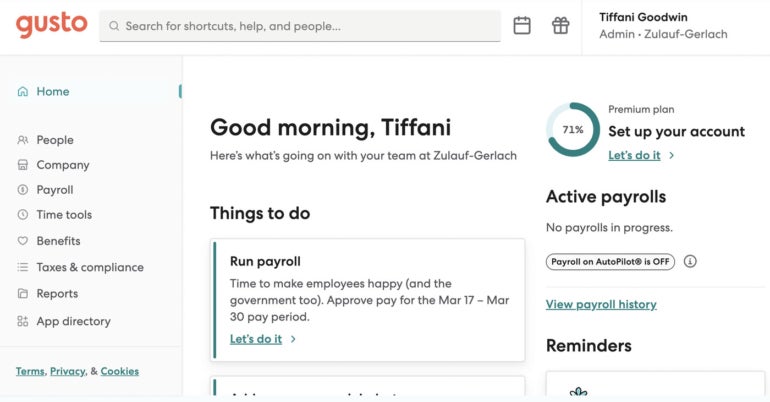
Gusto is one of the best payroll software services for small businesses, large corporations, and nonprofits alike. For one thing, the software is extremely accessible. Whether you have a lot of practice paying employees or your organization just hired its first W-2 employee, it won’t take you long to get the hang of processing payroll with Gusto.
Just how simple is Gusto for nonprofits? I’ve found that the only main thing you have to do is enter your employees’ pay information. From there, you can set payroll to run automatically. Gusto will pay your employees on a pre-set pay schedule via direct deposit, calculate and deduct payroll taxes, and remit those taxes to the government on your behalf.
Why I like Gusto
Frankly, I find it hard to find nonprofit payroll software more convenient, intuitive, and user-friendly than Gusto. If you’re anxious about processing payroll accurately, Gusto is the perfect software to start with.
What makes Gusto stand out is how little payroll knowledge it assumes from the user. That matters for small nonprofits where payroll may sit with an executive director, office manager, bookkeeper, or finance lead who already wears several hats. The easier the system is to run correctly, the lower the risk of missed steps, delayed payments, or manual workarounds.
Plus, as one of the most popular payroll providers in the United States, Gusto syncs with nonprofit-friendly business software, including accounting programs and nonprofit-specific software like Aplos and MonkeyPod.
Our Gusto review can tell you more.
Pricing
Gusto lists pricing for four of its plans online:
- Simple: $49/month + $6/contractor or employee/month.
- Plus: $80/month + $12/contractor or employee/month.
- Premium: $180/month + $22/contractor or employee/month.
- Contractor Only: $35/month + $6/contractor/month.
Gusto also has a wide range of products if you need employee benefits, faster payment options, and priority support, including global payroll and hiring tools. Visit its website to view pricing details.
Visit Gusto
Gusto top nonprofit payroll features
- Aplos and MonkeyPod integrations + dozens of other third-party software integrations.
- Optional health insurance and retirement plan benefits through Gusto’s brokerage.
- Built-in benefits administration.
- International contractor payment add-on for global organizations.
- Employee-friendly features like self-service onboarding, financial benefits and insurance enrollment.
Pros and cons
| Pros | Cons |
|---|---|
|
|
Rippling: Best for payroll flexibility
Our rating: 4.3 out of 5
Rippling is a domestic and global HR and payroll platform for both for-profit and nonprofit organizations. From tax deductions, PTO, and 401(k) calculations to HSA or FSA deductions — along with filing payroll taxes across all 50 states and internationally — Rippling takes care of compliance activities for you.
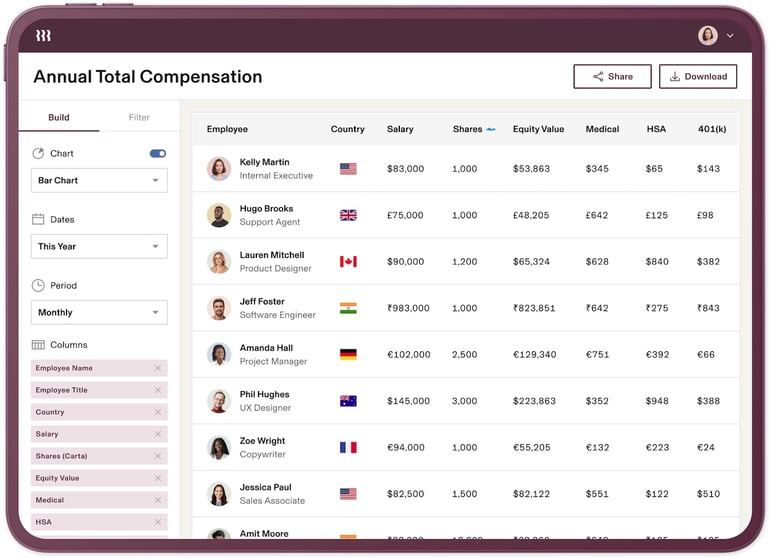
Crucially for nonprofits, Rippling lets users customize dozens of prebuilt reports. From the payroll dashboards, you can see, analyze, and share these reports across different teams and departments for seamless decision-making.
Why I like Rippling
Rippling comes with a minimalist, user-first design that offers nonprofits a payroll system they can set up and start using without difficulty.
Additionally, what I found unique about Rippling among the nonprofit payroll services on our list is that it’s modular. Organizations that use Rippling can build their own HR, payroll, IT, and financial plans from the ground up.
It’s easy to start off using Rippling payroll when yours is a small one- or two-employee organization, and it’s just as easy to scale up in features as your nonprofit expands to reach even more individuals.
Learn more by reading our Rippling review.
Pricing
Similar to Paychex, you have to call Rippling to get a quote. The provider works with you to create a package that fits your payroll needs. However, it can become pricey as you add more modules or features.
Visit Rippling
Rippling top nonprofit payroll features
- Over 600 third-party software integrations.
- Unified employee database for managing employee data automatically across all modules.
- Managing and filing payroll taxes across the U.S. + optional global payroll capability.
- Local currency payments for global contractors and employees.
Rippling pros and cons
| Pros | Cons |
|---|---|
|
|
ALSO READ: Why Does My Business Need a Payroll Service?
Justworks: Best PEO solution

Our rating: 4.2 out of 5
Justworks is one of the top PEO companies, or professional employer organizations, in the U.S. These co-employment companies partner with nonprofits and other organizations, taking care of their HR and payroll tasks and leaving them free to focus on their organization’s daily operations and overall mission.
Why I like Justworks
Professional employer organizations aren’t right for every nonprofit, but you might find them useful if you’re spending more time dealing with payroll, benefits, and day-to-day HR tasks than you can afford.
While Justworks isn’t the only PEO that works with nonprofits, it’s one of the best thanks to its low per-employee starting price, transparent pricing, and fully automated payroll. I would compare it as an outsourced HR and payroll operating model, not as ordinary payroll software. The PEO relationship adds services and shared administrative responsibilities, which explains why its per-employee cost is higher than a software-only plan.
Our Justworks review can tell you more.
Pricing
Unlike most PEOs, Justworks lists its prices upfront. It’s a good pick for nonprofits, which have unique financial transparency requirements and donor obligations:
- PEO Basic: $79/employee/month.
- PEO Plus: $124/employee/month.
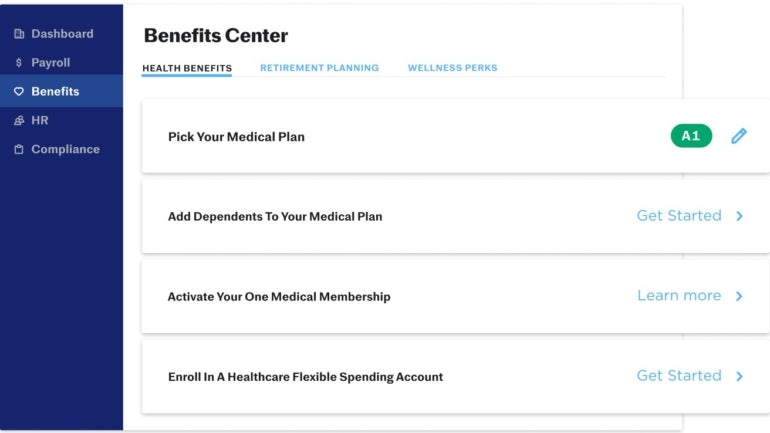
While both plans include the same payroll features, only the Plus plan includes benefits options, health advocacy services, COBRA administration, and access to mental health resources. For $8 per employee monthly, you can add time tracking tools to your plan.
Justworks also offers a standalone payroll module, which costs $50 plus $8 per employee monthly. Unlike the PEO plans, this option only includes tools to compliantly pay and onboard employees.
Visit Justworks
Justworks top nonprofit payroll features
- Enterprise-level benefits for nonprofit employees.
- 24/7 customer service.
- Thorough payroll reporting features.
- Well-reviewed mobile app for employees.
Justworks pros and cons
| Pros | Cons |
|---|---|
|
|
QuickBooks Workforce: Best QuickBooks Online integration

Our rating: 4.1 out of 5
QuickBooks Workforce, formerly QuickBooks Payroll, is Intuit’s cloud-based HR product. It goes hand in hand with QuickBooks Online, one of the most popular accounting software solutions around the globe.
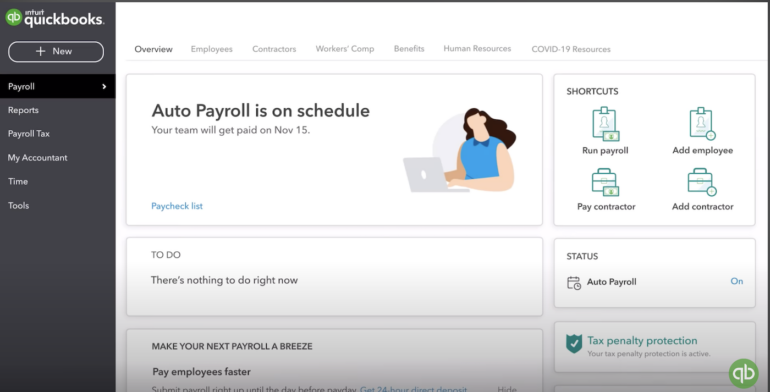
If you use both Intuit products, your QuickBooks Online general ledger will update automatically every time you run payroll.
You’ll always have the most up-to-date financial information at your fingertips, which is particularly crucial for nonprofit organizations that are uniquely accountable to donors and other stakeholders.
Why I like QuickBooks Workforce
Honestly, QuickBooks Workforce doesn’t have as many nonprofit-friendly features as most other payroll providers we reviewed here.
However, it does sync perfectly with QuickBooks Online — which, in my opinion, is one of the best accounting programs for nonprofits, large and small.
If you’re used to QuickBooks Online’s outstanding interface and worry about the learning curve you might get with another nonprofit software provider, QuickBooks Workforce is a natural next step.
Our QuickBooks Workforce review can tell you more.
Pricing
QuickBooks Workforce lists pricing for its three plans upfront and online:
- Workforce Payroll: $50/month + $7/employee/month.
- Workforce Premium: $88/month + $13/employee/month.
- Workforce Elite: $134/month + $17/employee/month.
The Workforce Payroll plan has the basic tools you need to manage payroll and employee data. Premium adds time tracking and broader HR tools. Elite adds expert setup and access to a tax penalty protection program, which covers penalties and interests of up to $25,000 per year.
Visit QuickBooks Workforce
QuickBooks Workforce top nonprofit payroll features
- Seamless integration with QuickBooks Online, one of the top accounting software products for nonprofits.
- Employee benefits administration.
- Optional employee benefits in all 50 states.
QuickBooks Workforce pros and cons
| Pros | Cons |
|---|---|
|
|
To learn more about QuickBooks’ accounting module, read our QuickBooks Online review.
Paychex: Best payroll tax compliance support
Our rating: 4 out of 5
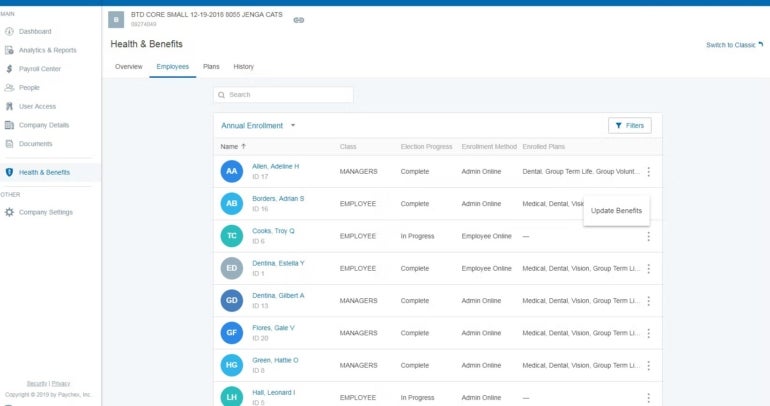
Paychex is one of the top payroll providers worldwide. Based on my experience, its software has a higher learning curve than Gusto, but it’s also equipped with more customizable reports and a much bigger HR library.
Paychex Flex also gives you many options for paying your employees, including via direct deposit, paycard, paper checks, and on-demand payment apps.
Why I like Paychex
Paychex’s payroll software, Paychex Flex, caters to small and midsize businesses as well as to nonprofits of all sizes. Its platform simplifies financial activities such as tracking donations, filing taxes, and recording expenditures for nonprofits.
In contrast to Gusto, which only issues compliance alerts with its highest-tier plan, Paychex keeps you on top of potential tax compliance issues with frequent alerts and useful reporting.
Our Paychex review can tell you more.
Pricing
While Paychex lists its plan details on its website, you have to call the provider to get a quote. For non-profits, this quote-based model can be helpful if you need payroll, tax compliance support, and benefits in one package. Note, however, that some features are paid add-ons, such as time tracking, HR analytics, and talent management tools.
Visit Paychex
Paychex top nonprofit payroll features
- Standout reporting features, including nonprofit-specific reports.
- Hundreds of integrations, including with nonprofit apps like Uncommon Giving.
- Wide range of HR tools and services.
- Tax compliance support.
- Fast direct deposit.
Paychex pros and cons
| Pros | Cons |
|---|---|
|
|
SEE: Why Does My Business Need a Payroll Service? (TechRepublic)
More payroll coverage
- A Complete Guide to Payroll Software
- The Best International Payroll Services
- The Best Payroll Software
- Choosing a payroll service: A guide for business leaders
- Verito vs. Rightworks: Which IT Provider Is Best for Your Firm?
Methodology
We follow a strict set of criteria outlined in our payroll methodology to determine which payroll software to review and to calculate our star ratings.
In addition to the criteria listed on our methodology page, we gave special emphasis to the following data points while reviewing the nonprofit payroll software on this list:
- Affordability.
- Built-in integrations with nonprofit-specific apps.
- Time-saving automations.
- 501(c)(3)-specific reporting features.
We also use an in-house algorithm to calculate our star ratings which breaks down into the following formula:
- Pricing: Weighted to 25% of the total score.
- General payroll features: Weighted to 35% of the total score.
- Ease of use: Weighted to 15% of the total score.
- Customer service: Weighted to 15% of the total score.
- Our expert’s firsthand experience and personal opinion: Weighted to 10% of the total score.
We emphasized these factors because nonprofit payroll buyers often need more than basic payroll processing. Predictable pricing helps protect tight administrative budgets, accounting integrations support grant and board reporting, and automation reduces manual work for lean teams.
How to choose the best payroll software for your nonprofit
Payroll decisions are becoming more strategic as nonprofits face rising compensation pressure. Nonprofits saw an average salary increase of 4.77% in the 2025 NonProfit Times survey, matching for-profit industries for the first time in years.
As pay becomes more tied to retention, the right payroll for nonprofits software should support accurate pay, clean reporting, and reliable compliance without adding extra work. It also needs to fit your budget and the way your organization manages people, payroll, and finance.
Now that you know your nonprofit payroll service options, it’s time to start narrowing down your list. If you’re trying to choose between payroll software providers, here are the steps:
- Evaluate your needs and integrations: List your must-have features (tax filing, direct deposit, reporting) and check which systems (accounting, HR, donor management) the payroll software needs to integrate with.
- Map the accounting workflow: List the payroll data your finance team needs by grant, program, department, location, or funding source. Confirm whether the provider supports that structure natively or through an accounting integration.
- Test-drive the software: Sign up for a free trial or schedule a demo to see how the platform works day to day. During a demo, ask the vendor to split one employee’s wages across two programs and show the resulting payroll report and general-ledger entry. This reveals more than a standard dashboard tour.
- Evaluate ease of use: Confirm the interface is intuitive enough that you won’t waste time and resources figuring it out.
- Confirm essential payroll features: Ensure the platform has all the payroll features required to calculate taxes and pay your team accurately and on time.
- Review pricing and affordability: Make sure the software fits comfortably within your nonprofit’s budget.
- Check multi-user access and permissions: If others will use the platform, confirm they’ll find it easy too and that you can set admin permissions to protect employee data.
- Ask about nonprofit discounts: Even if not listed on the site, share your mission with a sales rep—many payroll software providers will offer discounts when asked.
I’d prioritize accounting fit and control clarity over the longest feature list. The best payroll software for nonprofits should make it easy to trace a payroll number from the employee record to the tax filing, program report, and general ledger.
ALSO SEE: The Payroll Mistakes Experts See Most Often (and How to Avoid Them)
Frequently asked questions
Do nonprofits need specialized payroll software?
Most nonprofits do not need software designed exclusively for tax-exempt organizations. A standard payroll platform can work if it applies the correct tax treatment and produces records that fit the nonprofit’s accounting and reporting process.
Do 501(c)(3) organizations pay payroll taxes?
Yes, 501(c)(3) nonprofits must pay payroll taxes. Payroll taxes include your employees’ federal and state income taxes and FICA taxes (Social Security and Medicare taxes). Nonprofit employers also pay the employer’s share of the employees’ FICA taxes.
Can nonprofit payroll software track labor costs by grant or program?
Some payroll systems can categorize wages by program or department, but grant-level reporting varies. In other cases, the accounting system handles the final allocation after payroll data is exported.
During the nonprofit payroll software demo, ask the vendor to demonstrate the exact workflow, including split-funded employees, employer taxes, benefits, and indirect costs. Confirm that the resulting records meet your grant-reporting and audit requirements.
How can payroll software help nonprofits?
Managing payroll can be time-consuming and complex, especially for organizations with limited resources that rely on volunteers, grants, and donors to stay afloat. Payroll software helps by automating payroll processes, minimizing tax compliance risk, and saving time so you can focus on your mission instead of on finances. Payroll software can also help you avoid common payroll mistakes that can result in unhappy employees, confused donors, and unwanted messages from the IRS.