

Predictive analytics tools are revolutionizing customer interactions by enabling businesses to anticipate needs and personalize outreach. In contact centers, sales teams, and service desks, these tools utilize machine learning to predict behavior and outcomes across voice, chat, and social media channels. This results in faster response times, improved routing, and increased customer satisfaction.
Whether you’re looking to forecast call volume, analyze sentiment across social channels, or personalize engagement through unified customer profiles, this guide is designed to help you find the tool that best fits your technical needs, team skills, and budget.
- Best overall predictive analytics software: Genesys Cloud CX
- Best for AI-driven contact centers: Five9
- Best for cross-channel sentiment analysis: Sprinklr Insights
- Best for predictive workforce optimization: NICE CXone
- Best for real-time automation: Talkdesk
- Best for customer journey orchestration: Twilio Segment
- Comparing the top predictive analytics tools of 2025
- Genesys Cloud CX: Best overall predictive analytics software
- Five9: Best for AI-driven contact centers
- Sprinklr Insights: Best for cross-channel sentiment analysis
- NICE CXone: Best for predictive workforce optimization
- Talkdesk CX Cloud: Best for real-time automation
- Twilio Segment: Best for customer journey orchestration
- How to choose predictive analytics tools
- Review methodology
- Frequently asked questions (FAQs)
Comparing the top predictive analytics tools of 2025
|
|||
|
|||
|
|||
|
|||
|
|||
|
Genesys Cloud CX: Best overall predictive analytics software
My rating: 4.39 out of 5
Genesys Cloud CX offers cloud-based contact center and customer experience (CX) services, utilizing predictive analytics to enhance communication outcomes across voice, chat, and digital channels.
For organizations managing large or dispersed communication teams, Genesys provides an integrated platform for analytics, engagement, and automation, helping to eliminate the need for multiple disconnected systems.
Why I chose Genesys Cloud CX
Genesys Cloud CX is my choice for the best overall predictive analytics software because it consistently delivers advanced forecasting and real-time AI guidance in a single, reliable package.
Its predictive routing feature utilizes machine learning to match customers with the best available agent based on performance data. At the same time, its AI workforce engagement management (WEM) automatically predicts staffing needs by analyzing historical interaction patterns.
For businesses running contact centers or customer support operations across multiple regions, Genesys also provides unmatched scalability and strong compliance coverage. However, while it offers enterprise-grade power, smaller teams may find the setup and pricing less accessible.
Therefore, it’s best suited for midsize to large enterprises that want to integrate predictive communication analytics directly into their daily operations rather than attaching it to a separate BI tool.
Pricing
- Named license
- CX 1: $75 per user/month, billed annually
- CX 2: $115 per user/month, billed annually
- CX 3: $155 per user/month, billed annually
- CX 4: $240 per user/month, billed annually
- Concurrent license
- CX 1: $110 per user/month, billed annually
- CX 2: $170 per user/month, billed annually
- CX 3: $230 per user/month, billed annually
- CX 4: $360 per user/month, billed annually
- AI experience tokens are required for certain features, and each organization receives 250 named and 350 concurrent tokens per month.
Features
- Intelligent routing that predicts customer interactions
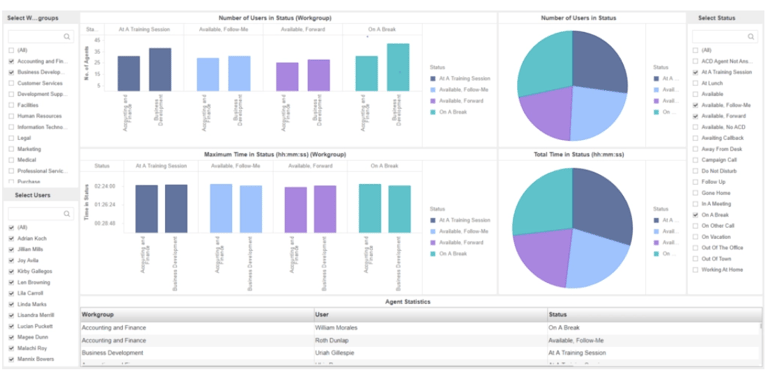
- Custom reporting and data visualizations
- Predictive engagement to analyze customer behavior
- Workforce forecasting and scheduling
- Omnichannel support for voice, digital, and social media
- Real-time sentiment tracking across channels
Pros and cons
| Pros | Cons |
|---|---|
| Comprehensive predictive feature set within one unified CX platform | Certain AI features require experience tokens |
| Uses data-driven insights to manage customer journeys | May require dedicated setup support for advanced features |
| Integrations with over 600 apps and business tools | Subscription costs can add up, depending on selected features |
Five9: Best for AI-driven contact centers

My rating: 4.27 out of 5
Five9 is a cloud-based contact center platform designed to enhance customer engagement through predictive analytics and automation. Specifically, Five9’s predictive dialing and agent-assist features help reduce wait times and improve call results, while integrated dashboards provide managers with real-time performance insights.
Overall, the platform strikes a balance between enterprise-level analytics and ease of use, although smaller teams may find its pricing structure somewhat high for entry-level needs.
Why I chose Five9
I chose Five9 Intelligence Cloud because it utilizes predictive analytics to enhance not only how businesses communicate but also how they manage call queues. Its AI-driven conversation intelligence monitors emotional tone, speaking pace, and key phrases to help agents tailor their responses in real time.
Five9 also provides managers with predictive visibility into customer behavior trends, enabling teams to proactively identify churn risk, escalation likelihood, or training opportunities.
The system integrates smoothly with CRMs like Salesforce and HubSpot, ensuring customer context follows the conversation across channels.
For organizations that view communication as a key differentiator in customer experience, Five9 provides a direct link between predictive insights and improved dialogue. But the lack of a free trial means that businesses should book a demo to get more hands-on experience with the platform before committing to a subscription.
Pricing
- Digital: $119 per seat, billed monthly
- Core: $159 per seat, billed monthly
- Premium, Optimum, and Ultimate: Contact sales for pricing
Features
- Predictive dialing and call routing
- Speech and sentiment analytics for customer interactions
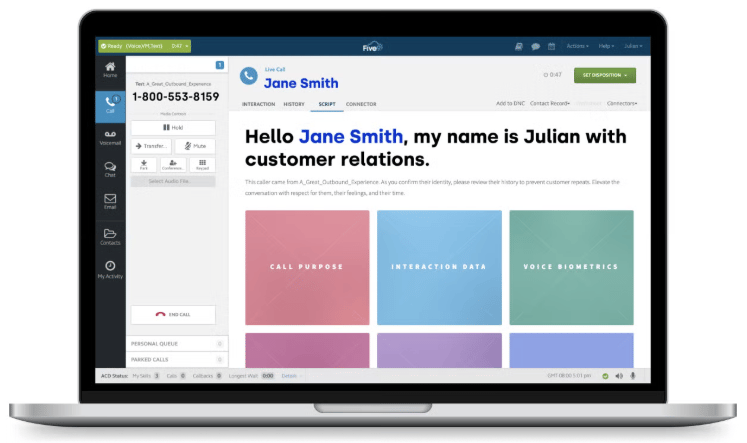
- Real-time performance dashboards and reporting
- Agent call center scripting and response development
- AI-driven quality management
- Forecasting for agent scheduling and workload distribution
Pros and cons
| Pros | Cons |
|---|---|
| Built specifically for predictive contact center operations | No free trial for subscriptions |
| Low-code workflow and task automation capabilities | Some analytics features require paid add-ons |
| Customer experience solutions supported by AI agents and assistance |
Sprinklr Insights: Best for cross-channel sentiment analysis

My rating: 4.25 out of 5
Sprinklr Insights is designed for organizations that want to understand and improve customer communication through social media, chat, email, and voice channels. The AI-driven analytics engine monitors sentiment, tone, and intent in real-time, helping teams anticipate customer reactions before problems arise.
The platform also gathers millions of data points to identify communication trends and brand risks, giving CX and marketing teams a unified view of how people feel and respond across channels.
Why I chose Sprinklr Insights
Sprinklr Insights made the list because it’s one of the few predictive analytics tools that connects sentiment analysis with a proactive communication strategy. Instead of focusing solely on internal call data, it helps businesses predict customer sentiment across social platforms, messaging apps, and support channels.
Using an AI-powered sentiment forecasting, the software identifies shifts in tone or emotion and flags opportunities for engagement or de-escalation before an agent intervenes.
Sprinklr’s unified dashboards and customizable reporting also facilitate collaboration among communication, marketing, and support teams on messaging strategies. Essentially, it converts scattered channel data into a single predictive signal that indicates the best times, places, and methods to engage with customers.
However, it’s not the most user-friendly option on the list, so teams new to predictive analytics might find it challenging to implement.
Pricing
- Contact sales for pricing.
Features
- Predictive sentiment analysis across social, chat, and voice channels
- Advanced listening with AI-generated summaries
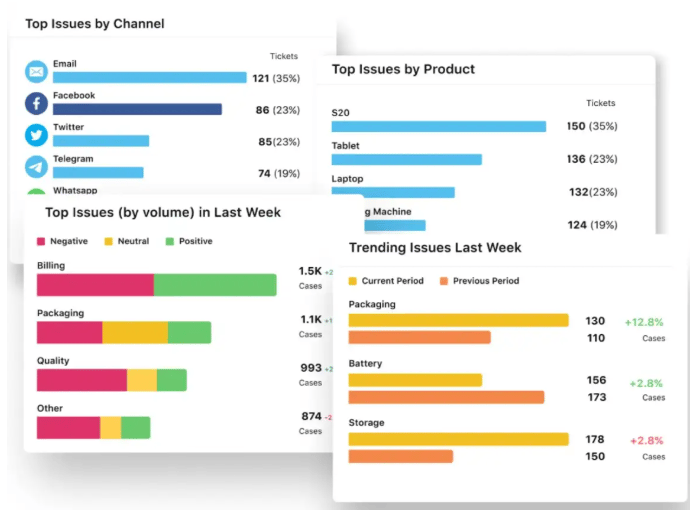
- Customizable dashboards for real-time communication insights
- Competitive benchmarking analysis across social platforms
- Predictive engagement scoring for proactive customer outreach
- Trend forecasting to identify emerging customer issues
- AI topic clustering for tone, emotion, and brand perception
Pros and cons
| Pros | Cons |
|---|---|
| Omnichannel customer support for over 30 channels | Lacks transparent pricing |
| Strong predictive sentiment and trend detection | Requires structured data feeds for optimal accuracy |
| Sprinklr Copilot for AI assistance | Can be difficult to set up and operate |
NICE CXone: Best for predictive workforce optimization
My rating: 4.24 out of 5
NICE CXone is a cloud-based platform that uses predictive analytics to enhance customer communication and team performance. It integrates behavioral routing, forecasting, and real-time reporting to make every customer interaction more efficient.
By analyzing voice and chat data, businesses can predict intent and modify their communication strategies in real time. Therefore, NICE CXone is ideal for midsize and enterprise teams seeking reliable, data-driven communication optimization.
Why I chose NICE CXone
NICE CXone connects predictive analytics directly to communication outcomes. With predictive behavioral routing, you can utilize customer profiles and historical performance data to pair each interaction with the most suitable agent for that situation, thereby improving both efficiency and tone.
The interaction analytics module goes deeper, using speech and text analysis to identify emotional cues and communication trends across thousands of calls or chats.
NICE’s predictive forecasting also benefits internal communication, as it anticipates staffing needs and automates schedule adjustments to maintain consistent response times.
For CX teams that manage high-volume customer communication, NICE CXone combines reliability, intelligence, and actionable insight in a way few competitors can match.
Pricing
CXone Mpower Plans
- Digital Agent: $71 per agent/month
- Voice Agent: $94 per agent/month
- Omnichannel Agent: $110 per agent/month
- Essential Suite: $135 per agent/month
- Core Suite: $169 per agent/month
- Complete Suite: $209 per agent/month
- Ultimate Suite: $249 per agent/month
Features
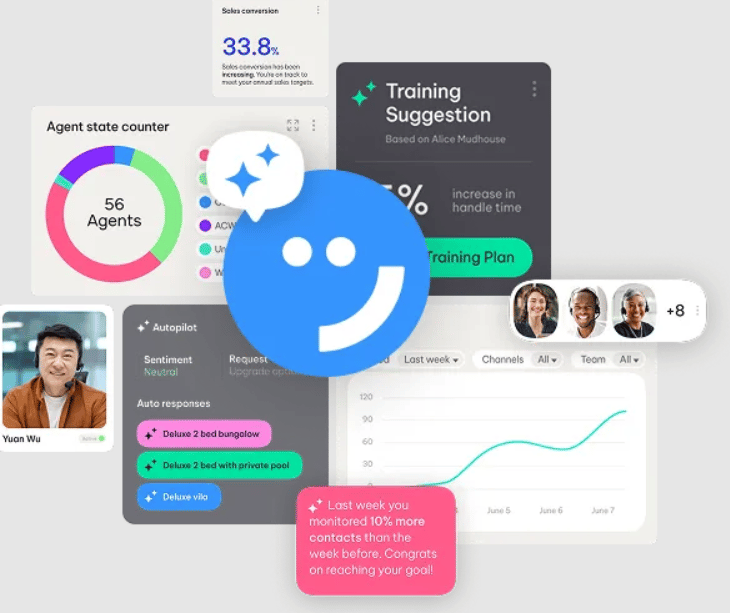
- Contextual and conversational customer feedback assessment
- Real-time sentiment and intent analysis
- Forecasting for communication and staffing needs
- Integrates with other unified communication platforms
- 90+ pre-built reports and customizable dashboards
- AI-driven coaching and performance management
Pros and cons
| Pros | Cons |
|---|---|
| Predictive analytics are integrated with quality management workflows | Slight learning curve for additional features |
| Omnichannel AI forecasting and agent scheduling | Some users have issues with reliable service |
| SmartReach includes proactive engagement with customers |
Talkdesk CX Cloud: Best for real-time automation
My rating: 4.13 out of 5
Talkdesk CX Cloud is a customer experience platform designed to turn predictive analytics into real-time communication improvements. By using AI to anticipate customer needs, it guides agents during live interactions and automates follow-up tasks across channels.
The platform’s predictive quality management and workflow automation tools help businesses respond faster and with greater accuracy. Therefore, Talkdesk is ideal for organizations that value agility and want a system that can act on data-driven insights.
Why I chose Talkdesk CX Cloud
I chose Talkdesk CX Cloud because its core platform already supports several communication-forward features out of the box without requiring extra modules. It offers omnichannel engagement, allowing seamless transitions between voice, text, chat, and digital channels while preserving context. It also provides self-service automation, which deflects simple queries and lets agents focus on higher-value interactions.
Additionally, Talkdesk offers workforce engagement tools and customer experience analytics as part of its standard package. These features help teams forecast call volume, track communication performance, and identify friction points without needing external systems.
Its flexible, low-code/no-code orchestration platform, called the Talkdesk Builder, allows for customization to match communication workflows. However, the absence of short-term contracts could be a barrier for businesses that are still exploring predictive analytics tools.
Pricing
- CX Cloud Digital Essentials: $85 per user/month
- CX Cloud Voice Essentials: $105 per user/month
- CX Cloud Elite: $165 per user/month
- Talkdesk also offers industry-specific editions of Experience Cloud, including solutions tailored to healthcare, retail, and financial services.
Features
- Omnichannel engagement (voice and digital channels)
- Self-service automation to deflect simple requests
- Workforce engagement tools for agents and managers
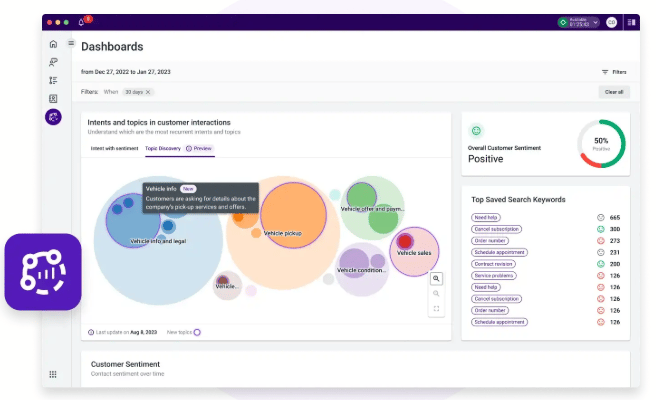
- Customer experience analytics for insight into communication trends
- Low-code/no-code orchestration with Talkdesk Builder
- Integrated platform with 70+ out-of-the-box integrations
Pros and cons
| Pros | Cons |
|---|---|
| Predictive automation improves customer engagement | Some advanced predictive features may require added AI modules |
| Interaction analytics with live and historical reporting | Standard customer support is limited |
| Proactive engagement that messages customers in advance | Subscriptions often require a three-year contract |
Twilio Segment: Best for customer journey orchestration
My rating: 4.09 out of 5
Twilio Segment is a customer data platform (CDP) designed to unify customer information and facilitate personalized communication across multiple channels. It assists businesses in collecting, cleaning, and activating data from multiple touchpoints, such as web, mobile, chat, and email, to develop more predictive engagement strategies.
By centralizing profiles and enabling event-based triggers, Segment turns raw communication data into actionable insights for marketing, sales, and support teams.
Why I chose Twilio Segment
I chose Twilio Segment because it bridges the gap between analytics and communication, providing teams with a single view of each customer. Its Connections product collects and standardizes data across platforms, ensuring every message, call, or campaign is backed by a consistent customer record.
This foundation enables predictive engagement, as Segment allows you to anticipate needs and deliver the right message on the right channel at the right time.
With the Engage features, teams can also build audiences and automatically send personalized communications. Using real-time tracking and event streaming, businesses can modify customer journeys as behaviors change. This makes Segment an excellent option for companies that want to use predictive analytics to customize outreach without managing separate analytics and messaging systems.
Pricing
- Free: $0 per month for 1,000 visitors/month and two data sources
- Team: Starts at $120/month for 10,000 visitors/month and unlimited data sources
- Business: Contact sales for custom pricing.
- Twilio Segment also offers customer data platform plans, which you can learn more about by contacting the sales team.
Features
- Unified customer profiles across communication channels
- Event tracking and data collection from web, mobile, and chat
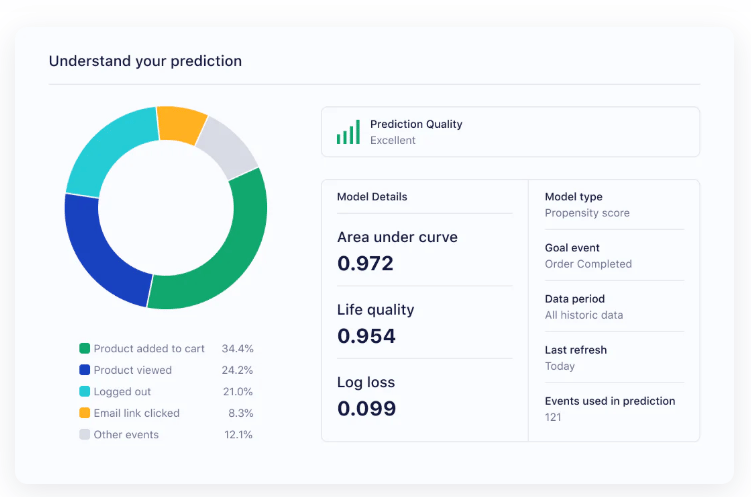
- Predictive audience segmentation for targeted communication
- Real-time data pipelines for automated engagement
- 700+ integrations with email, SMS, and in-app messaging platforms
- Data Warehouse for increased safety and security
Pros and cons
| Pros | Cons |
|---|---|
| Strong data foundation for predictive communication strategies | Requires technical setup for advanced workflows |
| Automated messaging for personalized customer interactions | Some users struggle with the Segment Protocols |
| Sync and segment audiences for more efficient journey mapping |
How to choose predictive analytics tools
As automation and artificial intelligence become essential components of modern workplaces, selecting the best predictive analytics tools begins with understanding your communication objectives and operational constraints. The best tool for one business might be too complex for another, so prioritize fit over features.
1. Define outcomes first
Before comparing vendors, it’s best to define what “success” means for your team. If you’re working with a customer experience team, you’ll be looking at metrics like deflection rate, CSAT improvement, or faster handling times.
But if you’re on a sales or marketing team, your priorities shift to conversion lift, churn reduction, or engagement forecasting. Whether it’s for routing, sentiment, or next-best-action, each of these metrics helps you figure out exactly what kind of predictive model you genuinely need.
2. Map your channels and data gravity
Choosing a predictive analytics tool that is closest to your system of record reduces latency and prevents data synchronization issues. Therefore, you should identify where your customer data naturally resides, such as in a contact center, CRM, CDP, or email automation platform. For example, a CCaaS-native solution works well for a call center, while a CDP-based tool may be better suited for omnichannel marketing.
3. Set real-time requirements
If your teams need instant agent prompts or routing predictions, look for tools with sub-second inference times. Batch-mode forecasting may suffice for scheduling or churn analysis, but can’t drive live interactions. Ask vendors for their average prediction latency and SLA guarantees.
4. Match to team skill sets
When assessing predictive analytics tools, consider your team’s current expertise. If you have a small operations team, you’ll gain more benefit from no-code dashboards and guided playbooks.
On the other hand, if you lead a larger IT or data science team, you can make use of tools with open APIs and model export options. Keep in mind that how easily your team can use a tool often influences its adoption more than the accuracy of the model.
5. Prioritize compliance and governance
While it might be easy to overlook, prioritizing data privacy and compliance is essential. You must ensure that the platform you select supports PII masking and consent tracking, thereby protecting sensitive information, such as recordings, transcripts, and user profiles.
You should also consider regional data storage options, verifying that the solution aligns with relevant regulations, such as GDPR, CCPA, and the upcoming AI Act readiness requirements.
Finally, to avoid any data governance challenges, look for explainability or audit features in any AI-driven decisions, providing clear insights into how those decisions are made.
6. Calculate the total cost of ownership (TCO)
Remember that the sticker price is just the beginning. You’ll need to factor in the time and resources required for training your team and implementing the solution, which can significantly impact your overall investment.
Additionally, be mindful of ongoing inference costs, such as API calls and compute time, as well as the storage and egress fees associated with your historical data. To effectively manage these expenses, prioritize tools that offer usage alerts and the ability to auto-suspend idle workloads, giving you greater control over your budget.
Review methodology
For this buyer’s guide, I focused on how each platform turns data into communication improvements that matter in day-to-day business operations. I looked for predictive analytics tools that go beyond reporting, such as those that forecast call volume, sentiment, or workforce engagement trends and then help teams act on those insights in real-time.
Each product was evaluated across several dimensions: core predictive accuracy and communication-specific functionality, pricing transparency, ease of deployment, and scalability for small to midsize tech teams. I also examined how well each integrates with CRMs, CCaaS, and CDPs, since interoperability often defines real business value.
I weighted predictive performance and business functionality most heavily, followed by affordability, usability, and vendor reliability. Pricing information and features were sourced from vendor websites and verified, where possible, through documentation and customer feedback.
Finally, I assigned an expert score based on my own assessment of overall usability, implementation effort, and total cost of ownership. The resulting ratings aim to provide a clear understanding of how each tool performs in real-world communication settings and the best uses for predictive analytics across various business use cases.
Frequently asked questions (FAQs)
Do predictive analytics tools integrate with our existing CCaaS or CRM?
Yes — most predictive analytics tools integrate directly with popular CRMs, CCaaS, and CDPs like Salesforce, HubSpot, Microsoft Dynamics, and ServiceNow. Confirm whether integrations are included in base pricing or require paid APIs.
What data quality is required for accurate predictions?
The accuracy of predictive analytics depends on the quality and quantity of your historical data. Six months or more of consistent interaction data, such as calls, chats, or email threads, is typically sufficient to train models that are useful.
What happens if real-time predictions time out or fail?
Reliable platforms use fallback logic to maintain service continuity. For example, routing tools may default to standard call distribution rules or cached historical patterns if live inference fails. When evaluating vendors, consider average prediction latency, uptime SLAs, and backup mechanisms. The best providers clearly document how they manage latency and failover events.
Can we export models and data if we switch vendors?
Yes, but portability varies. Cloud-native tools, such as Twilio Segment or Talkdesk, offer API-based data export, whereas CCaaS suites may require vendor assistance. Check for data ownership clauses before signing.