

Enterprise VPN solutions help organizations secure remote access to internal networks, cloud applications, and business-critical resources. As hybrid work, cloud adoption, bring-your-own-device policies, and distributed teams continue to expand, businesses need more than a basic encrypted tunnel. They need secure access tools that support strong authentication, centralized management, endpoint visibility, policy enforcement, and reliable connectivity across devices and locations.
While some businesses still need a traditional remote-access VPN for employees connecting to private networks, others may prefer a zero-trust network access solution that grants access to specific applications rather than to the full network. Security teams should also consider whether they need endpoint protection, log reporting, device posture checks, secure web access, or integration with existing firewalls and identity providers.
To help narrow the options, I compared top enterprise VPN and secure remote access solutions based on security features, deployment flexibility, and overall fit for enterprise users.
| Cisco Secure Client | ||
| Check Point Secure Remote Access | ||
| NordLayer | ||
| Proton VPN for Business | ||
| SonicWall Global VPN Client | ||
| Fortinet FortiClient | ||
| Palo Alto GlobalProtect | ||
| Zscaler Private Access |
Top enterprise VPN solutions comparison
The table below highlights key features of enterprise VPN solutions and how they compare.
| Cisco Secure Client | ||||
| Checkpoint Secure Remote Access | ||||
| NordLayer | ||||
| Proton VPN for Business | ||||
| SonicWall Global VPN Client | ||||
| Fortinet FortiClient | ||||
| Palo Alto Global Protect | ||||
| ZScaler Private Access | ||||
Cisco Secure Client: Best overall
Cisco Secure Client is my best overall pick for its wide range of security capabilities, quality customer support, and user-friendly experience. It uses multi-factor authentication and establishes a 24-hour usage window, after which the user’s connection drops and they must log in again.
A highlight for me is how it performs a system check during authentication to determine whether a workstation meets certain requirements, such as anti-malware software or corporate domain membership, before it permits access to the company network. This ensures only company-managed systems are allowed on the VPN.
I also like how Secure Client can block access to untrusted servers, display security products installed, and run diagnostics to gather information for analysis and troubleshooting. It also supports policy controls that can limit or disable split tunneling depending on how IT configures access.
Why I chose Cisco Secure Client
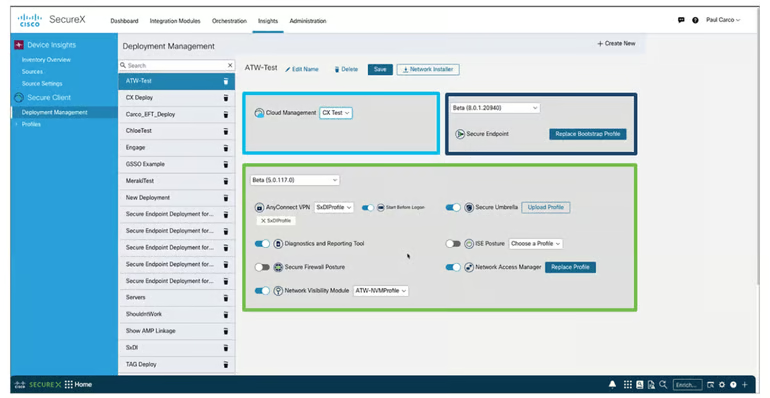
Cisco Secure Client, which includes the VPN capabilities many users know from Cisco AnyConnect, is my best overall pick for enterprise VPN and secure access. It gives employees secure access to corporate resources and private applications while helping IT teams manage endpoint security agents, access policies, and visibility from a more unified environment.
A highlight for me is that Cisco Secure Client combines traditional VPN access with newer secure access capabilities, including AnyConnect VPN/ZTNA, endpoint protection modules, cloud management, and network visibility. This makes it a strong fit for organizations that still need reliable remote access but also want a path toward broader zero trust and endpoint security management.
Pricing
- Contact the vendor for pricing details.
Visit Cisco Secure Client
Features
- Secure remote access to corporate resources and private applications.
- AnyConnect VPN/ZTNA capabilities within Cisco Secure Client.
- Unified management for multiple endpoint security agents.
- Endpoint protection and visibility through Cisco security integrations.
- Cloud-based management console.
- Network visibility and endpoint behavior insights when paired with Cisco Secure Network Analytics.
Pros and cons
| Pros | Cons |
|---|---|
| Strong enterprise VPN and secure access capabilities. | More complex than lightweight business VPN tools. |
| Combines VPN, ZTNA, endpoint visibility, and security integrations. | Best fit for Cisco environments. |
| Supports MFA and policy-based access controls. | Setup may require Cisco security expertise. |
| Good fit for large, security-focused organizations. |
Check Point Secure Remote Access: Best for web-based client support

For quality web-based remote access support, I recommend Check Point Secure Remote Access. It supports secure access through IPsec VPN, SSL VPN, and mobile access options, giving organizations flexibility in how employees connect to corporate resources. This makes it a strong fit for businesses that need both traditional VPN access and browser-based access for approved users.
I like that Check Point Secure Remote Access can be managed alongside Check Point security gateways and firewall policies. Administrators can control access based on users, groups, authentication requirements, and security policies, which helps keep remote access aligned with broader enterprise security controls.
Why I chose Checkpoint Secure Remote Access
I chose Check Point Secure Remote Access because it offers flexible remote access options, including web-based access via SSL VPN and mobile access. This is useful for organizations that want secure access to corporate resources without requiring every workflow to depend on a full VPN client.
It also stands out because it can fit into a broader Check Point security environment. For companies already using Check Point firewalls or gateways, Secure Remote Access can help centralize policy enforcement, authentication, and access management.
Pricing
- Contact the vendor for pricing details.
Visit Check Point
Features
- IPsec VPN and SSL VPN support.
- Web-based access through mobile access options.
- Multi-factor authentication support.
- Policy-based access controls.
- Centralized management through Check Point security infrastructure.
- Secure hotspot registration.
- VPN auto-connect support.

Pros and cons
| Pros | Cons |
|---|---|
| Supports IPsec VPN, SSL VPN, and web-based access. | May be more complex than simple business VPN platforms. |
| Strong fit for Check Point firewall environments. | Best value for teams already using Check Point tools. |
| Includes MFA and policy-based access controls. | Some advanced features may vary by operating system. |
| Centralized management through Check Point security infrastructure. |
NordLayer: Best for new enterprise VPN users

For businesses transitioning to an enterprise VPN or secure access solution, I recommend NordLayer. It combines business VPN features with private gateways, dedicated IP options, access controls, threat prevention, and centralized management, making it easier for growing teams to secure remote users without immediately moving into a complex, quote-only enterprise platform.
Like NordVPN, NordLayer comes from Nord Security, but it is built for business use rather than individual privacy. I like that NordLayer offers public pricing, clear plan tiers, and features such as Always On VPN, MFA, SSO, activity monitoring reports, DNS filtering, Custom DNS, and device posture monitoring. This makes it a practical option for teams that want enterprise-grade access security with a simpler onboarding path.
Why I chose NordLayer
I chose NordLayer for its strong emphasis on ease of deployment, installation, and scalability — which is ideal for businesses that want to start using an enterprise VPN. This allows NordLayer to accommodate most, if not all, business sizes without much headache. I also like that it offers its own proprietary NordLynx protocol, based on WireGuard, that’s built for both speed and security.
Pricing
NordLayer offers monthly and annual billing across four plan options. The prices below reflect annual billing.
- Lite: $8 per user per month; 5-user minimum. Includes essential internet access security and basic internet threat prevention.
- Core: $11 per user per month; 5-user minimum. Includes advanced internet access security and basic network access control features.
- Premium: $14 per user per month; 5-user minimum. Includes more granular network segmentation and tools for interconnecting sites and devices.
- Enterprise offer: Starts at $6 per user per month; 200-user minimum. This offer starts with Lite plan capabilities and is designed for larger teams that need custom-fit network security.
Visit NordLayer
Features
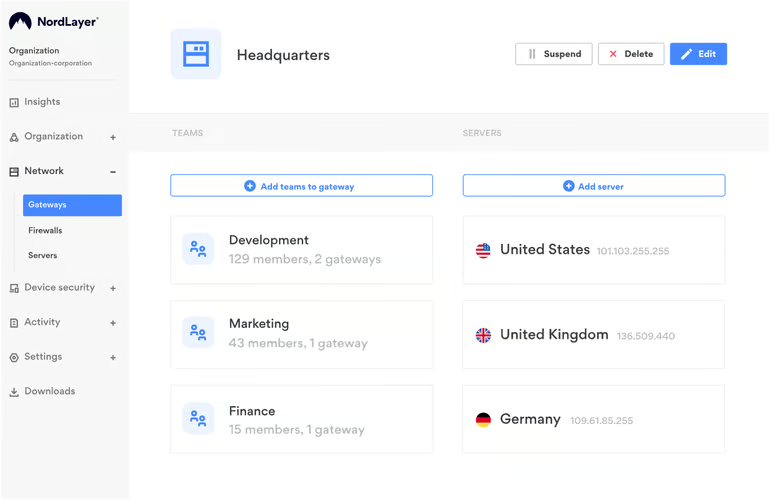
- Business VPN with private gateway options.
- Dedicated IP and IP allowlisting on supported plans.
- Always On VPN and auto-connect.
- Multi-factor authentication and SSO.
- NordLynx VPN protocol.
- DNS filtering and Custom DNS on supported plans.
- Activity monitoring reports and dashboards.
- Device posture monitoring on supported plans.
- Download protection and web protection.
Pros and cons
| Pros | Cons |
|---|---|
| Public pricing makes it easier to estimate costs | Some advanced network security features require higher-tier plans or add-ons. |
| Easy to deploy for teams new to enterprise VPN or secure access tools. | The Enterprise offer has a much higher user minimum than the standard plans. |
| Includes business-focused features such as private gateways, dedicated IP options, MFA, SSO, and activity monitoring. | Smaller businesses may outgrow the basic Lite plan quickly. |
| Supports modern secure access needs with VPN, network access control, DNS filtering, and device posture monitoring. |
Proton VPN for Business: Best for remote access

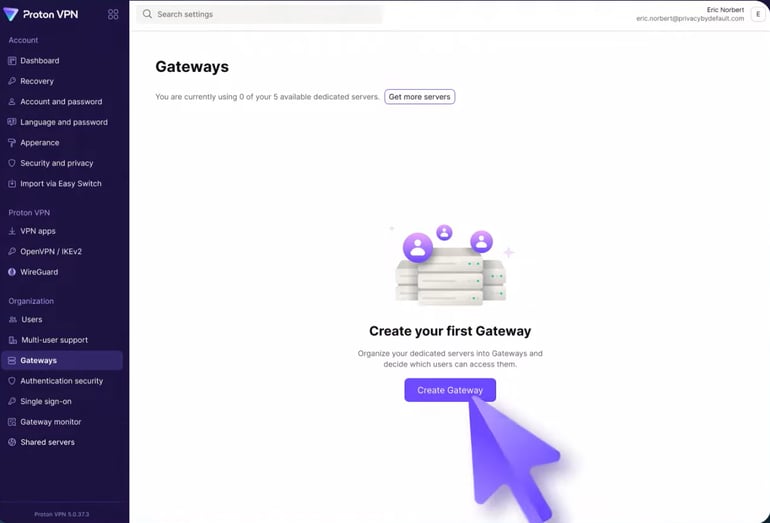
For businesses that need secure remote access across distributed teams, I recommend Proton VPN for Business. It provides encrypted access to company resources through business VPN features such as dedicated IPs, private gateways, SSO, SCIM support, enforced two-factor authentication, and apps for Windows, macOS, Linux, iOS, and Android.
I like that Proton VPN for Business combines remote access with Proton’s privacy-first reputation. Its open-source apps, no-logs approach, private gateways, and business-focused controls make it a strong option for teams that want secure access without adopting a more complex legacy enterprise VPN stack.
Why I chose Proton VPN for Business
I picked Proton VPN for Business for its strong remote access feature set and straightforward deployment for distributed workforces. It gives businesses dedicated infrastructure, identity controls, and cross-platform support in one package. I also think its focus on privacy and secure access makes it a strong option for teams working across multiple locations.
Pricing
Proton VPN for Business has annual pricing across three subscription tiers, with plans starting at $6.99 per user, per month. Below is a quick rundown of its yearly pricing.
- VPN Essentials: $6.99 per user, per month; Proton VPN for Business; shared server locations in 140+ countries with a minimum of two users.
- VPN Professional: $9.99 per user, per month; Proton VPN for Business with a minimum of two users.
- VPN and Pass Professional: $10.99 per user, per month; Proton VPN for Business and Proton Pass for Business with a minimum of three users.
Visit Proton VPN for Business
Features
- Dedicated IPs and private gateways.
- Enforced two-factor authentication.
- SSO and SCIM support on eligible plans.
- NetShield ad, tracker, and malware blocking.
- Cross-platform apps for Windows, macOS, Linux, iOS, and Android.
- Open-source apps.
- Business admin controls for managing users and access.
- Advanced business security features, including web filtering and VPN enforcement controls.
Pros and cons
| Pros | Cons |
|---|---|
| Strong privacy and security reputation. | No full endpoint protection. |
| Dedicated IPs and private gateways. | Advanced controls may require higher-tier plans. |
| Apps for Windows, macOS, Linux, iOS, and Android. | Less firewall-native management than legacy enterprise vendors. |
| Open-source apps and business admin controls. | May be too lightweight for complex enterprise deployments. |
SonicWall Global VPN Client: Best lightweight enterprise VPN

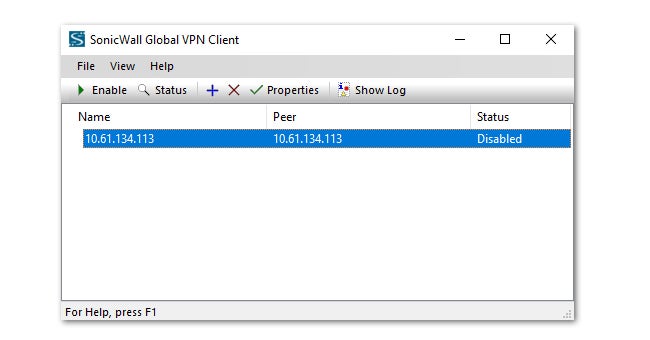
For organizations already using SonicWall firewalls, SonicWall Global VPN Client is a lightweight remote access option worth considering. It gives users a secure IPsec VPN connection into approved corporate resources and is designed to work within the SonicWall firewall ecosystem.
I like SonicWall Global VPN Client for its straightforward deployment and familiar VPN client experience. It supports strong encryption, multiple authentication options, connection profiles, and administrative logging, making it a practical choice for businesses that want a traditional VPN client tied closely to existing SonicWall infrastructure.
Why I chose SonicWall Global VPN Client:
I selected SonicWall Global VPN Client because it is a focused, lightweight option for businesses that already rely on SonicWall firewalls. It is not trying to be a full secure access service edge or zero trust platform; instead, it provides traditional IPsec VPN access for users who need secure connectivity to internal resources.
It is best suited for IT teams that want a straightforward VPN client, centralized firewall-based management, and compatibility with existing SonicWall infrastructure. Organizations considering SonicWall should also keep firmware, VPN policies, user accounts, and authentication settings up to date to reduce remote access risk.
Pricing
- Contact the vendor for pricing details.
Visit SonicWall
Features
- IPsec VPN client for secure remote access.
- Integration with SonicWall firewall infrastructure.
- Strong encryption support.
- Authentication through RADIUS, certificates, Smart Cards, or USB tokens.
- Connection profiles for approved corporate resources.
- Administrative logging and reporting.
- Support for automated deployment through command-line options.
Pros and cons
| Pros | Cons |
|---|---|
| Lightweight VPN client for SonicWall environments. | Best suited for organizations already using SonicWall firewalls. |
| Supports strong encryption and multiple authentication options. | Less modern than ZTNA or broader secure access platforms. |
| Straightforward setup and deployment options. | Pricing depends on SonicWall licensing and infrastructure. |
| Includes logging for VPN usage and troubleshooting. | Requires careful patching and policy management. |
More about Cloud Security
Fortinet FortiClient: Best for offering wider VPN security options

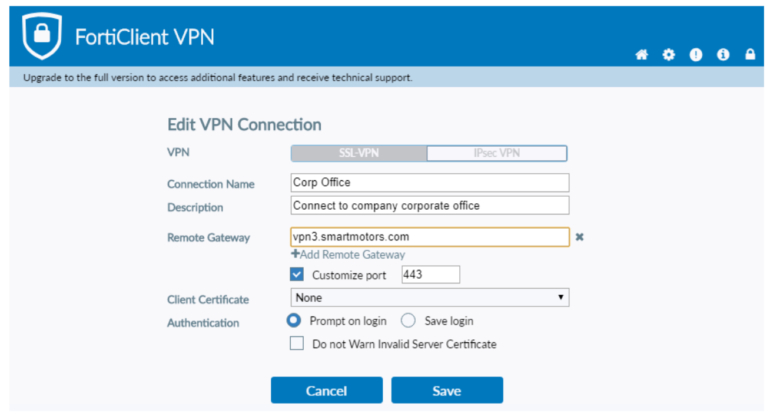
For businesses that want more than a standalone VPN client, I recommend Fortinet FortiClient. It combines secure remote access with ZTNA, endpoint visibility, compliance controls, web filtering, vulnerability remediation, and endpoint protection, making it a strong fit for organizations that want VPN access to work alongside broader endpoint security.
I like that FortiClient fits into the Fortinet Security Fabric and can be centrally managed through FortiClient EMS or FortiClient Cloud. This gives IT teams a way to manage VPN access, device posture, endpoint telemetry, security policies, logging, and reporting from a more unified environment.
Why I chose Fortinet FortiClient
I chose Fortinet FortiClient because it offers a broader set of security capabilities than a basic enterprise VPN. In addition to secure remote access through VPN and ZTNA, it can support endpoint visibility, vulnerability remediation, web filtering, malware protection, and automated endpoint response depending on the edition.
It is especially useful for organizations already using Fortinet firewalls or other Fortinet security tools. FortiClient can extend that security ecosystem to endpoints and remote users, helping administrators apply more consistent access and security policies across the business.
Pricing
- Contact the vendor for pricing details.
Visit Fortinet
Features
- Secure remote access through VPN and ZTNA.
- Central management through FortiClient EMS or FortiClient Cloud.
- Endpoint visibility and telemetry.
- Device posture checks and compliance enforcement.
- Vulnerability scanning and remediation.
- Web filtering and application controls.
- Central logging and reporting.
- Endpoint protection features on supported editions.
- Sandbox integration and automated endpoint quarantine on supported editions.
Pros and cons
| Pros | Cons |
|---|---|
| Combines VPN, ZTNA, and endpoint security. | Best fit for Fortinet environments. |
| Strong centralized management options. | Can be more complex than basic VPN tools. |
| Supports endpoint visibility and compliance checks. | Advanced protection depends on edition. |
| Includes logging, reporting, and web filtering. | Pricing is not publicly listed. |
Palo Alto GlobalProtect: Best for implementing security policies

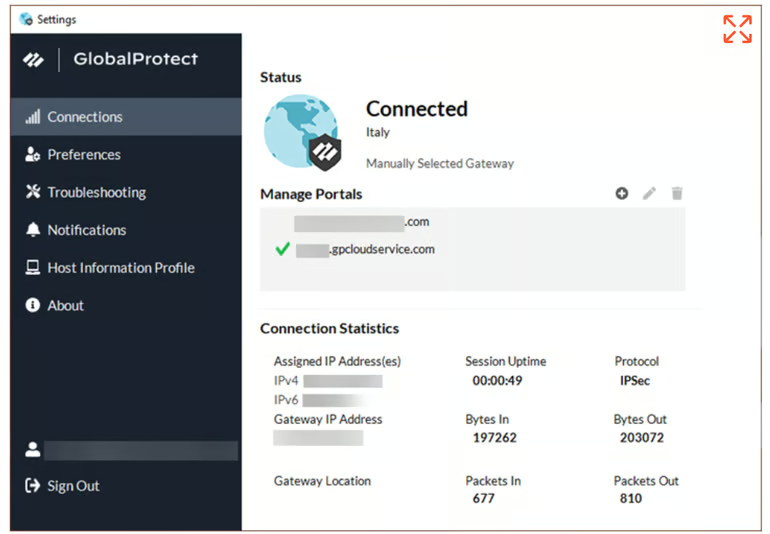
For enterprises that want remote access tied closely to security policy enforcement, I recommend Palo Alto GlobalProtect. It helps organizations secure user access based on identity, device posture, certificates, operating system details, patch status, and other contextual signals, making it a strong fit for businesses that already use Palo Alto Networks security infrastructure.
GlobalProtect also stands out because it extends Palo Alto Networks policy controls to remote users and devices. Instead of treating VPN access as a simple encrypted tunnel, it can help administrators apply least-privilege access, authentication requirements, threat prevention, and visibility policies across users, applications, ports, and protocols.
Why I chose Palo Alto GlobalProtect
I opted for Palo Alto GlobalProtect because it is built for organizations that want strong access policies, device visibility, and security controls around remote connections. It can help administrators evaluate who is connecting, what device they are using, and whether that device meets company security requirements before allowing access.GlobalProtect can also support secure remote access while helping enforce consistent security policies across users, devices, applications, and network traffic.
Pricing
- Contact the vendor for pricing details.
Visit Palo Alto
Features
- Secure remote access for users and devices.
- Identity-based and policy-based access controls.
- Device posture and host information checks.
- Certificate-based and cookie-based authentication support.
- Multi-factor authentication support.
- Threat prevention and web filtering support.
- Visibility across applications, ports, and protocols.
- Integration with Palo Alto Networks firewalls and Prisma Access.
Pros and cons
| Pros | Cons |
|---|---|
| Strong security policy enforcement. | Best fit for Palo Alto environments. |
| Supports device posture and identity-based access. | Can be complex for first-time deployments. |
| Integrates with firewalls and Prisma Access. | Pricing is not publicly listed. |
| Strong visibility across users, apps, and traffic. | Requires careful patching and configuration. |
ZScaler Private Access: Best for zero trust network access

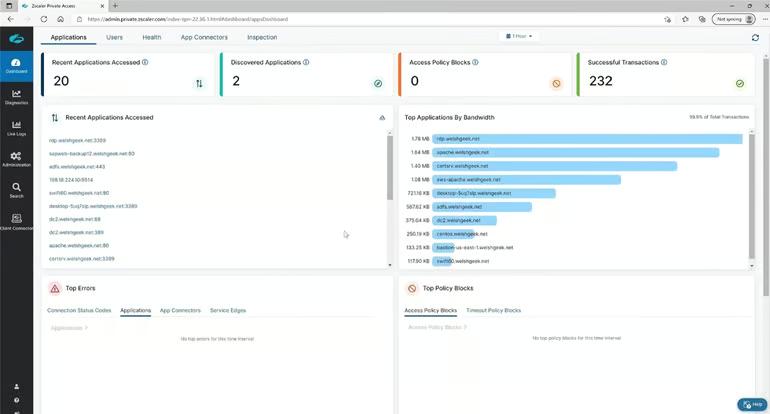
If you’re looking for a zero-trust network access solution rather than a traditional VPN, I recommend Zscaler Private Access. Instead of giving users broad access to a private network, Zscaler Private Access connects authorized users to specific private applications based on identity, device context, and access policies.
It also reduces the exposure associated with traditional VPN access. Applications are not placed directly on the public internet, and users only receive access to the resources they are approved to use. This makes it a strong fit for organizations moving toward zero trust, secure access service edge, or application-level access control.
Why I chose ZScaler Private Access
I have ZScaler Private Access on this list for its zero-trust approach that can provide organizations peace-of-mind in an increasingly hybrid workforce. While it isn’t a VPN per se, I feel its cloud service adopts maximum security in protecting corporate data and adds an additional layer of security against possible data breaches.
Pricing
- Contact the vendor for pricing details.
Visit ZScaler
Features
- Zero trust access to private applications.
- Identity- and policy-based access controls.
- Application-level access instead of broad network access.
- Support for users, devices, applications, and workloads.
- AI-powered segmentation capabilities.
- User-to-app, user-to-device, and workload-to-workload segmentation.
- Cloud-delivered access model.
- Visibility and policy controls for private application access.
Pros and cons
| Pros | Cons |
|---|---|
| Strong zero trust access model. | Not a traditional VPN. |
| Reduces broad network-level access. | Requires careful app and policy mapping. |
| Supports granular application access. | Pricing is not publicly listed. |
| Useful for hybrid and distributed teams. | May be more complex than basic VPN tools. |
Key features of enterprise VPN solutions
Enterprise VPNs have key features that separate them from traditional consumer VPNs. Below are some of the differentiating factors.
Support for Secure VPN Protocol
Support for secure VPN protocols is a crucial feature of enterprise VPNs. These protocols are designed to ensure the confidentiality, integrity, and authenticity of data transmitted between remote users and the corporate network.
Enterprise VPNs typically support multiple secure protocols, such as OpenVPN, IPSec, and SSL/TLS, providing a variety of options for secure network access. The use of secure VPN protocols help protect sensitive information from interception, eavesdropping, and other types of cyber threats.
SEE: 10 Common Cybersecurity Threats and How to Handle Them (TechRepublic Premium)
DNS Leak Protection support
DNS leaks can compromise the security of enterprise networks by exposing employees’ online activities and potentially allowing unauthorized access to sensitive company data. Enterprise VPN solutions need robust, built-in DNS leak protection mechanisms to ensure that all DNS queries are routed through the encrypted VPN tunnel and not leaked outside.
Centralized management support
A centralized management system allows administrators to quickly and easily configure VPN settings and policies, monitor VPN traffic and usage, and troubleshoot network issues. With a centralized management network, admins can also enforce policies — such as access controls and data retention policies, across the entire VPN network — ensuring that all users comply with company security policies and industry regulations.
High availability
High availability is another critical feature of enterprise VPNs. Having an enterprise VPN consistently and continuously operate properly is a crucial feature to watch out for. Any downtime in an enterprise VPN’s performance can disrupt business operations, preventing remote workers from accessing corporate resources and potentially causing revenue losses.
How to choose the best enterprise VPN solution
The best enterprise VPN solution depends on how your organization manages remote access, user identity, device security, and internal resources. A traditional VPN may be enough for employees who need encrypted access to a private network, while larger or cloud-first businesses may require more granular application-level controls.
When comparing enterprise VPN solutions, consider:
- Remote access model: Decide whether your business needs a traditional VPN, an SSL VPN, an IPsec VPN, a ZTNA solution, or a mix of secure access tools.
- Security features: Look for multi-factor authentication, strong encryption, least-privilege access, device posture checks, DNS leak protection, and support for secure VPN protocols.
- Endpoint protection: Consider whether the platform includes endpoint visibility, malware protection, vulnerability scanning, or integration with existing endpoint security tools.
- Centralized management: Choose a solution that lets IT teams manage users, devices, policies, permissions, and access rules from one admin console.
- Logging and reporting: Prioritize tools with detailed logs, usage reporting, analytics, and alerts so administrators can monitor remote access and investigate suspicious activity.
- Compatibility: Check support for Windows, macOS, Linux, iOS, Android, browsers, firewalls, identity providers, and existing security infrastructure.
- Reliability and performance: Evaluate connection stability, uptime, failover options, gateway availability, and VPN performance under heavy remote-access demand.
- Compliance needs: For regulated industries, review whether the solution supports audit trails, policy enforcement, data protection requirements, and compliance reporting.
Before choosing a provider, map out which users need access, what applications or networks they need to reach, which devices they use, and what security policies must be enforced. This will help determine whether a traditional enterprise VPN, a broader secure access platform, or a zero trust solution is the best fit.
Methodology: How I evaluated the best enterprise VPN solutions
To choose the best enterprise VPN solutions, I evaluated platforms that support secure remote access for business and enterprise environments. I focused on tools designed for IT teams managing distributed users, private network access, cloud applications, endpoint security, and centralized security policies.
I compared each provider based on the following criteria:
- Enterprise security features: I reviewed support for multi-factor authentication, secure VPN protocols, strong encryption, least-privilege access, split-tunneling controls, DNS leak protection, and zero-trust capabilities.
- Endpoint protection and visibility: I looked for endpoint security features such as malware protection, vulnerability scanning, compliance checks, and integrations with endpoint management tools.
- Centralized management: I prioritized platforms that provide administrators with a clear way to manage users, devices, access policies, authentication, reporting, and deployment from a single console.
- Reporting and analytics: I considered whether each product includes activity logs, analytics, monitoring, alerts, and reporting tools that help IT teams review usage and investigate security events.
- Compatibility and deployment: I reviewed operating system support, mobile device support, browser-based access, firewall compatibility, cloud deployment options, and ease of rollout for hybrid or remote teams.
- Scalability and business fit: I assessed how well each platform supports small teams, midsize businesses, and large enterprises with varying security and infrastructure needs.
- Pricing and transparency: I compared publicly listed pricing where available and noted when vendors require a custom quote.
- User experience and reputation: I considered product documentation, customer support, third-party reviews, user feedback, and my own experience with VPN and secure access tools.
The final selections reflect a mix of traditional enterprise VPN clients, remote access VPNs, and zero-trust access platforms. Each product was included because it offers a meaningful business use case, whether that is broad enterprise security, easier deployment, web-based access, endpoint protection, remote workforce support, or application-level zero trust access.
This article was originally written by Scott Matteson and updated by Franklin Okeke in September 2024. The current version contains additional information and updates by Luis Millares in April 2025 and Faithe J. Day in June 2026.
Frequently asked questions (FAQs) about Enterprise VPNs
How much do enterprise VPNs cost?
Enterprise VPN pricing depends on the provider, deployment model, number of users and devices, security requirements, and whether the product includes endpoint protection, zero-trust access, reporting, or firewall integration. Some business VPN providers publish per-user pricing, while many enterprise-focused vendors require businesses to contact sales for a custom quote.
Consumer VPN pricing is usually more straightforward, but it is not a good substitute for enterprise VPN pricing. Consumer VPNs are typically designed for individual privacy, while enterprise VPNs are built for secure business access, user management, policy enforcement, and centralized administration.
What are the advantages of using an enterprise VPN?
The main advantage of an enterprise VPN is that it gives employees, contractors, and remote teams a secure way to access company networks, systems, and applications. This helps organizations support hybrid work while reducing the risk of unauthorized access.
Compared with consumer VPNs, enterprise VPNs are designed for centralized IT management, larger user bases, compliance needs, device visibility, authentication controls, access policies, and secure access to internal business resources.
What is the difference between a VPN and ZTNA?
A traditional VPN usually gives authenticated users an encrypted connection into a private network. Once connected, users may be able to access multiple systems depending on network and firewall rules.
Zero trust network access, or ZTNA, grants access more narrowly. Instead of connecting users to the broader network, ZTNA tools give users access to specific applications based on identity, device posture, policy, and context.