
When you’re involved in a collaborative project, it’s essential to understand the roles and responsibilities of the other project participants in order to avoid miscommunication and unclear accountability. That’s where a RACI chart, also known as a RACI matrix or RACI diagram, comes in to help clarify task ownership.
In this guide, I’ll define the structure of a RACI chart and outline when to use it, how to create one, and why it can be invaluable for your project management needs.
What is a RACI chart?
A RACI chart, or responsibility assignment matrix, is a project management tool for clarifying and documenting each participant’s role in a project task or deliverable. It makes sure that everyone involved knows their specific responsibilities, eliminating confusion and promoting accountability.
The four key roles represented by the acronym RACI are:
- Responsible: The individual who performs the work required to complete the task. They can be a team member such as a project manager, developer, designer, or analyst.
- Accountable: The person ultimately answerable for the successful completion of the task. There should only be one accountable person per task. Some examples include lead engineers or department heads.
- Consulted: Subject matter experts whose input is sought during the task. These could be consultants, senior architects, or legal advisors.
- Informed: Those who need to stay updated on task progress but do not directly contribute to the task itself. Stakeholders, clients, or senior executives typically fall under this category.
By clearly defining these roles, a RACI chart removes ambiguity regarding task ownership, meaning each team member understands their contributions and stays aligned with the project’s goals. The RACI project management tool is particularly useful in complex projects, where overlapping responsibilities and communication challenges can hinder progress.
When to use a RACI chart
A RACI chart can streamline role clarity and accountability across various types of projects. RACI analysis lays out an essential framework to eliminate confusion and ensure efficient collaboration. It’s particularly useful for planning complex projects with ambiguity in roles, decision-making challenges, and resource allocation contexts.
- Complex projects: It’s so easy for projects involving multiple departments or teams to create confusion around responsibilities. With a RACI chart, you get a clear definition of each role and establish accountability. This prevents redundant or overlooked tasks.
- Role ambiguity: A RACI chart provides documentation that can be referenced throughout the project lifecycle so that all roles are properly defined. The RACI matrix clearly distinguishes who is responsible, accountable, consulted, and informed for each task.
- Decision-making projects: A RACI chart clarifies who is consulted versus who is informed, which helps to avoid unnecessary meetings or emails. This is important for projects that require approvals at certain stages or milestones so that you can keep the timeline on track.
- Resource distribution: The RACI chart can highlight workload imbalances among team members, allowing managers to redistribute responsibilities as needed. Setting these responsibilities before a project begins prevents bottlenecks down the line.
RACI charts are highly effective in settings where role clarity and structured communication channels are critical. Projects without these complexities may be better off considering a more basic role assignment matrix.
How is a RACI chart used in a project?
To illustrate how a RACI diagram can be applied, let’s look at a typical example in a tech project.
For instance, a company is planning to launch a cloud-based data analytics platform. The individuals involved in the execution of this project will include the following:
- Project manager: Oversees the project timeline, coordination, and final delivery; accountable for the overall success of the project
- Data engineer: Builds and implements data pipelines and infrastructure; responsible for technical execution
- Solutions architect: Designs system architecture and ensures technical alignment; accountable for architectural decisions
- Compliance officer: Defines and enforces data governance, privacy, and compliance requirements
- Business analyst: Responsible for gathering business requirements and ensuring dashboards meet user needs
- IT operations lead: Manages system monitoring, deployment, and infrastructure reliability
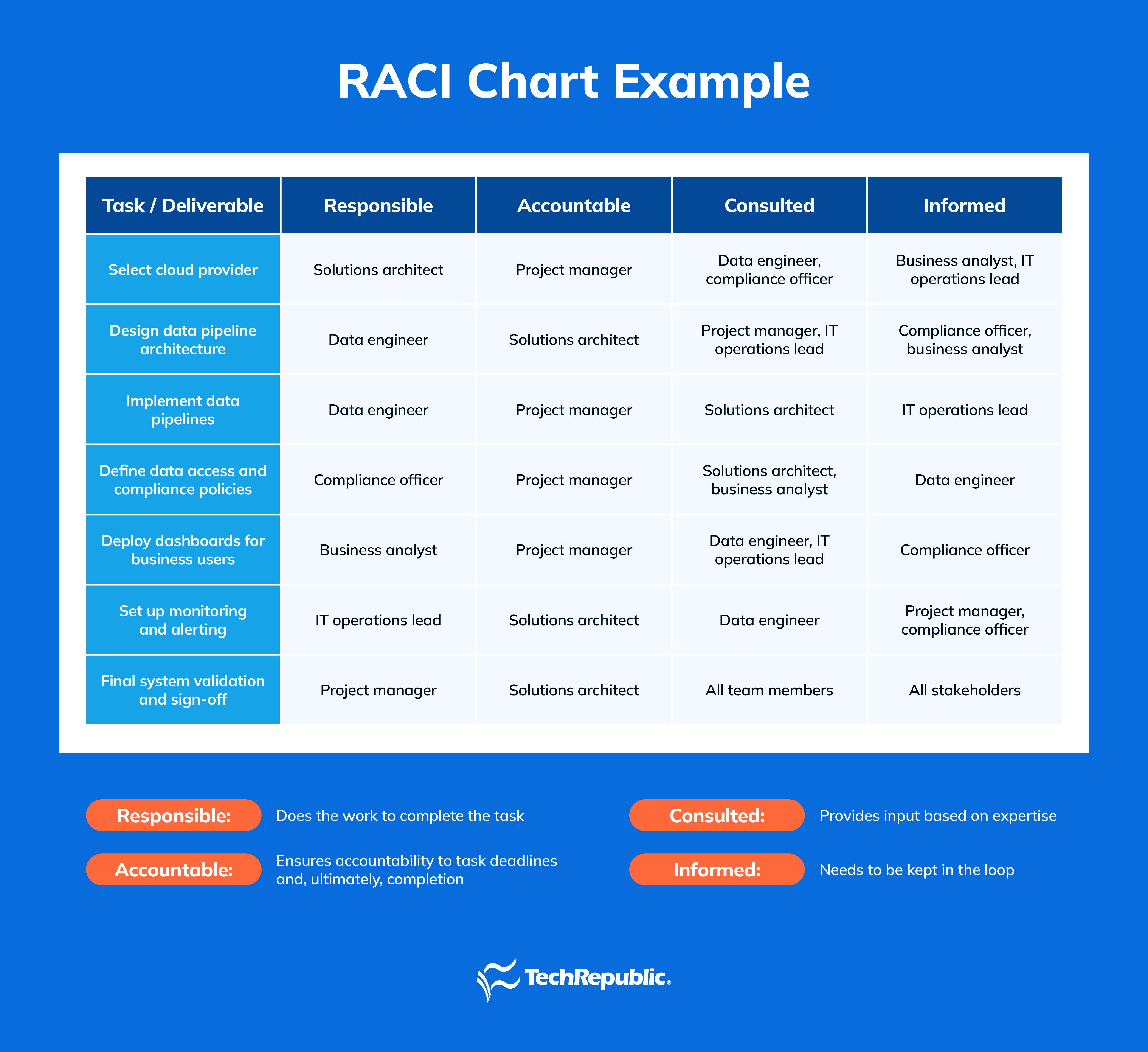
The project manager is ultimately accountable for the project’s completion and overall success. Meanwhile, the data engineer, solutions architect, compliance officer, business analyst, and IT operations each have varying responsibilities that contribute to the completion of the project.
This is how a RACI chart guarantees that each participant knows their specific roles and responsibilities, thereby improving the efficiency and effectiveness of project execution. Each role is clearly assigned, which reduces confusion, enhances accountability, facilitates smooth communication among team members, and helps keep the project on schedule.
Best Project Management Software
- Best Free Project Management Software
- Best Project Management Software for Small Businesses
- Best Project Management Software for Mac Users
- Best Marketing Project Management Software
- Best Project Management Software for Startups
- Best Project Management Software for Engineers
How to make a RACI chart
Creating a RACI chart for your project involves several straightforward stages. Here are four key steps:
- Identify all tasks: Start by listing every task required to complete the project. Break down the project into smaller, more manageable tasks so that nothing is overlooked. Be as detailed as possible to capture every aspect of the project.
- Define roles and responsibilities: Identify every team member or role that will participate in the project. Understand each team member’s strengths, expertise, and availability to effectively assign roles. This step makes sure that the right people are assigned to tasks they are best suited for.
- Assign RACI roles: For each task, designate the appropriate RACI role to each team member. It’s important that each task has only one Accountable individual to avoid conflicts. The same applies for Responsible; having multiple names assigned Responsible can cause confusion and finger-pointing. Be careful to avoid overloading a single team member with too many responsibilities, or else you’re likely to find yourself dealing with burnout or project delays. Consult team members to confirm that the assigned roles align with their capabilities and expectations.
- Validate and review: Share the completed chart with all team members and stakeholders to confirm that roles are understood. Hold a review meeting to review the RACI chart to allow team members to ask questions or request clarifications. Adjust roles as necessary throughout the project to accommodate any scope or changes in team dynamics.
By following these key steps, you’ll have a clear and practical RACI chart to streamline your project’s execution.
What are examples of RACI chart templates?
Templates simplify the process of creating and using RACI charts, providing flexibility and convenience to jump right in and manage roles and responsibilities effectively. I tried out templates from a few popular project management software tools and would recommend the following two options as a good starting point.
monday.com RACI chart template
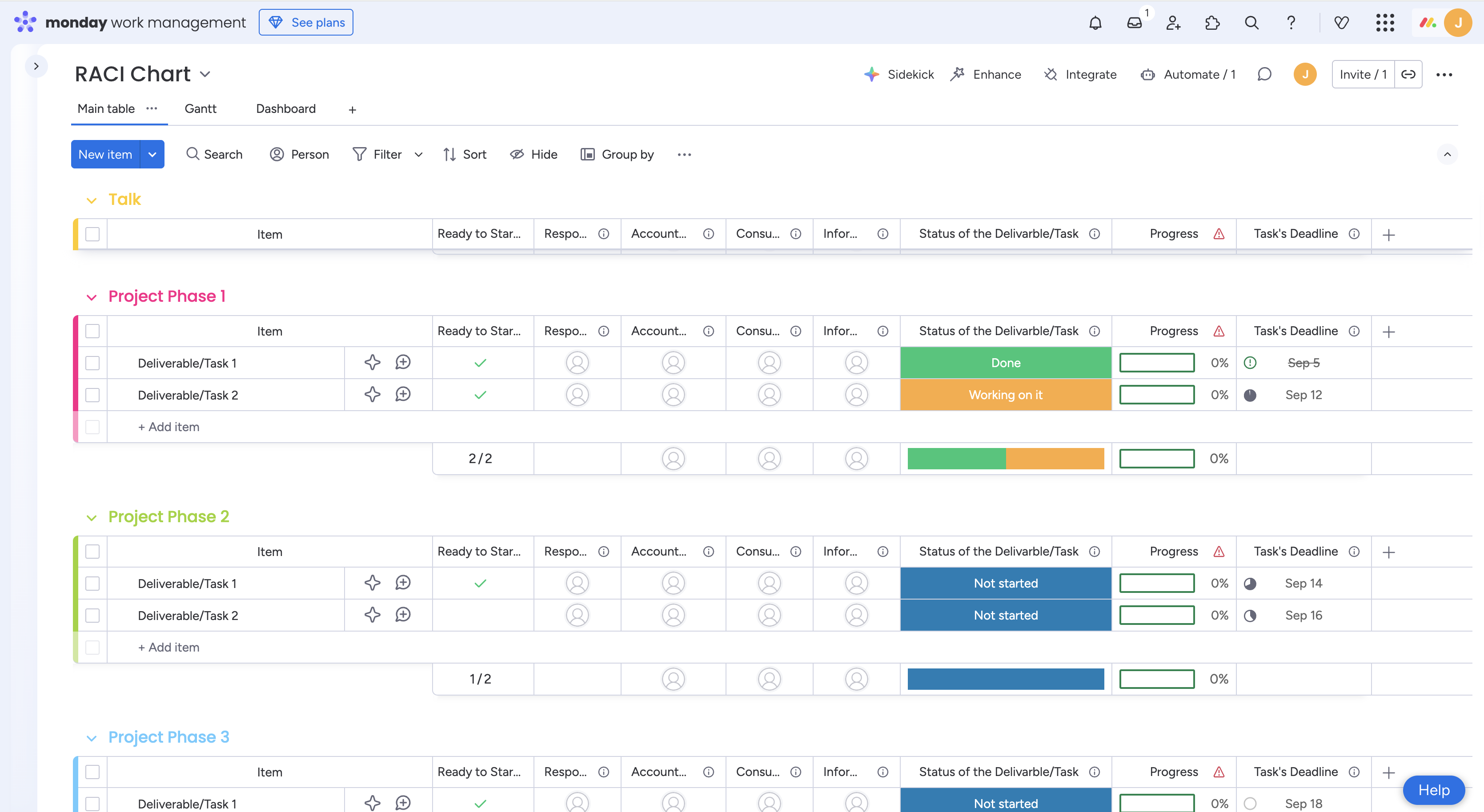
monday.com’s RACI matrix template integrates seamlessly into its work management system with a visually organized and interactive workspace for managing project roles and responsibilities. The template is divided into different project phases, with tasks listed under each phase. Each task is associated with the four RACI roles (Responsible, Accountable, Consulted, Informed), and progress tracking is integrated directly into the platform.
I found that the color-coded indicators and visual markers made it easy to understand the status of each deliverable at a glance. The template also includes features like dashboards, the ability to assign roles dynamically, and Gantt views, offering a different dimension of visualizing the chart.
Smartsheet RACI chart template
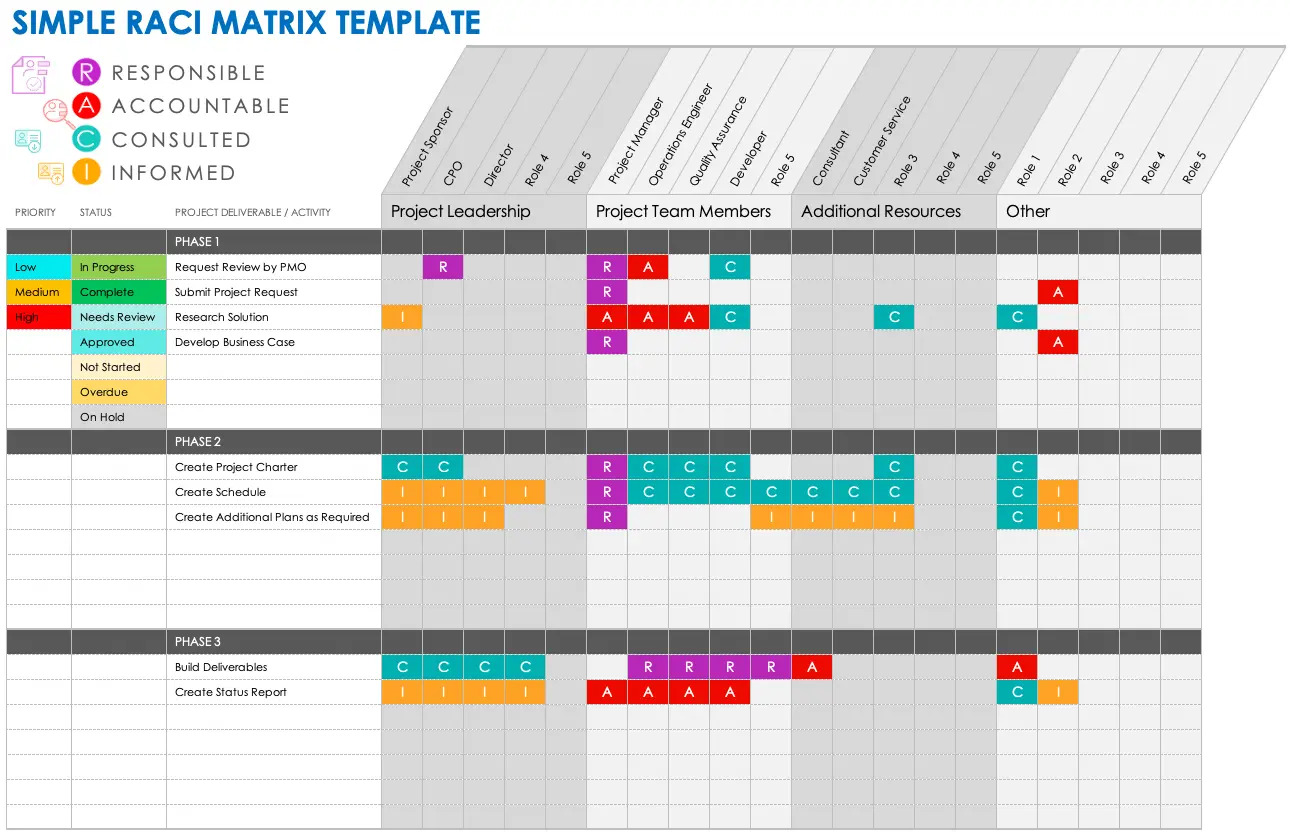
I explored Smartsheet RACI chart templates presented in both Excel and Google Sheets options. Both offered a familiar spreadsheet format, but I opted for the Microsoft Excel template to generate the example below, which includes pre-defined columns for each of the RACI roles, as well as fields for progress tracking, due dates, and task status.
It’s also color-coded to clearly distinguish responsibilities and includes a “Ready to Start?” column that helps with prioritization. With the added feature of tracking progress and task status, I found this template to offer an effective overview for managing roles and responsibilities effectively throughout a project.
What benefits do RACI charts offer?
The benefits of RACI charts revolve around providing structure and role clarity. RACI diagrams include clear role distinctions, enhanced communication channels, greater accountability, and smoother decision-making, all of which help streamline project execution and ensure efficiency.
- Role clarity: With explicit role definitions, team members know exactly who is involved and their level of involvement, reducing confusion and overlap throughout the project management lifecycle.
- Enhanced communication: A RACI chart creates a clear communication framework, defining who should be consulted or informed about each task.
- Improved accountability: Identifying one accountable person per task strengthens ownership and ensures tasks are completed thoroughly.
- Efficient decision-making: By clarifying who to consult and who to inform, a RACI chart prevents delays in the decision-making process, thus making the project more efficient.
What are alternatives to the RACI matrix?
While RACI is one of the most popular responsibility assignment tools, it may not fit all project scenarios best. For example, projects that require extensive quality control, involve complex decision-making processes or need additional support roles might benefit from alternatives with more specialized frameworks.
These alternatives can help fill gaps that a standard RACI chart doesn’t cover. Some top alternatives include:
- RASCI: An extension of RACI that adds Support for those who assist in completing the task but aren’t directly responsible.
- DACI: Focuses on decision-making, designating a Driver, Approver, Contributor, and Informed party.
- RACI-VS: Adds Verifier” and “Signatory roles for tasks requiring quality checks or final approval.
- RAPID: Designed for decision-making, where roles include Recommend, Agree, Perform, Input, and Decide.
- CLAM: Stands for Contribute, Lead, Approve, and Monitor, and is used in projects that require specific monitoring roles.
- MOCHA: A lesser-known alternative that defines roles as Mover, Owner, Consulted, Helper, and Approver, for projects requiring both decision-making and hands-on involvement.
The choice of framework depends entirely on your project’s complexity and your team’s needs.
FAQs
What does RACI stand for?
The direct RACI definition is Responsible, Accountable, Consulted, and Informed. These are the key roles a team member can hold within a task in a RACI chart, RACI matrix, or RACI diagram.
What is the main benefit of making a RACI chart?
The primary benefit of a RACI chart is clarity in task ownership, which streamlines completion and strengthens team communication.
What is the golden rule of RACI?
Each task should have only one accountable person to ensure clarity on who is ultimately responsible.
When should you not use a RACI chart?
RACI charts may not be necessary for small projects with few people or when roles are already clear. In such cases, a simpler responsibility matrix might suffice.