
- Best overall Mac project management software: ClickUp
- Best for data-driven project tracking and reporting: Smartsheet
- Best for startups and small businesses: monday.com
- Best for scalability: Asana
- Best for team collaboration: Wrike
- Best for development teams: Jira
- Best free project management software: Trello
- Best for client-facing users: Teamwork
- Best for project management analytics: Hive
- Best for remote teams: Basecamp
- Best for cost-effectiveness: Zoho Projects
- Best for complex project planning: Merlin Project
Mac computers are the standard for some industries, and many professionals prefer using them for work—even when it’s not required. When project management software is optimized for macOS, workflows are smoother, and projects are more likely to stay on track.
Based on my own testing and research, I’ve put together this list of the best project management software for Mac users that highlights features, use cases, and pros and cons. You’ll also find information about my methodology for evaluating the software and tips on choosing the best project management software for Mac.
Top project management software for Mac comparison
| Software | Gantt charts | Mobile app | Free version | Our star rating (out of 5) | Starting price |
|---|---|---|---|---|---|
| ClickUp | Yes | iPad (iPadOS 12+), iPhone (iOS 12+), Apple Watch (watchOS 7.5+) | Yes | 5 | $7 per user, per month, billed annually |
| Smartsheet | Yes | iPad (iPadOS 15+), iPhone (iOS 15+) | Yes | 3.8 | $9 per user, per month, billed annually |
| monday.com | Yes | iPad (iPadOS 15+), iPhone (iOS 15+) | Yes | 5 | $9 per seat, per month, billed annually |
| Asana | Yes | iPad, iPhone (iOS 16+) | Yes | 3.9 | $10.99 per user, per month, billed annually |
| Wrike | Yes | iPad (iPadOS 16+), iPhone (iOS 16+) | Yes | 4.6 | $10 per user, per month |
| Jira | No | iPad (iPadOS 16+), iPhone (iOS 16+) | Yes | 4.6 | $7.91 per user, per month |
| Trello | Available through add-on | iPad (iPadOS 16+), iPhone (iOS 16+) | Yes | 4.5 | $5 per user, per month, billed annually |
| Teamwork | Yes | iPad (iPadOS 15+), iPhone (iOS 15+) | Yes | 3.7 | $9.99 per user, per month, billed annually |
| Hive | Yes | iPad (iPadOS 12.4+), iPhone (iOS 12.4+), Apple Watch (watchOS 4+) | Yes | 3.9 | $5 per user, per month, billed annually |
| Basecamp | No | iPad (iPadOS 14.5+), iPhone (iOS 14.5+) | Only for teachers and students | 3.1 | $15 per user, per month |
| Zoho Projects | Yes | iPad (iPadOS 12+), iPhone (iOS 12+) | Yes | 4.2 | $4 per user, per month, billed annually |
| Merlin Project | Yes | iPad (iPadOS 15+), iPhone (iOS 15+) | No | _ | $6.99 per month |
ClickUp: Best overall Mac project management software

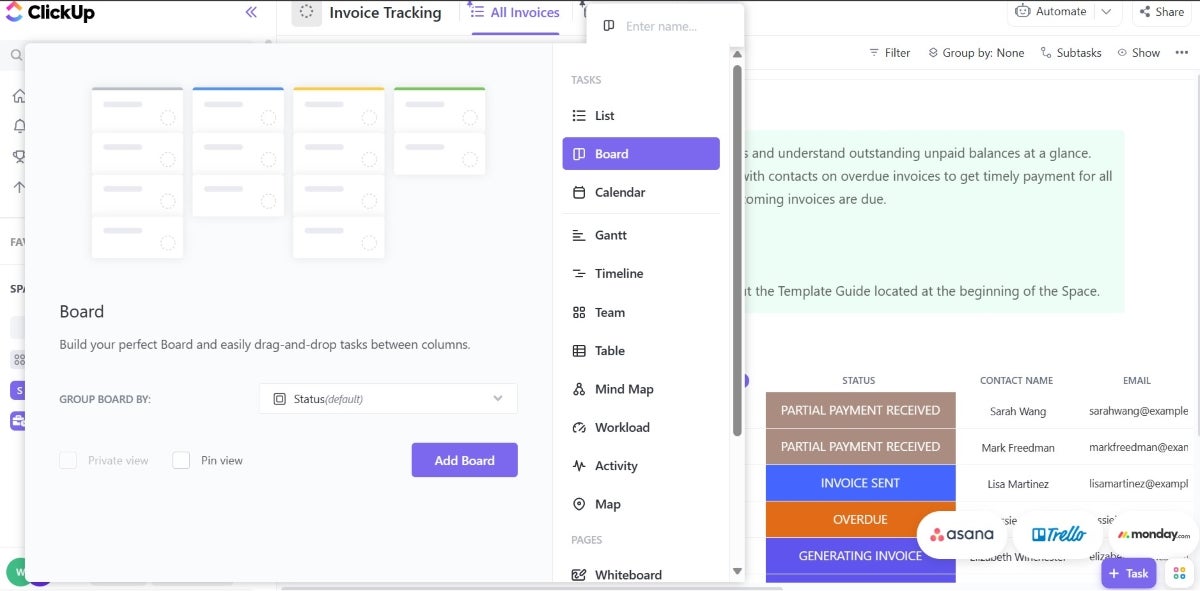
ClickUp is my pick for the best Mac project management software because it balances user-friendliness and functionality. It offers an all-in-one project management solution that includes file sharing, status alerts, task management, and additional functions to support you from project initiation to completion. It is also highly customizable and offers several automation tools for repetitive tasks.
In terms of mobile, ClickUp’s app is available in the App Store for iPhone, iPad, and even Apple Watch and iPod touch, making project management accessible across Apple devices. It’s also more compatible than most other tools on this list, supporting devices as far back as iPadOS 12.0 for the iPad, iOS 12.0 for the iPhone and iPod touch, and watchOS 7.5 or later for the Apple Watch.
Pricing
- Free Forever Plan: Unlimited tasks
- Unlimited: $7 per user, per month, billed annually; $10 per month
- Pro: $12 per user, per month, billed annually; $19 per month
- Enterprise: Contact sales
Visit ClickUp
Standout features
- Native time tracking: Users can track time, add notes, set estimates, view reports, and filter timesheets using the native time tracking tools.
- Dashboards: ClickUp offers multiple views, including customized dashboards, charts and a selection of over 50 widgets.
Pros and cons
| Pros | Cons |
|---|---|
| 24/7 live support. | User reports indicate bugs and glitches. |
| Multiple views. | Learning curve to navigate interface. |
| Highly customizable. | Features can feel overwhelming to project management software newbies. |
Top integrations
- Gmail
- Zoom
- Harvest
- Zendesk
Why I picked ClickUp
With its affordable pricing, multiple project views, and comprehensive set of features, ClickUp was an easy pick for me. Most of its project views are available on its free plan, including Gantt. Since some of these views are typically available only in premium pricing tiers for other tools, it reiterates why ClickUp was worth my consideration.
When to use something else
If you prefer a more focused and less feature-dense environment, you may want to consider Basecamp as an alternative. ClickUp has lots of features and customization options that are undeniably powerful but can sometimes introduce a steep learning curve or potentially overwhelm teams that just need simple project management tools.
For more information, read the full ClickUp review.
Smartsheet: Best for data-driven project tracking and reporting

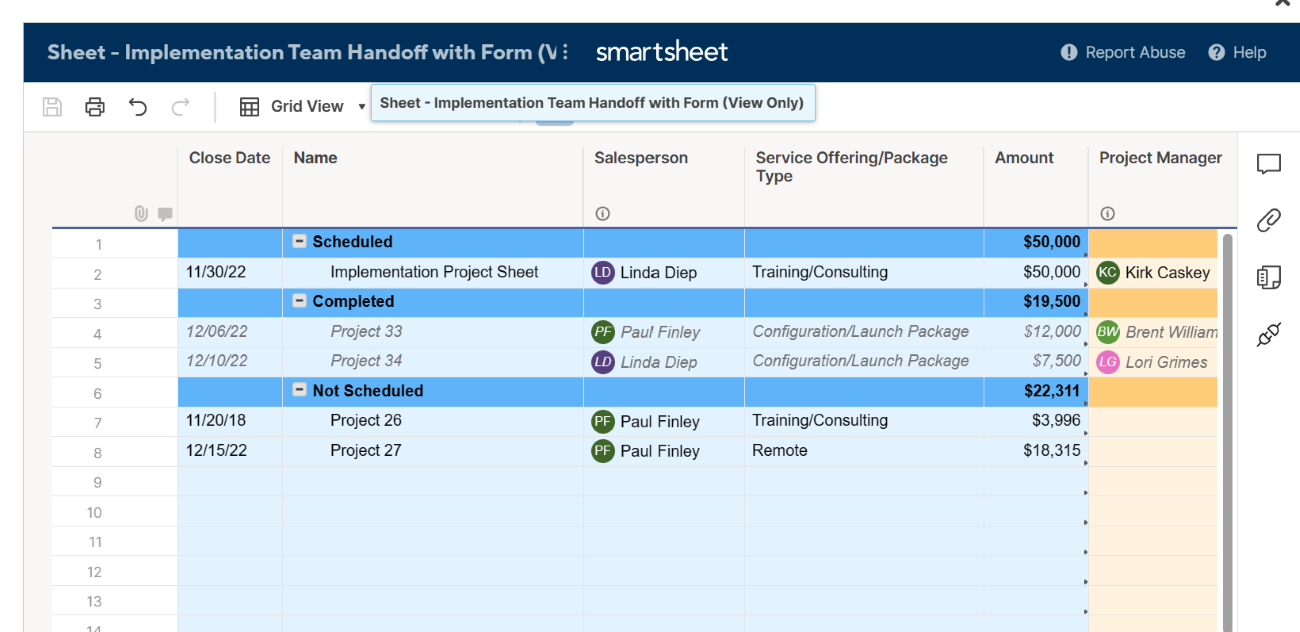
Smartsheet is worth considering for data-driven insights that optimize workflows and decision-making processes. Smartsheet offers a variety of reporting features, including row reports, sheet summary reports, and customizable dashboards. Project managers can use these features to aggregate data from multiple projects to monitor key metrics such as budget, timelines, task completion, and resource allocation in real-time.
Smartsheet’s top features include extensive customization options, project visualization tools like Gantt software capabilities, resource management, and workflow automation. Smartsheet is available for iPhone and iPad, but it needs iOS 15.0 or later and iPadOS 15.0 or later.
Pricing
- Pro: $9 per user, per month, billed annually; $12 per month
- Business: $19 per user, per month, billed annually; $24 per month
- Enterprise and Advanced Work Management: Custom pricing
Visit Smartsheet
Standout features
- Spreadsheet interface: Smartsheet delivers a flexible and simple feature set that is familiar to a spreadsheet interface.
- Automated workflows: Mac users can create no-code automated workflows within projects and eliminate tedious manual work.
Pros and cons
| Pros | Cons |
|---|---|
| Familiar spreadsheet interface. | Several important tools are only available through add-ons. |
| Variety of project tracking tools. | Dependence on spreadsheets. |
| Highly customizable dashboards. | Limited mobile app. |
Top integrations
- Miro
- DocuSign
- MS Teams
- Google Chat
Why I picked Smartsheet
Smartsheet’s detailed reporting is what particularly caught my eye. It’s easy to create real-time reports and dashboards, which gives instant visibility into project progress. You can generate and customize reports and then share them across teams, making it easy for project managers to track key metrics such as budget and task completion without the need for manual updates. Additionally, it has a spreadsheet interface that’s great for working with large volumes of tabular data and offers a high level of dashboard customizability.
When to use something else
Smartsheet has vast customization and reporting options, which can easily overwhelm new users. If you prefer a tool that’s more focused on task management without the need for detailed reporting, you’re better off choosing a different tool from this list. Plus, if a spreadsheet-like interface isn’t your style, a different platform might better suit your needs.
For more information, read the full Smartsheet review.
monday.com: Best for startups and small businesses

monday.com offers incredible functionality, as it can be used for everything from project management to software development. Users can choose to view a high-level project overview or dig into more granular details of each task throughout the entire lifecycle of a project. In addition, monday.com has a clean and intuitive dashboard, making it easy to learn for beginners.
The monday.com app supports iOS 15.0 or later on iPhone, with version 5.8 being the last one to support monday on iOS 15. It requires iPadOS 15.0 or later for iPad use.
Pricing
- Free: Up to 2 seats
- Basic: $9 per seat, per month, billed annually; $12 per month
- Standard: $12 per seat, per month, billed annually; $14 per month
- Pro: $19 per seat, per month, billed annually; $24 per month
- Enterprise: Contact sales
Visit monday.com
Standout features
- Data visualization: monday.com offers a variety of ways to view and analyze data that can be customized by adding a dashboard or widgets according to user preference.
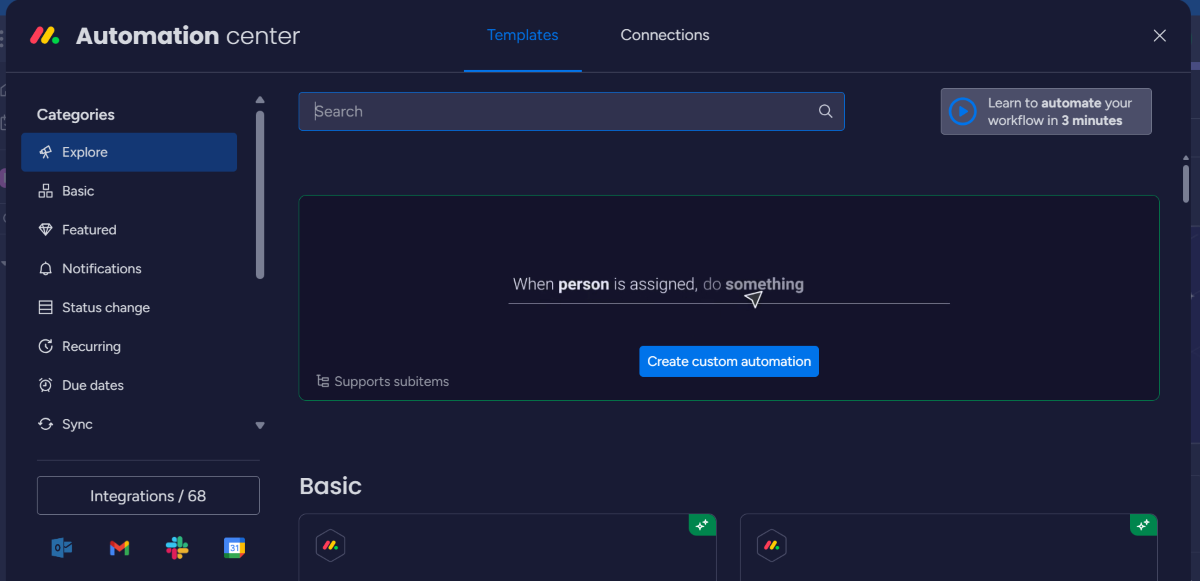
- Automation: Recurring or common tasks can be automated on monday.com. This includes setting up triggers, conditions, and actions, which make it easy to automate specific tasks. For some tasks, users can even build custom automations from scratch.
Pros and cons
| Pros | Cons |
|---|---|
| Ease of setup and use. | Limited reporting features. |
| Data visualization tools, including timeline view with dependencies. | Lack of advanced features in lower tiers. |
| Free trial that includes advanced features. | Steep learning curve for advanced features. |
Top integrations
- Slack
- Gmail
- Zendesk
- Hubspot
Why I picked monday.com
monday.com is featured on this list because of its versatility and customization capabilities, making it suitable for users of all technical levels. Both the Free and Basic plans offer enough features to be both useful and affordable for startups and small businesses.
When to use something else
For Mac users who require specialized project management features, such as native budget tracking or advanced risk analysis tools integrated within the platform, you’re likely to be better off exploring alternatives that focus on these areas, such as Teamwork.
For more information, read the full monday.com review.
Asana: Best for scalability

In addition to making my list of top project management software, Asana also offers a native desktop app for Mac users. With its feature-rich plans and impressive scalability, Asana is suitable for all types of businesses. Mac users can use it to create tasks, track project progress, collaborate with team members and clients and automate workflows.
Unlike the previous tools that required at least iOS 15.0, Asana’s mobile app for iPhone is compatible with iOS 16 or later, offering functionality across various features for both iPhone and iPad users.
Pricing
- Free Personal Plan: Unlimited tasks and projects
- Starter: $10.99 per user, per month, billed annually; $13.49 per month
- Advanced: $24.99 per user, per month, billed annually; $30.49 per month
- Enterprise: Contact sales
Visit Asana
Standout features
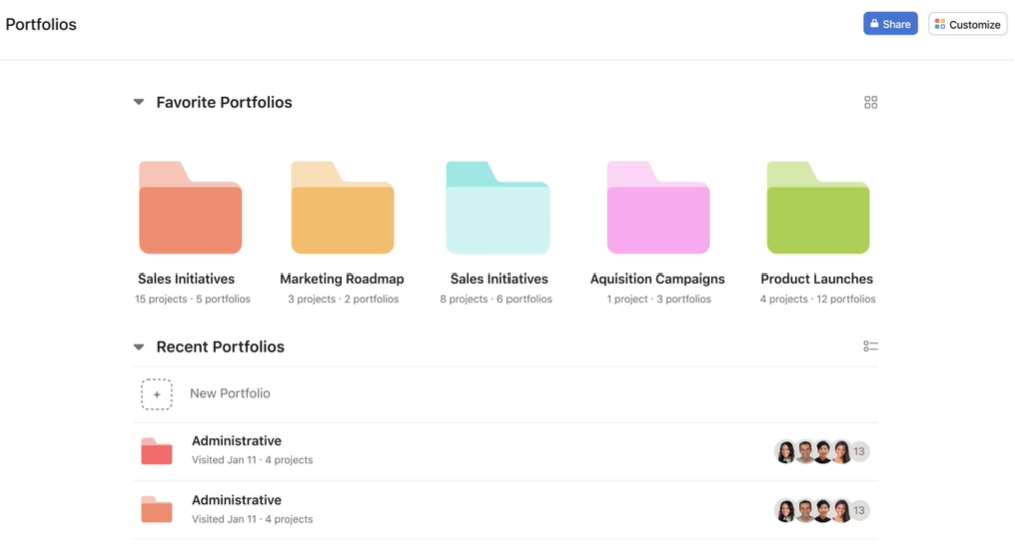
- Asana Portfolios: Using this feature, you can visualize the project schedule and progress of multiple projects using a timeline view with Gantt charts.
- Multi-device sync: With Asana, you can synchronize project data across multiple devices, including Windows and Mac computers.
Pros and cons
| Pros | Cons |
|---|---|
| Highly scalable. | UI is not as intuitive as other software. |
| Generous list of features. | Occasional lag when moving between data-extensive pages. |
| Powerful reporting and analytics. | Can be expensive for small businesses. |
Top integrations
- OneDrive
- Slack
- Adobe Creative Cloud
- Zapier
Why I picked Asana
Asana made it to my list because of how scalable it is. Its interface, features, and pricing make it a convenient choice for businesses of all sizes. I was also impressed with Asana’s reporting and analytics tools.
When to use something else
If you have projects that deal with lots of images and other graphics, Asana might not be the ideal choice, as its capabilities for handling visual content and markup tools are rather limited. Wrike is a better choice for visualizations.
For more information, read the full Asana review.
Wrike: Best for team collaboration

Wrike is a versatile project management solution that is available as a desktop app for both Mac and Windows. It is a cloud-based application, so it can be used on any device with internet access. One of the top features of Wrike is its visualization tools, including Gantt charts, waterfall schematics, and kanban boards. New users may need to take some time to get familiar with its user interface. Wrike is available for both iPad and iPhone but needs iPadOS 16.0 and iOS 16.0 or later.
Pricing
- Free: Project and task management
- Team: $10 per user, per month
- Business: $25 per user, per month
- Enterprise: Contact sales
- Pinnacle: Contact sales
Visit Wrike
Standout features
- Wrike Sync: You can use Wrike’s two-way sync with applications such as GitHub and Jira to automatically sync all important information about a project.
- AI Project Risk Prediction: Wrike has built-in artificial intelligence tools that can alert users to any hurdles or issues that might delay a project.
Pros and cons
| Pros | Cons |
|---|---|
| Free plan with unlimited users. | The mobile app needs improvement. |
| Excellent project visibility tools. | Steep learning curve. |
| Offline mode. | Many tools only available as add-on features. |
Top integrations
- Slack
- Dropbox
- Tableau
- GitHub
Why I picked Wrike
I shortlisted Wrike as one of the top project management software options for Mac users because of its outstanding team collaboration tools, quick data syncing capabilities, and variety of project views. Additionally, I found Wrike to be an ideal tool for complex projects due to its vast capabilities and extensive customization options.
When to use something else
If you value a minimalist and straightforward interface for quick task management without extensively customizing it, consider an alternative like Asana. Wrike’s extensive feature set and customization options can especially overwhelm users seeking simplicity in a project management tool.
For more information, read our full Wrike review.
Jira: Best for development teams

Jira is well known for its project management capabilities for development teams, but it offers much more than that. It supports agile project management and has an extensive range of integrations available, including deep integration within the Atlassian ecosystem. You also get impressive workflow customization to match your specific project requirements.
Teams can create and edit issues and requests and manage project boards and backlogs straight from their iPads and iPhones, provided they’re running on iPadOS 16.0 and iOS 16.0 or later.
Pricing
- Free Forever Plan: Unlimited goals, projects, tasks, and forms
- Standard: $7.91 per user, per month
- Premium: $14.54 per user, per month
- Enterprise: Contact sales
Visit Jira
Standout features
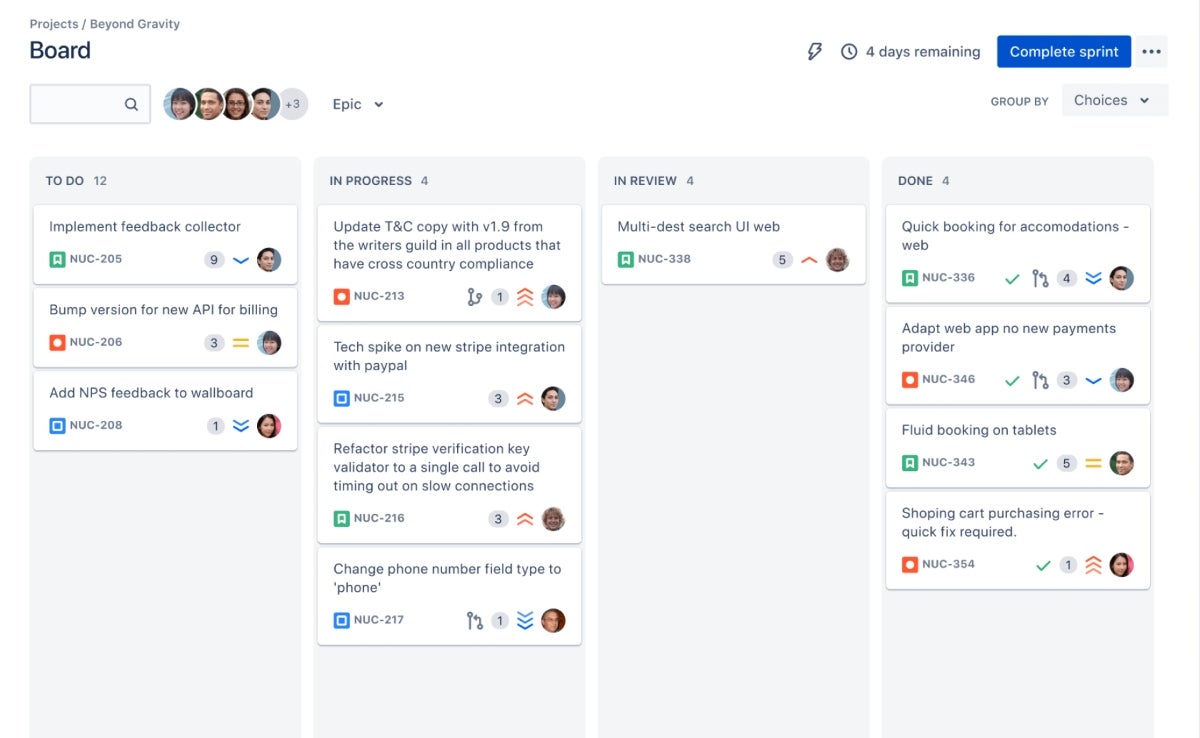
- Agile boards: Has both scrum and kanban boards to visualize project progress in real-time.
- Jira automation: Automation templates enable users to use drag-and-drop features to automate their tasks.
Pros and cons
| Pros | Cons |
|---|---|
| Outstanding issue-tracking capabilities. | Steep learning curve, especially for advanced tools. |
| Fast and responsive. | UI is not as intuitive as other competitors. |
| Deep integration with other Atlassian products. | Can be overkill for small, simple projects. |
Top integrations
- Atlassian products
- Google Drive and Gmail
- Figma
- GitHub
Why I picked Jira
Jira impressed me with its powerful issue-tracking capabilities, which software development teams and iterative project management teams are sure to appreciate. I also liked Jira’s agile project management capabilities and integration ecosystem with Atlassian products.
When to use something else
If you’re not involved in software development or prefer not to work within an agile framework, Jira may not be the right fit for you. Consider tools that are more accessible and take a visually straightforward approach to task and project management, minus the complexity of agile methodologies.
For more information, read the full Jira review.
Trello: Best free project management software

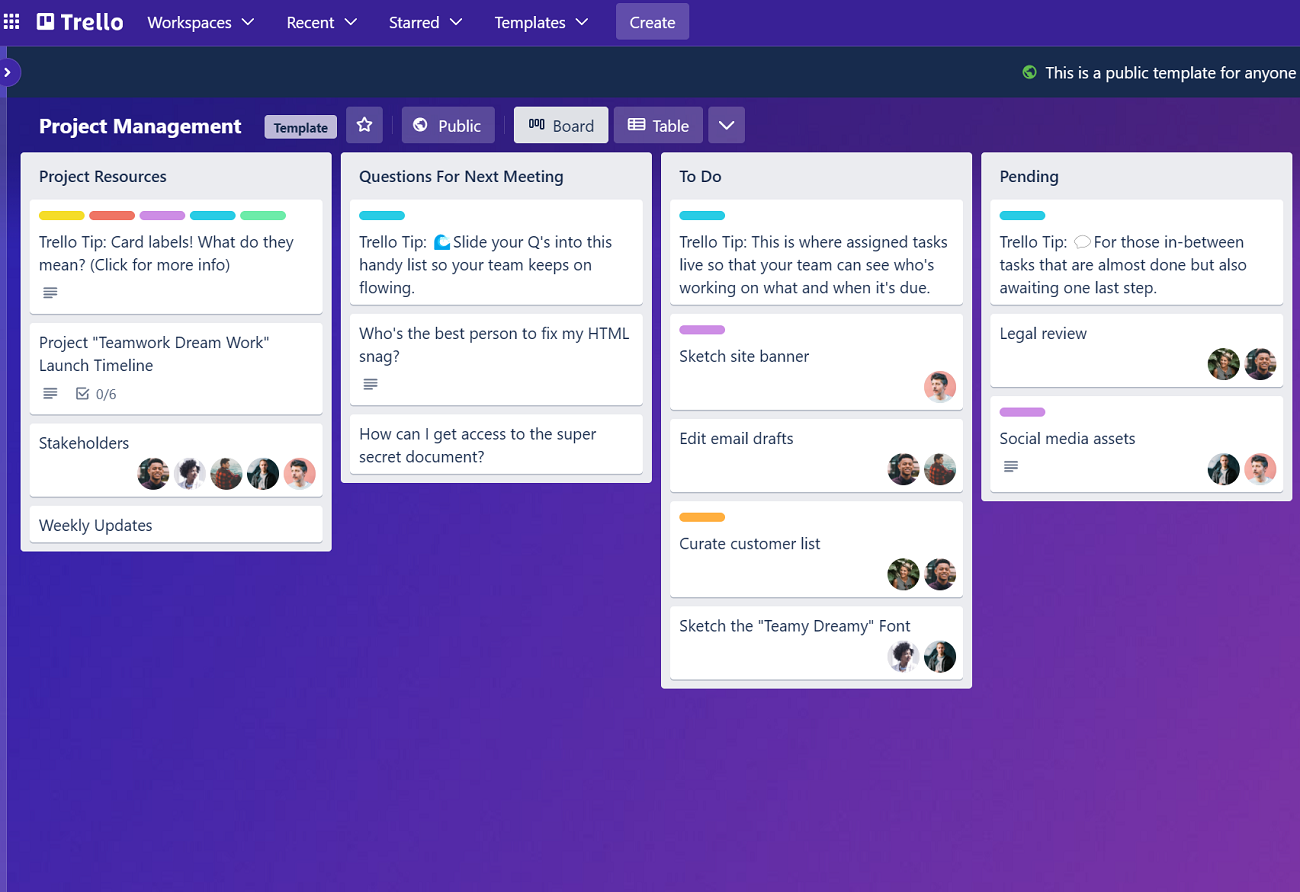
Trello uses management boards, templates, roadmap features, and other tools to simplify project management. The kanban-style design of the main dashboard is visually appealing and easy to use. Users can quickly and simply cross-collaborate, assign tasks, view workflow, and share files.
Additionally, the mobile app and desktop interface offer extra flexibility. This kanban interface extends to mobile as it’s available on iPad and iPhone, though it’s compatible with iPadOS 16.0 and iOS 16.0 or later, respectively.
Pricing
- Free: Up to 10 boards per Workspace
- Standard: $5 per user, per month, billed annually; $6 per user billed monthly
- Premium: $10 per user, per month, billed annually; $12. 50 per user billed monthly
- Enterprise: Starts at $17.50 per user, per month, billed annually
Visit Trello
Standout features
- Automation: The Butler is an automation tool offered by Trello that allows users to create rules, commands, and buttons to reduce repetitive work.
- Trello boards: The kanban-style interface is Trello’s signature feature. The board system allows users to oversee the progress of multiple tasks.
Pros and cons
| Pros | Cons |
|---|---|
| Plenty of functionality in the free version. | Reliance on kanban boards. |
| Drag-and-drop style interface. | No native time-tracking tool. |
| Unrivaled kanban boards. | The free plan only allows the upload of files of 10MB or less. |
Top integrations
- Jira
- TeamGantt
- GitHub
- Slack
Why I picked Trello
The reason I chose Trello is simple—kanban boards. It has some of the best kanban boards, which any team that loves visual project management will relish. This kanban software approach makes Trello really easy to use. It also offers an outstanding and feature-rich free plan.
When to use something else
With its impressive kanban boards, Trello can feel like a bit of a one-trick pony. It doesn’t offer advanced project management features, such as time tracking, detailed reporting, or advanced resource management. For access to those types of features, consider using alternatives like Wrike that offer a broader set of tools for complex project planning and execution.
For more information, read our full Trello review.
Teamwork: Best for client-facing users

Teamwork is often featured on the list of top project management software for Mac users as it offers a full range of project management tools. Some of the best features of Teamwork include workload management and time tracking, which help businesses streamline their project management processes.
Available in both desktop and mobile app versions, Teamwork can be used for collaboration, customer relationship management, knowledge sharing, and more. Its mobile versions need iOS 15.0 and iPadOS 15.0 or later.
Pricing
- Free: Up to five projects
- Basics: $9.99 per user, per month, billed annually; $13.99 per month
- Accelerate: $24.99 per user, per month, billed annually; $29.99 per month
- Optimize: Contact sales
- Enterprise: Contact sales
Visit Teamwork
Standout features
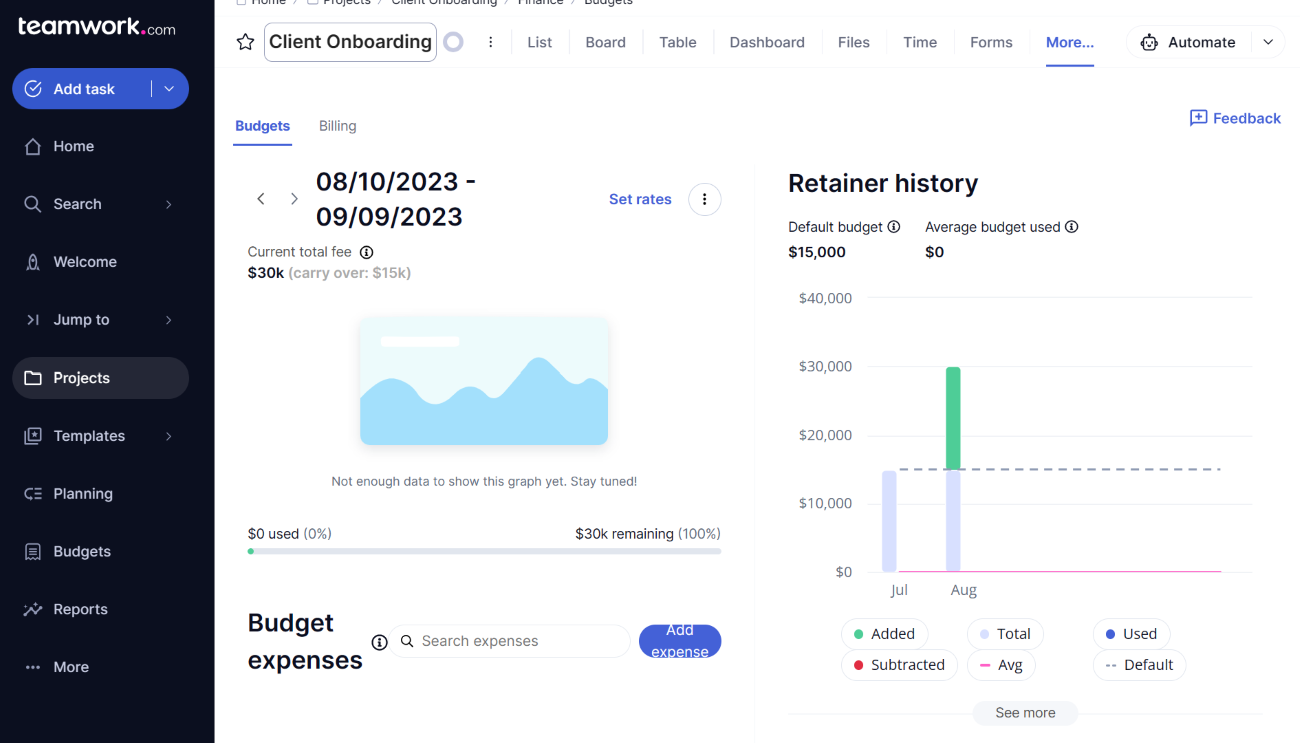
- Budget tracking: Using Teamwork, users can manage the budget of each task or project or view historical budgets. This feature is available on the Grow and Premium versions, with a maximum of 30 active budgets.
- Client-facing features: Teamwork offers various client-facing features, including team chat tools, client-access controls, collaborative document editors, and more.
Pros and cons
| Pros | Cons |
|---|---|
| Dedicated tools for workload management and time tracking. | Advanced features require extra training. |
| Variety of visualization tools for project data. | Interface feels a bit outdated. |
| Built-in apps and third-party tools. | Modifications take time to become visible. |
Top integrations
- MS Teams
- Dropbox
- Google Sheets
- Slack
Why I picked Teamwork
I picked Teamwork not only because of its comprehensive suite of features, including excellent workload management and time tracking but also because of how tailored it is for team communication and client-facing interactions.
When to use something else
If your Mac-based project management relies heavily on kanban methodologies with a need for sophisticated automation within those workflows, it’s unfortunate that Teamwork’s functionality in this area is limited. With such a restriction, you may want to find an alternative that’s better suited.
For more information, read our full Teamwork review.
Hive: Best for project management analytics

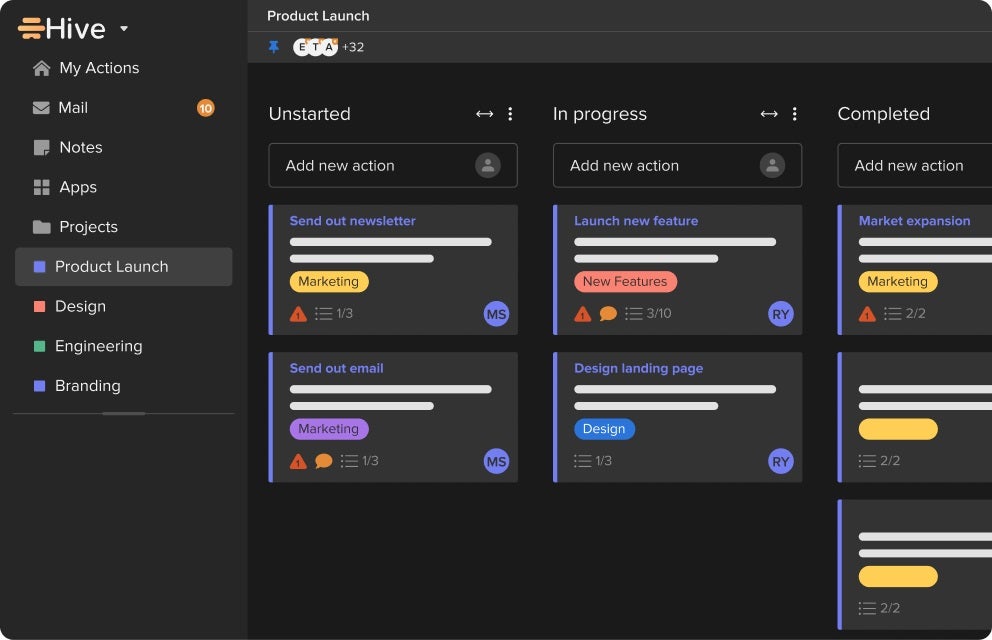
Hive, launched in 2016, is a more recent entry into the project management software market. However, it offers competitive pricing and features, including data visualization tools, portfolio views, Gantt charts, kanban boards, and to-do lists. It also offers a native messaging app for team collaboration and a compact and simple interface.
With mobile, we’re looking at very compatible apps, as Hive for iPhone needs iOS 12.4 or later, iPad requires iPadOS 12.4 or later, iPod touch needs iOS 12.4 or later, and Apple Watch requires watchOS 4.0 or later.
Pricing
- Free: Up to 10 workspace members
- Starter: $5 per user, per month, billed annually; $7 per month
- Teams: $12 per user, per month, billed annually; $18 per month
- Enterprise: Contact sales
Visit Hive
Standout features
- Automation: Hive project management software offers built-in templates and automation options to maximize user productivity. For example, users can set up buttons to automatically trigger specific actions or workflows to manage recurring or repetitive tasks.
- Hive Analytics: Hive’s powerful analytics tools allow businesses to gather valuable insights about a project. These include workload control, employee monitoring, forecasting reports, and performance assessment.
- Flexible project views: Hive offers multiple views for managing projects, including kanban, Gantt, and calendar views, which serve different project management styles and preferences.
Pros and cons
| Pros | Cons |
|---|---|
| Well-designed layout. | The mobile app version has significantly reduced functionality. |
| Plenty of add-ons and integrations. | Privacy controls need improvement. |
| Powerful analytics tools. | It has no low-tier plans. |
Top integrations
- Google Workspace
- Zoom
- MS Teams
- Slack
Why I picked Hive
I picked Hive for its in-depth analytics and reporting and its ability to process large volumes of data. It’s also a powerful tool that manages to present a well-designed layout.
When to use something else
Should you need to create and manage dependent tasks within your projects, Hive is rather limited in this area, and it might be a dealbreaker for you. In such cases, you may find an alternative like Asana, with its robust task dependency features and more straightforward task management capabilities, to be more suitable.
For more information, read the full Hive review.
Basecamp: Best for remote teams

Basecamp is a widely used project management solution that works on both Windows and Mac. Basecamp provides a suite of team communication and collaboration tools, making it ideal for remote teams. These include features such as message boards, pings, automatic check-ins, and group chatting. You also get a variety of project views and client access controls.
The mobile app is available for iPad, iPhone, and iPod touch, with a requirement of iOS 14.5 or later for the iPad and iOS 14.5 or later for the latter two.
Pricing
- Free: Up to 20 users
- Plus: $15 per user, per month
- Pro Unlimited: $299 per month, billed annually
Visit Basecamp
Standout features
- Campfire: This is the built-in chat feature in Basecamp for one-to-one or group messaging.
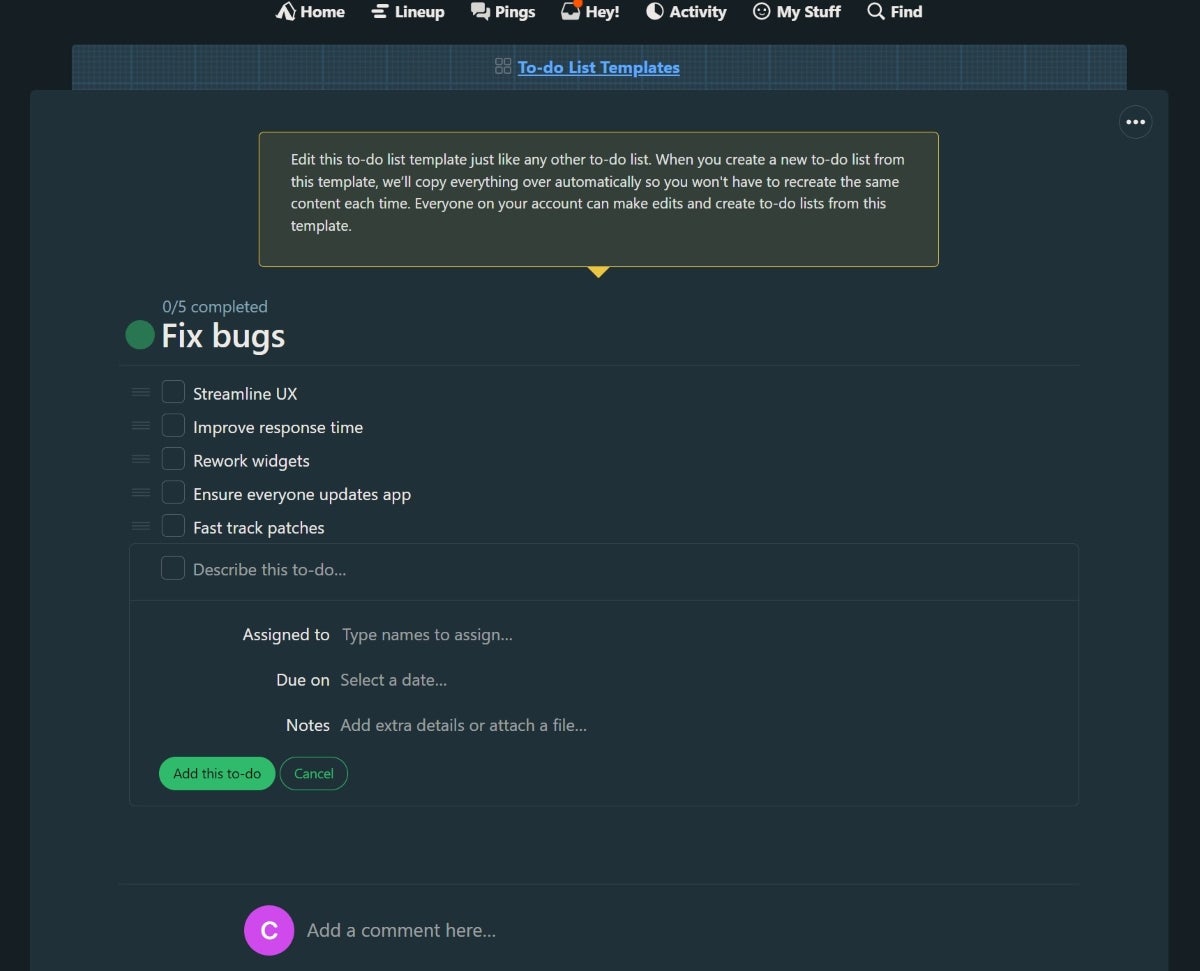
- To-do lists: Basecamp gives users a space to track their tasks, deadlines, progress, notes, and responsibilities through lists.
Pros and cons
| Pros | Cons |
|---|---|
| All-in-one platform for project management, team communication, and productivity. | The free account is only available for students and teachers. |
| Clean and intuitive interface. | An inclusive plan may not be suitable for small teams or freelancers. |
| The Pro Unlimited plan offers all features in one plan. | Not as extensive as some alternatives. |
Top integrations
- Zoho Flow
- ZapUp
- Unito.io
- Project Buddy
Why I picked Basecamp
With its extensive team communication and collaboration features, Basecamp is a top choice for remote Mac users. I particularly liked Basecamp’s unique UI, as I found it to really simplify project management. Plus, it has two straightforward paid pricing plans, which makes pricing very specific and ensures that each plan offers value.
When to use something else
If your project management needs on Mac include detailed time tracking or advanced project analytics, Basecamp’s lack of these features might prompt you to look elsewhere. Jira, known for its comprehensive time tracking and detailed reporting capabilities, could offer the functionality you need for more complex project requirements.
For more information, read the full Basecamp review.
Zoho Projects: Best for cost-effectiveness

Zoho Projects is an excellent option for small to midsize businesses, with features for task, time, resource, and issue tracking enhancing collaboration and raising productivity at an affordable price. It offers multiple views for projects, like list, Gantt, kanban, and more.
It also offers extensive integrations with other apps and tools in the Zoho ecosystem. Zoho Projects provides a mobile app for both iPhone and iPad, supporting iOS and iPadOS 12 or later.
Pricing
- Free: Up to five users
- Premium: $4 per user, per month, billed annually; $5 per user, per month
- Enterprise: $9 per user, per month, billed annually; $10 per user, per month
- Ultimate: $14 per user, per month, billed annually; $15 per user, per month
Visit Zoho Projects
Standout features
- Task automation: Zoho Projects offers end-to-end project automation, cutting across multiple teams, tasks, and workflows.
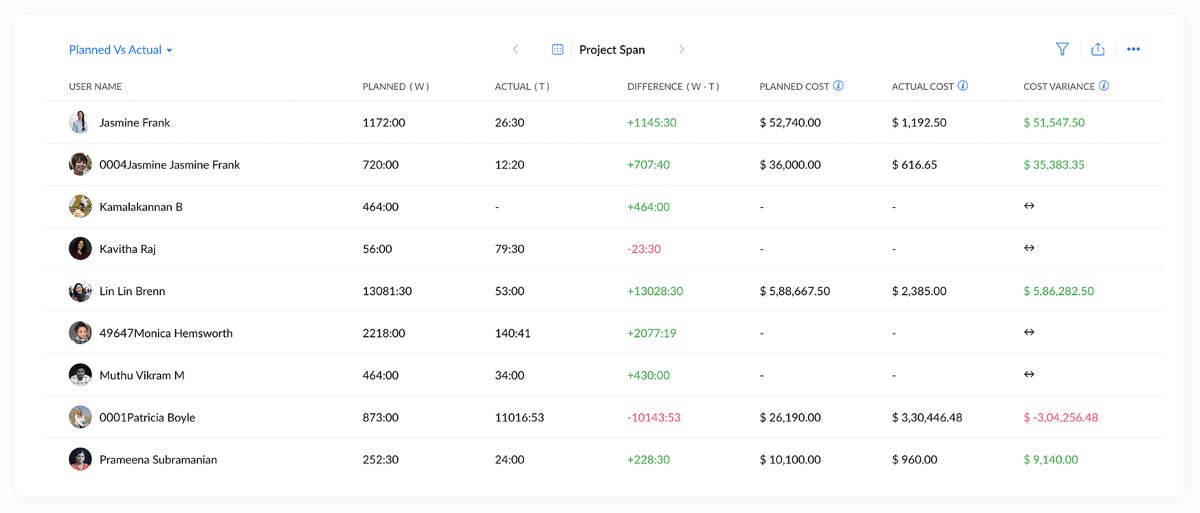
- Time tracking: It offers time tracking that helps project teams plan better, maintain accountability, and support productivity.
Pros and cons
| Pros | Cons |
|---|---|
| Cost-effective for small teams. | Some advanced features require higher-tier plans. |
| Comprehensive project management features. | Initial setup may require time to customize. |
| Compatible with older mobile operating systems. | It’s less advanced than many alternatives. |
Top integrations
- Zoho CRM
- Zoho People
- Zoho Desk
- Zoho Analytics
Why I picked Zoho Projects
For its price, Zoho Projects offered me the best bang for my buck. With its relatively low cost, it gives you channels for team collaboration and communication and unlimited projects. Plus, it’s also simple and straightforward to set up and use.
When to use something else
If you need more advanced features like in-depth resource management or enterprise-grade security, consider more specialized tools.
For more information, read the full Zoho Projects review.
Merlin Project: Best for complex project planning

Merlin Project is a project management application specifically crafted for Mac users who manage complex, large-scale projects. It’s highly functional with a user-friendly design that makes Mac users feel right at home, and it has a comprehensive toolset that covers every aspect of project management, from planning to completion.
Merlin Project’s mobile app is available for both iPad and iPhone, requiring iPadOS 15.0 or later and iOS 15.0 or later.
Pricing
- Merlin Project Express: $6.99 per month; $69.99 billed annually
- Merlin Project for iPad: $9.99 per month; $99.99 billed annually
- Merlin Project for Mac: $22.99 per month; $229.99 billed annually
Visit Merlin Project
Standout features
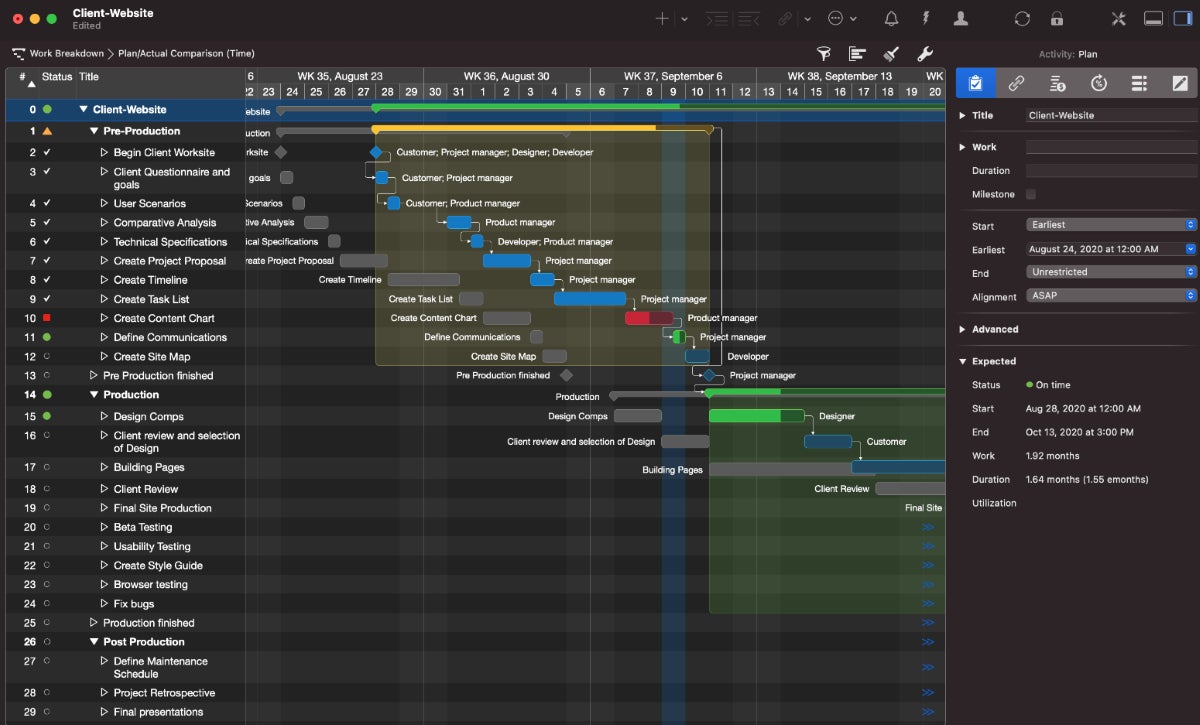
- Flexible project views: Merlin Project offers project views like Gantt charts, kanban boards, Structure views, mind maps, resource pools, and custom views, among others.
- Project planning: Merlin Project integrates extensive planning features such as time- and effort-based planning, milestones, cost and budget tracking, dependencies, resource leveling and advanced planning parameters, all supported by a suite of analysis and customization tools.
Pros and cons
| Pros | Cons |
|---|---|
| High-level project planning tools. | Complexity may be overwhelming for new users. |
| Extensive customization capabilities. | Higher price point compared to some alternatives. |
| Exclusive to Mac, iOS, and iPadOS. | Multiple licenses required for Mac and mobile. |
Top integrations
- Apple Calendar
- Microsoft Project
- Trello
- iCloud Drive
Why I picked Merlin Project
I chose Merlin Project not only because it can manage detailed and complex project structures but also because it’s the only tool on this list that’s truly built for Mac, iPadOS, and iOS. Its integration with workflows on this system feels much more intuitive.
When to use something else
If you prefer a simpler tool, has a lower learning curve, or is better suited for smaller projects, consider alternatives like Basecamp or Trello. Also, if you seek a tool with easier, more cost-effective licensing, consider any other tool on this list, as this tool offers separate subscriptions for the Mac and iPad versions. There are also robust open-source project management tools worth considering, should you prefer not to invest financially in a project management tool.
More project management coverage
- Best AI Project Management Tools
- Best Project Management Software
- Best Free Project Management Software
- Project Manager Resume Template (Free Download)
How I evaluated Mac project management software
I evaluated project management software for Mac using a combination of hands-on testing, user ratings, and TechRepublic’s in-depth individual software reviews. During this process, I focused on the factors that most directly affect day-to-day project management, including each platform’s pricing structure, overall functionality, and user interface. I also considered how easy each tool was to navigate and whether its features were practical for teams that need to plan, organize, and monitor projects from a Mac.
In addition to general usability, I assessed each platform’s core project management features, including Gantt charts, time tracking, and kanban boards. These capabilities helped me compare how well each tool supports different project planning styles, from visual task management to timeline-based scheduling and time-based project tracking. The final selections reflect a combination of firsthand evaluation, available user feedback, and TechRepublic’s existing software review insights.
FAQs
How do I choose Mac project management software?
To make sure you get all of the benefits from Mac project management software, you should choose software based on the ideal use case for your business. There are some project management software solutions that won’t work on Mac computers, so you have a smaller pool to choose from.
Here are a few tips for choosing the right project management software for Mac.
Identify your challenges
Each project management tool has its pros and cons. However, before you dig deeper into the details of the software, you need to identify the challenges or problems you want the software to solve. For example, if you are working on multiple projects and are struggling to manage them, it could result from a lack of team collaboration, scheduling conflicts, going over budget, or other types of problems.
Create a list of top priorities
Once you have identified the challenges and criteria, the next step is to prioritize what is important for your needs. For example, data visualization could be more important to you than integration with other software.
Similarly, Mac users would want project management software that is fully compatible with the Apple ecosystem. After you have a list of priorities, you can create a list of the top software options. This will be a short list of the best project management software based on your needs.
Test run
To make an informed decision on which project management software is best, you need to do a test run of the software. Sign up for a free trial to get a feel for the software. Ideally, you want to test as many features as possible, so software with a full-feature free trial will have an advantage. In the test run, look at the software in depth, checking everything from the basic features to the extra options.
Gather feedback
If you are investing in new project management software, it is worth the extra effort required to gather feedback from your team. After all, you want the software to facilitate your team, not bog them down. So, it is vital to get their feedback on the test run.
People who use Mac computers are often used to simple, streamlined user interfaces, so any software that feels slow or clunky may not be ideal for Mac users.
Does Microsoft Project work on a Mac?
Microsoft Project is designed and optimized for the Windows operating system, so it cannot be used on macOS. There are a few indirect methods to use Microsoft Project on a Mac, but they require downloading certain files and programs, such as a parallel or virtual desktop application. This might be too technical for some users, so check out these Microsoft Project alternatives.
Can project management software be used simultaneously on Mac and Windows?
Most of the top project management software allow you to simultaneously use the software on Mac and Windows. This is generally achieved through the web portal feature, which just needs an internet connection. Even with the Mac desktop app, all the project information should be automatically synced, so you can access and work on a project from a different device that uses the Windows desktop app.
What are the types of project management software for Mac?
There is a wide range of project management software available for Mac. These include software for task management, agile project management, Gantt chart software, design project management, issue tracking and more. There are several project management software for Mac that offer options for cloud-based or on-premises implementation.
Is Mac good for project management?
Yes, Mac is highly capable of handling project management tasks. With an intuitive interface paired with powerful performance, it’s well-suited for tools like ClickUp, Smartsheet, and monday.com that are optimized for macOS. Many of these tools have native Mac apps, meaning they offer seamless workflow management and enhanced user experience for Mac users.
What’s the best project management software for Mac?
The best tool is dependent on your use case as a Mac user, but ClickUp ranks highly as a project management solution for Mac users. It’s Mac-optimized and delivers a native desktop app that offers smooth navigation, multiple project views, and seamless multitasking across Apple devices like iPhones, iPads, and Apple watches, allowing for project updates on the go.
What is the best task manager for Mac?
Both ClickUp and monday.com are great task managers for Mac users. ClickUp stands out for its robust task management features, automation options, and real-time reporting, all of which work seamlessly within a native macOS app. On the other hand, monday.com offers a visually intuitive interface and is highly customizable. For more advanced reporting and collaboration, Asana is another great option for scalability and real-time task updates.
What is the most commonly used project management methodology?
The most commonly used project management methodology is agile. It is widely adopted across various industries, especially in software development, due to its flexibility and iterative approach. Other popular methodologies include scrum, and waterfall. Scrum is a subset of agile that’s popular for breaking down projects into manageable sprints. Waterfall is often used for projects with more rigid timelines and structures.
However you should learn how to choose the right project management methodology for your use case to get maximum efficiency in your projects.
Why do most professionals use Mac?
Professionals tend to favor Macs for their stability, security, and intuitive user experience, especially their seamless integration with devices in the Apple ecosystem. Macs integrate well with leading project management software such as ClickUp and Asana.