



Google is expanding Gmail’s AI Inbox to workplace accounts without a dedicated switch for administrators to disable it.
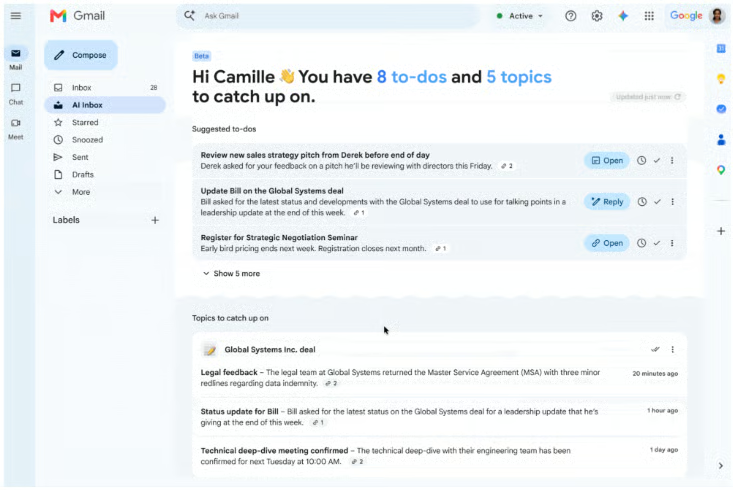
Google announced Oct. 15 that AI Inbox is expanding to eligible paid Google Workspace customers, bringing AI-generated task suggestions and discussion summaries into Gmail. The feature is designed to help employees identify outstanding work and catch up on conversations without manually reading every message.
The problem is that Workspace administrators, who manage organizational accounts and enforce company policies, cannot directly disable AI Inbox through a dedicated setting.
That leaves organizations weighing the productivity benefits against their need to decide which AI capabilities are available to employees, particularly where internal policies govern the use of AI with work correspondence.
How AI Inbox works and who gets access
Google has been pushing AI deeper into its products, from Gemini-powered assistance in Docs and Sheets to tools that help users find information across Workspace apps. Its latest move brings that push further into Gmail, where AI Inbox is designed to help businesses spend less time sorting through email and more time acting on what matters.
The feature has two main functions.
The first is Suggested to-dos, which extracts action items, deliverables, and deadlines from email conversations. This can help employees stay up to date on their tasks.
Topics to catch up on is the second. Users can have Gemini AI summarize important discussions across multiple messages, without manually reviewing lengthy email threads.
Google says the feature is expanding to paid Workspace editions, including Business Starter, Standard and Plus; Enterprise Starter, Standard and Plus; AI Pro for Education; and Frontline Plus.
Availability is limited to US users with their language set to US English. The gradual rollout began Oct. 12 for Rapid Release domains and starts Oct. 26 for Scheduled Release domains, with up to 15 days for feature visibility. Starter and Education editions will receive access in the coming months.
More Google coverage
- New Google Search AI Mode is ‘Total Reimagining,’ Says CEO Sundar Pichai
- In Major Ruling, Judge Finds Google ‘Willfully Acquired and Maintained Monopoly Power’ Over Digital Ad Market
- Google’s Big Bet on Nuclear Energy: ‘The Race to Power AI-Driven Data Centers is Accelerating’
- Computer History Museum Releases Original AlexNet Code: Why It Matters
What does Google’s new change mean for enterprises?
The immediate issue is selective control: Google provides no dedicated admin setting for disabling AI Inbox independently.
Users can hide AI Inbox through Gmail’s Inbox settings. Google’s help documentation also says access requires Smart features in Google Workspace and Smart features in other Google products to be enabled. However, hiding AI Inbox should not be treated as confirmation that underlying processing has stopped.
For IT teams, the practical step is to review existing Gemini and smart-feature settings and ask Google to clarify how they affect AI Inbox. Organizations that require approval before employees use new AI capabilities need to establish whether their available controls can enforce that policy.
Privacy and data governance also require review. Work email can contain confidential business information, client details, and sensitive project updates.
Google’s Workspace privacy documentation says customer data is not used to train its generative AI models without prior customer permission or instruction, and that existing Workspace protections apply to Gemini.
Those protections still leave organizations responsible for assessing whether AI Inbox fits their approved uses of workplace AI. IT teams should document any unanswered questions about feature-specific processing and controls before recommending its use for sensitive workflows.
Accuracy is another concern.
AI Inbox extracts tasks, deadlines, and key updates from email conversations, but an incorrect summary or missed commitment could cause employees to overlook a deliverable or act on the wrong information.
Google’s help documentation says AI Inbox does not support attachments, delegated inboxes, or encrypted emails. Employees should therefore avoid treating its suggested tasks and summaries as a complete account of outstanding work.
IT teams should establish a verification process for AI-generated output: check suggested deadlines and commitments against the original messages, retain existing task-tracking processes, and give employees a way to report missing or incorrect information.
Before recommending AI Inbox more widely, organizations should assess whether it reduces time spent reviewing email without increasing missed commitments or correction work. That gives administrators a practical basis for evaluating its value alongside their governance requirements.
Read more: Explore how Google’s expanding AI ecosystem affects business costs, controls, and workplace workflows.