


The best POS system for small business should do more than process transactions. A strong system should help you manage inventory, customers, employees, sales channels, and payments without adding unnecessary software or hardware costs as you grow.
I evaluated seven point of sale systems for small business using pricing, register and software features, hardware and payments, user experience and reliability, and customer feedback. Square earned the highest overall score for its low entry cost, flexible hardware, and broad range of tools for retail, restaurants, service businesses, and mobile sellers. However, Shopify, Lightspeed, Toast, KORONA, Helcim, and Clover each stand out for different business models and operational needs.
| Square | Overall small business POS | |
| Shopify POS | Omnichannel retail | |
| Lightspeed Retail | Inventory-heavy and multi-location retail | |
| Toast | Restaurants | |
| KORONA POS | Processor flexibility | |
| Helcim | B2Bs and wholesalers | |
| Clover | Customizable POS hardware |
- Why you can trust my advice
- Best small business POS systems compared
- Square: Best overall POS system for small business
- Shopify POS: Best for omnichannel retail
- Lightspeed Retail: Best for inventory-heavy and multi-location retailers
- Toast: Best for restaurants and food-and-beverage businesses
- KORONA POS: Best for payment processor flexibility
- Helcim: Best for B2Bs and wholesalers needing low-cost, interchange-plus processing
- Clover: Best for customizable POS hardware
- How to choose the best POS system for your small business
- Methodology: How I evaluated the best POS systems for small business
- Frequently asked questions
Why you can trust my advice
I’ve spent more than six years evaluating payment processors, merchant services, and POS systems for small businesses. My work includes hands-on POS testing, product demos with provider teams, pricing research, and comparisons of payment processing, hardware, inventory, ecommerce, and business management tools.
For this guide, I evaluated each POS using the same weighted rubric covering pricing, register and software features, hardware and payments, user experience and reliability, and customer feedback. I also checked current pricing and product details against provider documentation and considered how each system fits real retail, restaurant, service, B2B, and omnichannel selling needs.
Best small business POS systems compared
The table below compares each provider’s overall score, payment processing setup, inventory management, and omnichannel sales tools.
| Square | Square Payments | Advanced; multi-location on paid plans | Native online and in-person selling | |
| Shopify POS | Shopify Payments; third-party processors with added fees | Advanced, multi-location inventory | Native omnichannel selling and fulfillment | |
| Lightspeed Retail | Lightspeed Payments; supported third-party integrations | Advanced inventory, purchasing, and supplier tools | Native ecommerce and multi-location selling | |
| Toast | Toast Payments | Restaurant inventory available; some tools are add-ons | Online ordering and in-person restaurant sales | |
| KORONA POS | Choice of compatible processors | Advanced retail inventory | Ecommerce through integrations | |
| Helcim | Helcim interchange-plus processing | Inventory, variants, low-stock alerts, and syncing | POS, online checkout, invoicing, and payment links | |
| Clover | Clover/Fiserv processing ecosystem | Built-in inventory; advanced tools vary by plan/apps | Online ordering and ecommerce options |
Square: Best overall POS system for small business
Our rating: 4.78 out of 5
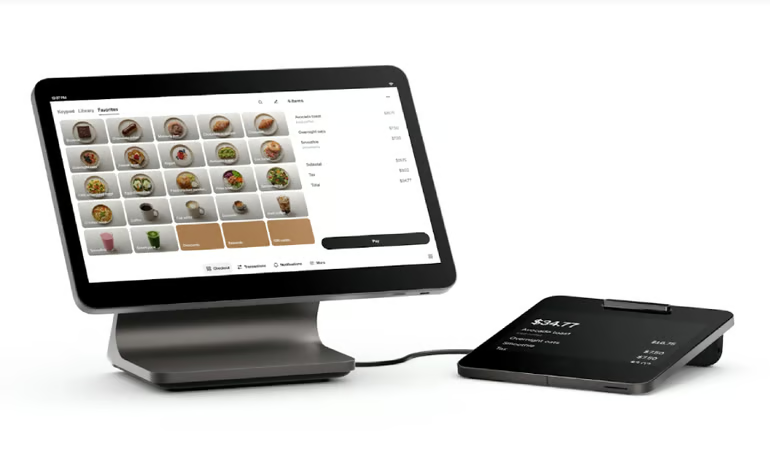
Square is my top choice for small businesses because it offers one of the easiest ways to start selling without a monthly software commitment. Businesses can begin with Square Free and add more advanced retail, restaurant, or appointment features as their operations grow.
Square POS has one of the widest ranges of use cases among the providers on this list, from small retail stores and pop-ups to salons, restaurants, and service businesses.
Why I chose Square
Square earned the highest score in my evaluation because it combines a $0 entry point with inventory, customer management, ecommerce tools, employee features, invoicing, appointments, and several hardware options.
It is particularly useful for businesses that want to start small without committing to expensive hardware or long contracts. The main limitation is payment processing flexibility. Square users process payments through Square Payments rather than choosing their own merchant account provider.
Pricing
Square’s general POS plans include:
- Square Free: $0 per month.
- Square Plus: $49 per location per month.
- Square Premium: $149 per location per month.
- Square Pro: Custom pricing.
Payment processing varies by plan and transaction type. Square’s retail pricing starts at 2.6% + 15 cents for in-person transactions on the Free plan.
Hardware ranges from mobile card readers to Square Terminal, Square Stand, and Square Register.
Key features
- Industry-specific POS configurations for retail, restaurants, and appointment businesses.
- Inventory and item tracking.
- Customer profiles and purchase histories.
- Ecommerce and online ordering.
- Tap to Pay and mobile checkout.
- Employee management.
- Invoicing and payment links.
- Offline payments.
- Multiple countertop and mobile hardware options.
Pros and cons
|
|
Shopify POS: Best for omnichannel retail
Our rating: 4.65 out of 5
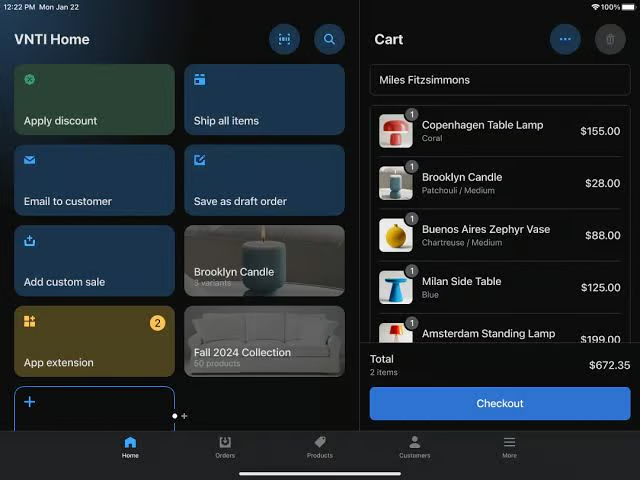
Shopify POS is my pick for retailers that sell both online and in person and want inventory, customers, orders, and fulfillment managed through one system.
Shopify stands out because its POS is closely tied to its ecommerce platform. Retailers can offer buy online, pick up in store; buy in store, ship to customer; cross-channel returns; and inventory tracking across physical and online locations without relying on separate ecommerce and POS platforms.
Why I chose Shopify POS
I chose Shopify for omnichannel retail because its strongest features are built around connecting online and physical selling. Its POS tools work with Shopify’s ecommerce platform, customer accounts, product catalog, order system, and fulfillment tools.
This makes Shopify particularly strong for retailers that began online and are opening physical stores, or brick-and-mortar businesses that want to add ecommerce without maintaining separate product and order databases.
The main drawback is cost. Shopify POS is not a standalone $0 system. You need a Shopify ecommerce plan, and businesses that need more advanced in-store tools will also need POS Pro.
Pricing
Shopify POS Lite is included with Shopify ecommerce subscriptions.
- POS Lite: Included with eligible Shopify plans, starting at $5 per month (Starter). Full ecommerce plans start at $39 per month.
- POS Pro: $89 per location per month in addition to the Shopify ecommerce subscription.
Processing rates depend on the Shopify plan. Businesses using third-party payment processors may also pay an additional Shopify transaction fee.
Key features
- Shared online and in-store inventory.
- Buy online, pick up in store.
- Buy in store, ship to customer.
- Cross-channel returns and exchanges.
- Multi-location inventory.
- Customer profiles and purchase history.
- Staff roles and permissions.
- Mobile checkout.
- Centralized order management.
- Large ecommerce app marketplace.
Pros and cons
|
|
Lightspeed Retail: Best for inventory-heavy and multi-location retailers
Our rating: 4.63 out of 5
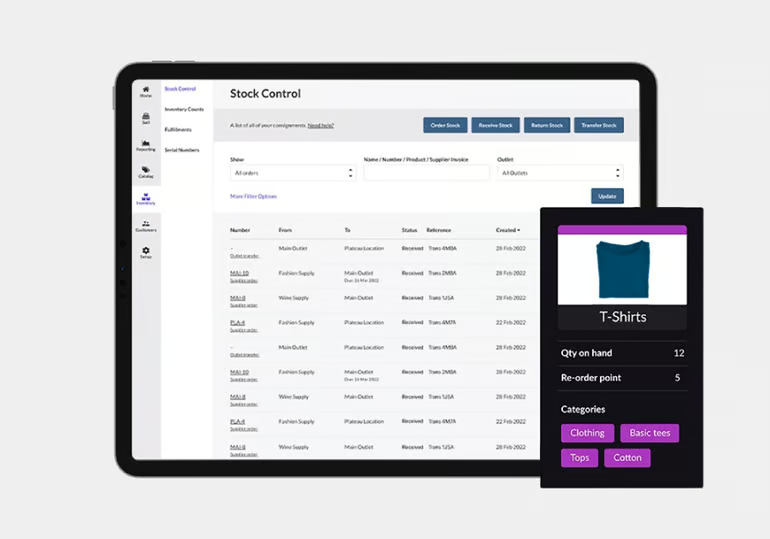
Lightspeed Retail is best suited to retailers that need deeper inventory, purchasing, reporting, and multi-location tools than simpler POS platforms typically provide.
Its retail software includes supplier management, purchase orders, product catalogs, inventory transfers, ecommerce tools, loyalty features, and detailed reporting. These tools make it a better fit for retailers with large catalogs or several physical stores.
Why I chose Lightspeed Retail
Lightspeed scored close to Shopify because it offers one of the strongest retail feature sets in this group. I gave Shopify a slight edge overall because of its native omnichannel selling tools, while Lightspeed remains the stronger choice for businesses focused on inventory control and retail operations.
The tradeoff is price. Lightspeed starts much higher than Square, Helcim, and several other POS options on this list.
Pricing
Lightspeed Retail plans currently include:
- Basic: $89 per month.
- Core: $149 per month.
- Plus: $289 per month.
Plans include one register. Businesses should account for added registers, payment processing, and optional services when calculating total cost.
Key features
- Advanced inventory management.
- Supplier and purchase-order tools.
- Product catalogs.
- Inventory transfers.
- Built-in ecommerce.
- Loyalty tools.
- Advanced sales reporting.
- Mobile Scanner POS.
- Multilocation management.
- 24/7 phone and chat support.
Pros and cons
|
|
Toast: Best for restaurants and food-and-beverage businesses
Our rating: 4.28 out of 5
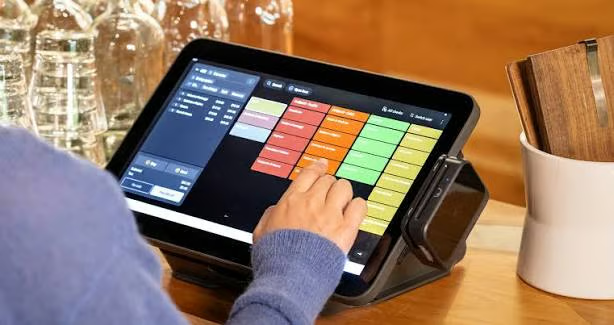
Toast is my pick for restaurants because its POS, hardware, online ordering, kitchen tools, and payment processing are built around food-service workflows.
Toast can support quick-service restaurants, full-service restaurants, bars, cafes, food trucks, and multi-location restaurant groups. It also offers restaurant-specific hardware such as handheld ordering devices and kitchen display systems.
Why I chose Toast
Toast stands out because its restaurant tools go far beyond basic checkout. Businesses can connect front-of-house ordering with kitchen operations, online orders, handheld devices, loyalty, payroll, inventory, and reporting.
Its main limitation is cost flexibility. The Starter Kit makes Toast accessible to small restaurants, but many of its more advanced tools are sold as add-ons. Toast also requires its own payment processing.
Pricing
Toast currently lists:
- Starter Kit: $0 per month.
- Point of Sale: $69 per month.
- Build Your Own: Custom pricing.
Hardware, payment processing, and add-ons can significantly affect the final cost.
Key features
- Restaurant POS and tableside ordering.
- Handheld payment devices.
- Kitchen display systems.
- Online ordering.
- Restaurant inventory options.
- Loyalty.
- Payroll and employee tools.
- Offline functionality.
- 24/7 support.
Pros and cons
|
|
KORONA POS: Best for payment processor flexibility
Our rating: 4.13 out of 5
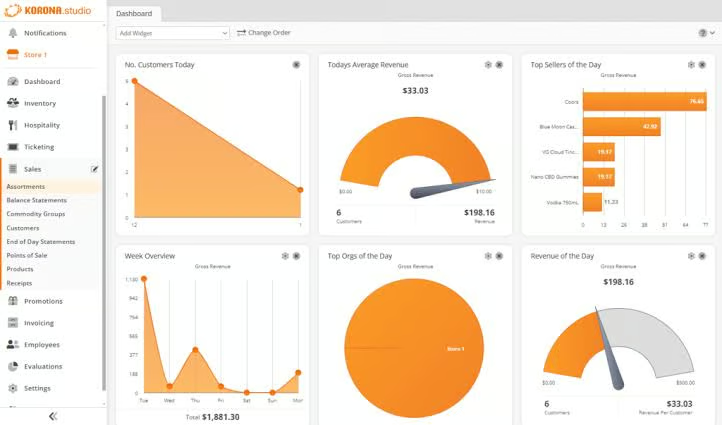
KORONA POS is a strong option for retailers that want more control over payment processing. Unlike POS providers that require their own payment service, KORONA is processor-agnostic and can integrate with several merchant account providers.
This can be useful for businesses that already have a merchant account, want to negotiate processing rates, or operate in industries where choosing a processor matters more than using an all-in-one payments platform.
Why I chose KORONA POS
KORONA’s processor flexibility is its biggest advantage. It also offers inventory, employee management, reporting, promotions, loyalty, and ecommerce integrations.
I would look at KORONA if payment processing choice matters more than having the lowest software price. Its monthly fee is higher than free POS systems, but businesses may be able to offset some of that cost through lower negotiated processing rates.
Pricing
KORONA POS pricing includes:
- Core: $59 per terminal per month.
- Retail: $79 per terminal per month.
- Plus: $99 per terminal per month.
KORONA states that its plans are processing-agnostic and do not require long-term contracts.
Key features
- Choice of compatible payment processors.
- Inventory tracking.
- Product reporting.
- Retail automation.
- Loyalty.
- Employee management.
- Ecommerce integrations.
- Promotions and discounts.
- Sales reporting.
Pros and cons
|
|
Helcim: Best for B2Bs and wholesalers needing low-cost, interchange-plus processing
Our rating: 4.10 out of 5
Helcim is my pick for B2Bs, wholesalers, and growing businesses that want POS software without a monthly subscription and prefer interchange-plus payment processing instead of flat-rate pricing.
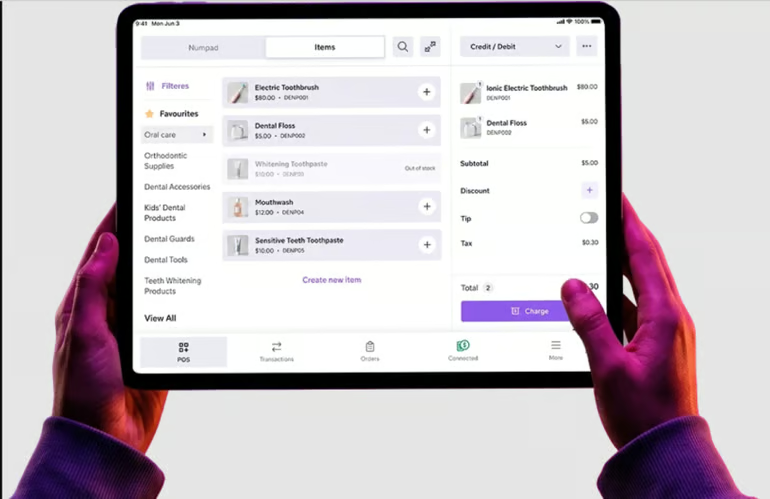
Helcim’s account includes POS software, invoicing, payment links, customer management, online checkout, inventory tools, and payment processing. That mix is useful for businesses that accept payments both at a counter and through invoices, phone orders, or online payment requests.
Why I chose Helcim
Helcim stands out because it combines a $0 monthly POS platform with interchange-plus pricing and automatic volume discounts. This can be particularly useful for B2B businesses and wholesalers with larger average tickets or increasing monthly card volume.
Its software also covers several payment workflows that matter in B2B sales, including invoicing, online checkout, stored customer details, and virtual payments. Inventory features include product variants, bulk imports, low-stock alerts, and cross-channel stock syncing.
The tradeoff is that Helcim does not have the same size POS app ecosystem as Square, Shopify, or Clover. It also requires Helcim processing and does not support offline card payments.
Related: Best B2B Payment Processors: Top Picks & Reviews
Pricing
Helcim does not charge a monthly account or POS software fee.
Software
- POS software: $0 per month.
- Account fee: $0 per month.
Hardware
- Helcim Card Reader: $199.
- Helcim Smart Terminal: $349.
- Tap to Pay on iPhone: No additional reader required; Helcim lists an additional 10-cent transaction fee for Tap to Pay.
Payment processing
Helcim uses interchange-plus pricing rather than a single flat percentage. Processing costs decrease automatically as monthly card volume rises, which can make it more attractive for businesses with higher transaction volume.
Key features
- Free POS software.
- Interchange-plus processing.
- Automatic volume discounts.
- Invoicing.
- Payment links.
- Virtual terminal.
- Customer profiles.
- Inventory tracking.
- Product variants.
- Online checkout.
- QuickBooks and Xero integrations.
Pros and cons
|
|
Clover: Best for customizable POS hardware
Our rating: 4.08 out of 5
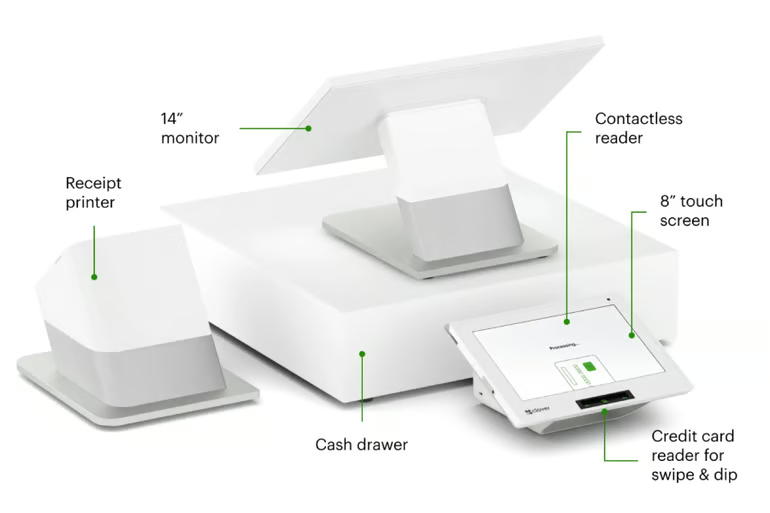
Clover is a good fit for businesses that want an all-in-one POS with a wide choice of countertop, handheld, and customer-facing POS hardware.
Its product range includes compact countertop devices, Clover Flex handhelds, and full Station systems. Businesses can also add applications for inventory, customer engagement, employee management, reporting, and industry-specific workflows.
Why I chose Clover
Clover stands out most for hardware flexibility. Businesses can choose a compact setup for a small counter, add handheld devices for mobile checkout, or use a full Station system with a customer-facing display.
The biggest limitation is that Clover pricing and payment arrangements can vary depending on where the system is purchased, the hardware package, business type, and merchant account terms. I recommend checking the full software, hardware, processing, and contract cost before signing up.
Pricing
Software fees: Clover bundles its retail POS software with hardware. Pricing varies based on the plan and whether you finance the hardware or pay for it upfront:
- Starter: $16/month for 36 months or $349 upfront
- Standard: $180/month for 36 months, or $1,899 upfront + $84.95/month
- Advanced: $240/month for 36 months, or $2,648 upfront + $104.90/month
Processing fees:
- In person: 2.3%-2.6% + 10 cents
- Online: 3.5% + 10 cents
Hardware fees: Hardware is included with each Clover plan, with additional devices available for purchase as needed.
Key features
- Wide range of POS hardware.
- Countertop and handheld devices.
- Customer-facing displays.
- Inventory management.
- Customer profiles.
- Loyalty tools.
- Employee management.
- Reporting.
- App marketplace.
- Retail and restaurant configurations.
Pros and cons
| Pros | Cons |
|---|---|
|
|
What's hot at TechRepublic
- Blackpoint Cyber vs. Arctic Wolf: Which MDR Solution is Right for You?
- Why AWS Sellers Choose Deepgram Over Other Voice AI Tools
- SS&C Intralinks DealCentre AI vs. Datasite: Which platform is built for the future of dealmaking?
- SS&C Intralinks FundCentre AI vs. Juniper Square: Which platform better supports modern private markets fund managers?
- Verito vs. Rightworks: Which IT Provider Is Best for Your Firm?
How to choose the best POS system for your small business
The best POS system should fit your current business model while leaving room for additional locations, products, employees, and sales channels. Before choosing a provider, compare how each system handles your main selling workflow and what it will cost as your business grows.
Start with how and where you sell
A retailer with thousands of SKUs has different POS needs than a restaurant, salon, wholesaler, or mobile seller.
Retailers with large product catalogs may benefit from Lightspeed’s inventory tools, while businesses selling through both an ecommerce site and physical stores may find Shopify easier to manage. Restaurants should prioritize industry-specific ordering and kitchen workflows, which is where Toast stands out.
Service businesses and smaller merchants may prefer Square because it can support general POS, appointments, invoicing, and retail without requiring separate systems.
Compare total POS cost
Do not compare providers using software subscriptions alone. Your actual POS cost may include:
- Monthly software fees.
- Additional registers or terminals.
- Hardware.
- Payment processing fees.
- Ecommerce fees.
- Loyalty.
- Employee management.
- Inventory add-ons.
- Financing.
- Installation.
- Contract or termination fees.
A $0 POS plan can still cost more over time if processing rates are significantly higher than another provider’s. Understanding credit card processing fees can help you compare the ongoing cost of each system.
Decide how much payment processor flexibility you need
Some POS systems bundle payments with the software. Square, Toast, and Helcim are examples of systems that require their respective payment processing services.
KORONA takes a different approach and works with compatible third-party processors. This can matter if you already have a merchant account or want to negotiate processing rates separately from your POS software.
Helcim is also worth comparing if you want interchange-plus pricing rather than flat-rate processing, especially if your business handles higher card volume.
Match inventory tools to your business
Basic inventory tracking may be enough for a small service business or pop-up shop, but retailers often need more.
Look for tools such as:
- Product variants.
- Purchase orders.
- Supplier management.
- Stock transfers.
- Low-stock alerts.
- Multi-location inventory.
- Barcode scanning.
- Bulk imports.
- Ecommerce inventory syncing.
Lightspeed is particularly strong for inventory-heavy retailers, while Shopify is a good fit for retailers that need to keep online and in-store inventory synchronized.
Plan for the next stage of growth
A POS that works for one register today may become limiting after you add another location, ecommerce channel, or sales team.
Before choosing a system, check how pricing changes when you add:
- Locations.
- Registers.
- Employees.
- Online sales.
- Loyalty.
- Advanced reporting.
- Inventory tools.
- Integrations.
- Customer management.
This gives you a clearer picture of whether the platform can support the business two or three years from now, not just at launch.
Methodology: How I evaluated the best POS systems for small business
I evaluated popular POS systems and selected the seven highest-scoring providers for this guide. I used a weighted rubric designed around the factors that matter most to small and growing businesses choosing a POS.
My evaluation covered the following categories:
- Pricing: I compared free plans, monthly software fees, contract terms, trial options, and overall cost structure. I gave higher marks to systems with transparent pricing and lower barriers to entry.
- Register and software features: I reviewed checkout tools, inventory, customer management, ecommerce, loyalty, employee features, refunds, reporting, and other tools used in day-to-day POS operations.
- Hardware and payments: I compared countertop and mobile hardware, supported payment methods, payment-processing flexibility, mobile payments, and card-present transactions.
- User experience and reliability: I looked at onboarding, integrations, mobile access, support availability, offline use, and how easily businesses can manage the system across regular operations.
- User reviews: I incorporated independent customer feedback to help validate real-world reliability, ease of use, support, and common product limitations.
I also drew on my hands-on experience testing POS and payment systems, including product demos, free accounts, test environments, and direct walkthroughs. Pricing and feature details were checked against current provider documentation.
Frequently asked questions
How much does a POS system cost for a small business?
POS software can cost anywhere from $0 to several hundred dollars per month depending on features, number of locations, and business type. You should also include hardware and payment processing in your cost comparison. For many businesses, processing fees will cost more over time than the POS software subscription itself.
What is the cheapest POS system for a small business?
Square, Helcim, and Toast all offer ways to start with no monthly POS software fee, although each has different payment-processing, hardware, and feature costs. The least expensive system depends on transaction volume, average ticket size, and which add-ons your business needs.
Can I use a POS system without a monthly fee?
Yes. Square offers a free POS plan, Helcim includes its POS software with no monthly account fee, and Toast offers a $0 Starter Kit. Businesses should still compare payment-processing fees and hardware costs before choosing a free POS plan.
Can I choose my own payment processor with a POS system?
Some POS systems allow third-party processors, while others require their own payment service. KORONA is processor agnostic, while Square, Toast, and Helcim use their own processing services. Payment flexibility can be useful if you already have a merchant account or want to negotiate rates separately.
What POS system works for both online and in-person sales?
Shopify POS is one of the strongest options for businesses that sell both online and in stores because its ecommerce and POS systems share product, inventory, customer, and order information. Square and Lightspeed also provide ecommerce and in-person selling options.