
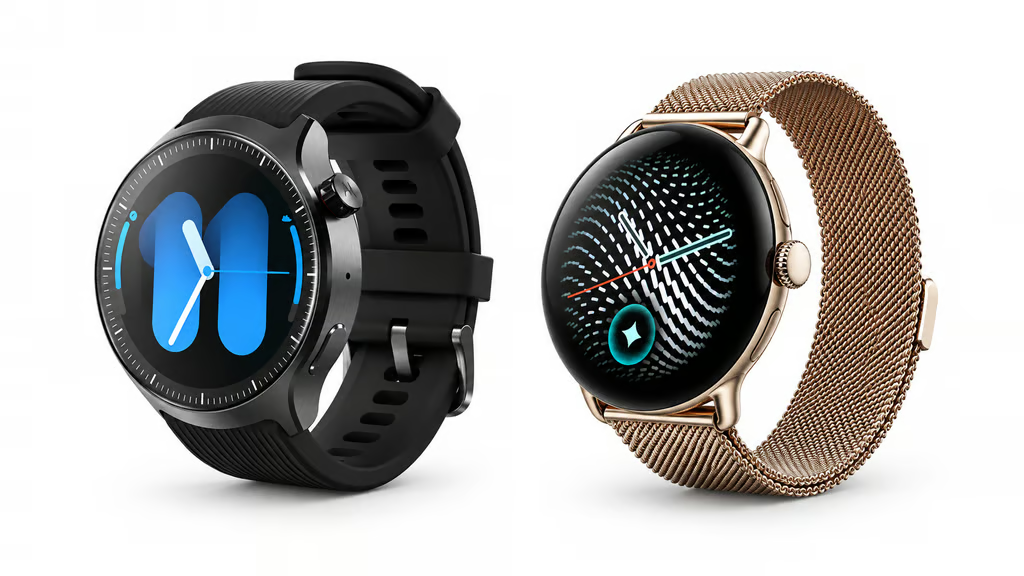


Motorola has returned to Wear OS with an aggressive price advantage. The Moto Watch Ultra went on sale Sept. 10 for $349.99 with LTE, while Google’s Pixel Watch 5 starts at $399 for the 41mm Wi-Fi model.
Cellular pricing widens the gap: Pixel Watch 5 LTE starts at $499.99, while the 45mm LTE model costs $529.99. Motorola pairs its lower price with a stainless-steel case, Polar fitness tools and standard watch bands; Google counters with Wear OS 7, newer hardware and a broader health platform.
| Moto Watch Ultra | Google Pixel Watch 5 | |
| US price | $349.99, LTE included | Wi-Fi: $399 (41mm), $429 (45mm); LTE from $499.99 |
| Case | 46mm stainless steel | 41mm or 45mm aluminum |
| Software | Wear OS 6 | Wear OS 7 |
| Processor | Snapdragon W5+ Gen 1 | Snapdragon W5 Gen 2 Accelerated + Cortex-M55 |
| Battery claim | Up to 2 days, AOD off | Up to 30 hours (41mm) or 40 hours (45mm), AOD on |
| Health platform | Polar | Google Health |
| Bands | Standard 22mm | Proprietary connector |
Motorola’s return to Wear OS brings LTE, Polar health tracking and two promised OS upgrades. The 45mm Pixel Watch 5 LTE is currently listed at $529.99.
How we compared the watches: This comparison weighs current US pricing, connectivity, hardware, battery claims and testing conditions, operating systems, update commitments, health tools and feature restrictions. Battery life and other manufacturer performance claims are compared using the conditions each company specifies rather than treated as independent test results. Recommendations focus on practical differences for different buyers rather than awarding points or naming an overall winner.
Price, battery and hardware
Motorola includes LTE in its $349.99 price and uses a 46mm stainless-steel case with standard 22mm bands. Pixel Watch 5 offers smaller 41mm and 45mm aluminum cases but uses Google’s proprietary band connector. Those trade-offs also shape the broader Wear OS smartwatch market, where battery life, software and phone compatibility separate otherwise similar models.
Battery figures are less straightforward. Motorola claims up to two days of active use with the always-on display disabled, plus up to 24 hours from a 15-minute charge. Google rates the 41mm Pixel Watch 5 for 30 hours and the 45mm for 40 hours with the always-on display enabled, so the figures are not directly comparable.
Google has the newer computing platform. Its Pixel Watch 5 specifications list Wear OS 7, Snapdragon W5 Gen 2 Accelerated, a Cortex-M55 co-processor and 64GB of storage. Moto Watch Ultra runs Wear OS 6 on Snapdragon W5+ Gen 1, with Motorola promising two operating-system upgrades.
The difference could become more significant over time: older smartwatches can lose new operating-system support while their hardware remains usable, as recent smartwatch support cutoffs illustrate.
Polar fitness vs. Google Health
Motorola uses Polar technology for fitness and recovery features including heart-rate and SpO2 monitoring, Sleep Plus Stages, Nightly Recharge and running guidance. The approach emphasizes workouts, sleep and recovery rather than Google’s expanding set of longer-term health trends.
Google is rolling out Health Guardian features covering blood-pressure trends, insulin-resistance trends and sleep-breathing quality. Google describes them as general-wellness tools rather than diagnostic or real-time clinical measurements, and availability varies by country and device.
Google Health Coach is separate and requires a Google Health Premium subscription. Breathing Emergency Detection is geographically limited: Google says it is available in selected European countries and has not been cleared or evaluated by the US Food and Drug Administration.
Moto Watch Ultra makes the stronger price case for buyers who want LTE, stainless steel and Polar fitness tools without moving above $400. Pixel Watch 5 asks more for cellular connectivity but starts with newer software and a broader health ecosystem, making the decision largely one of upfront cost versus platform depth.
Let us teach you How to Talk to AI for free! Try our six-minute course at The Neuron Academy and learn a few simple ways to write better prompts and get more useful results from AI, or browse our other AI course for free for seven days. Check out all the lessons here →