

QuickBooks Workforce is a popular pay processing software thanks to its full-service payroll, well-rounded features, and fast syncing with the QuickBooks accounting system. However, it has limited HR tools and can be pricey to use, depending on the plan you get. If you’re looking for a QuickBooks Workforce alternative that costs less, handles global employee payments, or offers more HR features, here are some options you can consider.
- Best overall: Gusto
- Best value for money: OnPay
- Best for contractor payments: Square Payroll
- Best for dedicated payroll support: Paychex Flex
- Best for scalability: RUN Powered by ADP
Top QuickBooks Workforce alternatives comparison
These alternatives to QuickBooks Workforce, including QuickBooks, offer tax reporting and filing assistance, automatic pay computations, benefits administration, and essential tools to manage employee information.
| Starting monthly price | Separate contractor plan (per month) | Global payroll tools | Time tracking | |
|---|---|---|---|---|
| QuickBooks Workforce | $50 per month + $6.50 per employee monthly | $15 for up to 20 workers + $2 per additional worker | No | Included in higher tiers |
| Gusto | $49 base fee + $6 per employee | $35 base fee + $6 per worker | Yes | Included in higher tiers |
| OnPay | $49 base fee + $6 per employee | No | No | Via integrations |
| Square Payroll | $35 base fee + $6 per employee | $6 per worker | No | Yes |
| Paychex Flex | Custom | No | No | Paid add-on |
| RUN Powered by ADP | Custom | No | Yes | Paid add-on |
Gusto: Best overall

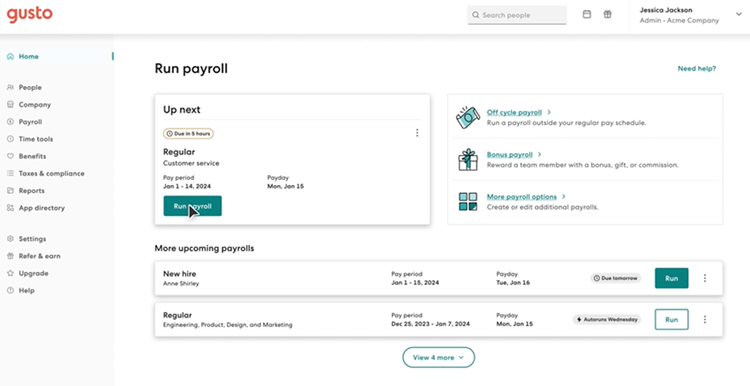
As a payroll software, Gusto has many of the same perks as QuickBooks, such as automatic salary and tax computations, wage garnishments, and automated tax filings. However, it has a broader range of HR features to streamline the employee lifecycle. It can post jobs, onboard workers, track attendance, plan work shifts, and monitor performance reviews.
Gusto can also pay international contractors in over 120 countries. And with its employer of record (EOR) service, Gusto Global, it can compliantly hire and pay workers in Australia, Brazil, Canada, Germany, India, Ireland, Mexico, the Netherlands, the Philippines, Portugal, the United Kingdom, and Spain (as of this writing).
Pricing
QuickBooks Workforce and Gusto offer three plans, but Gusto’s starter tier is slightly cheaper. It only costs $49 plus $6 per employee monthly, whereas QuickBooks Workforce’s starter plan is priced at $50 plus $6 per employee monthly. Plus, Gusto’s starter tier has more HR features, such as basic paid time off (PTO) policies, custom offer letter templates, and onboarding checklists.
Here are its pricing plans:
- Simple: $49 base fee per month plus $6 per employee per month.
- Plus: $80 base fee per month plus $12 per employee per month.
- Premium: $180 base fee per month plus $22 per employee per month.
It also offers a contractor plan if you only pay contract workers.
- Contractor only: $35 base fee per month plus $6 per worker monthly.
While Gusto’s contractor plan isn’t as affordable as QuickBooks Workforce’s ($15 monthly for up to 20 workers plus $2 per additional worker), Gusto includes new hire reporting in its package. This can save you time, especially if your business is located in California or a state that requires companies to report newly hired contract workers.
Gusto pros and cons
| Pros | Cons |
|---|---|
|
|
When to choose Gusto over QuickBooks Workforce
Gusto is my top QuickBooks Workforce alternative mainly because of its feature-rich platform. It’s great if you want a payroll system that can manage hiring to onboarding tasks with ease. QuickBooks doesn’t have an applicant tracking system (ATS) to monitor candidates, and its onboarding features aren’t as extensive. With Gusto, you can track applicants, create virtual welcome cards for new hires, manage email and software access, and run background checks via Checkr directly from its platform.
When it comes to payroll taxes and tax filings, both will calculate federal, state, and local taxes, but only Gusto includes tax payment and filing assistance across all levels in its starter tier. With QuickBooks, you must upgrade to at least its Premium plan to get automated local tax filing services.
Gusto’s functionalities also extend beyond just processing US and global payroll. It can help with state tax registration and offers an R&D tax credit service that lets you save up to $250,000 in payroll taxes each year. So, between features and pricing, I consider Gusto the top alternative to QuickBooks Workforce for most small businesses.
Visit Gusto
Learn more about Gusto
- For more information about its features, read our Gusto review.
- To see how it compares with QuickBooks Workforce, read our Gusto vs QuickBooks Workforce article.
OnPay: Best value for money

What sets OnPay apart from QuickBooks Workforce and the others on my list is its flat-rate pricing. You only get one plan, with all its features and services included in that package. So, you never have to worry about whether or not a specific functionality will cost you extra or require a plan upgrade.
OnPay’s simple pricing also gives you plenty of bang for your buck. For a monthly fee of $40 plus $6 per employee, you get full-service payroll, access to benefits plans, employee self-service tools, and essential HR and team management features. As an added perk, OnPay provides white-glove setup and data migration support to get you started ― at no extra cost to you. So, even if OnPay isn’t the cheapest or lacks global payroll services, it still offers a good balance between pricing and features.
Pricing
OnPay has just one plan, with all features included. It costs $49 per month plus $6 per employee, which is slightly less expensive than QuickBooks Workforce’s starter tier ($50 plus $6 per employee per month). Similar to Gusto, OnPay offers more HR functionalities than QuickBooks.
However, OnPay doesn’t have a separate contractor-only plan. You have to pay the same rate as its full-service payroll tier, even if you only need to process contractor payments. I recommend using Square Payroll if you want a QuickBooks Workforce alternative that offers a low-cost contractor package.
OnPay pros and cons
| Pros | Cons |
|---|---|
|
|
When to choose OnPay over QuickBooks Workforce
OnPay made my list of the top alternatives to QuickBooks Workforce because of the range of core HR features that it provides. In addition to its HR information system (HRIS) module to manage employee data and documents, you get a searchable company directory and online org chart that automatically updates based on changes to OnPay’s employee profiles.
I also appreciate its customizable time off policies, which allow you to create up to three accrual rules. This enables workers to earn PTO credits at different rates depending on various factors like employee type, tenure, and work location. While QuickBooks also has customizable accrual policies, it isn’t as flexible as OnPay’s.
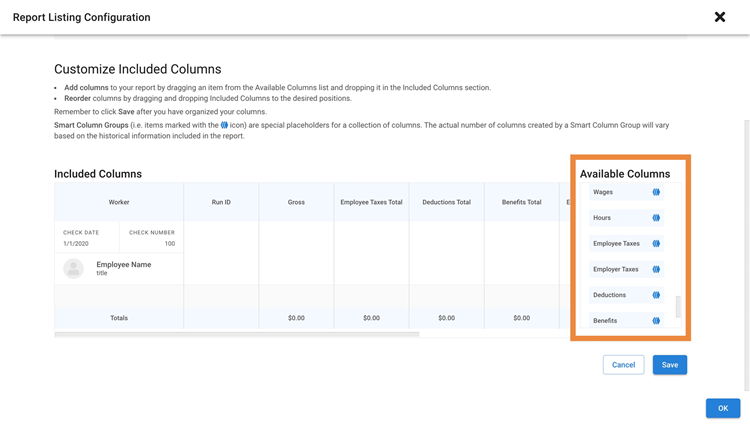
Further, creating payroll reports is easier with OnPay. You can add or remove a column, drag and drop it to your desired position, and use filters to select items. You can even add one of its collapsible “smart column” groups, which contain multiple columns of related data, such as work hours and employer taxes. This provides quick access to payroll info you may need to review online reports without these columns taking too much space on the report. With QuickBooks, you don’t get similar customization options.
Visit OnPay
Learn more about OnPay
- For more information about its features, read our OnPay review.
- To see how it compares with QuickBooks Workforce, read our QuickBooks Workforce vs OnPay article.
Square Payroll: Best for contractor payments

Square Payroll is a good option if you’re looking for a QuickBooks Workforce alternative with an affordable contractor-only plan. It may not be as cost-efficient as its competitor, but it’s the cheapest on my list for a monthly fee of only $6 per worker. It includes everything you need to run payroll while staying legal and compliant, like no-fee tax form processing for your 1099s. And given the price, Square Payroll gives you plenty of value ― especially if you want an intuitive pay processing platform for you and your contractors.
However, it lacks the comprehensive HR features and international payment tools that similar payroll providers offer. It’s also best used with other Square products, like Square POS. This allows you to maximize its payment functionalities while leveraging the direct integration between its payroll and point of sale (POS) systems for easy data transfers and employee tip or commission processing.
Pricing
With Square Payroll, you get two options:
- Full-service payroll: $35 base fee per month plus $6 per employee per month.
- Contractor-only payroll: $6 per worker per month.
Compared to all of the providers on my list, Square Payroll offers the most affordable full-service payroll and contractor-only payroll plans. You can save more with this QuickBooks Workforce alternative, provided you only need basic HR tools, such as simple new hire onboarding, scheduling, and time tracking features.
Square Payroll pros and cons
| Pros | Cons |
|---|---|
|
|
When to choose Square Payroll over QuickBooks Workforce
If you have a restaurant or retail shop, using Square’s products can simplify your payment processes and operations. For example, you can use Square Online to manage your online store and once you have a physical store, get Square POS to accept payments and Square Payroll to process staff payouts. Its marketing products also help you build client relationships through email and text marketing campaigns. While QuickBooks may have several products, these are focused on payment and accounting solutions.
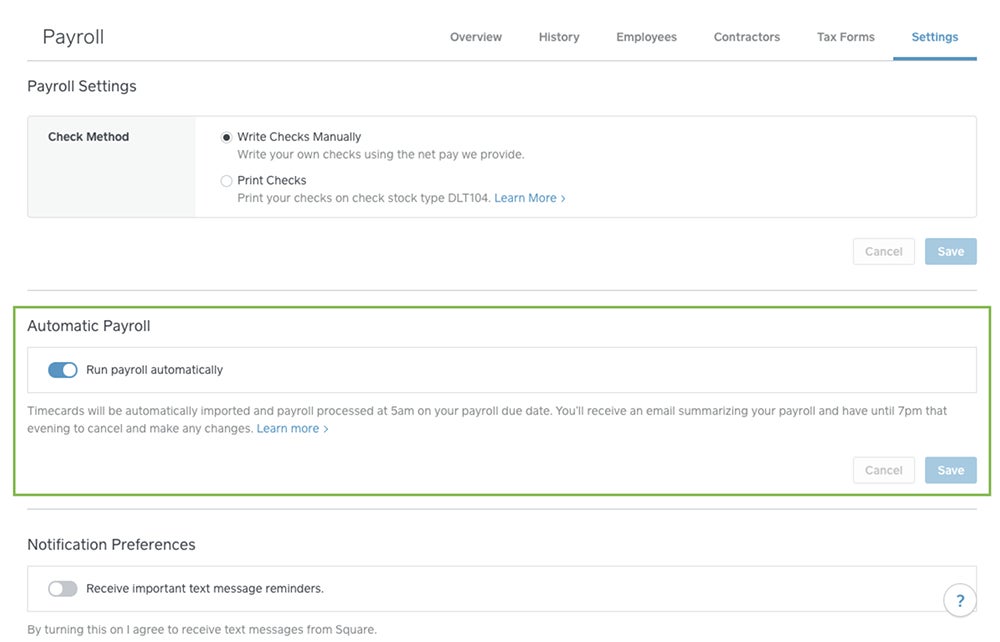
Unlike QuickBooks Workforce, which doesn’t have a downloadable app, Square Payroll has separate apps for employees and employers. The app for employees functions as a self-service tool where your staff can access payslips and tax forms, check schedules, get real-time messages, and clock in/out for work. Meanwhile, the app for employers allows you to import timecards, send payments, and manage payroll.
In terms of contractor payouts, you can also use the Square Payroll app to process payments for contract workers. You can even pay them by manual check, direct deposit, or via the Square Cash App. With the QuickBooks contractor payments plan, your payment option is only through direct deposits, which can be limiting, especially if you have workers who prefer to receive their pay via paychecks.
Visit Square Payroll
Learn more about Square Payroll
- For more information about its features, read our Square Payroll review.
- To see how it compares with QuickBooks Workforce, read our QuickBooks Workforce vs Square Payroll article.
Paychex Flex: Best for dedicated payroll support

Paychex offers a wide range of HR and pay processing products for businesses of all sizes. Its core payroll software is Paychex Flex, and depending on the plan selected, you also get basic to advanced HR tools. Paychex even offers a learning management system (LMS) that you can add to its payroll platform for a fee. This is great for keeping employees engaged while increasing their skills.
It also provides access to dedicated payroll specialists who can answer your payroll-related questions and assist with payroll runs. This sets Paychex Flex apart from QuickBooks Workforce and the others on my list. With a dedicated specialist who knows your unique payroll and business needs, you can save time explaining your situation and get answers quickly. Your dedicated specialist can also uncover pay and tax issues you may have missed.
Pricing
What I don’t like about Paychex is its non-transparent pricing. You have to call its sales team to request a quote. And if you’re getting other tools, like its time-tracking module, you need to contact a separate team to get pricing details. This is unlike QuickBooks Workforce, Gusto, and Square Payroll, which all list monthly fees on their websites.
Paychex also offers different custom-priced packages depending on the size of your business. It has a solopreneur tier and plans for companies with 50 to more than 1,000 employees. For small businesses with up to 49 workers, it has three packages:
- Select: Custom pricing
- Pro: Custom pricing
- Enterprise: Custom pricing
While each plan includes its own set of features, lower-tier plans offer the option to purchase extra tools, such as expense management via Expense Wire, pre-employment screenings, recruiting and onboarding, and garnishment payments — a service that Gusto offers at no extra cost. Even on the highest-tier plan, some tools, such as employee benefits, time and attendance, learning management, and HR analytics, are available only as paid add-ons.
Paychex Flex pros and cons
| Pros | Cons |
|---|---|
|
|
When to choose Paychex Flex over QuickBooks Workforce
Paychex Flex offers more payroll support tools than QuickBooks and other competitors. In addition to its dedicated payroll specialist, its Paychex Pre-check feature lets your employees review their paychecks before the scheduled pay day. This allows them to raise questions about missing pay items like overtime and, simultaneously, enables you to minimize payment errors and avoid costly payroll mistakes.
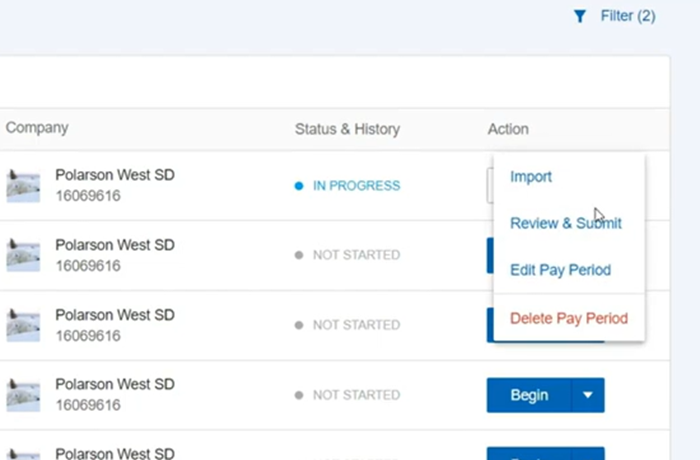
Like Square Payroll, Paychex Flex is also a good option for processing payroll while on the go. You can start pay runs via its mobile app and continue where you left off on your laptop or desktop and vice versa.
And if you’re looking for a financial wellness program, Paychex offers financial education courses and short-term loans for your employees. It even has an intuitive income calculator that lets your workers determine if their retirement plan is on track to meet their retirement goals based on the information that they provide. None of the providers on my list, including QuickBooks Workforce, have a similar retirement readiness calculator.
Visit Paychex Flex
Learn more about Paychex Flex
- For more information about its features, read our Paychex Flex review.
- To see how it compares with QuickBooks Workforce, read our QuickBooks Workforce vs Paychex article.
RUN Powered by ADP: Best for scalability
If you worry your business will outgrow QuickBooks Workforce, consider RUN Powered by ADP or ADP RUN as an alternative. It offers the full-service payroll, tax filing services, and compliance support that many of the best payroll software bundle into their plans. ADP also has a variety of HR products and services that can meet the needs of small to large businesses, making it highly scalable compared to QuickBooks and the other QuickBooks Workforce alternatives on my list (except Paychex Flex).
If you want a small business payroll system with nominal HR features, you can start with ADP RUN. Its basic plan offers a better range of HR tools than Paychex Flex and QuickBooks Workforce. If you want more features or have a bigger workforce, you can switch to other products like ADP Workforce, which is optimal for midsized to large businesses. You can also get ADP TotalSource, a professional employer organization (PEO) service that handles your day-to-day HR and payroll tasks.
Pricing
ADP RUN is another QuickBooks Workforce alternative that doesn’t list its pricing on its website. You can get a quote by contacting its sales team.
It has four plans:
- Essential: Custom pricing
- Enhanced: Custom pricing
- Complete: Custom pricing
- HR Pro: Custom pricing
While many of its HR features, such as learning management and applicant tracking, are only available in higher tiers, ADP RUN is better than Paychex Flex because it only charges extra for a handful of tools, such as time tracking, retirement and health insurance plans, and workers’ compensation. Plus, with Paychex Flex, hiring and employee onboarding features are paid add-ons, even if you get a higher plan.
RUN Powered by ADP pros and cons
| Pros | Cons |
|---|---|
|
|
When to choose RUN Powered by ADP over QuickBooks Workforce
If you need a wide range of HR features, higher-tier ADP RUN plans come with robust recruitment tools, such as ZipRecruiter job postings, applicant tracking, and background checks. You even get salary benchmark information to help you attract qualified candidates and gauge the competitiveness of your compensation package.
In addition to its LMS, which lets you assign and track the completion of online courses, it offers access to a sexual harassment prevention training program that you can readily deploy to employees. And that’s all on top of the in-app compliance alerts and HR support you get from ADP’s team of HR professionals who can help you navigate complicated HR issues. You can even access marketing tools and get legal assistance via Upnetic’s advisors and legal services.
Further, ADP RUN makes paying employees via paychecks easier. It can prepare the paychecks, stuff and seal them into envelopes, and then deliver these to your office in time for you to distribute to employees. It even offers check signing services and provides paychecks with 10 advanced fraud protection features — a functionality that QuickBooks and the others on my list don’t provide.
Visit RUN Powered by ADP
Learn more about RUN Powered by ADP
- For more information about its features, read our ADP RUN review.
- Want to learn more about other ADP products and services? Read our ADP Workforce Now and ADP TotalSource reviews.
To see how it compares with QuickBooks Workforce, read our ADP vs QuickBooks Workforce article.
More payroll tax coverage
- Verito vs. Rightworks: Which IT Provider Is Best for Your Firm?
- When Are Payroll Taxes Due?: Due Dates and Requirements
- How to Calculate Payroll Taxes: A Step-by-Step Guide
- What Payroll Documents Do You Need to Pay Employees?
- Taxation for Business Entities: A Comprehensive Guide
Should you choose QuickBooks Workforce or an alternative?
QuickBooks Workforce is a worthwhile investment for many businesses. While it does cost more than competitors, QuickBooks offers an easy-to-learn payroll platform with all the essential HR tools you need. If you already use the QuickBooks ecosystem, the slightly high cost is worth it for the ease of use. Plus, the direct integration between QuickBooks products minimizes the risk of getting data errors because it doesn’t require manual inputs.
However, depending on the payroll software features you’re looking for, you may need to find an alternative to QuickBooks Workforce. If you really want HR tools, for instance, other providers offer more features and more value. Or, if you need to make payments to workers in other countries, you’ll have to find an alternative, as QuickBooks doesn’t do global payroll.
QuickBooks Workforce alternative frequently asked questions (FAQs)
Which software is best to use as a QuickBooks Workforce alternative?
Gusto, OnPay, and Square Payroll are three of my top alternatives to QuickBooks Workforce. Both Gusto and OnPay offer a feature-rich payroll platform with the core HR features you need to manage employees. On the other hand, Square Payroll has a contractor-only plan that’s nearly as affordable as QuickBooks’ contractor payments package.
How should I switch from QuickBooks Workforce to another provider?
Changing software providers involves conducting product research, comparing the options available, and ensuring that the QuickBooks Workforce alternative you select has the key features you need at a price within your budget. Next, you set up your account with the new provider, upload your data into the new system, and perform test payroll runs to guarantee accuracy. Then, you create and implement a communication and training plan so your employees know what to expect and when their new user training sessions will happen.
Which alternative to QuickBooks Workforce is the most cost-effective?
Based on my list of best QuickBooks Workforce alternatives, Square Payroll is the most cost-effective. It has the most affordable plans for running employee payroll and processing contractor-only payments.
Methodology
Typically, I use a rubric and my expert assessment to compare software options. However, for this article, I leveraged my decade-long expertise in human resources and six years of experience reviewing HR and payroll software to determine the best alternatives to QuickBooks Workforce. I started my research by examining nine popular payroll systems for small businesses. These options include:
- Gusto
- SurePayroll
- Paychex Flex
- ADP RUN
- Rippling
- Patriot Payroll
- Wave Payroll
- OnPay
- Square Payroll
Then, I compared each software provider’s pricing, customer support options, and general ease of use. I even checked user reviews on reliable online sites like G2 and Capterra. I also looked for key payroll and HR features that QuickBooks Workforce lacks and areas where its competitors excel. After a thorough review, I narrowed my list down to the top five options, focusing on platforms that are generally easy to use, offer more HR features, and are more affordable than QuickBooks Workforce.
If you want to learn about our usual evaluation process, check out our payroll software review methodology page.