Images: Extend system memory with Windows Vista's EMD flash drive feature - TechRepublic

Images: Extend system memory with Windows Vista’s EMD flash drive feature

  • Windows Vista Flash Drive Extended Memory Device (1 of 5)

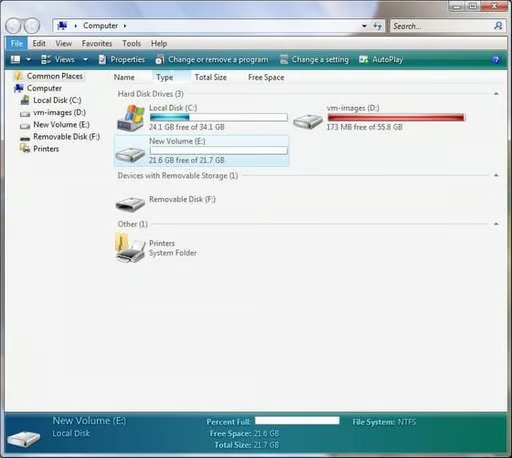
    Windows Vista offers several new ways to enhance system performance. A particularly interesting new technique lets you use a USB flash drive as an External Memory Device (EMD). Vista will use the memory provided by the EMD to extend the machine’s existing system memory (RAM).

    \r\n

    In his The Hot Button blog, TechRepublic columnist Steven Warren wrote about his experience installing, configuring, and using Windows Vista. This gallery’s five screenshots show you how Vista’s new flash drive EMD feature works.\r\n

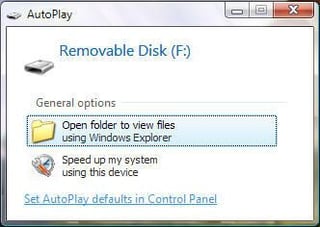
    When you place a USB flash key in a USB 2.0 slot, you are presented with the following 2 options: Open folder…., and Speed up my system…

    © CNET Networks - Submitted by Steven Warren
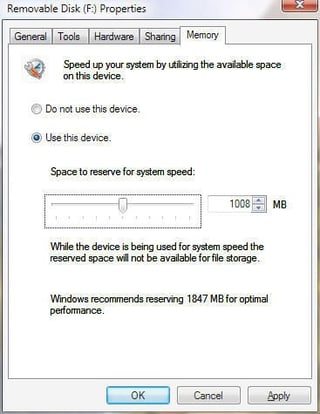
  • When you choose, Speed up my system, select the Memory tab and choose the Use this device radio button. Next, use the slider to allocate how much of the usb flash key you want to dedicate to virtual memory.

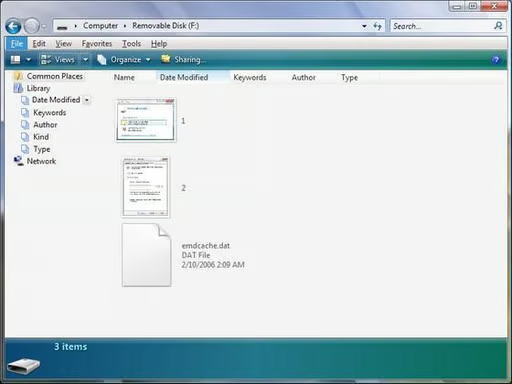
  • Once you allocate the memory, a file called emdcache.dat is created on your usb flash key.

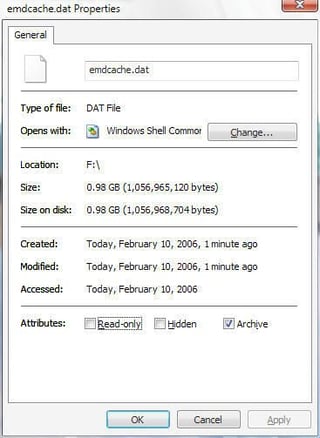
  • If you click on the file’s properties, the size will be identical to the amount of memory you allocated via the memory slider.

  • You can right-click on the removable disk (USB Flash Key, F:) and choose the memory tab to edit settings.

1 of 5
BD

Bill Detwiler is the Editor for Technical Content and Ecosystem at Celonis. He is the former Editor in Chief of TechRepublic and previous host of TechRepublic's Dynamic Developer podcast and Cracking Open, CNET and TechRepublic's popular online show. Previously, Bill was an IT manager in the social research and energy industries. He has bachelor's and master's degrees from the University of Louisville, where he has also lectured on computer crime and crime prevention.