


TL;DR: Emailing a password alongside a sensitive file defeats the point of protecting it. Get this lifetime subscription to EncryptPro Personal Plan for Windows for $39.99 (reg. $139) and share encrypted files through private key-based connections instead.
Contracts, payroll exports, and client records all pass through ordinary Windows folders at some point. EncryptPro encrypts those folders without moving anything into a vault or the cloud. Right-click a file or folder in Windows Explorer, encrypt it, and keep working.
Get this EncryptPro Personal Plan lifetime subscription for $39.99 (reg. $139) and protect local files on up to three PCs.
Built for files you actually share
Every file gets AES-256 encryption, and the app uses a zero-knowledge model, so EncryptPro can’t see your data. You can confirm that yourself with network tools like Wireshark or Glasswire. Nothing is uploaded or synced anywhere.
Sharing runs through PGP Connections, which are small trusted groups where only approved members hold the keys. The Personal plan supports up to 10 one-to-one connections. If a contractor’s project wraps up, Upgrade Lock rotates the connection’s keys and cuts off anyone without the new password.
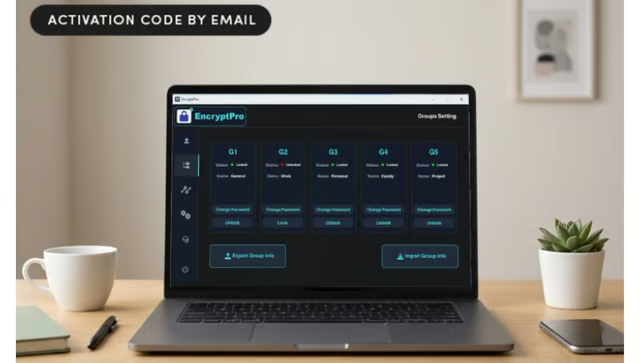
Files are sorted into five Security Groups, each with its own password, and a master password opens them all if you forget one. Encrypted folders stay browsable, and double-clicking an encrypted file opens it in its usual app.
Speed is a selling point here. In the developer’s testing, EncryptPro encrypted a 10.6GB file in 35 seconds on a standard machine. Streaming decryption means large videos start playing without unlocking the whole file first.
When EncryptPro encrypts an original, it overwrites it in multiple passes instead of sending it to the Recycle Bin. Encrypted files also work offline and from USB or external drives.
If the subscription ever lapses, Viewer Only Mode still lets you open and edit what’s already encrypted. The app runs on 64-bit Windows 10 and 11 with 2GB of RAM and 200MB of free space, and it’s open to both new and existing users.
Lock down your business files for good. Get this EncryptPro Personal Plan for Windows: Lifetime Subscription for $39.99 (reg. $139).
StackSocial prices subject to change.