



A hidden Windows security deadline is creeping toward millions of PCs.
The Secure Boot certificates used by Windows devices since 2011 are set to expire in June 2026, forcing Microsoft and PC makers to move eligible systems to newer certificates. Microsoft says supported Windows 11 PCs should receive the update through Windows Update, while some devices may still need firmware updates from their manufacturers.
While the transition is expected to be automatic and seamless, TechRadar reports that some users could experience multiple reboots as the new Secure Boot certificates are installed.
What is Secure Boot, and why is it so important?
Secure Boot is a built-in security feature that ensures that the integrity of low-level software isn’t modified or compromised. It is like a special antivirus that runs before the operating system is booted into.
It works by checking cryptographic signatures against trusted certificates stored in the device’s firmware. If there’s a mismatch, it blocks the computer from booting, effectively preventing malicious software from taking over the device.
Unlike Microsoft Defender and other antivirus programs, it sits within your computer’s Unified Extensible Firmware Interface (UEFI). That makes it an extremely powerful component of Windows security, which is all the more reason this expiration matters.
How to check your Secure Boot certificate
According to Windows Central, this will be the first time Windows updates Secure Boot. That means, very few people will know how to ensure they remain safe.
Fortunately for many, this transition is automatic, meaning you don’t need to do anything to get it. As long as you’re on a Windows 11 device or a Windows 10 device with ESU turned on, you should have received the update.
Still, it is important that users know where they stand.
Technology YouTuber, BrenTech showed a simple tutorial to check if your PC is currently running the new Secure Boot:
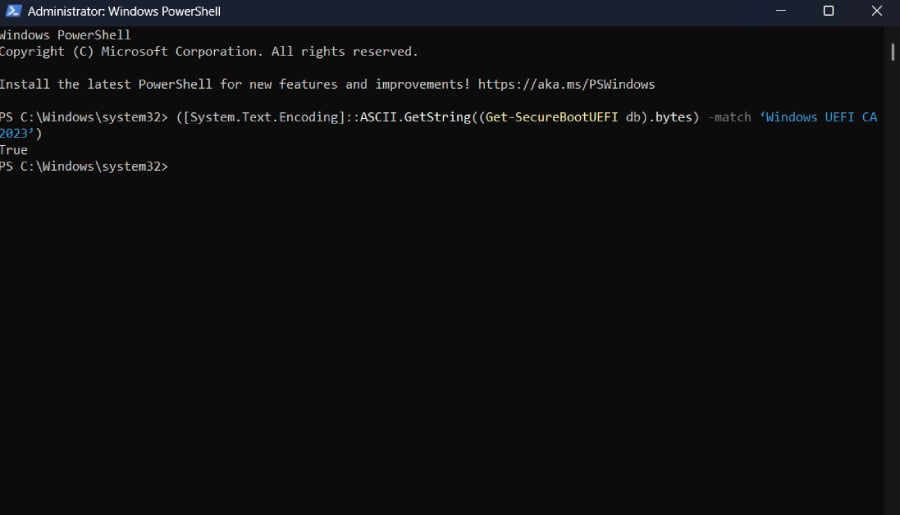
- Open PowerShell as Administrator
- Run this command: ([System.Text.Encoding]::ASCII.GetString((Get-SecureBootUEFI db).bytes) -match ‘Windows UEFI CA 2023’)
- Press Enter
Note: For this command to work, you must be in UEFI, not Legacy BIOS mode, Secure Boot must be turned on, and you must not be running the command from a Virtual Machine
After running the command, you should see a True or False Boolean message on your screen. True indicates that your PC is currently operating with the new Secure Boot; False means your PC has yet to get the new certificate. If you got False as your status, verify that:
- You are running Windows 11 and have updated to the latest version, as Secure Boot bundles with Windows Update.
- You’re running Windows 10 with ESU enabled.
If you’re eligible and up to date with Windows Update, your PC may fall into the category of computers that require manual installation from the manufacturer. Please check with your manufacturer.
However, there is also a workaround posted at Microsoft Learn Center that forces the update. To use that workaround, follow the steps below:
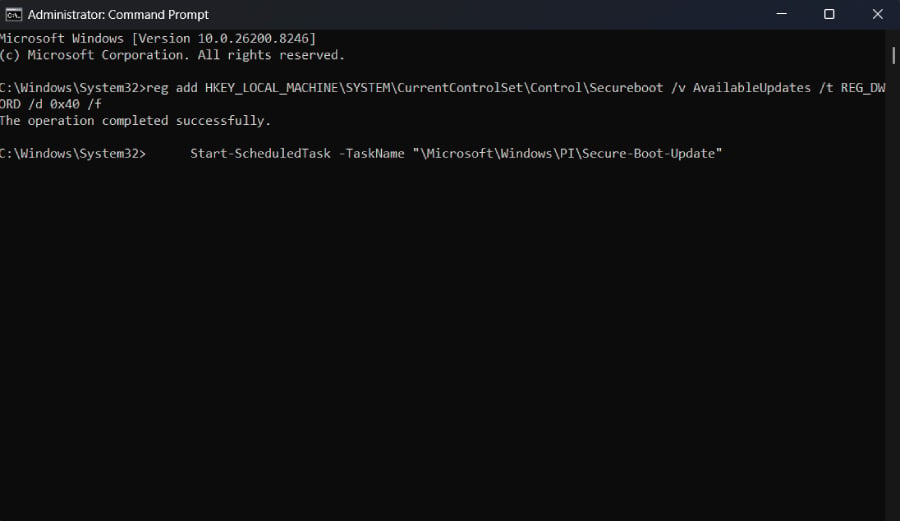
- Open Command Prompt as Administrator
- Run this command: reg add HKEY_LOCAL_MACHINE\SYSTEM\CurrentControlSet\Control\Secureboot /v AvailableUpdates /t REG_DWORD /d 0x40 /f
- Press Enter
- Then run this command: Start-ScheduledTask -TaskName “\Microsoft\Windows\PI\Secure-Boot-Update”
- Press Enter and restart your PC a couple of times. After that, recheck the first tutorial to see if it’s already been applied.
For Microsoft, the transition is part of a broader effort to retire aging security infrastructure, so Windows remains secure for all.
More Microsoft news
- Inside Microsoft’s Real-Time War Against Cybersecurity Threats
- Project Ire: Microsoft Tests AI That Autonomously Detects Malware
- Microsoft Targets ‘Critical AI Talent’ from Meta to Dominate Next AI Breakthroughs
- Windows 10 Support Ends Soon, Though Extended Security Updates Offers Are Available
What Windows 10 users should know
Admittedly, millions of people are still stuck on Windows 10.
All you have to do is install the ESU provided by Microsoft. This gives you access only to critical security updates and, in this case, still makes your device eligible to receive the new Secure Boot.
For consumers, Microsoft’s Windows 10 ESU program runs for one year after Windows 10 support ends; users should move to a supported operating system or device before that coverage ends.
While PCs are not expected to just stop working after the expiration date, weakened boot protections and software instability could gradually emerge on computers left behind by the transition. After ESU, Windows 10 users will feel this security vulnerability more, given that they are already locked out of Windows updates.
Also read: Microsoft fixed a Defender false positive involving DigiCert certificates after some legitimate certificates were flagged as malware.