


Key takeaways:
- Switching between retrospective formats maintains interest and encourages fresh perspectives, leading to continuous improvement.
- A sprint retrospective helps teams evaluate what worked well and what needs refinement to improve collaboration and delivery.
- Using a sprint retrospective template ensures structure and accountability across every session.
Sprint retrospectives often lose their purpose when teams treat them as routine meetings rather than opportunities to improve performance. When sessions feel repetitive, engagement drops, and discussions turn into status updates. Choosing the right sprint retrospective format helps teams refocus on collaboration and growth.

Lead more engaging sprint retrospectives with Jira
Run retrospectives directly from your completed sprints using Jira’s whiteboards and reports, now seamlessly integrated with Confluence. Create and link retrospective pages or whiteboards without leaving Jira, and view all sprint insights like burndown charts and performance data in one connected workspace.
What is a sprint retrospective?
A sprint retrospective is a type of meeting that gives Scrum teams an opportunity to reflect on the recent sprint, celebrate wins, and identify areas for improvement. Aligned with agile project management principles, a sprint retrospective is held at the end of each sprint, usually as the final activity before closing it out. During this session, the team focuses on three areas:
- What went well: Identify successful practices and teamwork strengths that supported delivery.
- What needs improvement: Discuss recurring obstacles or gaps that limited efficiency or communication.
- What to carry into the next sprint: Define actionable steps or adjustments that sustain progress and build on lessons learned.
Sprint retrospective templates
Project management platforms for agile workflows offer sprint retrospective templates that act as ready-made agendas to guide your team’s discussion and ensure all topics are covered. Here are some template options to help you run focused and productive retrospectives.
1. Confluence – Best all-in-one sprint retrospective tool
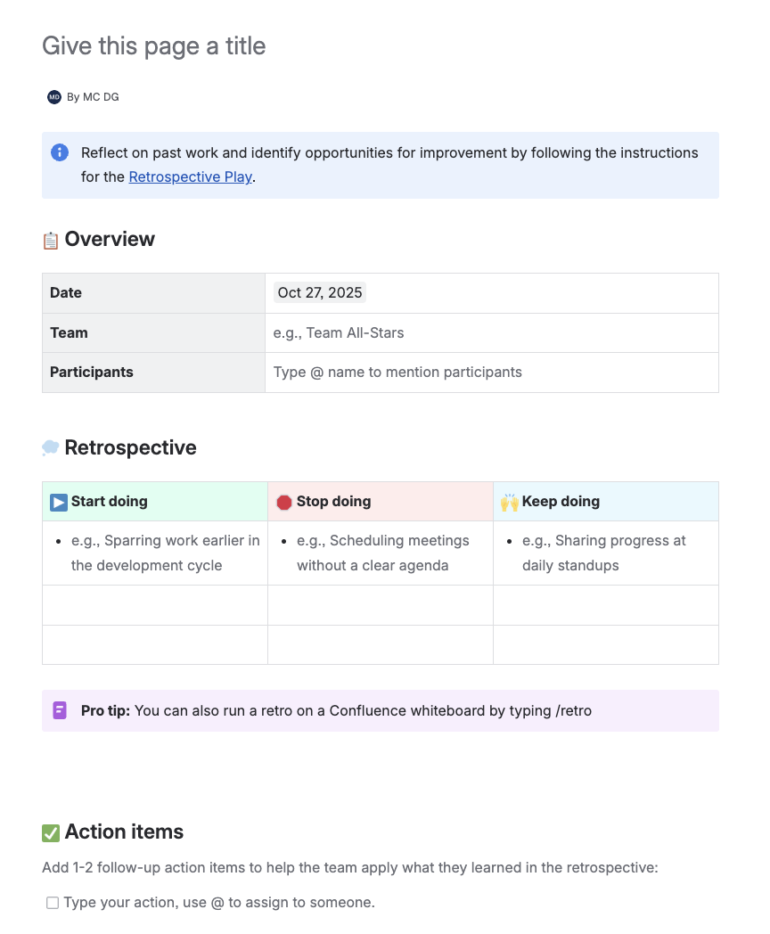
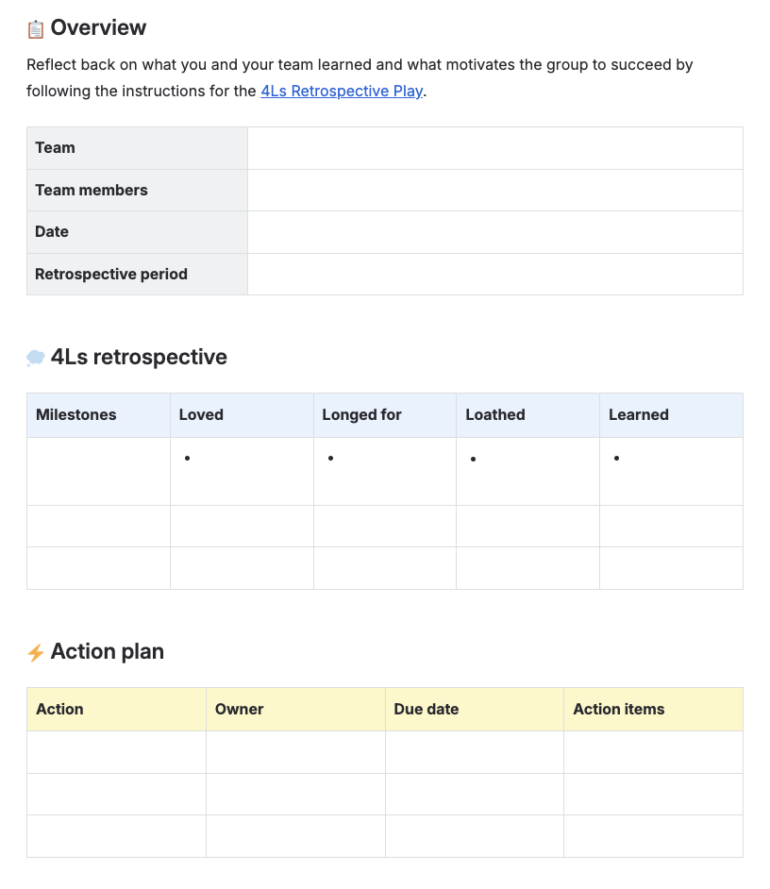
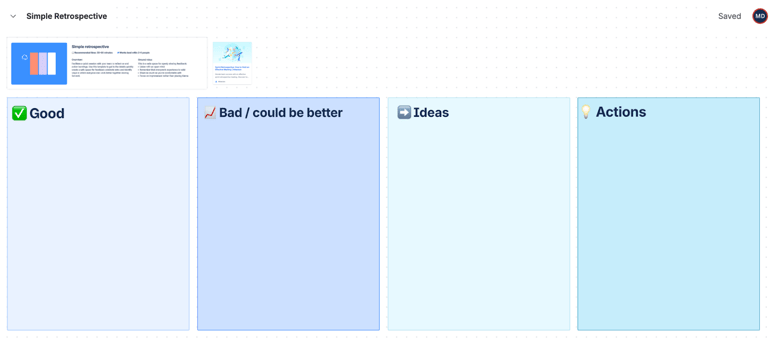
If you’re looking for an all-in-one sprint retrospective tool, Confluence simplifies how your team plans and runs retrospectives. It provides ready-made templates in two formats: a retrospective page or a retrospective whiteboard. Through its integration with Jira, you can embed live reports (e.g., velocity or burndown charts), into these spaces, where you can review performance data and make decisions during discussions.
The retrospective page includes a pre-built three-column table for Start Doing, Stop Doing, and Keep Doing, helping teams begin sessions quickly. The whiteboard format offers a more interactive setup for two to six participants, and includes collabora
2. Miro – Best for interactive retrospectives
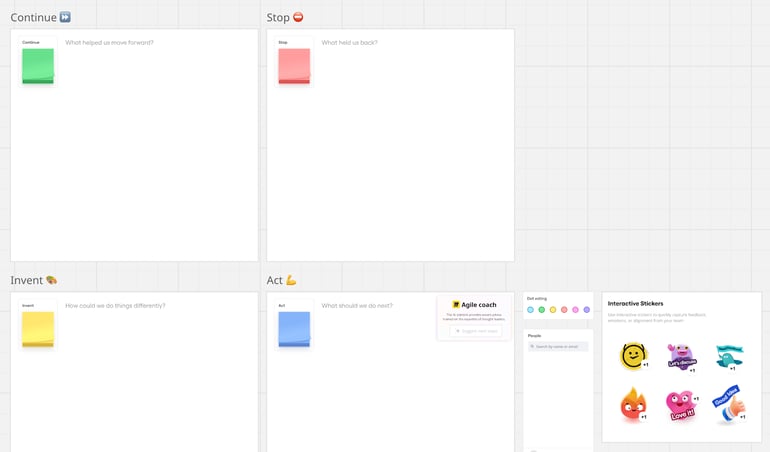
Known for its brainstorming tools, this Miro template works best for teams that rely on visual interaction and smooth facilitation during retrospectives. The four quadrants focus on four areas: Continue (what helped us move forward), Stop (what held us back), Invent (how could we do things differently), and Act (what should we do next).
Each area includes sticky notes for idea input and dot voting, where teams can decide on top issues before moving on to the next steps. You also get reactions, stickers, and a People tab that enhance participation for distributed teams. With its collaborative features and intuitive design, Miro’s retrospective template keeps sessions efficient and engaging while encouraging active feedback and data-driven follow-through.
3. monday.com – Best for grid-style action tracking across sprints
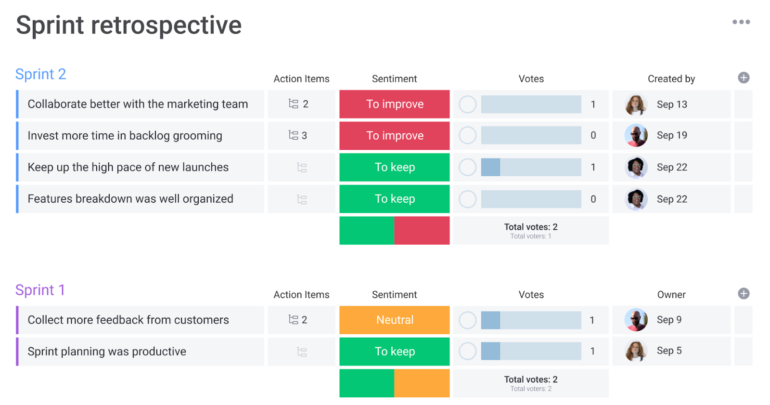
monday.com uses a grid-style layout that transforms sprint retrospectives into a table-based view with columns for action items, sentiment, votes, and owner. This layout gives you instant visibility into outcomes and accountability, perfect for managers overseeing multiple sprints and seeking a unified progress view.
To use the template, record notes during or immediately after the retrospective. Team members enter insights as rows, choose sentiment tags such as To improve or To keep, and vote on priorities. You can sync high-priority actions with the team board or backlog, while the action items column shows effort levels and controls work in progress.
4. ClickUp – Best for document-based collaboration
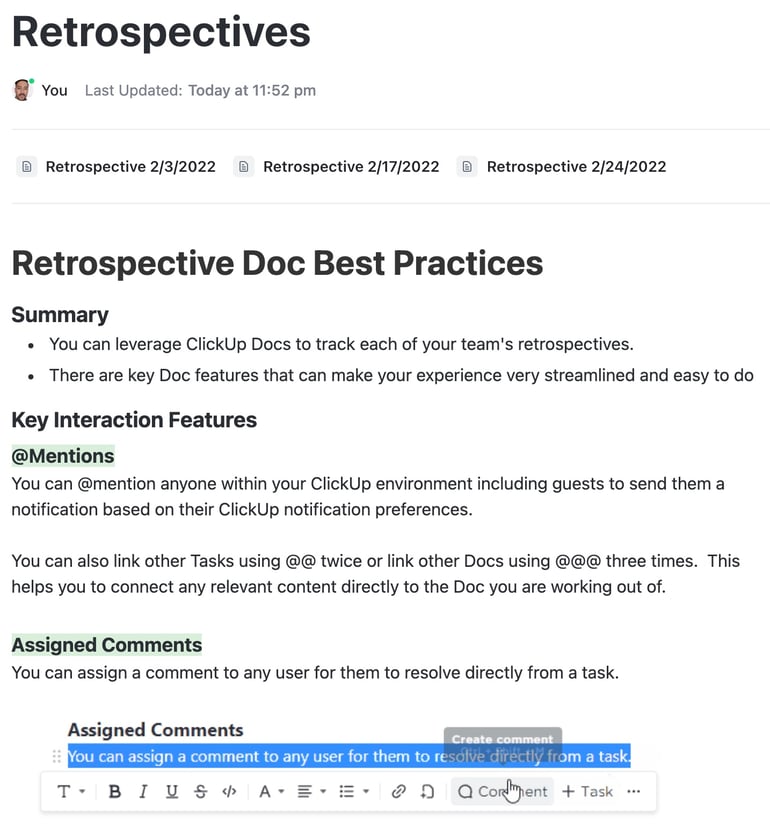
This ClickUp retrospective uses a collaborative document that acts as both a long-term archive and a central hub for past retros. It suits teams that prefer a text-based format over a visual board, as it keeps all retrospectives organized and easy to review. Instead of tables or checklists, the doc view focuses on narrative summaries, headings, and action notes.
The facilitation flow starts with capturing insights during the session, tagging owners with @mentions, and converting assigned comments into actionable tasks. Distributed teams gain extra value from built-in notifications and threaded comments, which maintain intent across asynchronous discussions.
5. Smartsheet – Best for teams new to sprint retrospectives
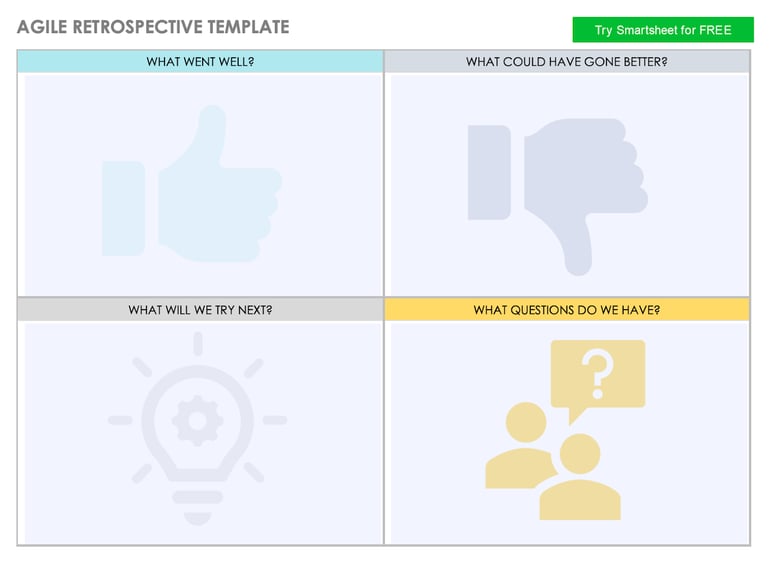
This Smartsheet template is ideal for teams learning how to conduct retrospectives because it removes the complexity often found in other agile tools and focuses on guiding the group through the core elements of reflection and improvement. Each quadrant prompts discussion on a specific aspect of the sprint and helps new Scrum Masters or project managers facilitate productive conversations even if they’ve never run a retro before.
You can run this session by timeboxing note writing, using dot- or thumb-voting to select the top themes, then turning the most valuable ideas from “try next” into actionable tickets with assigned owners. You can follow up by converting unresolved questions into tasks or spikes for validation.
Why do some sprint retrospectives fail?
Not all sprint retrospectives achieve the intended results. Some turn into repetitive status meetings or lose their purpose altogether. Teams that overlook the foundational principles of Scrum and Agile project management often face these challenges, as retrospectives lose their link to continuous improvement.
Here are some common reasons why retrospectives fail to deliver improvement.
1. Meetings feel repetitive and scripted
When retros follow the same agenda every time, they become a boring, repetitive loop. Team members go through the same old script instead of engaging in real reflection or dialogue.
2. Lack of psychological safety
If team members hesitate to admit mistakes or point out problems, honest discussion grinds to a halt. This limits learning and stifles continuous improvement.
3. No clear outcomes or action items
When discussions keep revisiting the same issues without producing clear outcomes or action items, the team fails to improve in future sprints and continues to face the same collaboration obstacles. Teams that drift into unrelated topics instead of focusing on improvement waste valuable time and leave without decisions that drive progress.
4. Uneven participation
A few voices dominate while quieter members stay silent. Valuable insights are lost, and the team misses perspectives that could uncover root causes.
5. Ignored action items
When previous retro commitments are forgotten, frustration builds. Team members begin to feel their feedback doesn’t matter, and they stop contributing ideas to improve future sprints.
6. Static meeting format
Using the same format for every sprint dulls energy and curiosity. Switching between frameworks, such as Start-Stop-Continue or 4Ls, keeps retros fresh and more productive.
7. Including attendees outside the project team
Inviting stakeholders or external participants often disrupts open conversation. Sprint retrospectives work best when attended only by the team members directly involved in the project. Adding extra attendees can create tension and shift focus away from the team’s real experiences and improvement goals.
8. Failure to implement agreed changes
Decisions made during the retrospective must lead to action in the next sprint. When new processes or workflows are identified but not implemented, the team loses trust in the value of retrospectives.
How to make sprint retrospectives more engaging
While retrospectives can easily lose focus or momentum, there are ways to reenergize your sprint sessions. Here are sprint retrospective ideas you can apply to make future sessions more engaging and valuable:
1. Make them fun to attend
Start by celebrating the wins from the previous sprint and recognizing the team’s efforts. Adding light games where teams can win prizes can motivate participation and reward performance, turning the meeting into something the team looks forward to.
2. Create a space where the team wants to attend
Ensure everyone knows their input matters. As the facilitator, give all members a chance to speak and encourage quiet teammates to contribute. Balance discussions by managing dominant voices while maintaining psychological safety. Remember, every idea is worth considering, and a little humor goes a long way. The team can have a good laugh at the setbacks while using them as opportunities to improve.
3. Use fun and thoughtful icebreakers
An icebreaker can set the tone for the session. Choose something light and enjoyable that helps the team relax before diving into feedback. Poorly chosen icebreakers can disengage participants early, so make it relevant and inclusive.
4. Add themes for variety
Keep things fresh by introducing themes based on movies, pop culture, or music. You can even give out points for creative references or make small, themed games to keep the group engaged throughout the session.
5. Use tools to visualize progress
Incorporate dashboards, Kanban boards, or velocity charts from tools like Jira, Confluence, or Miro. Scrum project management software consolidates these visualization tools into a single platform, allowing users to identify bottlenecks and connect changes to their impact on the workflow.
6. Ask for feedback
Make retrospectives a team event, not just a meeting. Ask the team how the session went, and if something doesn’t work, adjust. Invite feedback on what could make their jobs easier, and look for what feels broken or frustrating in the process. Help the team see that these meetings matter by following through on agreed-upon improvements.
Retrospectives fail when they become routine or lack follow-through, but they thrive when teams see them as opportunities for growth rather than formalities. Project management platforms can address this by providing interactive tools that track action items and visualize progress across sprints. When handled with care and openness, retrospectives turn into purposeful sessions that strengthen teamwork and drive continuous progress.
FAQs
When is a sprint retrospective held?
Sprint retros happen at the end of every sprint, ideally on the last day after all project work is completed.
What are the three retrospective questions?
The retrospective questions include: what went well, what needs improvement, and what actions can enhance the next sprint. This framework encourages continuous learning and accountability among team members.
What is the 3-5-3 rule in agile?
The 3-5-3 rule outlines the structure of Scrum: three roles, five events, and three artifacts. It defines how Agile teams track progress and deliver consistent value across sprints. Each element supports collaboration and transparency throughout the development cycle.
What are the 5 stages of the retrospective?
The five stages include setting the stage, gathering data, generating insights, deciding what to do, and closing the session. Using a sprint retrospective template can help facilitators guide discussion and record feedback that will strengthen future sprints.
What’s the difference between a sprint review and a retrospective?
A sprint review centers on the customer’s perspective, highlighting completed work and gathering feedback from stakeholders. In contrast, a sprint retrospective focuses on the team’s experience, examining what worked, what needs adjustment, and what should continue in future sprints to improve internal collaboration and delivery.