


Zoho Inventory is my top recommendation for small businesses that need purchasing, stock tracking, and sales channel connections at an affordable starting price. Cin7 is a better fit for more demanding multichannel operations, while Katana serves manufacturers and NetSuite supports businesses buying inventory management as part of a broader ERP system.
The best inventory management software should match how your business receives, stores, sells, and replenishes products. A retailer may need stock counts and purchase orders alongside its POS. A manufacturer also needs to track components, production orders, and finished goods.
This guide compares seven options across those requirements. Along with features and pricing, I explain the operating limits and setup requirements that could make another provider a better choice.
Best inventory management software at a glance
| Provider | Best for | Starting software price |
|---|---|---|
| NetSuite Inventory Management | Complex operations needing inventory within an ERP | Custom quote |
| Zoho Inventory | Small businesses managing purchasing and online orders | Free; paid plans from $29/organization/month, billed annually |
| Odoo Inventory | Businesses configuring inventory within a modular ERP | One App Free available; paid plans priced per user |
| Katana | Small manufacturers managing materials and production | Free for up to 30 SKUs; Advantage requires a quote |
| Cin7 Core | Multichannel sellers connecting inventory, orders, and accounting | $349/month |
| Unleashed Software | Wholesalers needing stock traceability and purchasing controls | $399/month |
| Square for Retail | Small retailers wanting POS and inventory together | Square Free: $0; Square Plus: $49/location/month |
Prices are in US dollars unless stated otherwise. Annual billing, taxes, implementation, hardware, payment processing, and optional services can affect the amount paid.
Best inventory management systems compared
Use this comparison to identify the type of system you need before comparing individual plans. Feature availability depends on the subscription, applications, modules, and integrations purchased.
| Our rating out of 5 | Inventory approach | Purchasing and replenishment | Manufacturing fit | |
|---|---|---|---|---|
| NetSuite Inventory Management | 4.6 | Inventory connected with ERP and financial operations | Inventory replenishment; confirm demand-planning modules in the quote | Manufacturing functions depend on the selected configuration |
| Zoho Inventory | 4.3 | Standalone inventory and order management | Purchase orders, reorder levels, and plan-dependent automation | Composite items and assemblies; assess production requirements separately |
| Odoo Inventory | 4.2 | Inventory and warehouse functions within Odoo’s application suite | Reordering rules and configurable supply routes | Manufacturing app available within the broader suite |
| Katana | 4.1 | Materials, finished goods, orders, and production | Purchasing and planning tools | Production and material tracking are central to the recommendation |
| Cin7 Core | 4.0 | Inventory connected with sales channels and accounting | Purchasing; planning features vary by tier and add-on | Assembly and manufacturing options; confirm required level |
| Unleashed Software | 3.9 | Stock, purchasing, sales, and traceability | Purchasing; Advanced Inventory Manager included with Pro or added to Core | Production module included with Pro or added to Core |
| Square for Retail | 3.7 | Inventory managed alongside retail POS and payments | Purchase orders on eligible paid subscriptions | Consider a dedicated manufacturing system for production requirements |
For technical buyers, an integration listing should be the start of the evaluation. Confirm which records move between systems, how often they update, and who fixes failed transfers. A connection that imports orders may handle returns, bundles, or inventory adjustments differently.
How I chose the best inventory management software
I researched and evaluated a variety of inventory management software. Using a weighted rubric in my full methodology, I compared core inventory capabilities, integrations, customization, analytics, reporting, forecasting, scalability, security, reliability, total value for functionality, and my own personal evaluation.
Why you can trust TechRepublic
We evaluated 11 inventory management solutions using a rubric with 20+ data points, focusing on what matters most to SMBs: flexibility, scalability, and real-world usability.
Our analysis prioritized integrations, analytics, core inventory features, and system reliability, along with overall value for functionality.
Recommendations are based on hands-on testing (when available), vendor documentation, and verified user feedback to reflect real business use.
NetSuite Inventory Management (Oracle): Best for complex, scaling operations
Our rating: 4.6 out of 5

NetSuite belongs on the shortlist when inventory decisions need to connect with financial management and operations across a larger business. Its inventory tools support multiple locations, replenishment, and lot and serial traceability.
Why I chose NetSuite
I chose NetSuite for businesses evaluating their wider operating system alongside inventory. It is a stronger candidate when finance, purchasing, inventory, and fulfillment teams need coordinated records and controls.
I would begin with Zoho or Cin7 if the immediate problem is managing stock and orders while keeping the existing accounting system. NetSuite warrants the implementation effort when the business also needs the broader ERP functions.
Who should use NetSuite Inventory Management
- Mid-market and enterprise businesses that need ERP, WMS, demand planning, and inventory controls in one system
- Multi-location or omnichannel operations managing warehouses, ecommerce, POS, marketplaces, and 3PLs
- Teams that can budget for implementation, system administration, and longer setup timelines
Pricing
NetSuite requires a custom quote. Ask for a breakdown covering the subscription, users, inventory functions, implementation, integrations, training, and support.
Have the vendor identify whether warehouse management, manufacturing, demand planning, and connectors are included or priced separately. Reach out to NetSuite for a custom quote.
Visit NetSuite
Features
- Demand planning using historicals, seasonality, and sales forecasts
- Mobile WMS with RF barcode scanning, putaway/pick strategies, cycle counts
- SuiteScript (JavaScript) for custom workflows/UI; SuiteTalk REST/SOAP APIs
- NetSuite Connector for ecommerce, marketplaces, POS, and 3PLs
- Assemblies/BOMs and kits/packages for complex item structures
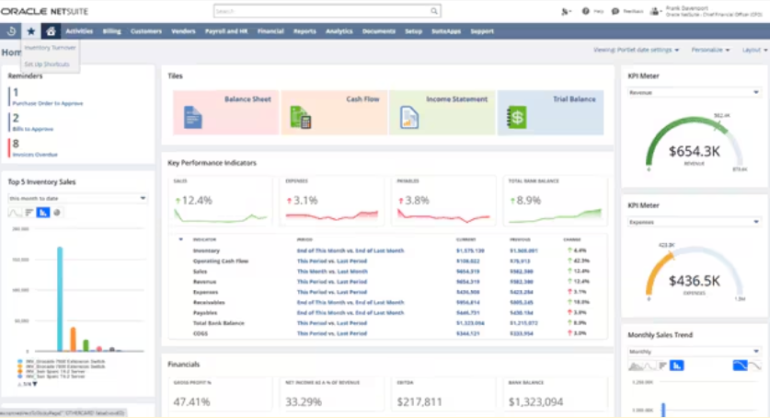
NetSuite Inventory Management user reviews
NetSuite Inventory Management user reviews are strongest for ERP depth, reporting, multi-location visibility, and scalability. Common complaints mention cost, implementation time, and the need for experienced admin or consulting support.
Pros and cons
|
|
Zoho Inventory: Best overall for new and SMBs
Our rating: 4.3 out of 5

Zoho Inventory is my first recommendation for smaller businesses that need to organize purchasing, stock, and customer orders without committing to an ERP implementation. Its sales channel and accounting connections also make it worth considering when spreadsheets no longer keep pace with online orders.
Why I chose Zoho Inventory
I chose Zoho for the balance between its entry price and the work it can handle. Businesses can begin with a limited free plan, then pay for more order volume, users, locations, and advanced controls as requirements grow.
I would compare it with Cin7 when a seller starts adding channels and fulfillment partners. Zoho is the more affordable starting point; Cin7 deserves a closer look when the business needs more involved order and inventory coordination.
Who should use Zoho Inventory
- SMBs that want strong inventory tools without enterprise pricing
- Businesses that need ecommerce, shipping, accounting, and marketplace integrations
- Teams that want automation through workflows, webhooks, custom functions, and the Zoho product suite
Pricing
(monthly) | (annually) | ||||||
|---|---|---|---|---|---|---|---|
| Free | |||||||
| Standard | |||||||
| Professional | |||||||
| Premium | |||||||
| Enterprise |
Premium adds serial and batch tracking, stock counting, and customization and automation tools. Compare those requirements before choosing Standard based on price alone.
Visit Zoho Inventory
Features
- Workflow automation with webhooks and custom functions (Deluge)
- 100+ ready-made reports/dashboards via Zoho Analytics; Zia AI for natural-language insights
- Composite items (kitting/light assemblies) with optional serial/lot tracking
- Broad native integrations: marketplaces, shopping carts, shipping carriers (including EasyPost), accounting, CRM
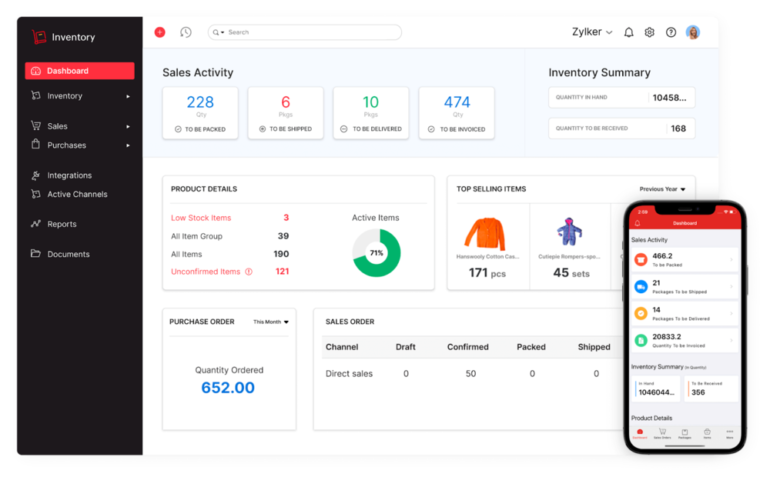
Zoho Inventory user reviews
Zoho Inventory user reviews are mostly positive for ease of use, value, integrations, and order management tools. Common complaints mention plan limits, advanced feature gating, and the need to upgrade as order volume, users, or locations increase.
Pros and cons
|
|
Also read: 6 Best Free Inventory Management Software
Odoo Inventory: Best for highly customizable, modular ERP
Our rating: 4.2 out of 5

Odoo suits businesses that want to configure inventory alongside applications for purchasing, accounting, manufacturing, ecommerce, and other operations. It requires clear decisions about how those applications should work together.
Why I chose Odoo Inventory
I chose Odoo for teams willing to configure their system around an established process. Its inventory tools include replenishment rules, warehouse routes, and product tracking, while other Odoo applications can extend the setup.
Before selecting Odoo over a standalone inventory product, I would assign responsibility for configuration, user permissions, integrations, and future changes. Otherwise, a low subscription price can lead to more administration than the business expected.
Who should use Odoo Inventory
- Businesses that want inventory, ecommerce, accounting, manufacturing, and other ERP tools in one modular system
- Tech-savvy teams that want to configure workflows, automations, and inventory rules around their own processes
- Companies that may need MRP, barcode scanning, multi-warehouse control, and carrier connections as they grow
Pricing
(monthly, per user/mo) | ||
|---|---|---|
| One App Free | One app, unlimited users, hosted on Odoo Online. (You can even choose Studio as the one app.) | |
| Standard | All apps, hosted on Odoo Online. (No Studio, multi-company, or external API in this tier.) | |
| Custom | All apps + Studio, Multi-Company, External API; host on Odoo Online / Odoo.sh / On-prem. |
Visit Odoo Inventory
Features
- Double-entry inventory with multi-warehouse and real-time moves
- Lots/serials traceability and barcode workflows
- Manufacturing (MRP) app with BOMs, operations, and work orders
- Replenishment planner with reordering rules (min/max, routes like MTO)
- Odoo Studio Automated Actions for no/low-code workflow logic
- External JSON-2 API for integrations and analytics access
- Carrier connectors for rating, labels, and tracking
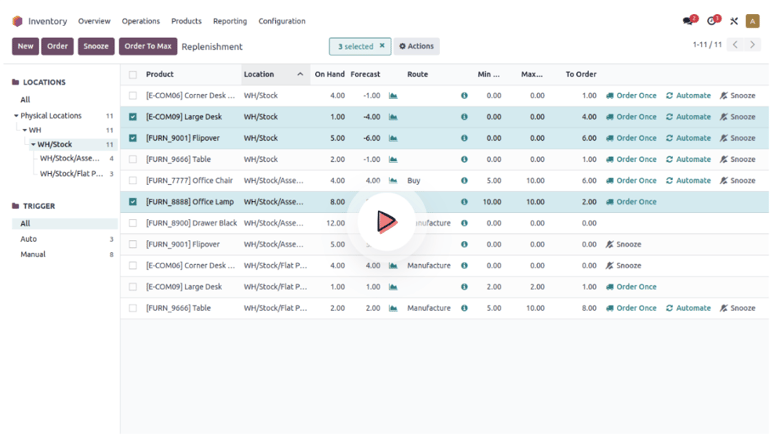
Odoo Inventory user reviews
Odoo Inventory user reviews are mostly positive for flexibility, modular apps, and the ability to connect inventory with accounting, ecommerce, and manufacturing. Common complaints mention setup time, configuration needs, and a steeper learning curve than simpler inventory tools.
Pros and cons
|
|
See also: Best Open Source CRM Software for 2025
Katana MRP: Best for modern SMB manufacturers
Our rating: 4.1 out of 5

Katana is my recommendation for smaller manufacturers that need to connect raw materials, production, and finished-goods availability. It is particularly relevant when a simple stock count cannot show whether the business has the materials needed to complete an order.
Why I chose Katana MRP
I chose Katana for its production focus. A manufacturer needs to know what can be made, which materials are committed, and what needs to be purchased. Those questions should guide the evaluation.
I would compare Katana with Unleashed using an actual production order. Ask both vendors to show material allocation, substitutions or shortages, production costs, and the finished item’s traceability. The better fit depends on the work your team performs each day.
Who should use Katana MRP
- SMB manufacturers that need live material planning, production workflows, and shop-floor visibility
- Makers that have outgrown basic inventory tools and need BOMs, subassemblies, and production order tracking
- Teams that sell through Shopify, WooCommerce, QuickBooks, Xero, or ShipStation and need cleaner inventory sync
Pricing
- Free: Up to 30 SKUs, with unlimited users, integrations, and inventory locations.
- Advantage: Custom pricing under an annual contract covering the agreed setup and services.
Visit Katana MRP
Features
- Open REST API with webhooks for real-time event notifications and custom apps
- Full Traceability add-on for batch/lot and serial number tracking
- Inventory reports (stock levels, movements, valuation) and cost reports; optional partner BI dashboards
- Inventory planning and forecasting tools to automate replenishment decisions
- Native integrations for ecommerce, accounting, and shipping (e.g., Shopify, WooCommerce, QuickBooks, Xero, ShipStation)
- SOC 2 Type II attestation and documented security posture
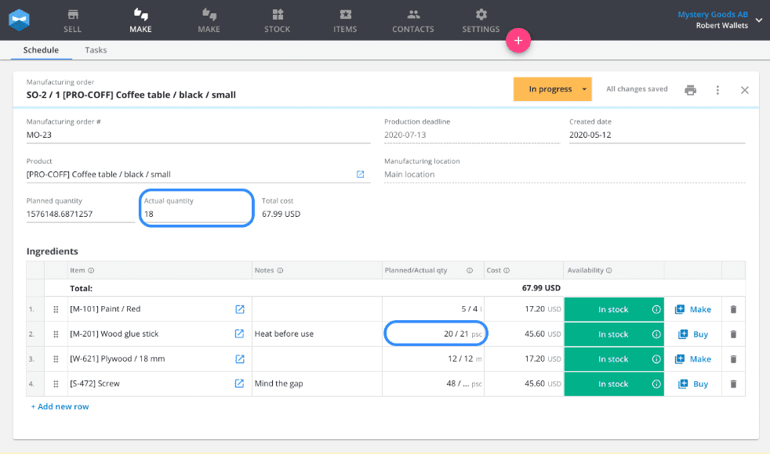
Katana MRP user reviews
Katana MRP user reviews are mostly positive for production visibility, BOM tools, material tracking, and ecommerce or accounting integrations. Common complaints mention higher pricing than basic SMB inventory systems and the need for add-ons or higher tiers for advanced traceability and planning.
Pros and cons
|
|
Cin7: Best for multichannel ecommerce + accounting sync
Our rating: 4 out of 5

Cin7 Core is my recommendation for sellers coordinating inventory across ecommerce, marketplaces, accounting, and fulfillment. Its appeal grows when keeping those systems aligned takes too much manual work.
Why I chose Cin7
I chose Cin7 for businesses that want to retain their sales and accounting applications while improving inventory and order coordination. Its published connections include Shopify, Amazon, QuickBooks, and Xero.
I would start with Zoho for a smaller operation with a tighter budget. Cin7 deserves the additional expense when its order workflows and connections address problems the less expensive system cannot handle.
Who should use Cin7
- Ecommerce and wholesale sellers managing inventory across Shopify, Amazon, accounting software, and 3PLs
- Growing brands that need order automation, forecasting, assemblies, and stronger channel sync
- Businesses that need more inventory depth than SMB-first tools but do not want a full ERP rollout
- Pricing
| Core Standard | 5 users, 2 ecommerce/app integrations, 6,000 sales orders/year, unlimited locations | |
| Core Pro | 10 users, 4 integrations, 24,000 orders/year, MRP (material requirements planning) | |
| Core Advanced | 15 users, 6 integrations, 120,000 orders/year (expandable), Advanced WMS | |
| Omni | 8 users, 5 integrations, flexible order volume, fully customizable |
Visit Cin7
Features
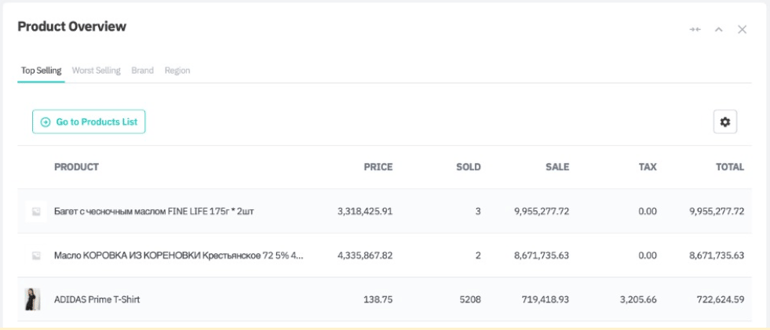
- Sales Demand Forecasting with selectable models from historical sales
- API v2 with broad endpoints; event subscriptions for near-real-time workflows
- Assemblies/BOMs included in standard manufacturing; Advanced Manufacturing available for complex production
- Optional AI forecasting and replenishment optimization (ForesightAI / partner apps)
- Native and partner integrations across ecommerce, accounting, shipping, and 3PL
Cin7 user reviews
Cin7 user reviews are mostly positive for multichannel order management, ecommerce integrations, inventory visibility, and accounting sync. Common complaints mention pricing, setup time, add-on costs, and occasional reliance on partners for deeper reporting or planning needs.
Pros and cons
|
|
Unleashed Software: Best for wholesalers needing lot/serial traceability
Our rating: 3.9 out of 5

Unleashed is worth considering when purchasing, stock traceability, and wholesale order management drive the buying decision. Its inventory tools cover stock movements, batches, serial numbers, and purchasing, with additional planning and warehouse functions available.
Why I chose Unleashed Software
I chose Unleashed for product businesses that need to follow inventory from supplier receipt through customer fulfillment. For these buyers, being able to locate affected stock and identify its transaction history can be more useful than a long list of sales-channel connections.
I would compare it with Cin7 if multichannel selling is the main challenge, and with Katana if production scheduling and material availability are the main concerns.
Who should use Unleashed Software
- Wholesalers and distributors that need lot, batch, or serial number tracking
- Product businesses that need purchasing, sales, inventory, light manufacturing, and traceability tools in one system
- Teams that need API and webhook support for ecommerce, 3PL, accounting, and custom workflows
Pricing
- Core: $399/month, including three users and three basic integrations.
- Pro: $729/month, including five users and five basic integrations.
Both list an initial allowance of 100 sales orders per month, with upgrades available. Pro includes Advanced Inventory Manager, warehouse management, analytics, and production functions that may otherwise carry additional charges.
Visit Unleashed Software
Features
- Batch/lot and serial number tracking across transactions
- Assemblies/BOMs for light manufacturing and kitting
- Advanced Inventory Manager (AIM) for demand forecasting and replenishment optimization
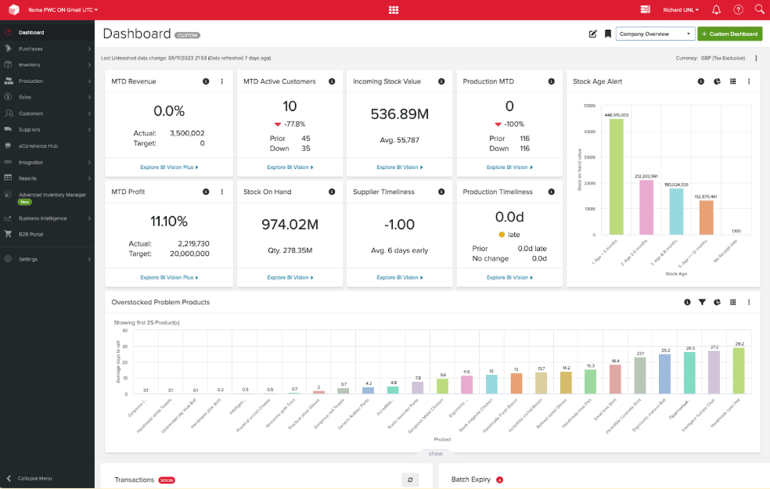
- Business Intelligence (BI) dashboards with published KPI definitions
- Public REST API and webhooks (with sandbox) for integrations and automation
- Daily backups and GDPR-aligned data protection practices
Unleashed Software user reviews
Unleashed Software user reviews are strongest for traceability, purchasing, stock control, and wholesale inventory visibility. Common complaints mention pricing, onboarding time, add-on costs, and the need to configure reports and workflows carefully.
Pros and cons
|
|
Square for Retail: Best for new/small retailers
Our rating: 3.7 out of 5

Square is my recommendation for a small retailer that wants to manage stock alongside checkout and payments. It is a practical starting point when staff need to sell products, adjust quantities, and monitor stock without operating a separate inventory application.
Why I chose Square for Retail
I chose Square for the convenience of handling retail transactions and inventory within the same system. A store already using Square should assess its paid inventory tools before adding another application.
For buyers needing manufacturing, detailed batch traceability, or warehouse processes beyond retail stock management, I would begin with the dedicated inventory products in this guide.
Who should use Square for Retail
- New retailers that want POS, payments, and basic inventory in one easy system
- Small stores that need stock counts, purchase orders, barcode labels, and low-stock alerts without heavy setup
- Retailers already using Square payments or Square POS that want a simple upgrade path
Pricing
(per location) | (high level) |
||
|---|---|---|---|
| Free | Retail POS app, online store, basic inventory tools | ||
| Plus | Advanced inventory, barcode label printing, COGS reports; 30-day free trial available | ||
| Premium | Custom rates, priority support, and tailored onboarding for larger retailers |
Square for Retail
Features
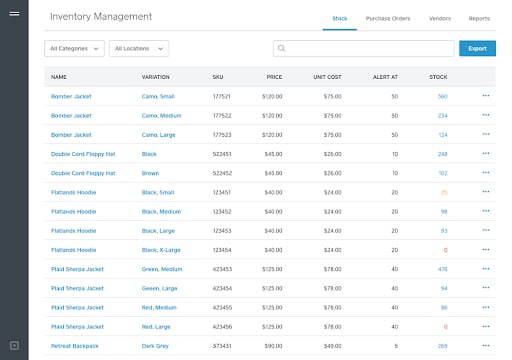
- POS-native inventory: stock counts, multi-location transfers, low-stock alerts, and POs
- Inventory API and webhooks for real-time updates and custom automations
- Optional handheld device with built-in barcode scanner for mobile counts and sales
- App marketplace integrations for accounting, ecommerce, shipping, and more
- Role-based access and simple dashboards for item, sales, and location performance
Square for Retail user reviews
Square for Retail user reviews are mostly positive for easy setup, POS usability, payment processing, and basic inventory tools. Common complaints mention limited advanced reporting, no native lot or serial tracking, and less inventory depth than dedicated inventory management systems.
Pros and cons
|
|
Further reading: The 5 Best Retail Point of Sale (POS) Systems
What's hot at TechRepublic
- Blackpoint Cyber vs. Arctic Wolf: Which MDR Solution is Right for You?
- Why AWS Sellers Choose Deepgram Over Other Voice AI Tools
- SS&C Intralinks DealCentre AI vs. Datasite: Which platform is built for the future of dealmaking?
- SS&C Intralinks FundCentre AI vs. Juniper Square: Which platform better supports modern private markets fund managers?
- Verito vs. Rightworks: Which IT Provider Is Best for Your Firm?
Methodology: How I evaluated the best inventory management software
To build this guide, I assembled an initial list of 11 inventory platforms (standalone IMS, POS-with-inventory, and SMB ERPs). I then scored each provider on a scale of 1 to 5 across our rubric and 20+ data points, emphasizing technical depth, extensibility, and fit for growing small businesses.
- Integrations and customization (25%): Breadth and quality of native connectors (ecommerce, POS, accounting, 3PL), API + webhooks depth, custom fields/forms, workflow automation, and third-party ecosystem/middleware support.
- Analytics, reporting, and forecasting (20%): Real-time dashboards/KPIs, ad-hoc drill-downs, scheduled/automated reporting, exception alerts, and the presence/maturity of predictive or AI-assisted demand planning.
- Scalability, security, and reliability (20%): Multi-user/multi-location performance, documented uptime posture, encryption and access controls (RBAC, SSO/MFA), compliance signals (e.g., SOC 2/ISO 27001), backups/DR, and audit logs.
- Core inventory capabilities (20%): Real-time, multi-location accuracy; barcode/QR plus lot/serial traceability; reordering rules and lead-time handling; variants/kitting/BOM/assemblies.
- Total value for functionality (15%): Feature-to-cost ratio, licensing flexibility, implementation time/effort, vendor transparency and release cadence, and quality of technical support/developer resources.
Scores were based on hands-on exploration (when available), verified vendor documentation and pricing pages, and aggregated user feedback from reputable review sites. I then selected the top seven that map cleanly to common SMB scenarios (new retailers, multichannel brands, light manufacturers, and teams needing maximum flexibility).
How to choose the best inventory management software
Start with the transaction causing the most trouble. Examples include stock that differs across channels, purchase orders maintained outside the system, missing batch records, or production orders delayed by unavailable components. Then use the following steps to assess the shortlist.
1. Document the inventory you need to track
List products, variants, components, bundles, units of measure, batches, serial numbers, and storage locations. Identify which records staff must capture when goods arrive and leave.
A business selling shirts in different sizes needs variant-level quantities. A manufacturer needs component consumption and finished-goods records. Use those requirements to rule out unsuitable products early.
2. Map the systems that share inventory data
List your POS, ecommerce stores, marketplaces, accounting software, shipping tools, and 3PL. For each connection, record what must move between systems.
| Stock availability | Which system controls the quantity available to sell? |
| Orders | When is inventory reserved, and what happens when an order is canceled? |
| Returns | Does the return update stock, refunds, and accounting records correctly? |
| Bundles | Does selling a bundle reduce the right component quantities? |
| Connection failures | Who sees the error, and how is it corrected without duplicating records? |
3. Use the same demonstration tasks for every provider
Give each vendor a small sample containing a product variant, a bundle, a purchase order, and a return. Ask the demonstrator to:
- Import the items and opening quantities.
- Receive part of a purchase order.
- Transfer stock between locations.
- Fulfill an order and process a return.
- Show the resulting stock and financial records.
- Export the transaction history.
Record any manual work, additional application, or upgrade needed. This gives you a more useful comparison than watching unrelated product demonstrations.
4. Check replenishment and forecasting separately
Ask the vendor to explain how it calculates a suggested purchase. Does it use a fixed minimum, expected orders, historical demand, supplier lead times, or another method?
Then test a stockout, a seasonal item, and a new product with little sales history. Review how users can question or change a recommendation before it becomes a purchase order.
5. Assess access, support, and administration
Decide who can change quantities, item costs, supplier details, and integrations. Check how changes are recorded and how a manager investigates an unexpected adjustment.
For support, request the channels, hours, response commitments, and fees that apply to the proposed subscription. Identify who owns configuration changes after launch.
Who should choose what
Use this quick guide if you already know your main inventory problem.
| Choose this software | If you need |
|---|---|
| NetSuite Inventory Management (Oracle) | Enterprise-grade planning, WMS tools, ERP depth, and multi-location control |
| Zoho Inventory | Strong inventory tools, integrations, and automation at SMB-friendly pricing |
| Odoo Inventory | A modular ERP setup you can shape around inventory, ecommerce, accounting, and manufacturing |
| Katana MRP | Real-time production visibility, BOMs, material planning, and shop-floor tools |
| Cin7 | Multichannel ecommerce, marketplace sync, accounting integrations, and forecasting |
| Unleashed Software | Lot, batch, serial, wholesale, and light manufacturing traceability |
| Square for Retail | Fast POS setup, basic inventory, barcode tools, and retail payments in one system |
How to implement inventory management software
Switching inventory management systems is easier when you clean your data, test workflows, and run the new system alongside your current process before fully switching.
- Audit SKUs, suppliers, categories, bundles, variants, units, locations, and open purchase orders.
- Clean item names, SKUs, barcodes, units of measure, cost fields, and product categories.
- Map integrations for POS, ecommerce, accounting, shipping, 3PL, ERP, and reporting tools.
- Import sample inventory data into a test account or sandbox before moving all records.
- Test receiving, sales orders, returns, transfers, adjustments, reorder points, and inventory counts.
- Train users by role so warehouse, retail, finance, and admin teams know their exact workflows.
- Run parallel inventory counts and order tests before replacing your old system.
- Review reports after launch to catch sync errors, stock mismatches, missing SKUs, and reorder issues.
FAQs
What’s the difference between inventory management and warehouse management software?
Inventory management software tracks what stock you have, where it is located, and when to reorder. Warehouse management software focuses more on warehouse operations, including receiving, putaway, picking, packing, cycle counts, labor workflows, and fulfillment accuracy.
How much does inventory management software typically cost?
Inventory management software can range from free plans to quote-based enterprise systems. SMB tools often start between $0 and a few hundred dollars per month, while advanced platforms with ERP, WMS, forecasting, manufacturing, or traceability tools can cost more due to users, locations, order volume, add-ons, and implementation.
Can inventory management software integrate with accounting or ecommerce platforms?
Yes. Most leading inventory management software integrates with accounting and ecommerce platforms such as QuickBooks, Xero, Shopify, WooCommerce, Amazon, and other marketplaces. Before choosing a system, confirm whether the integration is native, partner-built, API-based, or available only on higher plans.
How hard is it to switch inventory management systems?
Switching inventory management systems can take a few days for a small retailer or several months for a larger business with multiple locations, sales channels, warehouses, or manufacturing workflows. The hardest parts are cleaning SKU data, mapping integrations, training users, and testing transactions before launch.
What is the best inventory management software for ecommerce?
Cin7 is the best inventory management software for multichannel ecommerce sellers that need Shopify, Amazon, accounting, order, and inventory sync. Zoho Inventory is a stronger value pick for smaller ecommerce businesses, while NetSuite is better for larger ecommerce operations that need ERP and warehouse controls.
What is the best inventory management software for manufacturing?
Katana MRP is the best inventory management software for SMB manufacturers because it supports BOMs, subassemblies, shop-floor workflows, production planning, and material tracking. NetSuite and Odoo are better fits for businesses that need broader ERP or advanced manufacturing workflows.
What features matter most in inventory management software?
The most important inventory management software features are real-time stock tracking, low-stock alerts, purchase orders, barcode scanning, lot or serial tracking, multi-location inventory, sales channel integrations, accounting integrations, reporting, forecasting, user permissions, and audit logs.