


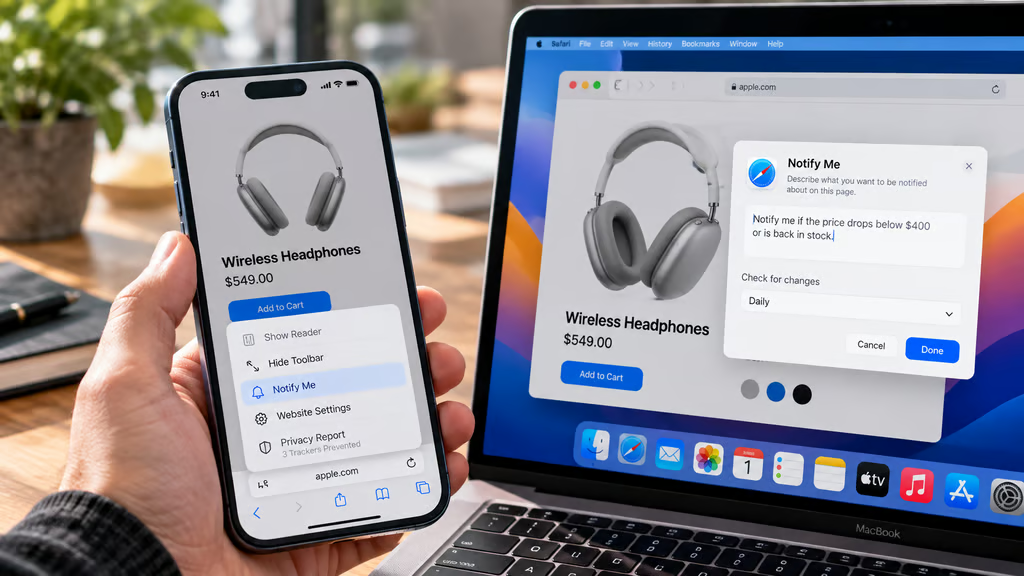
Safari’s Notify Me feature can monitor webpages for changes, including price drops and product restocks, then send an alert when it detects an update. Users describe what they want to track in plain language, without installing a separate app or browser extension.
The feature arrived with Apple’s September 2026 software releases, including iOS 27, iPadOS 27, and macOS 27 Golden Gate. For IT teams, the main questions are whether managed devices support Apple Intelligence, where notifications appear, and whether the feature is reliable enough for workplace use.
How to set up Safari Notify Me alerts
Apple introduced Notify Me as part of its new Apple Intelligence features. It allows Safari to check a selected webpage for a change described by the user.
For example, someone could ask Safari to notify them when a product falls below a particular price or an out-of-stock item becomes available again.
On iPhone
According to Apple’s iPhone instructions, users can create an alert in five steps:
- Open Safari and visit the webpage to monitor.
- Tap the Page Menu button beside the address bar.
- Select Notify Me.
- Describe the change Safari should detect.
- Tap Edit to adjust the checking interval, if needed, then tap the checkmark to save.
Safari checks the page at the selected interval and displays a notification on the iPhone when it detects the requested change.
On Mac
Apple’s Safari for Mac documentation confirms a similar process:
- Open the relevant webpage in Safari.
- Click the Page Menu button in the Smart Search field.
- Choose Notify Me.
- Enter what Safari should monitor.
- Select Edit to change the checking frequency or time, then click Done.
The notification appears on the Mac when Safari detects an update.
These instructions are confirmed for iPhone and Mac. Administrators preparing iPad-specific guidance should verify the interface on a supported iPad rather than assume every menu appears in precisely the same place.
What can Notify Me track?
Apple specifically identifies price changes and product availability as supported examples.
Other possible uses include monitoring public registration pages, event availability, or changes to published product information.
However, Apple hasn’t documented how accurately Notify Me handles every type of webpage. In particular, its public guidance doesn’t establish reliable behavior for login-protected pages, CAPTCHA challenges, or dynamically generated inventory information.
Safari also gained automatic tab organization and natural-language extension creation in Apple’s September software updates. These features were introduced together as part of the wider Safari improvements announced at WWDC 2026.
Device compatibility, availability, and IT limitations
Notify Me is an Apple Intelligence feature, so operating system compatibility alone doesn’t establish eligibility.
Apple’s requirements for iPhone include the iPhone 15 Pro, iPhone 15 Pro Max, and compatible iPhone 16 models or later. Older iPhones may run iOS 27 without supporting Notify Me.
For Macs, Apple Intelligence generally requires Apple silicon and a compatible version of macOS. Organizations can review the broader macOS 27 requirements before enabling the feature across managed devices.
Language and regional restrictions also apply. Apple warns that Apple Intelligence isn’t available in every language or region and that usage limits may affect supported features.
Those restrictions should be checked separately for iPhone, iPad, and Mac deployments. A limitation reported for Siri AI, for example, shouldn’t automatically be treated as a restriction on Notify Me.
Do Safari alerts sync between devices?
Apple’s documentation describes notifications appearing on the device where Safari monitors the webpage.
That means administrators shouldn’t assume an alert created on an iPhone will also appear on a Mac. Users who depend on multiple devices should test notification behavior before relying on a single tracker.
Because Notify Me is built into Safari, it also doesn’t require the installation of a separate monitoring extension. IT teams reviewing browser capabilities should account for that distinction when documenting supported workflows.
Should businesses rely on Notify Me?
Notify Me is useful for tracking noncritical changes to public webpages, but Apple’s documentation leaves several operational questions unanswered.
It doesn’t provide independently validated detection-accuracy figures, guaranteed notification delivery times, or service-level commitments for business monitoring.
Before recommending the feature across managed devices, administrators should:
- Verify eligibility: Confirm supported hardware, OS version, language, and region.
- Test the setup: Check that Notify Me appears in Safari and accepts the intended tracking request.
- Confirm notification behavior: Determine which device receives alerts and whether notification settings interfere with delivery.
- Test realistic webpages: Use a public vendor or product page and verify that a genuine change triggers the expected alert.
- Set usage boundaries: Keep procurement, compliance, and other time-sensitive monitoring on established business systems.
Organizations already deploying Apple Intelligence tools should also distinguish Safari’s built-in notifications from broader AI features that may have different eligibility requirements.
Notify Me offers a convenient way to monitor prices and restocks without manually revisiting webpages. For enterprise use, however, its practical value depends on supported hardware, reliable alerts, and whether the monitored page behaves consistently.
Until Apple publishes more detailed reliability and management guidance, dedicated procurement alerts, vendor APIs, and approved monitoring services remain the safer choice for business-critical workflows.
Also read: iOS 27 compatibility varies significantly by iPhone model, with older devices missing several Apple Intelligence features despite supporting the operating system.