


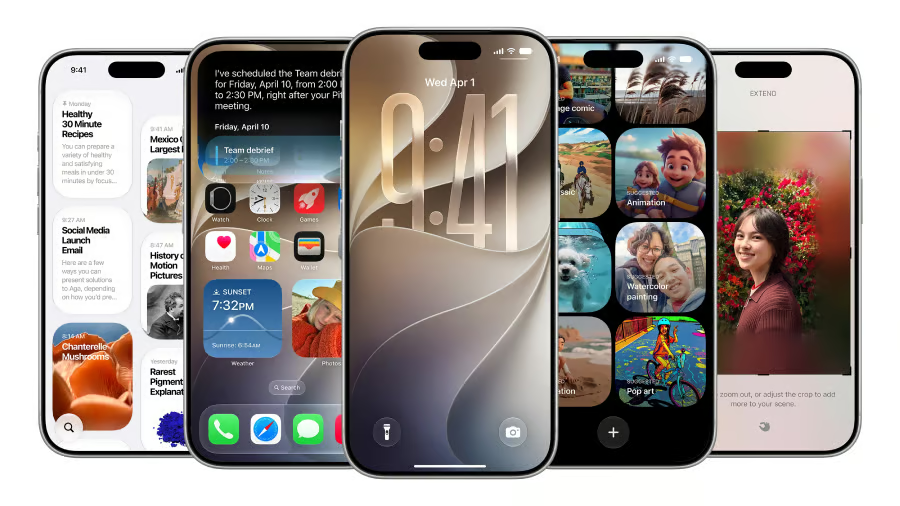
Your iPhone might support iOS 27, but that doesn’t mean you’ll get everything Apple’s latest software has to offer.
Apple released iOS 27 on Sept. 14, 2026, bringing new AI capabilities, improved productivity tools, and additional security and accessibility features. The operating system supports iPhones dating back to 2019, but many older models cannot access Apple Intelligence or the new Siri AI assistant.
That distinction matters for anyone deciding whether to update an existing iPhone or buy a replacement. Here’s the complete compatibility list, which includes older devices that are missed and what iPhone owners should check before upgrading.
Which iPhones are compatible with iOS 27?
According to Apple’s official iOS 27 compatibility documentation, iOS 27 supports the iPhone 11 and newer, as well as the second- and third-generation iPhone SE.
Here’s the full breakdown, including which models have the hardware needed for Apple Intelligence. Actual feature availability also depends on software version, language, region, and storage requirements.
| iPhone model | iOS 27 | Apple Intelligence |
|---|---|---|
| iPhone 18 Pro, 18 Pro Max | Yes | Yes |
| iPhone Duo | Yes | Yes |
| iPhone 17, 17 Pro, 17 Pro Max | Yes | Yes |
| iPhone 17e | Yes | Yes |
| iPhone Air | Yes | Yes |
| iPhone 16, 16 Plus, 16 Pro, 16 Pro Max | Yes | Yes |
| iPhone 16e | Yes | Yes |
| iPhone 15, 15 Plus | Yes | No |
| iPhone 15 Pro, 15 Pro Max | Yes | Yes |
| iPhone 14, 14 Plus, 14 Pro, 14 Pro Max | Yes | No |
| iPhone 13, 13 mini, 13 Pro, 13 Pro Max | Yes | No |
| iPhone 12, 12 mini, 12 Pro, 12 Pro Max | Yes | No |
| iPhone 11, 11 Pro, 11 Pro Max | Yes | No |
| iPhone SE (2nd generation) | Yes | No |
| iPhone SE (3rd generation) | Yes | No |
The biggest exception is the iPhone 15 family. While all four models support iOS 27, only the iPhone 15 Pro and Pro Max qualify for Apple Intelligence.
Owners of older devices can still receive compatible software improvements and security updates, but some of the most prominent AI features remain unavailable.
For more information about Apple’s latest hardware, see TechRepublic’s iPhone 18 Pro cheat sheet.
Which iPhones miss out on iOS 27?
Several older iPhones cannot install iOS 27, including:
- iPhone X, XR, XS, and XS Max
- iPhone 8 and iPhone 8 Plus
- iPhone SE (1st generation)
- iPhone 7 and earlier models
These devices are not eligible for Apple’s latest major iOS release.
That doesn’t necessarily mean every unsupported iPhone immediately becomes unusable or stops receiving security patches. Apple sometimes issues security updates for older operating systems, but continued support is not guaranteed for every model.
Users should not expect unsupported devices to receive iOS 27’s new features. Compatibility with newer applications may also become more limited over time as developers raise their minimum iOS requirements.
Which iOS 27 features require a newer iPhone?
The biggest differences between supported iPhones involve Apple Intelligence, Siri AI, and advanced photo-editing tools.
According to Apple’s official Apple Intelligence requirements, Apple Intelligence requires an iPhone 15 Pro, iPhone 15 Pro Max, or a compatible iPhone 16 or newer model, including the iPhone Air and iPhone Duo.
Here’s what owners of older iPhones could miss.
- Siri AI: Apple’s redesigned assistant can understand personal context, answer questions about onscreen information, and help perform actions across applications. However, Siri AI is currently in beta, with separate language, regional, and activation requirements.
- Advanced photo editing: Compatible iPhones gain intelligent tools for reframing photos, extending image boundaries, and removing unwanted objects.
- AI-powered writing and productivity: Eligible devices can use expanded writing assistance and intelligent features integrated into supported applications.
- AI-enhanced browsing: Supported iPhones gain intelligent Safari capabilities, including tools for organizing tabs by topic, creating extensions through natural-language descriptions, and monitoring webpages for changes.
Importantly, Apple Intelligence and Siri AI are not interchangeable. Apple Intelligence includes a broader collection of features across applications, while Siri AI is a specific assistant powered by that technology.
An iPhone may support Apple Intelligence features even when Siri AI is unavailable in the user’s region.
Availability also varies by model, language, and software version. Certain features rely on server-side processing and are subject to daily usage limits.
For a closer look at practical AI capabilities, TechRepublic previously explored five useful iOS 27 AI Shortcuts.
What about the new Siri AI?
Siri AI is one of the most significant changes introduced with iOS 27, but its availability is more restricted than that of the operating system itself.
Under Apple’s Siri AI requirements, the assistant requires compatible Apple Intelligence hardware, supported language settings, and an eligible region.
Siri AI is currently available in beta in English. It is not available on iOS in the European Union, even though other Apple Intelligence features are available there on eligible devices.
Availability in mainland China is more complicated. Apple says Apple Intelligence currently does not work on supported devices purchased in mainland China.
For supported devices purchased outside mainland China, Apple Intelligence is also unavailable when the device is being used in mainland China, and the associated Apple Account country or region is set to mainland China. Siri AI also remains unavailable when the Apple Account region is mainland China.
Apple says previously purchased compatible devices will be able to activate a core set of Apple Intelligence features when the technology becomes available in mainland China, although newer features will remain subject to regulatory requirements.
Eligible iPhone owners can check for Siri AI by opening Settings, selecting Siri, and tapping Try Siri AI (Beta). If Siri is turned off, users should first select Turn On Siri, then choose the beta option.
Follow the onscreen instructions to choose a voice, complete voice enrollment, and review your privacy settings. Apple says this adds users to a waitlist, with Siri AI downloading automatically when access becomes available. Wait times can vary.
For iPhone 11, 12, 13, and 14 owners, installing iOS 27 will not unlock Siri AI.
How to check whether your iPhone supports iOS 27
You don’t need to know your iPhone’s release year to determine whether it’s eligible.
Follow these steps:
- Open Settings on your iPhone.
- Select General, then About.
- Find the Model Name and current iOS Version.
- Compare your model against the compatibility table above.
- Return to General, then select Software Update to check whether an update is available.
If your device is eligible, a compatible iOS 27 update should appear, subject to your current software version and any device-management restrictions.
As of Oct. 26, 2026, Apple’s latest general iPhone software release is iOS 27.0.1, while the iPhone Duo runs iOS 27.1. The version offered in Software Update depends on your device.
Before installing, back up important information and make sure you have enough storage space available.
Storage requirements are particularly relevant for Apple Intelligence. Apple says its AI features can require up to 8GB of on-device storage on many eligible iPhones and up to 14GB on certain newer models, including the iPhone Duo, iPhone Air, and iPhone 17 Pro models and later.
Apple also notes that storage usage may temporarily exceed those amounts during or shortly after an update as new AI models are downloaded and older ones are removed.
These requirements are separate from the space needed to download and install an iOS update.
Should you upgrade your iPhone just to get iOS 27?
For most people, iOS 27 compatibility alone isn’t a compelling reason to purchase a new phone. The more important question is whether your existing device supports the features you actually want.
If you own an iPhone 11, 12, 13, or 14: Your phone can install iOS 27, but it won’t gain Apple Intelligence. If you’re satisfied with its performance, battery life, and existing capabilities, there may be little reason to replace it immediately.
If you own an iPhone 15 or 15 Plus: Your device supports iOS 27 but lacks Apple Intelligence eligibility. Upgrading could make sense if the new AI capabilities are important to your daily workflow.
If you own an iPhone 15 Pro or newer eligible model: You already have access to supported Apple Intelligence features. Replacing your phone solely for Siri AI may not be necessary, although individual features can vary by model and region.
If you own an unsupported iPhone: Consider the device’s remaining security support, application compatibility, battery condition, and overall performance before deciding whether to upgrade.
For readers comparing newer devices, TechRepublic’s iPhone 18 Pro vs. iPhone 17 Pro comparison examines whether the latest hardware improvements justify replacing an existing flagship.
What iOS 27 compatibility means for iPhone owners and IT teams
For everyday iPhone owners, the biggest takeaway is that software support and feature support are now two different questions.
An iPhone 13 or 14 can run iOS 27, but it cannot use Apple Intelligence or the new Siri AI capabilities. Meanwhile, an iPhone 15 Pro can access Apple Intelligence without requiring an upgrade to Apple’s newest hardware.
That difference becomes especially important when deciding whether to spend hundreds of dollars on a replacement device.
Before upgrading, iPhone owners should consider three things:
- Check what you’re actually missing. If you mainly use your iPhone for messaging, browsing, photography, and everyday applications, the absence of advanced AI features may not justify buying a new device.
- Prioritize security and performance. An older iPhone that still receives supported updates and runs essential applications reliably may remain practical. However, devices that no longer receive security fixes deserve closer scrutiny.
- Consider the total upgrade cost. Battery replacement, storage needs, trade-in value, and expected remaining lifespan may matter more than access to a particular AI feature.
For IT administrators managing company-issued iPhones, the decision is more complicated.
Organizations should inventory their devices by model, verify compatibility with mobile device management software, and test critical business applications before deploying iOS 27 broadly.
They should also distinguish between employees who need the latest operating system and those whose work genuinely benefits from Apple Intelligence.
For example, an employee using an iPhone 13 for authentication, email, and company messaging may not require an immediate hardware replacement. An employee expected to use Siri AI for supported productivity workflows would need an eligible device and access to the beta in their region.
Security policies, AI data-handling requirements, storage capacity, and regional availability should also factor into deployment decisions.
IT teams should pay particular attention to the distinction between Apple Intelligence and Siri AI. A company may be able to deploy supported AI-powered writing or photo-editing features while Siri AI remains unavailable to some employees.
Ultimately, the best upgrade isn’t necessarily the newest iPhone. It’s the device that supports the software, security requirements, and features you actually need. With iOS 27, checking that distinction before buying could save consumers and businesses from an unnecessary upgrade.
More Apple coverage: For more ways to get the most out of your current iPhone before upgrading, check out TechRepublic’s 7 iPhone Settings That Help Your Battery Last Longer.