


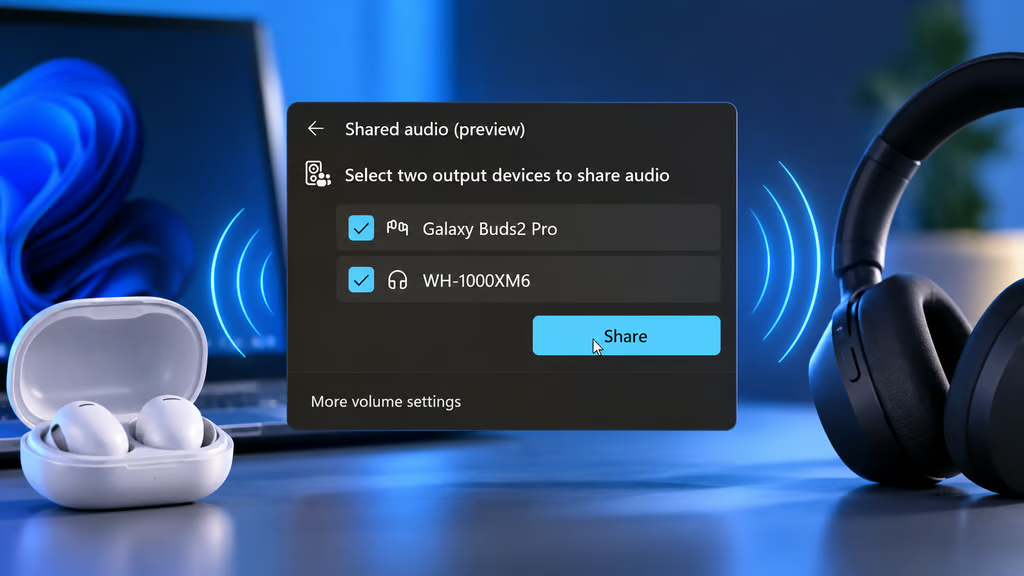
Windows can recognize two Bluetooth headphones without playing sound through both. Pairing them is only half the job.
Microsoft improved Windows 11’s Shared Audio reliability in its September 22, 2026, update, following the feature’s broader rollout in May. Shared Audio allows two compatible headsets to play sound simultaneously, but requires specific Bluetooth hardware, drivers, and accessories.
Both headphones can therefore appear connected while only one produces sound. Getting them to work together depends on the laptop’s audio capabilities, Windows version, and feature availability, not simply its Bluetooth pairing settings.
Why Bluetooth pairing doesn’t enable shared playback
Traditional Bluetooth audio typically sends playback to one selected output device. Pairing a second headset does not automatically duplicate that stream, even when Windows recognizes both devices.
Shared Audio works differently. It uses Bluetooth Low Energy Audio (LE Audio) broadcasting to transmit sound to two compatible accessories. Microsoft introduced the capability more broadly through its May 26, 2026, Windows 11 update, which TechRepublic also covered in its report on the optional update.
Microsoft later improved Shared Audio reliability and performance with LE Audio accessories in September. Earlier Windows 11 Bluetooth improvements addressed headset microphone behavior and reconnection issues, but these updates did not eliminate Shared Audio’s hardware requirements.
The PC needs supported Bluetooth hardware and audio drivers, while both receiving devices must support the necessary LE Audio features. Availability also depends on the Windows version and Microsoft’s staged rollout, so installing an update alone does not guarantee access.
Bluetooth version numbers alone offer little assurance. The Bluetooth Special Interest Group explains that LE Audio relies on technology introduced with Bluetooth 5.2, but devices using that version or newer do not necessarily support broadcasting.
Microsoft’s original Shared Audio announcement identified compatible headphones, speakers, and hearing aids. Later Insider improvements introduced individual volume controls and a taskbar indicator, as detailed in TechRepublic’s coverage of the updated audio controls.
Setting up Shared Audio in Windows 11
On a compatible PC, pair and connect both supported LE Audio accessories. Open Quick Settings from the taskbar, select Shared Audio, choose the two devices, and click Start sharing.
If the option is missing, check whether Windows supports LE Audio. Microsoft’s compatibility guide directs users to Settings > Bluetooth & devices > Devices, where Use LE Audio when available should appear.
If that setting is absent, the computer does not currently support LE Audio, possibly because of hardware limitations or incompatible drivers. Its presence indicates basic LE Audio support, but does not guarantee Shared Audio broadcasting.
If a compatible headset does not appear in the selector, update the PC’s Bluetooth and audio drivers. Check for headset firmware updates through the manufacturer’s app, then remove and re-pair the accessory.
A missing Shared Audio tile may also indicate unsupported hardware or an incomplete feature rollout. Check the laptop manufacturer’s specifications before assuming another Windows update will enable it.
For unsupported PCs, a wired headphone splitter or an external Bluetooth transmitter designed for two headsets may provide an alternative. These options have separate compatibility requirements and audio controls.
IT teams purchasing equipment for training, shared workstations, or accessibility should confirm LE Audio broadcast support with manufacturers before deployment. Bluetooth pairing alone is not a reliable compatibility test.
Read more: For more Windows 11 troubleshooting, see how Microsoft addressed Remote Desktop and Hyper-V issues in an emergency Windows update following September’s Patch Tuesday release.