

QuickBooks Workforce, formerly QuickBooks Payroll, combines full-service payroll and HR tools with tight integration with Intuit’s accounting module, QuickBooks Online. Its entry-level plan includes mostly pay processing features, while time tracking and additional HR functionalities, such as recruiting and performance reviews, sit in higher tiers. If you need stronger service support, better reporting, or scalability options, these alternatives to QuickBooks Workforce are worth considering.
| Software | ||
|---|---|---|
| Gusto | ||
| OnPay | ||
| Square Payroll | ||
| Paychex Flex | ||
| RUN Powered by ADP |
Top QuickBooks Workforce alternatives comparison
These alternatives to QuickBooks Workforce, including QuickBooks, offer tax reporting and filing assistance, automatic pay computations, benefits administration, and essential tools to manage employee information.
| Software | ||||
|---|---|---|---|---|
| QuickBooks Workforce | ||||
| Gusto | ||||
| OnPay | ||||
| Square Payroll | ||||
| Paychex Flex | ||||
| RUN Powered by ADP | ||||
| *HR feature levels: Basic covers core employee management, onboarding, and payroll tools. Moderate adds broader HR workflows such as hiring or performance reviews. Advanced includes a wider HR suite and support services. |
Why you can trust TechRepublic
TechRepublic follows a strict editorial policy, combining rigorous research with practical analysis to help IT and business leaders make informed technology purchasing decisions.
My recommendations draw on more than eight years of experience reviewing HR and payroll software, along with 10 years of HR experience working with HRIS, payroll, time-tracking, and other workforce systems. That background helps me look past feature lists and consider how software actually fits into day-to-day HR and payroll work.
For this guide, I evaluated nine products and narrowed the list to my top five picks after reviewing product documentation, pricing pages, and support resources from QuickBooks Workforce and each alternative. I also looked at the differences most likely to affect a small business’s decision, including payroll administration, reporting, HR functionality, contractor payments, support, time tracking, and scalability.
See my full methodology below.
Robie Ann Ferrer
Payroll & HR Software Expert at TechRepublic
Methodology
I started with nine payroll platforms commonly considered by small businesses:
- Gusto
- SurePayroll
- Paychex Flex
- RUN Powered by ADP
- Rippling
- Patriot Payroll
- Wave Payroll
- OnPay
- Square Payroll
Rather than ranking them as general payroll products, I compared each one against QuickBooks Workforce and looked for a clear reason a business might choose it instead.
Core payroll functions and pricing still mattered, but I gave extra consideration to areas where these providers stand apart. That includes broader HR support, payroll reporting flexibility, contractor payment options, service levels, and the ability to support a business as its workforce becomes more complex.
I also considered ease of use and implementation because switching payroll software creates work of its own. A lower subscription price doesn’t provide much value if the replacement requires more manual processing or creates headaches around accounting, employee data, or payroll setup.
Gusto: Best for small business payroll and HR

Gusto has many of the same perks as QuickBooks, such as automatic salary and tax computations, wage garnishments, and automated tax filings. Where it stands out is its broader range of HR tools, which can help small businesses manage more of the employee lifecycle alongside payroll.
Depending on the setup, Gusto can support hiring, onboarding, time tracking, scheduling, performance management, benefits, and other HR tasks. It also supports international contractor payments in more than 120 countries. Gusto can even help with state tax registration and offers an R&D tax credit service that lets you save up to $250,000 in payroll taxes each year.
Pricing
QuickBooks Workforce and Gusto offer three plans, but Gusto’s starter tier is slightly cheaper. It only costs $49 plus $6 per employee monthly, whereas QuickBooks Workforce’s starter plan is priced at $50 plus $7 per employee monthly. Plus, Gusto’s starter tier has more HR features, such as basic paid time off (PTO) policies, custom offer letter templates, and onboarding checklists.
Here are its pricing plans:
- Simple: $49 base fee per month plus $6 per employee per month.
- Plus: $80 base fee per month plus $12 per employee per month.
- Premium: $180 base fee per month plus $22 per employee per month.
It also offers a contractor plan if you only pay contract workers.
- Contractor only: $35 base fee per month plus $6 per worker monthly.
While Gusto’s contractor plan isn’t as affordable as QuickBooks’ contractor payments package ($25 monthly for up to 20 workers plus $2 per additional worker), Gusto includes new hire reporting in its package. This can save you time, especially if your business is located in California or a state that requires companies to report newly hired contract workers.
Gusto pros and cons
| Pros | Cons |
|---|---|
|
|
When to choose Gusto over QuickBooks Workforce
Gusto is a good choice if you want payroll and HR to work more closely together. It gives small teams more room to manage hiring, onboarding, benefits, employee records, and other HR work from the same platform.
That broader HR coverage also helps Gusto stand apart from Square Payroll and OnPay, which are more payroll-focused. At the same time, it is generally less complex than the larger HR ecosystems available from Paychex and ADP, which make it a better fit for a small business that wants more than payroll without moving into a heavier HCM setup.
However, QuickBooks Workforce is stronger when easy integration with QuickBooks Online is key to your business. Gusto integrates with it, so changing payroll providers does not necessarily mean replacing your accounting software.
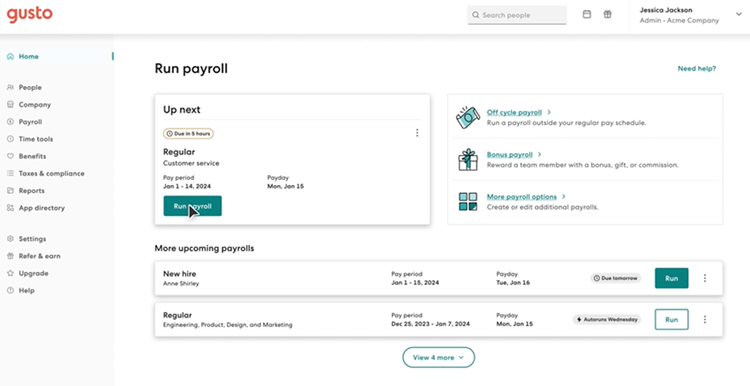
To learn more about Gusto, read our Gusto review. To see how it compares with QuickBooks Workforce, read our Gusto vs QuickBooks Workforce article.
OnPay: Best for customizable payroll reports

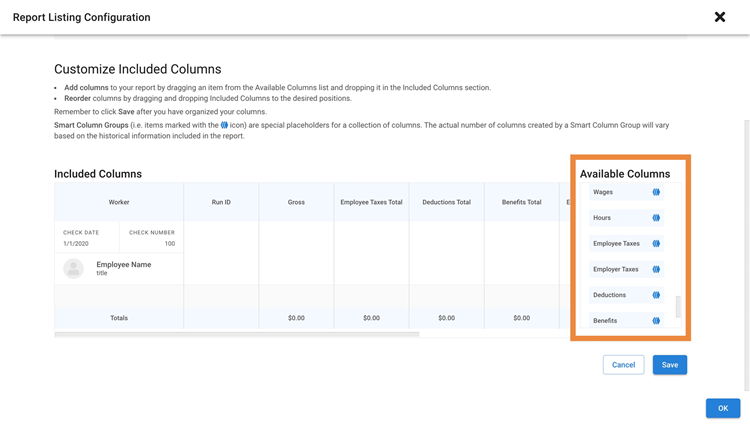
What sets OnPay apart from QuickBooks Workforce and the others on this list is how much control it gives you over payroll reporting. Its report designer lets you add, remove, and rearrange more than 50 payroll data points, apply filters, change date ranges, save custom views, and export reports for further analysis.
That flexibility can save time if HR, finance, and accounting regularly need different views of the same payroll data. OnPay also includes 15 standard payroll reports covering areas such as earnings, locations, departments, positions, workers’ compensation, and retirement, so you can start with a standard report and customize it when needed.
Pricing
OnPay’s core payroll plan, which costs $49 per month plus $6 per employee, is slightly less expensive than QuickBooks Workforce’s starter tier ($50 plus $7 per employee monthly). HR and time tracking features are available as add-ons, so businesses that need those tools should compare the combined monthly cost rather than looking only at OnPay’s payroll starting price.
OnPay also doesn’t have a separate contractor-only plan. You use the same payroll service whether you pay employees, contractors, or both. Square Payroll is the better option if you only need contractor payroll and want to avoid a monthly base fee.
OnPay pros and cons
| Pros | Cons |
|---|---|
|
|
When to choose OnPay over QuickBooks Workforce
OnPay is a good fit if you want full-service payroll without stepping into a larger HR system. Its core payroll service includes multi-state payroll, unlimited pay runs, and federal, state, and local tax filings, which can work well for a small business that needs solid payroll coverage but doesn’t need the broader HR ecosystems of Paychex or ADP.
It also makes sense if you prefer a more focused payroll platform than Gusto. Gusto gives you more HR depth, while OnPay keeps the core experience centered on payroll and lets you add HR or time tracking separately if those needs come up later.
Another advantage is implementation support. OnPay includes account setup and historical payroll data migration, which can make switching from QuickBooks Workforce less cumbersome for a small team without a dedicated payroll implementation resource.
Learn more about OnPay: Read our OnPay review or see how it compares with QuickBooks Workforce in our QuickBooks Workforce vs OnPay article.
Square Payroll: Best for contractor payments

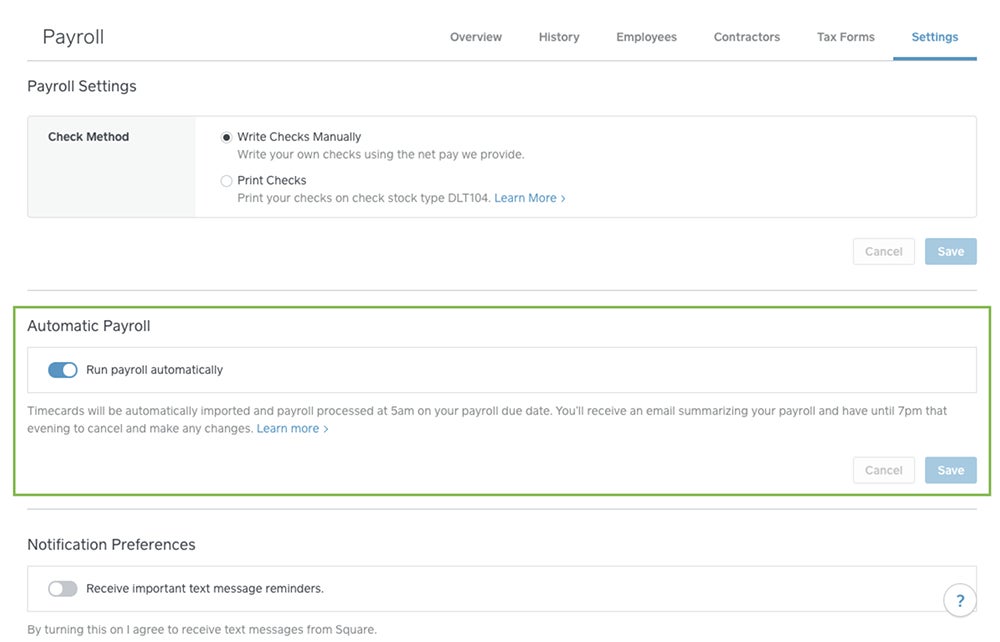
Square Payroll is a good option if you’re looking for a QuickBooks Workforce alternative that can handle both employee and contractor payroll. It calculates pay and payroll taxes, handles tax filings and year-end forms, and supports direct deposit, paper checks, and other payment options.
It also works closely with other Square products, including Square POS and its workforce tools. For businesses already using Square, employee hours, tips, and commissions can flow into payroll with fewer manual transfers.
Pricing
With Square Payroll, you get two options:
- Full-service payroll: $35 base fee per month plus $6 per employee per month.
- Contractor-only payroll: $6 per worker per month.
Compared to all of the providers on my list, Square Payroll offers the most affordable full-service payroll and contractor-only payroll plans. You can save more with this QuickBooks Workforce alternative, provided you only need basic HR tools, such as simple new hire onboarding, scheduling, and time tracking features.
The tradeoff is that Square offers fewer HR capabilities than Gusto, Paychex, or ADP, so the lower price works best if your needs stay fairly close to payroll, scheduling, and time tracking.
Square Payroll pros and cons
| Pros | Cons |
|---|---|
|
|
When to choose Square Payroll over QuickBooks Workforce
Square Payroll is particularly useful if contractors make up a meaningful part of your workforce. Its contractor-only option has no monthly base fee, and Square prepares and files Form 1099-NEC, which gives businesses a straightforward way to manage 1099 payroll without paying for a full employee payroll package.
It also has an edge for restaurants, retailers, salons, and other hourly businesses already using Square. Timecards, tips, and commissions can move into payroll from Square’s workforce and POS tools. QuickBooks Workforce can handle time tracking in higher tiers, but Square may create fewer handoffs if the rest of your day-to-day operations already run through its ecosystem.
Want to learn more? For more information about its features, read our Square Payroll review. To see how it compares with QuickBooks Workforce, read our QuickBooks Workforce vs Square Payroll article.
Paychex Flex: Best for dedicated payroll support

Paychex offers a wide range of HR solutions and services for businesses of all sizes. Its core payroll software is Paychex Flex, and depending on the plan selected, you get basic to advanced HR tools. Paychex also offers a learning management system (LMS) that can be added to its payroll and HR setup, giving businesses a way to deliver compliance, onboarding, leadership, and professional development training without using a separate learning platform.
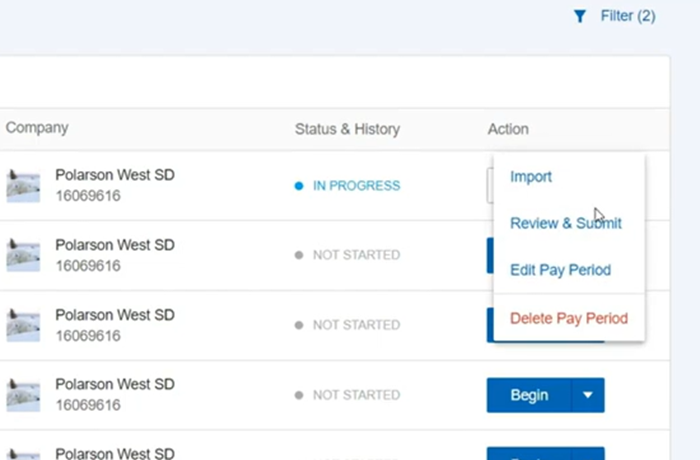
It also offers access to dedicated payroll specialists who can answer payroll-related questions and assist with pay runs. This sets Paychex Flex apart from QuickBooks Workforce and the others on my list. With a dedicated specialist who knows your unique payroll and business needs, you can save time explaining your situation and get answers quickly.
Pricing
What I don’t like about Paychex is its non-transparent pricing. You have to call its sales team to request a quote. And if you’re getting other tools, such as time tracking, you need to contact a separate team to get pricing details.
Your total cost also depends on the payroll package and any additional services you add, such as time tracking, benefits, recruiting, or HR support. That makes Paychex harder to compare upfront with providers like Gusto, OnPay, and Square Payroll, which publish their starting monthly prices.
Paychex Flex pros and cons
| Pros | Cons |
|---|---|
|
|
When to choose Paychex Flex over QuickBooks Workforce
Paychex Flex is a good fit if you want more support around payroll rather than relying mostly on self-service tools. Its payroll service can provide more hands-on assistance than QuickBooks Workforce, which may be helpful when you’re dealing with tax questions, payroll corrections, or unusual employee situations.
Paychex Pre-Check is another useful difference. It lets employees review paycheck details before payday and flag potential errors, giving payroll teams another opportunity to catch issues before payments are finalized.
Compared with Gusto and OnPay, Paychex gives businesses access to a wider mix of HR, benefits, training, and advisory services around payroll. That extra depth can be useful if you expect your needs to grow, while businesses that prefer transparent pricing or a simpler software-first experience may find those providers easier to manage.
Learn more about Paychex Flex: Read our Paychex Flex review or our QuickBooks Workforce vs Paychex article to see how it compares with Intuit’s HR platform.
RUN Powered by ADP: Best for scalability
If you worry your business will outgrow QuickBooks Workforce, consider RUN Powered by ADP or ADP RUN as an alternative. It handles payroll calculations, tax filing, employee self-service, and reporting, while higher packages add recruiting, HR support, training, and other workforce tools. ADP also has a variety of HR products and services that can meet the needs of small to large businesses, making it highly scalable compared to QuickBooks and the other software on my list (except Paychex Flex).
If you want a small business payroll system with nominal HR features, you can start with ADP RUN. If you want more features or have a bigger workforce, you can switch to other products like ADP Workforce, which is optimal for midsized to large businesses. You can also get ADP TotalSource, a professional employer organization (PEO) service that handles your day-to-day HR and payroll tasks.
Pricing
ADP RUN is another QuickBooks Workforce alternative that doesn’t list its pricing on its website. You can get a quote by contacting its sales team.
RUN Powered by ADP pros and cons
| Pros | Cons |
|---|---|
|
|
When to choose RUN Powered by ADP over QuickBooks Workforce
If you need a wide range of HR features, higher-tier ADP RUN plans come with robust recruitment tools, such as ZipRecruiter job postings, applicant tracking, and background checks. You even get salary benchmark information to help you attract qualified candidates and gauge the competitiveness of your compensation package.
In addition to its LMS, which lets you assign and track the completion of online courses, it offers access to a sexual harassment prevention training program that you can readily deploy to employees. And that’s all on top of the in-app compliance alerts and HR support you get from ADP’s team of HR professionals who can help you navigate complicated HR issues.
It also gives payroll teams more help with routine processing. ADP Assist includes tools that can flag potential payroll errors before processing and help import time information, which can reduce some of the manual checking that happens before a pay run.
Compared with Gusto and OnPay, RUN offers a longer runway into broader HR services, while Paychex is its closest match for service depth and scalability. ADP may be the stronger fit if you want to stay with one vendor as the business moves from straightforward small-business payroll toward more complex HR and workforce needs.
For more information about its features, read our ADP RUN review. To see how it compares with QuickBooks Workforce, check out our ADP vs QuickBooks Workforce article. And if you want to learn more about other ADP products and services, look at our ADP Workforce Now and ADP TotalSource reviews.
More payroll coverage
- A Complete Guide to Payroll Software
- The Best International Payroll Services
- The Best Payroll Software
- Choosing a payroll service: A guide for business leaders
- Verito vs. Rightworks: Which IT Provider Is Best for Your Firm?
Also read: If none of these QuickBooks Workforce alternatives quite fit, our list of the best payroll software and services compares additional options for small and growing businesses.
Should you choose QuickBooks Workforce or an alternative?
QuickBooks Workforce makes the most sense if you already use QuickBooks accounting and want payroll to stay closely connected to your books. That integration can reduce manual data transfers between payroll and accounting, while the platform still covers core payroll tasks and basic HR needs. Its starting price is higher than some competitors, but the convenience may outweigh the difference if QuickBooks already sits at the center of your financial workflow.
An alternative may be a better fit if you need something QuickBooks Workforce handles less deeply. Gusto offers broader HR capabilities, OnPay gives you more control over payroll reporting, Square Payroll is stronger for low-cost contractor payments, Paychex provides more hands-on payroll support, and ADP gives growing businesses a longer runway into more complex HR and payroll needs.
For a closer look at what to compare, see our payroll software features guide.
How to choose a QuickBooks Workforce alternative
Start with the reason you’re considering a switch. That usually narrows the field faster than comparing every feature side by side.
- Check your accounting workflow. QuickBooks Workforce’s close connection with QuickBooks accounting remains one of its strongest advantages. Before switching, confirm how payroll journal entries, labor costs, and tax data will move into your accounting system so you don’t trade software savings for extra reconciliation work.
- Look at your workforce structure. Multiple states, contractors, hourly workers, and remote employees can create very different payroll requirements. A system that works well for a five-person salaried team may become cumbersome once you add multiple tax jurisdictions or hourly time tracking.
- Consider what sits around payroll. Hiring, onboarding, employee records, PTO, benefits, and time tracking often create more HR work as headcount grows. If several of those processes already live in separate tools, a payroll platform with broader HR functionality may reduce duplicate data entry and system switching.
- Decide how much support you want. Self-service payroll can work well for routine pay runs, but access to knowledgeable support becomes more important when you’re dealing with tax notices, unusual deductions, payroll corrections, or other issues you don’t handle every week.
- Compare total cost, not just the starting price. Paid add-ons like time tracking, HR tools, additional states, integrations, and support can change what you’ll actually pay each month.
If you’re still defining what your next system needs to handle, our guide to payroll software explains the key features, costs, and considerations to look at before comparing providers.
QuickBooks Workforce alternative frequently asked questions (FAQs)
What should you look for in an alternative to QuickBooks Workforce?
Start with the reason QuickBooks Workforce no longer fits. That may be stronger HR tools, better reporting, lower-cost contractor payments, more hands-on support, or more room to scale. Also compare accounting integrations, time tracking, multi-state payroll, and the total cost of any add-ons you expect to use.
Can you switch from QuickBooks Workforce without leaving QuickBooks Online?
Yes. Some QuickBooks Workforce alternatives integrate with QuickBooks Online, so you can move payroll to another provider without replacing your accounting software. Before switching, check how payroll journal entries sync and whether the integration supports the account mapping and reporting detail your business needs.
When is the best time to switch from QuickBooks Workforce?
The start of a calendar year is usually the simplest time because the new provider begins with clean year-to-date balances. You can switch midyear if wages, taxes, deductions, and prior payroll records transfer accurately. However, a midyear move requires more careful reconciliation to avoid duplicate or missing tax information.
What payroll data should you keep when switching from QuickBooks Workforce?
Keep employee and contractor details, pay rates, year-to-date earnings, tax withholdings, deductions, employer contributions, payroll registers, direct deposit information, and copies of filed tax forms. You should also retain historical records according to federal and state recordkeeping requirements rather than relying only on the new payroll provider to preserve them.