


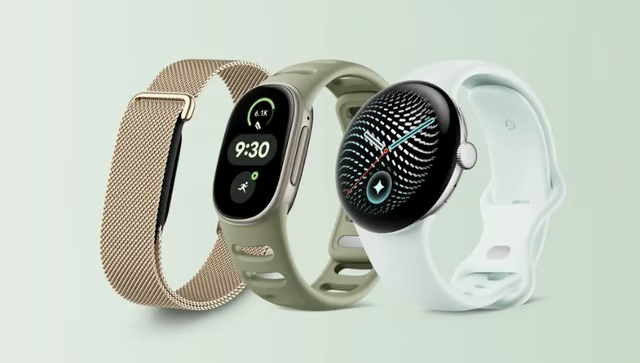
Google Fitbit Edge brings a larger display, built-in GPS, advanced health tracking, and Gemini-powered coaching to a lightweight fitness tracker starting at $179.99.
Scheduled for release on Oct. 27, 2026, Edge promises up to seven days of battery life and includes features for tracking workouts, sleep, and recovery. Its AI-powered coaching tools, however, require a paid Google Health Premium subscription.
For buyers, the main questions are whether Edge offers enough to justify upgrading from an older Fitbit and whether its fitness-focused features make it a better choice than a full smartwatch. Here’s what to know about its specifications, pricing, battery life, and available models.
Google Fitbit Edge at a glance
| Release date | Oct. 27, 2026 |
| Starting price | $179.99 |
| Display | 1.34-inch AMOLED, always-on capability |
| Case | Recycled aluminum, 17.7g without band, 11.58mm thick |
| Processor | Ambiq AP5 MCU |
| Storage | 64MB NOR flash |
| Battery | Up to 7 days; up to 2 days with always-on display |
| Charging | Full charge in about 90 minutes; 5-minute charge for up to 1 day |
| Fitness | Built-in GPS, altimeter, automatic exercise recognition, Cardio Load, Readiness |
| Health sensors | Optical heart rate, ECG-compatible electrical sensors, SpO2, skin temperature |
| AI features | Google Health Coach with Gemini, Premium subscription required |
| Water and dust resistance | 5 ATM, IP68 |
| Connectivity | Bluetooth 5.4, GPS, Galileo |
| Compatibility | Android 11 or later; iOS 16.4 or later |
| Companion app | Google Health, Google Account required |
Fitbit Edge is best suited to buyers who want advanced fitness and recovery tracking without moving to a full smartwatch. Existing Charge 6 owners may have less reason to upgrade, while users interested in Gemini-powered coaching should account for the additional subscription cost.
The technical specifications also list enough onboard storage for seven days of detailed motion records and 30 days of daily totals. Unlike the larger storage found in a full smartwatch, this memory is intended primarily for retaining tracking information.
What are the key features of Google Fitbit Edge?
Edge records health and activity data on the wrist, with the Google Health app providing more detailed analysis and longer-term insights.
Health, sleep, and recovery
The built-in sensors and companion app cover four main areas:
| Heart health | ECG, irregular rhythm notifications, high and low heart rate alerts, resting heart rate |
| Sleep | Sleep stages, Sleep Score, breathing rate, overnight health metrics |
| Recovery | Readiness, heart rate variability, skin temperature variation, Cardio Load |
| Blood oxygen | Overnight SpO2 tracking |
| Menstrual health | Cycle tracking, symptom logging, period predictions |
Health readings become more useful when viewed over several days rather than individually. Readiness considers activity, sleep, and recovery information to help users judge how prepared they may be for exercise.
Someone who slept poorly after a demanding workout, for example, might find a lighter training day more appropriate. Sleep Score shows a simpler summary of overnight rest, although wearable sleep-stage estimates should not be treated as equivalent to clinical sleep measurements.
Heart monitoring includes an on-wrist ECG app that can check for signs of atrial fibrillation, an irregular heart rhythm. Availability depends on regional regulatory approvals, and the results are not a substitute for medical evaluation.
Fitness tracking, GPS, and automatic workout detection
Built-in GPS records routes, distance, and pace without requiring a nearby phone. An altimeter measures elevation changes, adding information about climbs during hikes, stair workouts, and hill training.
The tracker supports dozens of exercise modes, with automatic recognition for activities that begin without manually starting a session. Its workout controls and tracking tools also include real-time heart rate broadcasting to compatible gym equipment.
During exercise, users can check their pace, heart rate zones, and progress on the wrist. Afterward, Cardio Load helps explain how demanding the activity was relative to recent training.
For someone building a consistent routine, this gives a way to compare workout intensity over time instead of simply recording another exercise session.
Google Health Coach and Gemini
Google Health Coach uses Gemini to develop personalized training guidance from activity, sleep, and recovery information.
A person training for a 5K while managing changing work hours, for example, could receive revised workout suggestions when their schedule changes. Coaching also extends to sleep habits, nutrition, and questions about personal health trends.
Much of the conversation happens through the Google Health app on the phone, while the tracker displays selected metrics, workout guidance, and coaching cues.
Not every feature requires payment:
| Steps, activity, and workout history | Adaptive fitness plans |
| Sleep Score and sleep stages | Personalized sleep coaching |
| Readiness and Cardio Load | Daily recommendations built with Gemini |
| Heart rate and other supported health metrics | AI health questions and personalized insights |
| Cycle and nutrition logging | Advanced nutrition and metabolic coaching |
The Google Health Premium features also include a library of guided workouts and mindfulness sessions. Availability varies by region.
AI recommendations can help users interpret patterns, but they should not replace professional medical advice when evaluating health concerns.
Battery, charging, and repairability
Fitbit Edge is rated for up to seven days between charges under standard test conditions. Keeping the display active or using GPS continuously changes that estimate considerably.
- During everyday use.A five-minute charge can restore up to one day of battery life. A short top-up before leaving home could be enough when the battery is running low.
- With the screen always on. Estimated endurance falls to two days. Keeping information immediately visible comes with more frequent charging.
- During continuous GPS tracking. Battery life reaches up to 10 hours. Users planning lengthy hikes, rides, or endurance events should account for that shorter estimate.
Another difference is the user-replaceable battery, which could extend the tracker’s usable life when capacity eventually declines.
However, replacement is not necessarily a routine home repair. Google recommends self-service only for adults with suitable technical expertise and warns against handling damaged or swollen batteries.
Design, display, and durability
The redesigned screen provides 46% more viewing area than previous Fitbit trackers, giving workout metrics and health summaries more room without requiring users to rely entirely on their phones.
At 17.7 grams without the band, Edge is considerably lighter than a conventional smartwatch. Its compact body may appeal to people who wear their tracker through the workday and overnight.
A mechanical side button complements touchscreen gestures, which can be useful for pausing an activity while moving. Users can also switch watch faces, customize displayed information, and change bands.
The 5 ATM water-resistance rating covers swimming and everyday exposure to water, although it should not be interpreted as approval for scuba diving or high-pressure water activities.
Notifications, controls, and phone compatibility
Users can check calls, text messages, and notifications from supported apps directly on the tracker. Android users can send preset quick replies, while media controls let users pause music, skip tracks, or adjust volume on a connected phone.
Other everyday functions include silent alarms, timers, weather updates, and Find My Phone.
Setup requires a Google Account and the Google Health app. The tracker connects through Bluetooth to synchronize activity and health information with a compatible smartphone.
Built-in GPS allows independent workout tracking, but Edge has no cellular option. Messaging and other communication features still require a paired phone.
How much does Google Fitbit Edge cost, and when is it available?
Preorders opened Oct. 12, 2026, with retail availability scheduled for Oct. 27.
Current US starting prices are:
- Google Fitbit Edge: $179.99
- Stephen Curry Special Edition: $219.99
Both versions include a three-month Google Health Premium offer for eligible buyers.
After the promotional period, Premium costs $9.99 per month or $99 annually in the US. Buyers who intend to keep using Gemini-powered coaching should factor that recurring expense into the purchase.
Which Google Fitbit Edge should you choose?
A fitness tracker can stay on your wrist through morning workouts, long workdays, and nights spent tracking sleep. How it looks and feels can make a difference when you’re wearing it that often. With one case size and the same tracking capabilities across versions, choosing a Fitbit Edge largely comes down to personal style and comfort.
Standard Edge or Stephen Curry Special Edition?
The standard model comes in four case and band combinations: Matte Black with Obsidian, Satin Silver with Fog, Satin Pyrite with Olive, and Champagne Gold with Canyon.
The Stephen Curry Special Edition adds a band made from water-repellent recycled polyester, with moisture-wicking properties and stainless steel lugs. Its rye and orange colors draw inspiration from Curry’s signature style.
At $40 more, the special edition is an option for buyers who prefer its design. Both versions have identical health sensors, workout tracking, and other core features.
Which Fitbit Edge band should you choose?
Every standard Edge includes small and large Active Bands, giving buyers two sizes to try without purchasing an additional strap.
Silicone Active Bands work well for exercise and everyday wear. Active Sport Bands and Performance Loops offer different materials and fit options, particularly for users who regularly switch between workouts and daily activities.
Magnetic and metal-link bands create a more polished look for work or casual outings.
For those planning to track sleep every night, comfort is especially important. A secure fit helps keep the sensors in contact with the skin, while a band that feels comfortable for hours can make overnight tracking easier to maintain.
Who should consider Google Fitbit Edge?
The right smartwatch choice depends on your current device, daily routine, and how you plan to use the tracker.
First-time fitness tracker buyers
Edge suits people who want to follow their activity, sleep, and exercise progress without investing in a full smartwatch.
Its health and fitness tools provide a substantial starting point, while the week-long battery estimate makes frequent charging less of a concern for users new to wearables.
Buyers primarily interested in personalized AI coaching should consider the additional subscription cost.
Existing Fitbit Charge 6 owners
Upgrading from Charge 6 brings a larger display, elevation tracking, a redesigned interface, and the option to replace an aging battery.
However, the older model already has built-in GPS, ECG, heart rate broadcasting, sleep tracking, and seven-day battery life. Its Google Wallet support is another consideration because Edge’s published specifications do not list NFC payments.
People satisfied with their current fitness readings may prefer to keep their existing tracker for now.
Buyers comparing Fitbit Air and Pixel Watch 5
Fitbit Air is a screenless fitness tracker for people who want activity and recovery information collected in the background, without checking a display.
Pixel Watch 5 delivers a more complete smartwatch experience, with a wider selection of apps and available LTE connectivity typical of Wear OS smartwatches.
Edge fits between them, particularly for users who want health information visible on their wrist but value longer battery endurance over a wider selection of smartwatch applications.
More Google coverage
- New Google Search AI Mode is ‘Total Reimagining,’ Says CEO Sundar Pichai
- In Major Ruling, Judge Finds Google ‘Willfully Acquired and Maintained Monopoly Power’ Over Digital Ad Market
- Google’s Big Bet on Nuclear Energy: ‘The Race to Power AI-Driven Data Centers is Accelerating’
- Computer History Museum Releases Original AlexNet Code: Why It Matters
What’s next for Google Fitbit Edge?
A few advertised software capabilities are still awaiting wider availability.
Turn-by-turn Google Maps directions are planned for the wrist, allowing users to follow walking, cycling, and running routes without repeatedly checking their phones. The Fitbit Edge product overview currently labels navigation as coming soon.
Health Guardian is another area awaiting clarification. Future capabilities advertised for Edge include monthly blood pressure and insulin resistance trends, but the supported-device documentation currently identifies only Pixel Watch 3, 4, and 5 for these tools.
The separate insulin resistance guidance is more explicit: Fitbit devices are not supported at present. Neither capability should therefore be treated as available on Edge at launch.
Even when supported, these trend estimates will differ from direct blood pressure or glucose measurements. Current smartwatch blood sugar monitoring still depends on separate sensors for actual glucose readings.
Anyone buying at launch should base the decision on its current tracking and coaching features, while treating future health and navigation tools as possible additions.
Choosing Fitbit Edge comes down to what you want from a wearable. If tracking workouts, sleep, and recovery matters more than having a full range of smartwatch apps, Edge could be a worthwhile option.
But existing Fitbit owners should weigh the improvements against what their current device already offers, while anyone interested in AI coaching should factor in the ongoing subscription cost. The best choice is the one that fits your routine and provides features you’ll actually use.
More on smartwatches: Explore Apple Watch Series 12 features, pricing, health tools, battery life, and configuration options in one guide.