


A Mac can have an app for nearly every job, yet completing one task can still mean switching between several of them.
MacPaw, the company behind CleanMyMac and Setapp, launched Eney on Oct. 15. The AI assistant for Mac and iPhone is designed to recognize tasks that need attention and help users complete them across supported applications, according to the company.
Rather than simply reminding users what needs to be done, Eney aims to handle some of the work that follows, from preparing meeting notes to organizing files. The question is how much of that work users can safely delegate.
Meeting notes, screen shortcuts, and Mac upkeep
Before a scheduled call, Eney can remind the user and offer to transcribe the conversation without adding a separate bot to the meeting. Once it ends, the assistant prepares notes and action items, then drafts a follow-up invitation for approval.
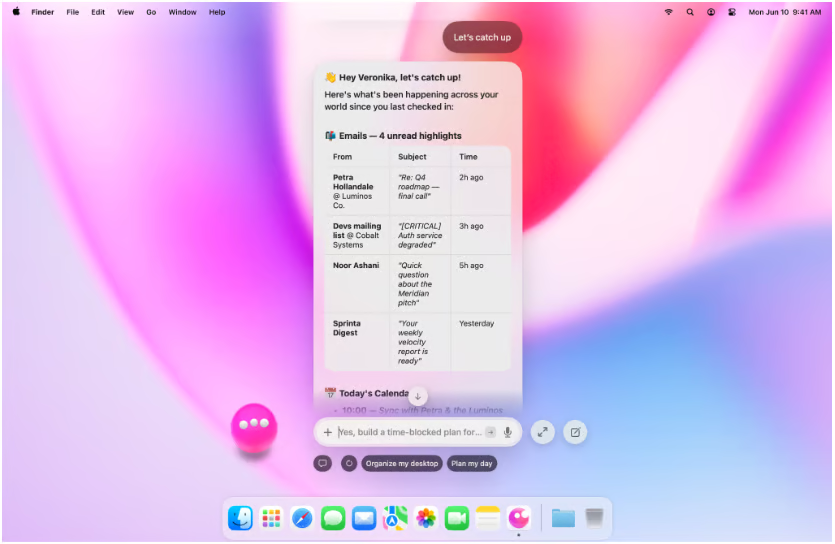
Other capabilities extend across writing, connected applications, and computer maintenance.
- On-screen assistance and writing. Eney Wand, activated with Option-W, can translate selected text, extract words from images, and blur sensitive details before sharing. Eney Spell offers grammar and wording corrections within supported applications, including Mail, Slack, and Notes.
- Connected apps and scheduled work. Eney works with Apple Mail, Calendar and Reminders, while integrations extend to Gmail, Google Drive, Slack, Notion, Jira and Linear. Ready-made workflows including Morning Brief, Plan My Day and Weekly Review can run on demand or according to a schedule, without users having to configure the steps themselves.
- Mac maintenance and file management. System-care features can warn about low disk space, memory pressure and applications that repeatedly crash, then suggest fixes. File management tools also locate documents, handle related tasks and help with organizing Downloads.
- Voice and text interaction. Double-tapping Option opens the assistant from anywhere on the Mac, allowing users to speak or type their requests. It supports eight languages, including English, German, Spanish and Ukrainian.
MacPaw founder and CEO Oleksandr Kosovan linked the approach to the company’s experience developing specialized Mac software.
“The real opportunity is to give that expertise a new interface, one you simply talk to,” he said.
MacPaw’s AI technology brings memory and approval controls
Eney is the first product powered by MacPaw’s proprietary AI stack, part of the company’s plan to connect its previously standalone applications through shared technology.
MacPaw’s research among US Mac users in July and August 2026 found that 81% had used an AI tool in the previous three months, but only 39% said AI was embedded in how they worked.
MacPaw says Eney uses a memory component called Mnemos to retain information relevant to the user, update details when corrected, and indicate when responses rely on stored information.
According to the company, Mnemos manages the assistant’s memory rather than independently accessing files or modifying other applications. That distinction does not eliminate the need to review Eney’s broader permissions, particularly when connecting workplace accounts.
Access to external services depends on the permissions granted to each integration, a consideration with AI agents working across workplace applications.
MacPaw says Eney requests user confirmation before certain actions, including sending messages, changing calendar events, and moving files. Users can adjust the assistant’s level of autonomy, although the permissions granted to individual integrations determine which external services and information it can access.
Getting started with Eney
Eney is available through its official website for Apple-silicon Macs running macOS 15 or later, with an iPhone version on the App Store.
Mac users download the assistant through Setapp, although a paid membership isn’t necessary. New users receive a 14-day trial with 10,000 AI credits. Paid subscriptions start at $14.99 per month, and unused credits do not carry over to the next billing cycle.
Must-read Apple coverage
- Nearly 7 in 10 iPhone Owners Plan iPhone 17 Upgrade
- Apple Prepares AI-Powered Siri Upgrade With Google Search Integration
- Apple’s Xcode 26 Beta Now Supports GPT-5 and Claude
- Apple’s Vision Pro Adoption Stalled As Content Released ‘Drip by Drip’
What Mac users should check before using Eney
Eney’s ability to work across applications introduces several considerations for people planning to use it with personal or company information.
- Review permissions before connecting workplace accounts. Employees should check whether their IT department permits Eney to access company email or shared drives. Examine the permissions requested by each integration and MacPaw’s data-handling policies to understand what information can be accessed, where it is processed and how long it is retained. Approval before sending a message does not necessarily explain which information the assistant accessed while preparing it.
- Check meeting recording and consent rules. Before enabling transcription during conversations with clients or colleagues, confirm that recording is permitted under applicable laws and workplace policies. Review AI-generated meeting notes before assigning responsibilities or sharing summaries, since mistakes involving decisions or deadlines could affect subsequent work.
- Test accuracy and credit consumption during the trial. Start with recurring, non-sensitive tasks, such as organizing a personal folder or preparing a daily schedule. Monitor credit usage through Setapp AI credits in Settings > Usage and check how often Eney needs corrections. Repeated mistakes or unnecessary permission requests should be addressed before giving the assistant access to more sensitive information.
Users can gradually expand Eney’s responsibilities if it consistently completes routine work accurately. Time saved on everyday tasks should also justify the subscription cost and any additional review involved.
Eney also reflects a broader shift in AI assistants, from answering questions to taking action across the tools people already use. For Mac users, the real test will be whether that convenience translates into fewer interruptions and less time spent managing routine work. An assistant that requires constant corrections or supervision could end up adding another layer of work rather than removing one.
Eney may anticipate some of your Mac tasks, but there will still be times when you need to tell AI exactly what you want. Learn a few ways to write clearer prompts with our free six-minute How to Talk to AI course, plus seven days of free access to other Neuron Academy courses. Check out all the lessons here →