


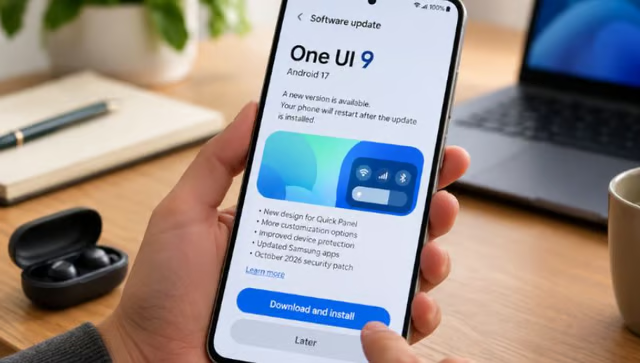
A software update is supposed to improve your device, but what happens when installing one makes you wish you hadn’t?
That is the dilemma facing some Samsung Galaxy S24 and S25 owners who report significantly worse battery life after installing One UI 9.
The complaints remain unconfirmed as a software defect. Still, they highlight a problem that is persistent across the consumer technology industry: updates can introduce new problems even as they promise better performance, new features, and improved security.
For users, experiences like these can make future updates harder to trust. For businesses managing fleets of devices, the consequences can extend beyond inconvenience, potentially disrupting employee productivity and complicating security patching.
Galaxy S24 and S25 owners report battery drain after One UI 9
Shortly after Samsung began rolling out One UI 9 to users on its Galaxy S24 and S25 series, some owners began reporting unusually rapid battery drain, with several saying they needed to charge their phones multiple times a day.
Android Authority’s report, published Oct. 23, cites complaints from multiple Galaxy owners, including posts on Reddit and Samsung’s community forum, which 9to5Google also referenced.
The reports span different devices and usage patterns, suggesting the issue isn’t limited to a particular use case.
In one instance posted on X, a Galaxy S24 Ultra owner reported losing 95% of the battery after just 3 hours and 15 minutes of screen-on time, and 2 hours and 5 minutes of screen-off time, totaling 5 hours and 20 minutes from when it last charged to 100%. Samsung subsequently contacted the owner to arrange a service appointment.
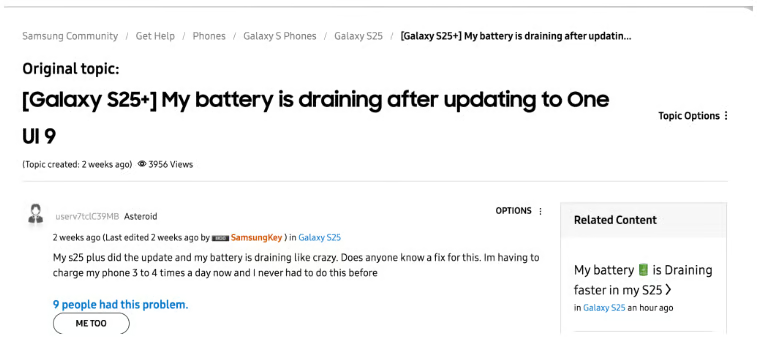
On the Samsung Community forum, a Galaxy S25+ user described experiencing abnormal battery consumption even when the device was idle and on battery saving mode. Another user reported needing to charge the device three to four times daily, raising concerns about how the update may be affecting everyday use.
Samsung has not publicly confirmed a One UI 9 battery-drain bug. Android Authority says it contacted the company for clarification, but no confirmed cause or software fix has emerged.
Why software updates can become a trust problem
Samsung’s reported battery issues reflect a broader challenge facing technology companies: users increasingly have to weigh the benefits of software updates against the possibility of unexpected problems.
A June 2026 UserTesting study found that 78% of US, 81% of UK, and 85% of Australian respondents avoid updating their devices unless necessary.
The issue isn’t even unique to Samsung. Windows offers a particularly striking example. In January 2026, a Microsoft update caused problems that demanded an emergency fix, which in turn introduced further issues and forced Microsoft to issue another fix.
Incidents like these can make users more hesitant about future updates. That hesitation creates a security concern because software updates frequently include patches for vulnerabilities that attackers could exploit.
The challenge for technology companies is maintaining user confidence while delivering the security improvements that devices need.
What's hot at TechRepublic
- Blackpoint Cyber vs. Arctic Wolf: Which MDR Solution is Right for You?
- Why AWS Sellers Choose Deepgram Over Other Voice AI Tools
- SS&C Intralinks DealCentre AI vs. Datasite: Which platform is built for the future of dealmaking?
- SS&C Intralinks FundCentre AI vs. Juniper Square: Which platform better supports modern private markets fund managers?
- Verito vs. Rightworks: Which IT Provider Is Best for Your Firm?
What users and businesses should do next
None of this means users should stop updating their devices. Security patches remain essential for protecting against known vulnerabilities, and delaying updates indefinitely can expose devices to unnecessary risks.
Delaying updates indefinitely can leave devices exposed, so the answer isn’t to avoid updates but to make installing them less risky.
For enterprises, the stakes are even higher. A faulty update can disrupt employee workflows, interrupt access to business-critical applications, and force IT teams to spend hours troubleshooting or rolling back changes. That downtime can translate into lost productivity, additional support costs, and, for businesses whose revenue relies on maximum uptime, lost revenue.
Organizations can reduce these risks by testing updates on a limited group of devices before deploying them more widely. IT teams should also monitor early reports of problems, maintain recovery procedures, and prioritize critical security patches rather than delaying every update.
Individual users can back up their devices before installing major updates and check official manufacturer guidance when problems emerge. Keeping devices current remains important, even when some updates introduce unexpected complications.
Manufacturers also have a responsibility to test updates thoroughly, communicate known issues, and respond quickly when problems arise. Users should not have to choose between keeping their devices secure and keeping them working as expected.
Other news: Samsung’s Galaxy Tab S12 Ultra starts at $1,399.99, offering a 14.6-inch AMOLED display, Galaxy AI features, and DeX multitasking.