


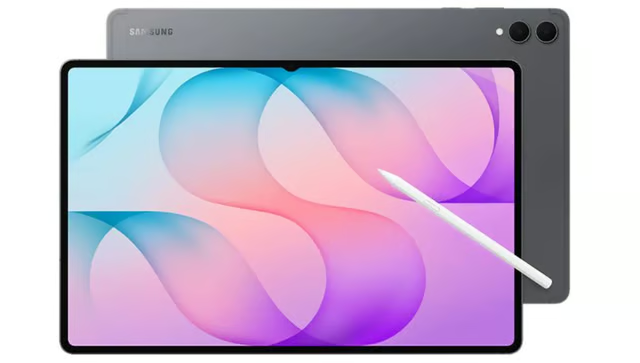
Samsung’s Galaxy Tab S12 Ultra has the screen size and productivity features to make some buyers reconsider carrying a laptop.
Starting at $1,399.99, the premium Android tablet combines a 14.6-inch AMOLED display, MediaTek Dimensity 9500 processor, included S Pen, and Samsung DeX for desktop-style multitasking. It’s designed for people who move between creative projects, entertainment, and everyday work.
But a large display and powerful hardware don’t automatically make it the right laptop replacement. Software compatibility, accessories, and the tasks you perform most often will determine whether the Galaxy Tab S12 Ultra is worth its price.
Galaxy Tab S12 Ultra at a glance
| US release date | Oct. 7, 2026 |
| Starting US price | $1,399.99 |
| Display | 14.6-inch Dynamic AMOLED 2X, 2960 x 1848 resolution, 120Hz refresh rate, up to 1,600 nits peak brightness |
| Processor | MediaTek Dimensity 9500 |
| Memory and storage | 12GB RAM with 256GB or 512GB storage, 16GB RAM with 1TB storage |
| Expandable storage | microSD up to 2TB |
| Battery | 11,600mAh, up to 23 hours of video playback |
| Charging | 45W wired fast charging |
| Cameras | 12MP ultrawide front, 13MP main and 8MP ultrawide rear |
| Audio | Four speakers with four-channel spatial audio |
| Connectivity | Wi-Fi 7, Bluetooth 6.0, USB-C |
| Dimensions and weight | 326.3 x 208.5 x 5.1mm, 692g for Wi-Fi model |
| Durability | Armor Aluminum construction, IP68 dust and water resistance |
| Operating system | Android 17 with One UI 9 |
| Software support | Seven generations of OS upgrades and seven years of security updates |
| Source: Samsung's official Galaxy Tab S12 series specifications. | |
What are the key features of the Galaxy Tab S12 Ultra?
A large screen is only one part of the experience. Display quality, processing performance, and everyday usability determine how comfortably the tablet handles different activities.
Display and sound
A spacious AMOLED display gives detailed documents and illustrations room without constant zooming. Its 120Hz refresh rate keeps scrolling smooth, while the anti-reflective treatment and Vision Booster improve visibility when surrounding lighting changes.
The four-speaker system supports spatial audio, while Samsung’s audio processing can expand conventional stereo content into a four-channel presentation.
Combined with the large AMOLED display, the speakers make the tablet suitable for watching movies, attending online classes, and viewing presentations without external speakers.
Design and durability
At 5.1mm thick, the Ultra has a slim profile despite its large screen. Its 692g weight becomes more noticeable during prolonged handheld use. A desk or stand provides a more comfortable setup for extended reading and drawing sessions.
Armor Aluminum construction gives the body a rigid frame, and IP68 protection provides resistance to dust and freshwater exposure. Gray and Silver finishes complete the design.
Performance and storage
MediaTek’s Dimensity 9500 processor supports demanding applications, with an upgraded 3D vapor chamber helping manage heat during sustained workloads.
According to Samsung, the Dimensity 9500 delivers 19% higher CPU performance, 17% higher GPU performance, and 61% better NPU performance than the Galaxy Tab S11 Ultra. These improvements could benefit demanding applications, multitasking, and supported AI features, although real-world performance will depend on the workload.
More RAM supports heavier multitasking. Additional storage, on the other hand, accommodates larger applications and project files. The 1TB configuration also increases RAM to 16GB.
A microSD card provides up to 2TB of additional capacity for media collections and other supported files. Expandable storage is useful for keeping offline material available, although it does not increase RAM or replace internal storage for every application.
Battery and charging
An 11,600mAh battery supports up to 23 hours of video playback, giving you considerable endurance for entertainment and reading. Activities such as gaming and intensive multitasking use power differently, so battery consumption depends on how the tablet is used.
Compatible 45W charging can replenish the battery from empty to full in approximately 95 minutes.
Cameras and video recording
A 12MP ultrawide front camera captures more participants in the frame during group video calls and meetings. Its position along the longer edge also suits landscape use, particularly when the tablet is paired with a keyboard.
At the back, a 13MP main camera with autofocus handles everyday photography and document capture. An additional 8MP ultrawide camera accommodates larger scenes, such as whiteboards or presentation spaces, while video recording reaches 4K resolution at 60 frames per second.
For work and study, the rear cameras are particularly useful for scanning documents, capturing whiteboards, and recording demonstrations that need to be reviewed or shared later.
Ports and wireless connectivity
Wi-Fi 7 supports faster wireless networking with compatible equipment, and Bluetooth 6.0 connects headphones and other peripherals. Quick Share allows files to move between supported devices without requiring a cable.
USB-C handles charging and wired data transfers through USB 3.2 Gen 1. Owners can connect compatible external drives to transfer large project files or access stored material. Depending on the peripheral, a USB-C adapter or hub may be necessary.
S Pen
The S Pen works with compatible drawing and note-taking apps without requiring charging or Bluetooth pairing. Unlike some earlier Bluetooth-enabled S Pens, it does not support Air Actions for remotely controlling the camera or using gestures. On-screen shortcuts remain available through Air Command.
What is Samsung DeX and how does it improve productivity?
Samsung DeX is a built-in feature that turns the Galaxy Tab S12 Ultra into a desktop-style workspace, allowing you to arrange Android apps in resizable windows. It supports up to four workspaces, with five apps open in each. Multi Window, a separate feature, displays up to three compatible apps in a split-screen layout.
Someone preparing a report can keep reference materials visible beside a document without repeatedly switching screens. Adding a compatible keyboard, mouse, or external monitor makes extended work more comfortable. With Second Screen, the tablet can also extend or mirror a compatible Windows PC display wirelessly.
DeX offers more flexibility for work that already takes place in Android apps and web services. Like other desktop-style Android setups, however, it does not run traditional Windows software.
What Galaxy AI features are available?
Galaxy AI provides assistance within supported applications, helping you work with information already on your screen.
| Note Assist | Summarizes and formats text in Samsung Notes | Requires Samsung Account sign-in and internet access. Summarization supports 200-4,000 characters. |
| Transcript Assist | Converts supported recordings into transcripts and summaries | Requires Samsung Account sign-in, internet access, and a compatible recording app. |
| Now Nudge | Suggests actions based on on-screen information, such as opening Calendar from a date in a message | Requires Samsung Account sign-in and works within supported apps. |
| Ask anything | Answers questions about webpages, open tabs, and browsing information | Available through Samsung Browser in supported languages and regions. |
| Now Brief | Provides personalized schedules, recommendations, and information cards | Personalized information requires access to relevant connected services. |
| Creative Studio | Generates or refines artwork using text prompts and S Pen sketches | Availability varies by region |
| Dynamic AI Agents | Offers access to Bixby, Google Gemini, and Perplexity | Account and service requirements vary |
| Automated App Action | Helps carry out eligible multistep tasks across applications | Works with supported partner apps and actions. |
Built-in AI tools are particularly convenient for small actions that arise while using another application. For more extensive research or tasks involving outside services, a standalone assistant may be more appropriate.
Workplace users should also consider which accounts and services they plan to connect when using these features with business information.
How much does the Galaxy Tab S12 Ultra cost?
Galaxy Tab S12 Ultra is available in Gray and Silver. Regular prices depend on memory and storage, with the following configurations listed in the official US store.
| 12GB RAM and 256GB storage | $1,399.99 |
| 12GB RAM and 512GB storage | $1,599.99 |
| 16GB RAM and 1TB storage | $1,999.99 |
Moving from 256GB to 512GB costs $200 more without increasing RAM. Another $400 for the 1TB configuration increases both memory and storage, making it better suited to buyers who regularly run demanding applications or maintain large projects.
US models are Wi-Fi-only, but 5G configurations are available in selected international markets. Buyers who frequently work away from wireless networks can use a phone hotspot or check local cellular availability.
What accessories are available for the Galaxy Tab S12 Ultra?
The Ultra comes with an S Pen, while keyboards and other accessories are available separately. You can choose additional equipment based on how you plan to use the tablet.
| S Pen | Stylus for handwriting and drawing | $64.99 for a replacement |
| Pro Keyboard | Backlit keys, trackpad, productivity shortcuts | $399.99 |
| Book Cover Keyboard Slim | Lightweight keyboard with Galaxy AI Key | $209.99 |
| Book Cover | Protective cover with adjustable stand | $109.99 |
| Frame Cover | Lightweight protective frame for the Ultra | U.S. price not listed |
| Anti-Reflecting Screen Protector | Additional glare reduction | $39.99 |
| 45W power adapter | Supports maximum wired charging speed | From $39.99 |
| Sources: Samsung US accessory listings, 45W adapter pricing. | ||
Regular US list prices exclude promotional discounts and may change. The $39.99 charger is the adapter-only version.
Do Galaxy AI features and creative apps cost extra?
Basic Galaxy AI features provided by the manufacturer are free, but enhanced and third-party services may have separate subscription fees.
Eligible buyers can receive six months of Google AI Pro and four months of Adobe Photoshop mobile, alongside promotional access to selected creative applications. Google AI Pro renews at $19.99 per month in the US after the introductory period unless canceled. Offer terms and availability vary by market.
Trial periods can be useful for exploring applications before committing to them. For a longer-term budget, consider the subscriptions you expect to maintain instead of the total promotional value of every included offer.
What's hot at TechRepublic
- Blackpoint Cyber vs. Arctic Wolf: Which MDR Solution is Right for You?
- Why AWS Sellers Choose Deepgram Over Other Voice AI Tools
- SS&C Intralinks DealCentre AI vs. Datasite: Which platform is built for the future of dealmaking?
- SS&C Intralinks FundCentre AI vs. Juniper Square: Which platform better supports modern private markets fund managers?
- Verito vs. Rightworks: Which IT Provider Is Best for Your Firm?
Who should buy the Galaxy Tab S12 Ultra?
Galaxy Tab S12 Ultra offers more than a large display. Its creative tools and flexible workspace give the following buyers reasons to consider it:
- Creative professionals. Artists spending hours illustrating or editing detailed visuals have a stronger case for the larger display than occasional sketchers. Video editors can also benefit from the additional room for timelines and previews.
- Students and researchers. Reading beside handwritten notes can be particularly comfortable on the Ultra. Those carrying a tablet throughout the day may prefer the lighter Galaxy Tab S12+, which offers the same processor and included S Pen at a lower starting price.
- Mobile professionals. People who alternate between document reviews and keyboard-based work can handle both on one device. Frequent travelers should also account for the weight of their preferred accessories.
- Existing Galaxy Tab owners. S11 Ultra users already have a 14.6-inch AMOLED display and the same battery capacity. Upgrading is more practical for those who can make regular use of the improved processing hardware or newer software features.
The Galaxy Tab S12 Ultra makes the strongest case for buyers who regularly need a large display for drawing, multitasking, document review, or media editing. Its included S Pen and desktop-style workspace add flexibility, but the high starting price and additional keyboard cost make it a significant investment.
For users who mainly browse, stream videos, or take occasional notes, a smaller and less expensive Galaxy Tab may be the more practical choice. And if your work depends on traditional Windows or macOS applications, a laptop remains the safer option.
Related reading: Our Galaxy S26 Ultra cheat sheet takes a closer look at Samsung’s premium flagship, including its biggest upgrades and long-term ownership costs.